17 - Sensors & Compass
Recap
16 - Google Maps in Compose drew the track, the markers and a camera that can rotate direction-up, but only while you move: standing still, there is no movement heading. It also switched off the Maps SDK's "compass", because that's only a rotation indicator. The final project requires a real on-screen compass that can be turned on and off. This lecture covers the Android sensor framework, turns the rotation-vector sensor into a heading, wraps it in a Flow with callbackFlow from 09 - Kotlin Flow, and draws the compass with Canvas from 07 - Material 3, Theming & Adaptive Layouts. At the end, touch gestures in Compose replace the view-era onTouchEvent.
By the end of this lecture you should be able to:
- Use
SensorManager,Sensor,SensorEventandSensorEventListener, check availability, and choose a sampling rate. - Compute the device heading (azimuth) from the rotation-vector sensor, remapped for the current display rotation.
- Implement the accelerometer + magnetometer fallback with a low-pass filter.
- Explain sensor accuracy, calibration, and magnetic vs true north.
- Wrap a sensor in a lifecycle-friendly
Flowthat registers and unregisters the listener automatically. - Draw an animated compass with Canvas and toggle it from settings.
- Handle taps, drags and pinch/rotate gestures with Compose's gesture APIs.
Lecture demos: native-2026-fall
Sensors on Android
Most devices have three groups of sensors:
| Group | Sensors | Typical use |
|---|---|---|
| Motion | accelerometer, gyroscope, gravity, linear acceleration, step counter | shake detection, games, fitness |
| Position | magnetometer (TYPE_MAGNETIC_FIELD), rotation vectors, proximity | compass, device orientation |
| Environment | light, pressure (barometer), temperature, humidity | auto-brightness, altitude changes |
Some are hardware sensors (a chip in the phone). Others are virtual (fused) sensors that Android computes from several chips. TYPE_ROTATION_VECTOR combines accelerometer, magnetometer and gyroscope. Which sensors exist depends on the device and the Android version:
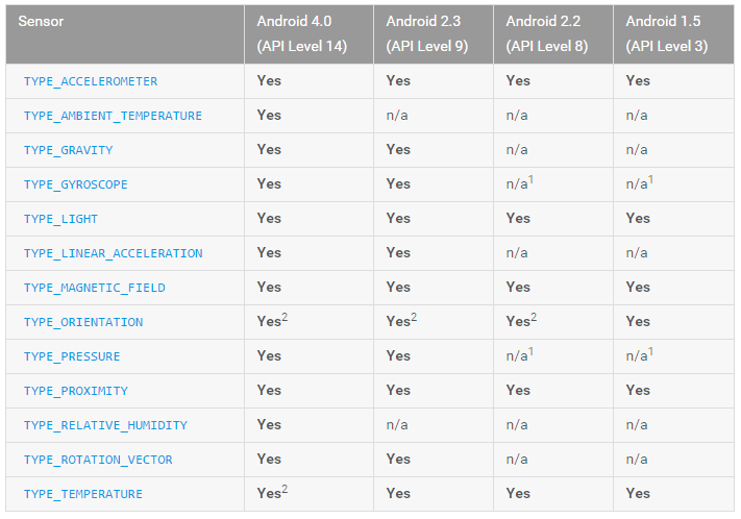
There is no guarantee any particular sensor exists. Cheap phones often have no gyroscope, and some tablets have no magnetometer.
The sensor framework
| Class | Role |
|---|---|
SensorManager | system service: lists sensors, registers listeners, has math helpers (rotation matrices) |
Sensor | one sensor: type, vendor, resolution, range, power (mA), min/max delay |
SensorEvent | one reading: values, accuracy, timestamp (ns), sensor |
SensorEventListener | callbacks onSensorChanged(event) and onAccuracyChanged(sensor, accuracy) |
val sensorManager = context.getSystemService(SensorManager::class.java)

val all: List<Sensor> = sensorManager.getSensorList(Sensor.TYPE_ALL)
val rotationVector: Sensor? = sensorManager.getDefaultSensor(Sensor.TYPE_ROTATION_VECTOR)
A quick sensor browser is a good first test on your own phone:
@Composable
fun SensorList(modifier: Modifier = Modifier) {
    val context = LocalContext.current
    val sensors = remember {
        context.getSystemService(SensorManager::class.java).getSensorList(Sensor.TYPE_ALL)
    }
    LazyColumn(modifier, contentPadding = PaddingValues(16.dp)) {
        items(sensors, key = { "${it.type}-${it.name}" }) { sensor ->
            Text("${sensor.name} (${sensor.vendor})", style = MaterialTheme.typography.titleSmall)
            Text("type ${sensor.stringType}, ${sensor.power} mA, min delay ${sensor.minDelay} µs")
            HorizontalDivider(Modifier.padding(vertical = 8.dp))
        }
    }
}
getDefaultSensor returns null when the sensor is missing, so check it and degrade gracefully: hide the compass button instead of crashing. If your app cannot work without a sensor, declare it so Google Play filters out devices without it. For the compass, it's optional:
<uses-feature android:name="android.hardware.sensor.compass" android:required="false" />
<uses-feature android:name="android.hardware.sensor.accelerometer" android:required="false" />
Registering and sampling rate
sensorManager.registerListener(listener, sensor, SensorManager.SENSOR_DELAY_UI)
// ...
sensorManager.unregisterListener(listener)
| Constant | Delay | Rate |
|---|---|---|
SENSOR_DELAY_NORMAL | 200 ms | ~5 Hz |
SENSOR_DELAY_UI | 60 ms | ~16 Hz, enough for a compass |
SENSOR_DELAY_GAME | 20 ms | 50 Hz |
SENSOR_DELAY_FASTEST | 0 | as fast as the hardware goes (apps targeting Android 12+ are capped at 200 Hz without HIGH_SAMPLING_RATE_SENSORS) |
The delay is a hint. The system may deliver faster or slower. You can also pass microseconds directly. The overload with maxReportLatencyUs enables batching: the sensor chip collects events and delivers them in bursts, which lets the CPU sleep. That's great for step counting and useless for a compass, which must react immediately.
A registered listener keeps the sensor (and often the CPU) awake, even when the screen is off. Unregister as soon as the readings aren't needed. Below, a Flow does this automatically.
Coordinate system
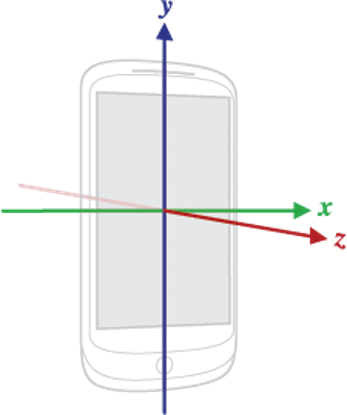
Sensor axes are fixed to the device in its natural orientation (portrait for phones, often landscape for tablets): X points right, Y points up along the screen, Z points out of the screen. They don't change when the UI rotates. That matters for the compass: in landscape, "the top of the screen" is a different device axis.
From sensors to a heading
The azimuth is the angle between magnetic north and the direction the top of the screen points, measured clockwise: 0° north, 90° east, 180° south, 270° west.
Rotation vector: the preferred source
TYPE_ROTATION_VECTOR fuses accelerometer, magnetometer and gyroscope into the device's orientation. It's stable, fast and already filtered. Turn its values into an azimuth in three steps:
getRotationMatrixFromVector: rotation vector → 3×3 rotation matrix.remapCoordinateSystem: rotate the matrix so it matches the current display rotation.getOrientation: matrix → azimuth, pitch and roll in radians.
private val rotationMatrix = FloatArray(9)
private val remapped = FloatArray(9)
private val orientation = FloatArray(3)

fun azimuthFromRotationMatrix(rotationMatrix: FloatArray, displayRotation: Int): Float {
    val (axisX, axisY) = when (displayRotation) {
        Surface.ROTATION_90 -> SensorManager.AXIS_Y to SensorManager.AXIS_MINUS_X
        Surface.ROTATION_180 -> SensorManager.AXIS_MINUS_X to SensorManager.AXIS_MINUS_Y
        Surface.ROTATION_270 -> SensorManager.AXIS_MINUS_Y to SensorManager.AXIS_X
        else -> SensorManager.AXIS_X to SensorManager.AXIS_Y
    }
    SensorManager.remapCoordinateSystem(rotationMatrix, axisX, axisY, remapped)
    SensorManager.getOrientation(remapped, orientation)
    val degrees = Math.toDegrees(orientation[0].toDouble()).toFloat()   // -180..180
    return (degrees + 360f) % 360f                                      // 0..360
}

// in onSensorChanged:
SensorManager.getRotationMatrixFromVector(rotationMatrix, event.values)
val azimuth = azimuthFromRotationMatrix(rotationMatrix, displayRotation)
Getting the display rotation:
- In UI code:
LocalView.current.display.rotation, or the activity'sdisplay. - In a singleton with the application context (our
CompassSensor),context.displaythrows, because the application context isn't tied to a screen. UseDisplayManagerinstead:displayManager.getDisplay(Display.DEFAULT_DISPLAY).rotation. Read it on every event, because the user can rotate while the flow is collected (a ViewModel keeps the flow alive across the rotation).
Related virtual sensors:
| Sensor | Uses | Good for a compass? |
|---|---|---|
TYPE_ROTATION_VECTOR | accel + mag + gyro | yes, the best choice |
TYPE_GEOMAGNETIC_ROTATION_VECTOR | accel + mag | yes, lower power, noisier |
TYPE_GAME_ROTATION_VECTOR | accel + gyro | no, no magnetometer means no north |
getOrientation is reliable when the phone is held roughly flat, like a compass. If it's held upright (camera facing forward), the azimuth becomes unstable near 90° pitch. Augmented-reality apps remap with AXIS_X, AXIS_Z for that case. An orienteer holds the compass flat, so the standard remapping is right.
Fallback: accelerometer + magnetometer
Without a rotation-vector sensor, compute the matrix yourself from gravity (accelerometer) and the magnetic field. Both are noisy, so smooth them with a low-pass filter: each new reading moves the stored value only a fraction of the way.
private const val ALPHA = 0.15f      // 0 = never change, 1 = no filtering

private val gravity = FloatArray(3)
private val geomagnetic = FloatArray(3)

private fun lowPass(input: FloatArray, output: FloatArray) {
    for (i in 0..2) output[i] += ALPHA * (input[i] - output[i])
}

override fun onSensorChanged(event: SensorEvent) {
    when (event.sensor.type) {
        Sensor.TYPE_ACCELEROMETER -> lowPass(event.values, gravity)
        Sensor.TYPE_MAGNETIC_FIELD -> lowPass(event.values, geomagnetic)
    }
    if (SensorManager.getRotationMatrix(rotationMatrix, null, gravity, geomagnetic)) {
        val azimuth = azimuthFromRotationMatrix(rotationMatrix, displayRotation)
        // ...
    }
}
getRotationMatrix returns false when the device is in free fall or the values are unusable. A smaller ALPHA is smoother but lags behind. 0.1–0.2 feels right for a compass.
Accuracy and calibration
onAccuracyChanged reports SENSOR_STATUS_ACCURACY_HIGH, _MEDIUM, _LOW or SENSOR_STATUS_UNRELIABLE. For the magnetometer (and the rotation vector built on it) LOW/UNRELIABLE means: calibrate. Show a hint ("move the phone in a figure-8"). The sensor calibrates itself while being rotated through all axes. The rotation vector also gives an estimated heading accuracy in values[4] (radians, -1 if unknown) on most devices.
Magnetometers are easily disturbed: steel, cars, power lines, laptops, and magnetic phone cases and mounts. If your compass is off by 40°, check the case first.
Magnetic north vs true north
The compass measures magnetic north. Maps, GPS bearings and the Google Maps camera bearing use true north. The difference, the declination, depends on where you are and slowly changes over time. In Estonia it's currently about 10° east. Android computes it from the World Magnetic Model:
fun trueAzimuth(magneticAzimuthDeg: Float, at: GpsLocation): Float {
    val field = GeomagneticField(
        at.latitude.toFloat(),
        at.longitude.toFloat(),
        (at.altitude ?: 0.0).toFloat(),
        at.recordedAt.toEpochMilli(),
    )
    return (magneticAzimuthDeg + field.declination + 360f) % 360f
}
Which one to show? An orienteering map is drawn to magnetic north (the north lines on the paper map), so the on-screen compass should show magnetic north. That way it matches the paper map and a real orienteering compass. For direction-up rotation of the Google map (lecture 16), convert to true north first.
CompassSensor: a sensor as a Flow
callbackFlow (lecture 09) turns the listener API into a Flow. Register in the producer, unregister in awaitClose, and the sensor runs exactly while someone collects:
@Singleton
class CompassSensor @Inject constructor(
    @ApplicationContext context: Context,
) {
    private val sensorManager = context.getSystemService(SensorManager::class.java)
    private val displayManager = context.getSystemService(DisplayManager::class.java)

    private val rotationVector = sensorManager.getDefaultSensor(Sensor.TYPE_ROTATION_VECTOR)
    private val accelerometer = sensorManager.getDefaultSensor(Sensor.TYPE_ACCELEROMETER)
    private val magnetometer = sensorManager.getDefaultSensor(Sensor.TYPE_MAGNETIC_FIELD)

    val isAvailable: Boolean = rotationVector != null || (accelerometer != null && magnetometer != null)

    private val _accuracy = MutableStateFlow(SensorManager.SENSOR_STATUS_ACCURACY_HIGH)
    /** Updated while [azimuthDeg] is collected; LOW or UNRELIABLE = ask the user to calibrate. */
    val accuracy: StateFlow<Int> = _accuracy.asStateFlow()

    /** Magnetic azimuth in degrees 0..360, for the current display rotation. */
    val azimuthDeg: Flow<Float> = callbackFlow {
        val rotationMatrix = FloatArray(9)
        val gravity = FloatArray(3)
        val geomagnetic = FloatArray(3)

        val listener = object : SensorEventListener {
            override fun onSensorChanged(event: SensorEvent) {
                when (event.sensor.type) {
                    Sensor.TYPE_ROTATION_VECTOR ->
                        SensorManager.getRotationMatrixFromVector(rotationMatrix, event.values)
                    Sensor.TYPE_ACCELEROMETER -> { lowPass(event.values, gravity); if (!fromAccelMag()) return }
                    Sensor.TYPE_MAGNETIC_FIELD -> { lowPass(event.values, geomagnetic); if (!fromAccelMag()) return }
                }
                trySend(azimuthFromRotationMatrix(rotationMatrix, displayRotation()))
            }

            private fun fromAccelMag() =
                SensorManager.getRotationMatrix(rotationMatrix, null, gravity, geomagnetic)

            override fun onAccuracyChanged(sensor: Sensor, accuracy: Int) {
                if (sensor.type != Sensor.TYPE_ACCELEROMETER) _accuracy.value = accuracy
            }
        }

        if (rotationVector != null) {
            sensorManager.registerListener(listener, rotationVector, SensorManager.SENSOR_DELAY_UI)
        } else if (accelerometer != null && magnetometer != null) {
            sensorManager.registerListener(listener, accelerometer, SensorManager.SENSOR_DELAY_UI)
            sensorManager.registerListener(listener, magnetometer, SensorManager.SENSOR_DELAY_UI)
        } else {
            close()                       // no compass hardware: complete the flow
        }

        awaitClose { sensorManager.unregisterListener(listener) }
    }.conflate()

    private fun displayRotation(): Int =
        displayManager.getDisplay(Display.DEFAULT_DISPLAY)?.rotation ?: Surface.ROTATION_0
}
(lowPass and azimuthFromRotationMatrix are the functions from above.)
trySendnever blocks the sensor thread. Withconflate(), a slow collector skips stale headings and always gets the newest one.- Each collector gets its own registration (a cold flow). Share it in the ViewModel with
stateIninstead of collecting it twice. - The class is a
@Singleton, but it holds no listener while nobody collects, so it costs nothing.
Collecting only when needed
The sensor is needed in two cases. One is when the on-screen compass is switched on (Settings.compassVisible). The other is when the map is direction-up, because lecture 16's movement heading is null while you stand still. It should stop when neither applies, and when the app goes to the background. flatMapLatest switches the upstream on and off, and stateIn shares one sensor registration between the compass and the map heading. These members are added to lecture 16's MapViewModel (constructor: private val compassSensor: CompassSensor):
// MapViewModel, lecture 17 additions
@OptIn(ExperimentalCoroutinesApi::class)
private val magneticAzimuth: StateFlow<Float?> = settingsRepository.settings
    .map { it.compassVisible || it.mapOrientation == MapOrientation.DIRECTION_UP }
    .distinctUntilChanged()
    .flatMapLatest { needed ->
        if (needed && compassSensor.isAvailable) compassSensor.azimuthDeg else flowOf(null)
    }
    .stateIn(viewModelScope, SharingStarted.WhileSubscribed(5_000), null)

/** What the on-screen compass shows: magnetic north (matches the paper map), null when hidden. */
val compassDeg: StateFlow<Float?> = combine(magneticAzimuth, settingsRepository.settings) { azimuth, settings ->
    azimuth.takeIf { settings.compassVisible }
}.stateIn(viewModelScope, SharingStarted.WhileSubscribed(5_000), null)

/** Replaces lecture 16's headingDeg: movement heading, or the compass (true north) when standing still. */
val headingDeg: StateFlow<Float?> = combine(trackingRepository.state, currentFix, magneticAzimuth) { tracking, fix, magnetic ->
    movementHeading(tracking.track)
        ?: magnetic?.let { azimuth -> fix?.let { trueAzimuth(azimuth, it) } ?: azimuth }
}
    .map { it?.roundTo5() }                 // camera animates at most once per 5° change
    .distinctUntilChanged()
    .flowOn(defaultDispatcher)
    .stateIn(viewModelScope, SharingStarted.WhileSubscribed(5_000), null)
currentFix, movementHeading and roundTo5 are lecture 16's private members of the same class. The map camera uses true north (trueAzimuth from above), while the compass shows magnetic north.
In the screen, read the heading lazily. Reading compassDeg.value directly in composition would recompose the screen on every sensor tick (why, and the full version: Drawing the compass):
val compassDeg = viewModel.compassDeg.collectAsStateWithLifecycle()        // State, not `by`
val compassVisible by remember { derivedStateOf { compassDeg.value != null } }
if (compassVisible) {
    Compass(azimuthDeg = { compassDeg.value ?: 0f })
}
The chain of off-switches:
- The compass is hidden and the map isn't direction-up →
flowOf(null)→ the sensor flow is cancelled →awaitCloseunregisters the listener. - The app goes to the background →
collectAsStateWithLifecyclestops collecting → after 5 sWhileSubscribedstops the upstream → the listener is unregistered. - Rotation → the UI resubscribes within 5 s → the sensor keeps running, with no gap.
The compass must not run in the TrackingService: nobody looks at it with the screen off, and it would drain the battery for hours.
Drawing the compass
The compass card rotates by minus the azimuth, so its N always points north while the phone turns under it. A fixed marker at the top shows where the phone points.
A sensor delivers about 16 headings per second, and the animation produces a new angle every frame. If the angle were read during composition, the whole compass would recompose and redraw 60 times a second. Instead, use the deferred read from lecture 06: the dial is drawn once, and the angle is read only inside graphicsLayer { rotationZ = ... }. That rotates the already-drawn layer, so there's no recomposition and no redraw.
@Composable
fun Compass(azimuthDeg: () -> Float, modifier: Modifier = Modifier) {
    val angle = rememberSmoothedAngle(azimuthDeg)
    val textMeasurer = rememberTextMeasurer()
    val labelStyle = MaterialTheme.typography.labelLarge.copy(color = MaterialTheme.colorScheme.onSurface)
    val dialColor = MaterialTheme.colorScheme.surface.copy(alpha = 0.85f)
    val tickColor = MaterialTheme.colorScheme.onSurfaceVariant
    val northColor = Color(0xFFC62828)

    Box(modifier.size(120.dp).semantics { contentDescription = "Compass" }) {
        // The card: drawn once, rotated as a layer. angle.value is read in the layer block only.
        Canvas(
            Modifier
                .matchParentSize()
                .graphicsLayer { rotationZ = -angle.value }
        ) {
            val radius = size.minDimension / 2f
            drawCircle(dialColor, radius)
            for (deg in 0 until 360 step 30) {
                rotate(deg.toFloat()) {
                    drawLine(
                        tickColor,
                        Offset(center.x, center.y - radius),
                        Offset(center.x, center.y - radius * 0.88f),
                        strokeWidth = 2.dp.toPx(),
                    )
                }
            }
            listOf("N" to 0f, "E" to 90f, "S" to 180f, "W" to 270f).forEach { (label, deg) ->
                rotate(deg) {
                    val layout = textMeasurer.measure(label, labelStyle)
                    drawText(layout, topLeft = Offset(center.x - layout.size.width / 2f, center.y - radius * 0.82f))
                }
            }
            val half = 7.dp.toPx()
            val north = Path().apply {
                moveTo(center.x, center.y - radius * 0.5f)
                lineTo(center.x - half, center.y); lineTo(center.x + half, center.y); close()
            }
            val south = Path().apply {
                moveTo(center.x, center.y + radius * 0.5f)
                lineTo(center.x - half, center.y); lineTo(center.x + half, center.y); close()
            }
            drawPath(north, northColor)
            drawPath(south, tickColor)
        }
        // Fixed heading marker at the top: where the phone points.
        Canvas(Modifier.matchParentSize()) {
            drawLine(northColor, Offset(center.x, 0f), Offset(center.x, size.height * 0.09f), strokeWidth = 3.dp.toPx())
        }
    }
}
rotate(degrees) { }inside aDrawScoperotates what's drawn inside it around the canvas center. That's how the ticks and labels are placed around the dial, and it runs only when the dial is drawn.graphicsLayer { rotationZ = -angle.value }rotates the finished layer. Becauseangle.valueis read inside the lambda, a change only re-runs the layer block, which skips both composition and drawing.- The parameter is a lambda
() -> Float, not aFloat. AFloatparameter would recomposeCompasson every sensor tick. With a lambda, only the code that calls it reads the state.
Animating the shortest way round
Animating 350° → 10° directly swings the needle 340° the long way. Animate by the shortest signed difference and let the value grow past 360. Rotation doesn't care.
@Composable
fun rememberSmoothedAngle(targetDeg: () -> Float): Animatable<Float, AnimationVector1D> {
    val angle = remember { Animatable(targetDeg()) }
    LaunchedEffect(Unit) {
        snapshotFlow(targetDeg).collectLatest { target ->
            val current = angle.value
            val delta = ((target - current) % 360f + 540f) % 360f - 180f    // -180..180
            angle.animateTo(current + delta, animationSpec = tween(durationMillis = 150))
        }
    }
    return angle
}
snapshotFlow(lecture 09) turns the state read insidetargetDeginto aFlow, observed in the effect and not in composition.collectLatestcancels the running animation when a newer heading arrives and starts from wherever the needle is now. Fast sensor updates produce smooth movement.
The caller hands over a lambda and recomposes only when the compass appears or disappears:
val compassDeg = viewModel.compassDeg.collectAsStateWithLifecycle()       // State, not `by`
val compassVisible by remember { derivedStateOf { compassDeg.value != null } }

if (compassVisible) {
    Compass(
        azimuthDeg = { compassDeg.value ?: 0f },
        modifier = Modifier.align(Alignment.TopEnd).padding(16.dp),
    )
}
You can check the result in the Layout Inspector's recomposition counts (lecture 06): while you turn the phone, the Compass count stays put.
Touch and gestures in Compose
The view system made you override onTouchEvent and feed MotionEvents to a GestureDetector. In Compose gestures are modifiers, from high level to low level:
| Need | API |
|---|---|
| tap / long-press | Modifier.clickable, Modifier.combinedClickable(onClick, onLongClick) |
| taps with position, double tap | Modifier.pointerInput(key) { detectTapGestures(...) } |
| drag in one direction | Modifier.draggable(rememberDraggableState { delta -> }, Orientation.Horizontal) |
| free 2D drag | pointerInput { detectDragGestures { change, dragAmount -> } } |
| pinch-zoom, rotate, pan | Modifier.transformable(rememberTransformableState { centroid, zoom, pan, rotation -> }) or detectTransformGestures |
| anything custom, multi-touch | pointerInput { awaitEachGesture { ... } } |
Tap the compass to switch between magnetic and true north, and long-press to hide it:
Compass(
    azimuthDeg = { shownAzimuth.value },              // State<Float> from the ViewModel
    modifier = Modifier.pointerInput(Unit) {
        detectTapGestures(
            onTap = { onToggleNorthReference() },
            onLongPress = { onHideCompass() },        // settings: compassVisible = false
        )
    },
)
Dragging an overlay around:
var offset by remember { mutableStateOf(Offset.Zero) }
Box(
    Modifier
        .offset { IntOffset(offset.x.roundToInt(), offset.y.roundToInt()) }
        .size(64.dp)
        .background(MaterialTheme.colorScheme.primary, CircleShape)
        .pointerInput(Unit) {
            detectDragGestures { change, dragAmount ->
                change.consume()                      // don't let parents scroll too
                offset += dragAmount
            }
        }
)
Pinch-zoom and rotate, for example a photo of the paper orienteering map:
var scale by remember { mutableFloatStateOf(1f) }
var rotation by remember { mutableFloatStateOf(0f) }
var pan by remember { mutableStateOf(Offset.Zero) }
val state = rememberTransformableState { centroid, zoomChange, panChange, rotationChange ->
    // centroid = the point between the fingers; use it to zoom "around the fingers"
    scale = (scale * zoomChange).coerceIn(0.5f, 5f)
    rotation += rotationChange
    pan += panChange
}
Image(
    painter = painterResource(R.drawable.orienteering_map),
    contentDescription = "Paper map",
    modifier = Modifier
        .fillMaxSize()
        .graphicsLayer {
            scaleX = scale; scaleY = scale
            rotationZ = rotation
            translationX = pan.x; translationY = pan.y
        }
        .transformable(state = state),
)
Low-level multi-touch: each pointer (finger) is a PointerInputChange with an id. awaitPointerEvent() returns all current pointers:
Modifier.pointerInput(Unit) {
    awaitEachGesture {
        awaitFirstDown()
        do {
            val event = awaitPointerEvent()
            val fingers = event.changes.count { it.pressed }
            // react to `fingers`, event.changes[i].position, ...
        } while (event.changes.any { it.pressed })
    }
}
GoogleMap handles its own pan/zoom/rotate gestures. Don't put a pointerInput over the whole map unless you mean to block them. Use the map's own callbacks (onMapClick, onMapLongClick) and cameraMoveStartedReason (lecture 16) instead.
Testing sensors
- Use a real device. The emulator's Extended controls → Virtual sensors panel lets you rotate a phone model and set the magnetic field, which is enough to check that rotation and remapping work. Real noise, calibration and interference only show up on hardware.
- Test all four display rotations: the compass must point the same way in portrait and landscape.
- Compare with a real compass, or with a known landmark direction, outdoors and away from steel.
- Watch battery: Android Studio's Power Profiler / Energy profiler shows whether the sensor stops when the compass is hidden.
In the final project
- "Provide on-screen real compass (must be possible to turn on-and-off)":
CompassSensor(rotation vector, accel + mag fallback) →MapViewModel.compassDeg(switched bySettings.compassVisible) → theCompasscomposable over the map. - Direction-up while standing still:
MapViewModel.headingDeg= movement heading, or else the compass converted to true north. One shared sensor registration serves both. - Show magnetic north to match the paper orienteering map. Convert to true north with
GeomagneticFieldwhen the compass drives the map's direction-up bearing while standing still (lecture 16). - If
isAvailableis false, hide the compass toggle. Show a calibration hint whenaccuracydrops to LOW/UNRELIABLE. - The sensor runs only while the compass is visible and the app is in the foreground. Never run it in the tracking service.
- Gestures: the toolbar buttons and the compass use click/tap gestures. The map keeps its own gestures.
Self preparation QA
- What is the difference between a hardware and a virtual sensor? Give an example of each. — A hardware sensor is a physical chip (accelerometer, magnetometer). A virtual sensor is computed by Android from several chips (
TYPE_ROTATION_VECTORfrom accelerometer, magnetometer and gyroscope). - Why must you check
getDefaultSensorfor null, and what doesuses-feature required="false"do? — Any sensor may be missing, so use it only if present and degrade gracefully.required="false"declares the feature as optional, so Play doesn't filter out devices without it. - Why is
TYPE_GAME_ROTATION_VECTORuseless for a compass? — It uses no magnetometer, so it knows rotation but not where north is. - Why do you need
remapCoordinateSystemfor the compass? — Sensor axes are fixed to the device's natural orientation. When the display is rotated, the matrix must be remapped so the azimuth refers to the current top of the screen. - What does a low-pass filter do in the accelerometer + magnetometer fallback, and what is the trade-off of
ALPHA? — It smooths noise by moving the stored value only a fraction towards each new reading. A smallerALPHAis smoother but reacts more slowly. - What is declination, and which north should an orienteering app's compass show? — The angle between magnetic and true north at a place and time (about 10° east in Estonia). The compass should show magnetic north, matching the paper map, and convert to true north for the map's bearing.
- How does
callbackFlowmake the compass battery-friendly? — The listener is registered when collection starts and unregistered inawaitClosewhen it's cancelled. WithflatMapLateston the setting and lifecycle-aware collection, the sensor runs only while the compass is visible. - Why can't
CompassSensorusecontext.display? — It holds the application context, which isn't associated with a display, so the call throws.DisplayManager.getDisplay(Display.DEFAULT_DISPLAY)works. - How do you animate a compass needle from 350° to 10° without spinning the long way, and without recomposing on every frame? — Animate by the shortest signed difference (+20°) from the current value, letting the angle grow past 360°. Read the animated value only inside
graphicsLayer { rotationZ = ... }, and pass the heading as a lambda. Each change then just rotates the drawn layer, with no recomposition or redraw. - What replaces
onTouchEvent+GestureDetectorin Compose? — Gesture modifiers:clickable/combinedClickable,pointerInputwithdetectTapGestures/detectDragGestures/detectTransformGestures,draggable,transformable, andawaitEachGesturefor custom multi-touch.