08 - Kotlin Coroutines
Recap
06 - State & Side Effects already launched coroutines: LaunchedEffect runs a suspending block, and rememberCoroutineScope gives a click handler a scope to launch into. 07 - Material 3, Theming & Adaptive Layouts showed a snackbar, and showSnackbar() is a suspend function. This lecture explains what is going on underneath. You'll see what a coroutine is, who owns it, which thread it runs on, how it is cancelled and how errors travel. Everything that follows (location updates, database, network, the foreground service) is written with coroutines.
By the end of this lecture you should be able to:
- Explain why blocking the main thread is forbidden and how suspend functions avoid it.
- Start coroutines with
launch,async,withContextandcoroutineScope, and explain whererunBlockingbelongs. - Explain structured concurrency: who waits for whom, and how cancellation and failures propagate.
- Write cancellable code, clean up correctly, and avoid swallowing
CancellationException. - Handle errors with
try/catch,supervisorScopeandCoroutineExceptionHandler. - Pick the right dispatcher, keep suspend functions main-safe and pass dispatchers in through the constructor.
- Use the Android scopes (
viewModelScope,lifecycleScope,rememberCoroutineScope, a service scope), timeouts, and Play ServicesTask.await(). - Test coroutine code with
runTestand virtual time.
Lecture demos: native-2026-fall
Why coroutines
Android draws the UI on one thread, the main thread. At 60 Hz a frame has about 16 ms, and at 120 Hz about 8 ms. Anything slow on that thread (a file read, a network call, a database query, a big calculation) freezes the UI:
- a few hundred milliseconds means dropped frames, which the user sees as jank;
- five seconds without handling input gets the ANR dialog (Application Not Responding);
- network on the main thread isn't even allowed and throws
NetworkOnMainThreadException.
So slow work has to run elsewhere and report back. Historically that meant threads plus Handler, then AsyncTask (deprecated), and callbacks:
// Callbacks: nesting grows with every step, error handling is repeated at every level
api.login(email, password) { tokenResult ->
    tokenResult.onSuccess { token ->
        api.createSession(token, "Evening run") { sessionResult ->
            sessionResult.onSuccess { session -> showMap(session) }
            sessionResult.onFailure { showError(it) }
        }
    }
    tokenResult.onFailure { showError(it) }
}
With coroutines the same logic reads top to bottom, and one try/catch covers all of it:
viewModelScope.launch {
    try {
        val token = api.login(email, password)          // suspends, the main thread stays free
        val session = api.createSession(token, "Evening run")
        showMap(session)
    } catch (e: IOException) {
        showError(e)
    }
}
A coroutine is a suspendable computation. It runs on some thread, and when it has to wait it suspends: it frees the thread and resumes later, possibly on another thread. Coroutines are cheap. A hundred thousand of them is fine, but a hundred thousand threads would kill the process.
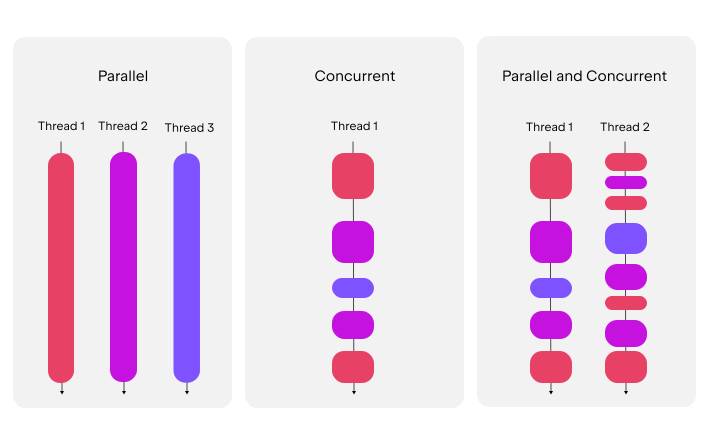
Coroutines give you concurrency: many tasks in progress at the same time, interleaved. Whether they also run in parallel (on several CPU cores at once) depends on the dispatcher.
Setup
kotlinx-coroutines-android already comes with activity-compose and lifecycle, so there's nothing to add for the basics. The course catalog has a coroutines version for the extra artifacts used below:
# libs.versions.toml
[libraries]
kotlinx-coroutines-play-services = { group = "org.jetbrains.kotlinx", name = "kotlinx-coroutines-play-services", version.ref = "coroutines" }
kotlinx-coroutines-test = { group = "org.jetbrains.kotlinx", name = "kotlinx-coroutines-test", version.ref = "coroutines" }
Suspend functions
suspend fun loadSessionName(): String {
    delay(500)                 // suspends this coroutine for 500 ms - the thread is free meanwhile
    return "Evening run"
}
suspendmarks a function that may pause. It can be called only from a coroutine or from another suspend function.delay()suspends, butThread.sleep()blocks: it holds the thread hostage and must never run on the main thread.- The compiler turns a suspend function into a state machine with a hidden continuation parameter (where to resume). You write sequential code, and the compiler writes the callbacks.
suspendsays nothing about threads. A suspend function that calls blocking code is still blocking. Switching threads is the job ofwithContext(see Dispatchers).
Starting coroutines: builders
| Builder | Returns | Use it to |
|---|---|---|
scope.launch { } | Job | fire and forget: start work that produces no value |
scope.async { } | Deferred<T> | compute a value concurrently, get it later with await() |
withContext(ctx) { } | the block's result | switch dispatcher (thread) for a block, suspending until it's done |
coroutineScope { } | the block's result | start child coroutines inside a suspend function and wait for all of them |
runBlocking { } | the block's result | bridge from blocking code: main() and legacy code only, never on Android's main thread |
fun main() = runBlocking {                    // only in main() or quick experiments
    val job: Job = launch {
        println("Loaded ${loadSessionName()}")
    }
    val answer: Deferred<Int> = async {
        delay(300)
        42
    }
    println("Answer: ${answer.await()}")      // suspends until the async block finishes
    job.join()                                // suspends until launch finishes
}
launch and async are extension functions on CoroutineScope, so you always need a scope to start a coroutine. That's on purpose, and it's the next section.
Structured concurrency
Every coroutine is started in a scope, and the scope tracks its children. Three rules follow:
- A parent waits for its children.
coroutineScope { }returns only when every coroutine started inside it has finished. - Cancellation flows down. Cancelling a scope or job cancels all its children.
- Failure flows up. A child that fails with an exception cancels its parent, and the parent cancels the other children. (Supervisors are the exception, see below.)
When the user leaves the screen, viewModelScope is cancelled, and so are the lookups and both requests. Nothing keeps running for a screen that no longer exists. Without this, every "forgotten" request is a leak or a crash when its callback touches a dead UI.
Parallel decomposition
coroutineScope plus async runs independent steps concurrently inside a suspend function:
data class Lookups(val sessionTypes: List<String>, val locationTypes: List<String>)

suspend fun loadLookups(api: SportMapLookupApi): Lookups = coroutineScope {
    val sessionTypes = async { api.getSessionTypes() }
    val locationTypes = async { api.getLocationTypes() }
    Lookups(sessionTypes.await(), locationTypes.await())    // total time = max, not sum
}
For a list of independent jobs, use awaitAll():
suspend fun uploadAll(ids: List<Long>, upload: suspend (Long) -> Boolean): List<Boolean> = coroutineScope {
    ids.map { id -> async { upload(id) } }.awaitAll()
}
If one async fails, coroutineScope cancels the others and rethrows. You get either all results or an exception, never half a result.
Dispatchers and main safety
A dispatcher decides which thread(s) a coroutine runs on:
| Dispatcher | Threads | Use for |
|---|---|---|
Dispatchers.Main | the main (UI) thread | UI updates, calling suspend functions, light work |
Dispatchers.Main.immediate | main thread, without re-dispatching if already on it | default of viewModelScope and lifecycleScope |
Dispatchers.IO | a large shared pool (64+ threads) | blocking I/O: files, XmlSerializer writing a GPX file, legacy blocking libraries |
Dispatchers.Default | one thread per CPU core | CPU-heavy work: sorting, parsing, simplifying a 10 000-point track |
The main-safety rule: every suspend function must be safe to call from the main thread. The function that does the blocking work switches dispatcher itself, so callers never have to think about it:
class GpxFileWriter(private val cacheDir: File) {
    suspend fun write(name: String, content: String): File = withContext(Dispatchers.IO) {
        File(cacheDir, name).apply { writeText(content) }   // blocking - fine on IO
    }
}

// Caller - in a ViewModel, on the main thread, no dispatcher in sight:
viewModelScope.launch {
    val file = gpxFileWriter.write("session.gpx", gpx)
    _uiState.update { it.copy(exportedFile = file) }
}
Libraries you'll use are already main-safe: Room's suspend DAO functions, DataStore and Ktor switch threads internally. Don't wrap them in withContext(Dispatchers.IO), because it only adds a pointless thread hop.
viewModelScope.launch(Dispatchers.IO) { ... }It works, but it puts the threading decision in the wrong layer, and every caller has to remember it. Keep ViewModels on the default dispatcher and make the data layer main-safe.
Injecting dispatchers
Hard-coded Dispatchers.IO can't be replaced in a test. Make the dispatcher a constructor parameter:
class GpxWriter(
    private val cacheDir: File,
    private val ioDispatcher: CoroutineDispatcher = Dispatchers.IO,
) {
    suspend fun write(name: String, content: String): File = withContext(ioDispatcher) {
        File(cacheDir, name).apply { writeText(content) }
    }
}

val writer = GpxWriter(context.cacheDir)                              // app: real IO dispatcher
val testWriter = GpxWriter(tempDir, StandardTestDispatcher(testScheduler))   // test: virtual clock
In a test the code then runs on the test's virtual clock (see Testing).
Lecture 10 introduces Hilt, the dependency-injection library the final project uses. There a module provides the dispatchers, and qualifier annotations tell the two apart. Read this part again after lecture 10:
@Qualifier @Retention(AnnotationRetention.BINARY) annotation class IoDispatcher
@Qualifier @Retention(AnnotationRetention.BINARY) annotation class DefaultDispatcher

@Module
@InstallIn(SingletonComponent::class)
object DispatchersModule {
    @Provides @IoDispatcher
    fun provideIoDispatcher(): CoroutineDispatcher = Dispatchers.IO

    @Provides @DefaultDispatcher
    fun provideDefaultDispatcher(): CoroutineDispatcher = Dispatchers.Default
}

class GpxWriter @Inject constructor(
    @ApplicationContext private val context: Context,
    @IoDispatcher private val ioDispatcher: CoroutineDispatcher,
) { /* same body */ }
Job and cancellation
launch returns a Job, a handle to the running coroutine:
val job = viewModelScope.launch {
    repeat(1_000) { i ->
        delay(1_000)          // cancellation is checked here
        println("tick $i")
    }
}

job.cancel()                  // request cancellation
job.join()                    // wait until it has really finished (or: job.cancelAndJoin())
Cancellation is cooperative. cancel() doesn't kill anything: it marks the job as cancelled, and the coroutine stops the next time it reaches a suspension point that checks (delay, withContext, await, yield, any kotlinx or library suspend function). Code that never suspends never stops:
suspend fun everyNth(points: List<GpsLocation>, n: Int): List<GpsLocation> = withContext(Dispatchers.Default) {
    val result = mutableListOf<GpsLocation>()
    for ((index, point) in points.withIndex()) {
        ensureActive()                    // throws CancellationException if the job was cancelled
        if (index % n == 0) result += point
    }
    result
}
ensureActive() throws, isActive returns a Boolean for a manual check, and yield() checks and also lets other coroutines run on the same thread.
Cleaning up
Cancellation is delivered as a CancellationException thrown at the suspension point, so finally blocks run normally. A cancelled coroutine can't suspend any more, though. If the cleanup itself has to call a suspend function, wrap it in NonCancellable:
viewModelScope.launch {
    try {
        recordSomething()
    } finally {
        withContext(NonCancellable) {
            draftRepository.save(currentDraft)    // a suspend call that must complete
        }
    }
}
Use NonCancellable only for short cleanup, never to keep long work alive.
Don't swallow CancellationException
// WRONG - catches CancellationException too; the coroutine keeps running after cancel()
try {
    upload()
} catch (e: Exception) {
    Log.e(TAG, "Upload failed", e)
}

// RIGHT - catch what you can handle, let cancellation through
try {
    upload()
} catch (e: IOException) {
    Log.e(TAG, "Upload failed", e)
}
runCatching has the same problemrunCatching { upload() } catches every Throwable, including CancellationException, and turns it into a Result.failure. Your code then continues as if a normal error happened, inside a coroutine that should have stopped. Catch specific exceptions instead, or rethrow: .onFailure { if (it is CancellationException) throw it }.
Exceptions
The normal tool is plain try/catch around the suspend call, inside the coroutine. Uncaught exceptions follow the structure:
- An exception in
launchpropagates to the parent. At the root (viewModelScope.launch { ... }itself) an uncaught exception crashes the app. - An exception in
asyncis rethrown fromawait(), but in a regular scope it also cancels the parent immediately. Wrappingawait()intry/catchdoesn't stop that. CoroutineExceptionHandleris a last-resort logger for uncaught exceptions, and it only works when installed in the root coroutine or scope:
val handler = CoroutineExceptionHandler { _, e -> Log.e(TAG, "Unhandled", e) }
viewModelScope.launch(handler) { syncEverything() }
Supervisors
Sometimes children are independent, and one failing shouldn't cancel the others. A supervisor doesn't cancel siblings when a child fails:
data class Dashboard(val profile: String?, val sessionCount: Int)

suspend fun loadDashboard(api: ProfileApi, sessions: SessionCounter): Dashboard = supervisorScope {
    val profile = async { api.profileName() }          // may fail - backend unreachable
    val count = async { sessions.count() }             // local database, keeps going anyway
    Dashboard(
        profile = try { profile.await() } catch (e: IOException) { null },
        sessionCount = count.await(),
    )
}
With coroutineScope the failed profile request would cancel count and the whole function, even with the try/catch around await().
viewModelScope and lifecycleScope are built with SupervisorJob(), which is why one failed launch doesn't cancel the other coroutines of the screen. The uncaught exception still crashes the app, though.
Timeouts
// Throws TimeoutCancellationException after 10 s
val types = withTimeout(10_000) { api.getSessionTypes() }

// Returns null instead of throwing - wait for the first GPS fix, but not forever
val firstFix: Location? = withTimeoutOrNull(10_000) {
    locationClient.locationUpdates(intervalMs = 1_000).first()
}
The timed-out block is cancelled like any other coroutine, so the location request inside is stopped too.
Android scopes
| Scope | Cancelled when | Typical use |
|---|---|---|
viewModelScope | the ViewModel is cleared | screen logic, loading and saving data |
lifecycleScope (activity, LifecycleService) | the lifecycle owner is destroyed | activity-level work, the whole lifetime of a service (lecture 15) |
LaunchedEffect / rememberCoroutineScope | the composable leaves the composition | UI work: animations, snackbars, scrolling (lecture 06) |
| injected application scope | never (process lifetime) | work that must outlive a screen: finishing a save after the user navigated away |
| WorkManager (lecture 19) | the work completes | work that must survive process death: backend sync |
In an activity (or service), work that should run only while the UI is visible goes into repeatOnLifecycle:
class MainActivity : ComponentActivity() {
    override fun onCreate(savedInstanceState: Bundle?) {
        super.onCreate(savedInstanceState)
        lifecycleScope.launch {
            repeatOnLifecycle(Lifecycle.State.STARTED) {
                // started in onStart, cancelled in onStop, restarted after returning
                while (true) {
                    Log.d(TAG, "Visible - refreshing")
                    delay(1_000)
                }
            }
        }
    }
}
Usually the block inside repeatOnLifecycle collects a flow (lecture 09). In Compose you rarely need this at all, because collectAsStateWithLifecycle() does the same.
GlobalScope exists but is unstructured. Nobody cancels it, nobody waits for it and tests can't control it. If you need an application-wide scope, create one, own it in one place, and hand it to the classes that need it, so a test can pass its own:
class SportMapApp : Application() {
    // lives as long as the process; SupervisorJob so one failure doesn't cancel everything
    val applicationScope = CoroutineScope(SupervisorJob() + Dispatchers.Default)
}

class SessionSaver(private val scope: CoroutineScope) {
    fun saveLater(save: suspend () -> Unit) {
        scope.launch { save() }        // keeps running after the screen that called it is gone
    }
}
With Hilt (lecture 10), the same scope becomes a @Singleton binding with an @ApplicationScope qualifier, provided by a module like the dispatchers above.
Bridging callback APIs
Play Services tasks
Google Play Services APIs (fused location in lecture 13) return a Task<T>, Google's own future type with addOnSuccessListener. kotlinx-coroutines-play-services turns it into a suspend call:
// app/build.gradle.kts
implementation(libs.kotlinx.coroutines.play.services)
@SuppressLint("MissingPermission")          // permission is checked before calling - lecture 12
suspend fun lastKnownLocation(client: FusedLocationProviderClient): Location? =
    client.lastLocation.await()

@OptIn(ExperimentalCoroutinesApi::class)    // the await(cancellationTokenSource) overload
@SuppressLint("MissingPermission")
suspend fun currentLocation(client: FusedLocationProviderClient): Location? {
    val cancellation = CancellationTokenSource()
    return client.getCurrentLocation(Priority.PRIORITY_HIGH_ACCURACY, cancellation.token)
        .await(cancellation)                 // cancelling the coroutine also cancels the request
}
Any one-shot callback
For your own or other callback APIs, suspendCancellableCoroutine suspends until the callback fires:
@RequiresApi(Build.VERSION_CODES.TIRAMISU)
suspend fun Geocoder.addressOf(latitude: Double, longitude: Double): Address? =
    suspendCancellableCoroutine { continuation ->
        getFromLocation(latitude, longitude, 1, object : Geocoder.GeocodeListener {
            override fun onGeocode(addresses: MutableList<Address>) {
                continuation.resume(addresses.firstOrNull())
            }

            override fun onError(errorMessage: String?) {
                continuation.resumeWithException(IOException(errorMessage))
            }
        })
    }
A callback that fires many times (location updates, sensor readings, broadcasts) becomes a Flow with callbackFlow, in lecture 09.
Testing coroutines
runTest from kotlinx-coroutines-test runs a test on a virtual clock. delay() doesn't wait. Time jumps forward instantly, so a test of a 3-second retry runs in milliseconds:
suspend fun <T> retryWithBackoff(times: Int, initialDelayMs: Long, block: suspend () -> T): T {
    var delayMs = initialDelayMs
    repeat(times - 1) {
        try {
            return block()
        } catch (e: IOException) {
            // fall through to the delay and try again
        }
        delay(delayMs)
        delayMs *= 2
    }
    return block()                       // last attempt - let the exception escape
}

@OptIn(ExperimentalCoroutinesApi::class)
class RetryTest {
    @Test
    fun succeedsOnThirdAttempt() = runTest {
        var attempts = 0
        val result = retryWithBackoff(times = 3, initialDelayMs = 1_000) {
            attempts++
            if (attempts < 3) throw IOException("offline") else "ok"
        }
        assertEquals("ok", result)
        assertEquals(3, attempts)
        assertEquals(3_000, currentTime)    // 1 s + 2 s of virtual time
    }
}
advanceTimeBy(ms)andadvanceUntilIdle()move the virtual clock by hand, for code you launched and didn't await.- Code that switches to an injected dispatcher can be given
StandardTestDispatcher(testScheduler)so it shares the virtual clock. A hard-codedDispatchers.IOwould run on real threads. viewModelScopeneedsDispatchers.setMain(...), as shown in lecture 10.
In the final project
- No ANRs in a 3-hour session. Nothing blocking runs on the main thread. Database writes are suspend calls, and the GPX export runs in
withContext(ioDispatcher). - The foreground service (lecture 15) collects locations in its
lifecycleScope. Stopping the service cancels the location request, the database writes and the notification updates in one go. - Backend calls (lecture 19) are suspend functions. Independent requests can run in parallel with
async, and uploads benefit from timeouts and retries with backoff. - A first fix with a time limit: you could, for example, wait for the first GPS fix with
withTimeoutOrNullbefore starting a session, so the user gets a "no GPS signal" message instead of an endless spinner. - Finishing a session when the user stops tracking must complete even if the screen is closed right away. Do it in the service or an application scope, not in a composable's scope.
Self preparation QA
- Why is it forbidden to block the main thread, and what does the user see if you do? — The main thread draws every frame and handles input. Blocking it drops frames (jank), and after about 5 s of unhandled input the system shows an ANR dialog. Network calls on it even throw.
- What is the difference between
delay()andThread.sleep()? —delaysuspends the coroutine and frees the thread for other work.Thread.sleepblocks the thread for the whole time. - When do you use
launch,async,withContextandcoroutineScope? —launchfor work without a result,asyncfor concurrent work whose result youawait,withContextto run a block on another dispatcher and get its result, andcoroutineScopeto start children inside a suspend function and wait for all of them. - What are the three rules of structured concurrency? — A parent waits for its children, cancelling a parent cancels its children, and a failing child cancels its parent and siblings (except under a supervisor).
- Why might a coroutine keep running after
job.cancel()? — Cancellation is cooperative. A loop that never suspends or callsensureActive()/isActivenever notices, and catchingException(or usingrunCatching) can swallow theCancellationException. - What does "main-safe" mean, and who is responsible for it? — A main-safe suspend function can be called from the main thread without blocking it. The function doing the blocking work is responsible and switches with
withContext(Dispatchers.IO or Default). Room, DataStore and Ktor already are main-safe. - What is the difference between
coroutineScopeandsupervisorScope? — IncoroutineScopeone failing child cancels all the others and the scope. InsupervisorScopechildren fail independently, and you handle each failure yourself. - Why should dispatchers be injected rather than hard-coded? — Tests can substitute a test dispatcher that runs on the virtual clock, so timing-dependent code is deterministic and fast.
- Which scope do you use for work in a screen, in a composable callback, in a service, and for work that must survive process death? —
viewModelScope,rememberCoroutineScope, the service'slifecycleScope, and WorkManager. - How do you call a Play Services
Taskfrom a coroutine? — Addkotlinx-coroutines-play-servicesand calltask.await(), orawait(cancellationTokenSource)so that cancelling the coroutine also cancels the request.