12 - Permissions in Compose
Recap
11 - Navigation 3 gave SportMap its screens. Before the map screen can show anything, the app needs the user's permission to read the location. Before the tracking notification can appear, it needs permission to post notifications. You may have met permissions in classical Android with registerForActivityResult in an activity. This lecture does the same in Compose. It also covers the questions the final project raises: what if the user grants only approximate location, what if they deny twice, and which permissions a foreground location service needs.
By the end of this lecture you should be able to:
- Distinguish install-time, runtime and special permissions, and declare them in the manifest.
- Check and request runtime permissions from a composable with
rememberLauncherForActivityResult. - Decide when to show a rationale, and handle "denied" and "permanently denied" respectfully.
- Re-check permissions when the user returns from the system settings.
- Handle precise vs approximate location and the Android 13 notification permission.
- List what a location foreground service needs, and explain why SportMap doesn't need background location.
- Inspect and reset permissions with
adbwhile testing.
Lecture demos: native-2026-fall
Why permissions
Every app runs in its own sandbox. Anything outside it needs a permission: restricted data (location, contacts, photos) and restricted actions (recording audio, posting notifications, running in the foreground in the background). Permissions are declared in the manifest, and some of them must also be granted by the user at runtime.
When you add a library, its manifest is merged into yours, including its <uses-permission> entries. Check the merged manifest (AndroidManifest.xml → Merged Manifest tab in Android Studio) before release.
All permissions are listed in the Manifest.permission reference.
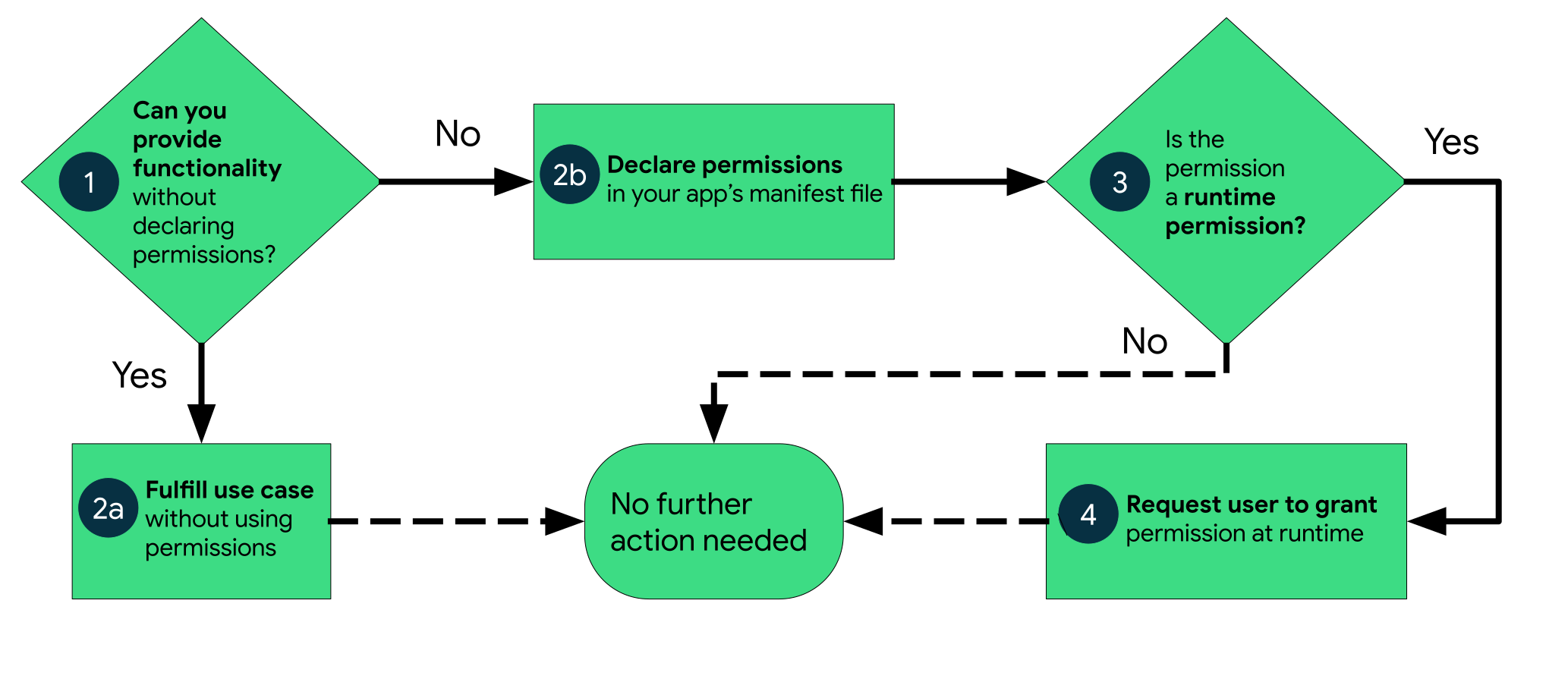
Three kinds of permissions
| Kind | Granted | Examples in SportMap |
|---|---|---|
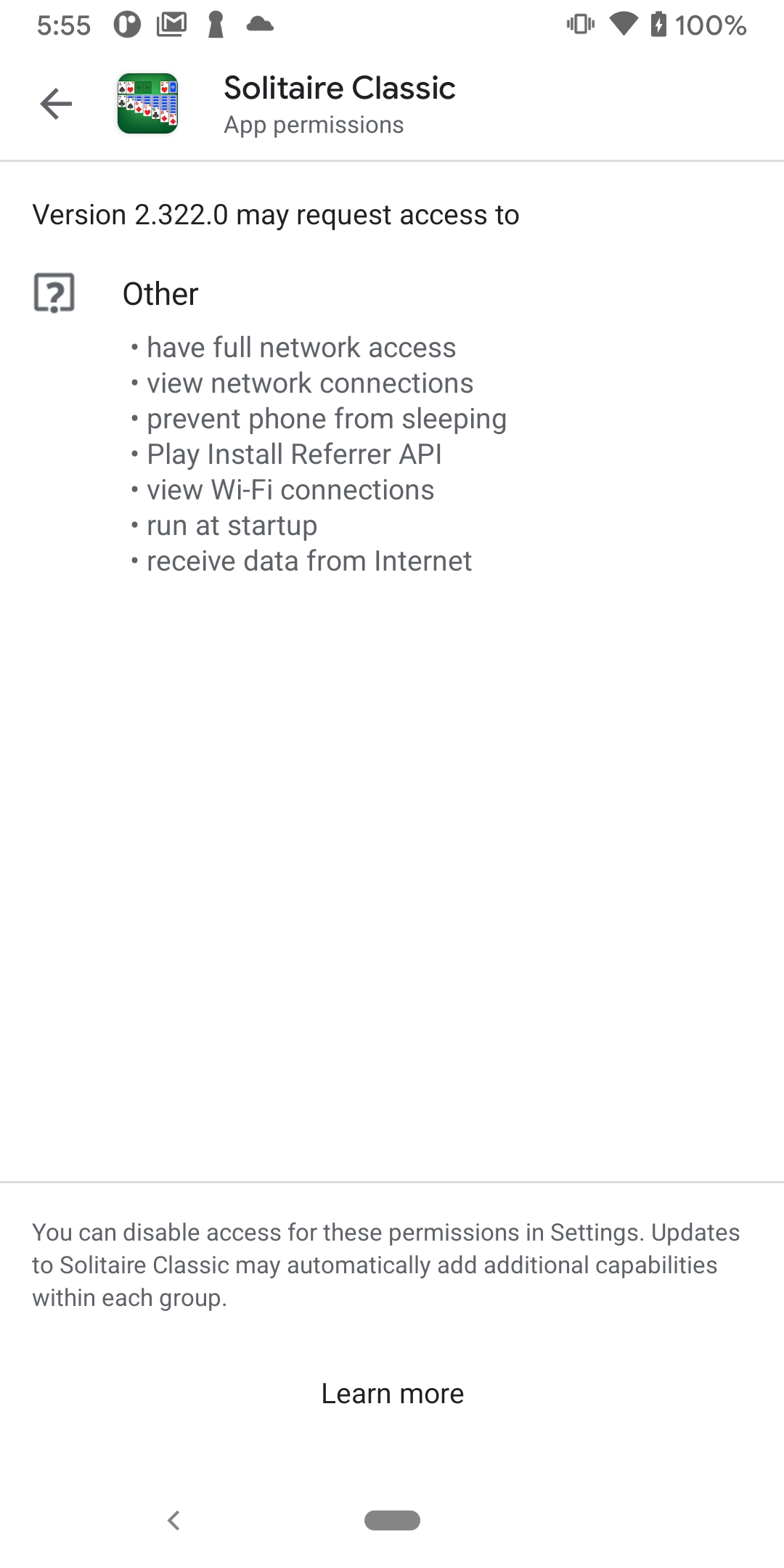
| Install-time, normal | automatically at install, listed in the store | INTERNET, FOREGROUND_SERVICE, FOREGROUND_SERVICE_LOCATION |
| Install-time, signature | only to apps signed with the same certificate as the defining app | - |
| Runtime ("dangerous") | by the user, through a system dialog, at runtime | ACCESS_FINE_LOCATION, ACCESS_COARSE_LOCATION, POST_NOTIFICATIONS (API 33+) |
| Special | by the user in a system settings screen ("Special app access") | display over other apps, exact alarms, all-files access |
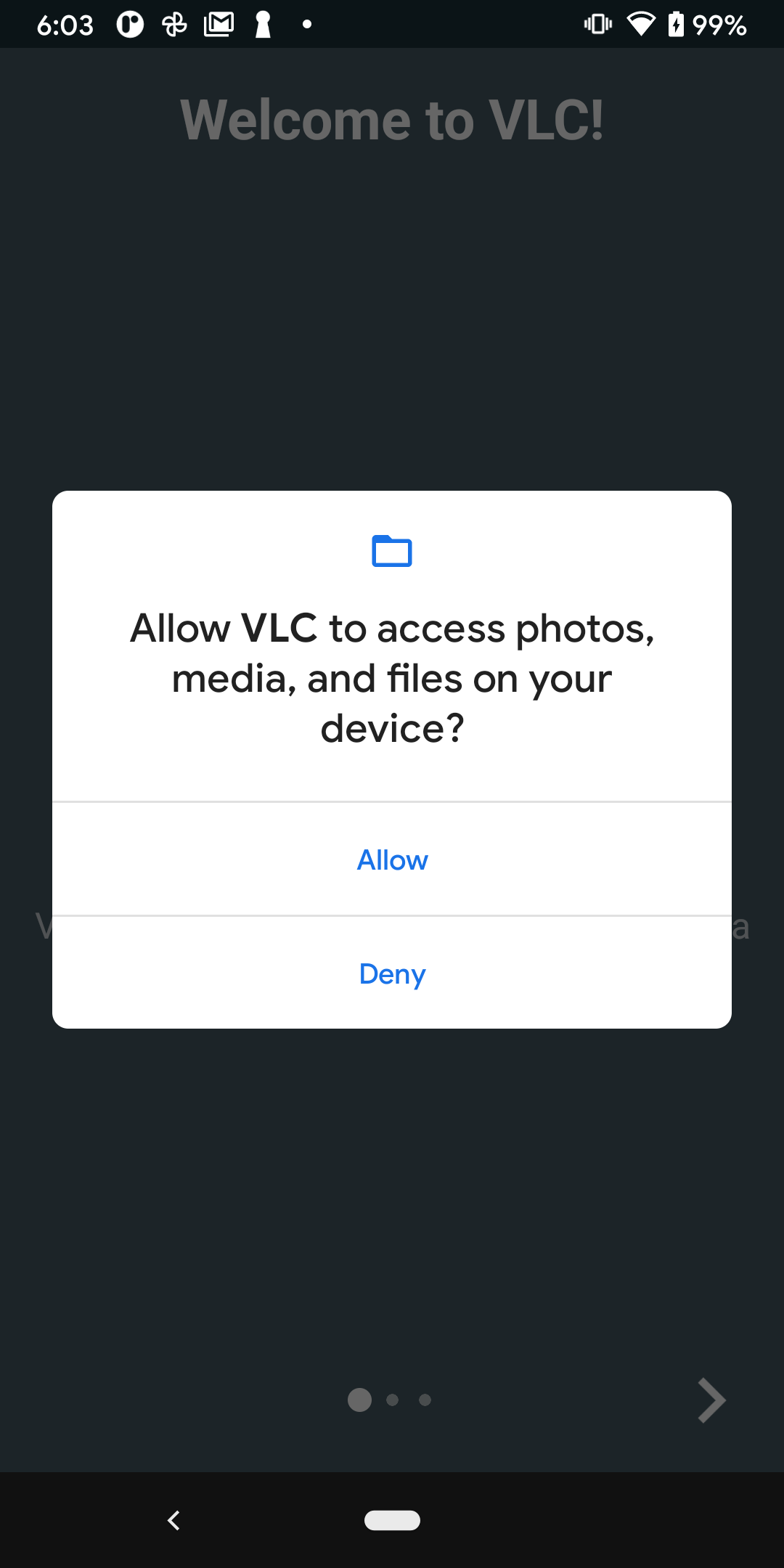
Runtime permissions protect private data or powerful actions. The user sees a system dialog that you can't customise, so you can't add your explanation to it:
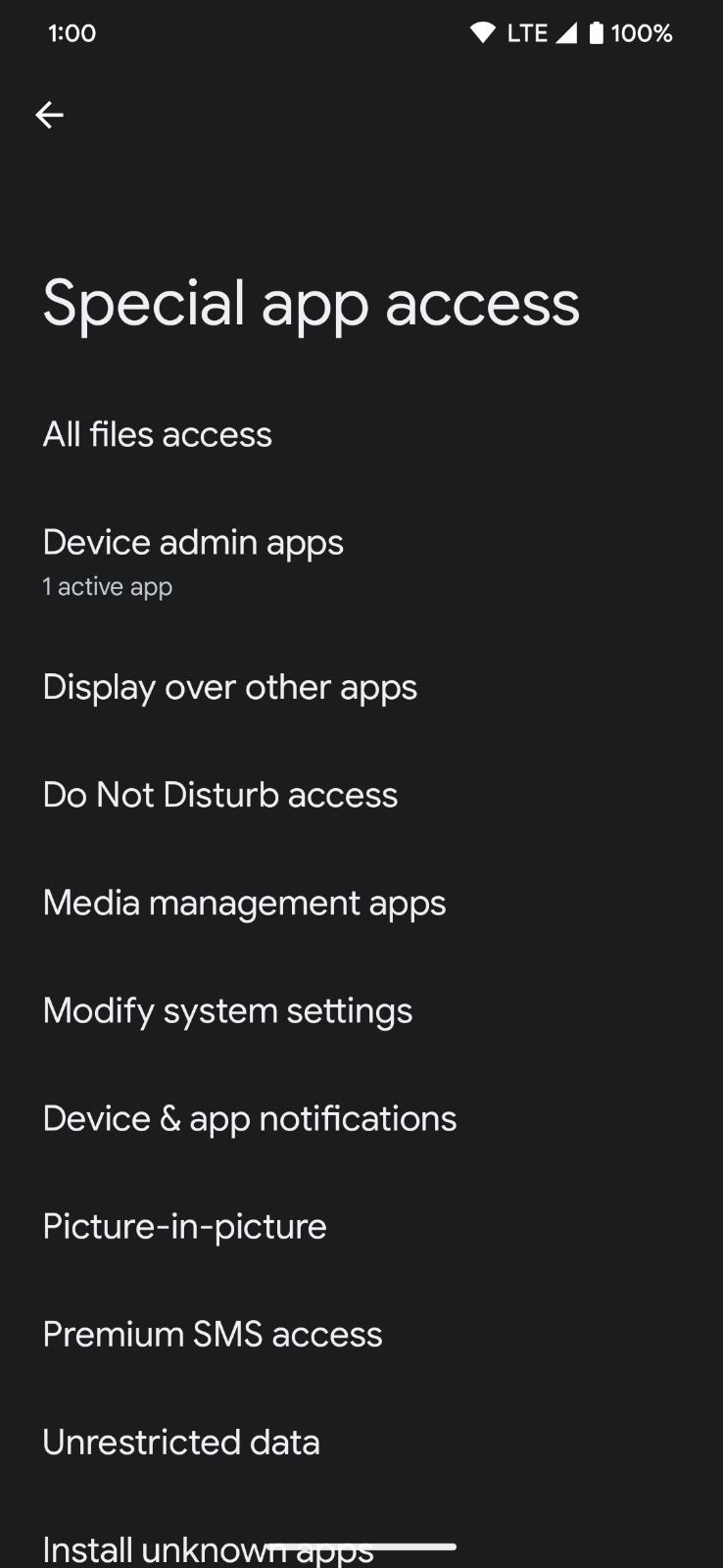
Special permissions are granted through a dedicated settings page, opened with an intent. Battery optimisation exemptions (lecture 15) live there too.
Declaring permissions
SportMap's manifest:
<manifest xmlns:android="http://schemas.android.com/apk/res/android">

    <!-- runtime -->
    <uses-permission android:name="android.permission.ACCESS_FINE_LOCATION" />
    <uses-permission android:name="android.permission.ACCESS_COARSE_LOCATION" />
    <uses-permission android:name="android.permission.POST_NOTIFICATIONS" />

    <!-- install-time (normal) -->
    <uses-permission android:name="android.permission.INTERNET" />
    <uses-permission android:name="android.permission.FOREGROUND_SERVICE" />
    <uses-permission android:name="android.permission.FOREGROUND_SERVICE_LOCATION" />

    <!-- the app is useless without GPS: hide it in Play from devices that have none -->
    <uses-feature android:name="android.hardware.location.gps" android:required="true" />

    <application ... />
</manifest>
- Always declare and request both fine and coarse location. Since Android 12, the user can pick "Approximate", and the system ignores a request for fine location alone (no dialog, nothing granted).
POST_NOTIFICATIONSexists since API 33. On older devices the line is ignored and notifications are allowed by default.- A permission that isn't in the manifest can't be granted: the request fails silently, and the check returns denied.
<uses-feature> is about hardware. A permission for hardware (camera, GPS) implies the hardware is required. Say android:required="false" if the app can work without it, and check at runtime with packageManager.hasSystemFeature(PackageManager.FEATURE_LOCATION_GPS).
Runtime permission workflow
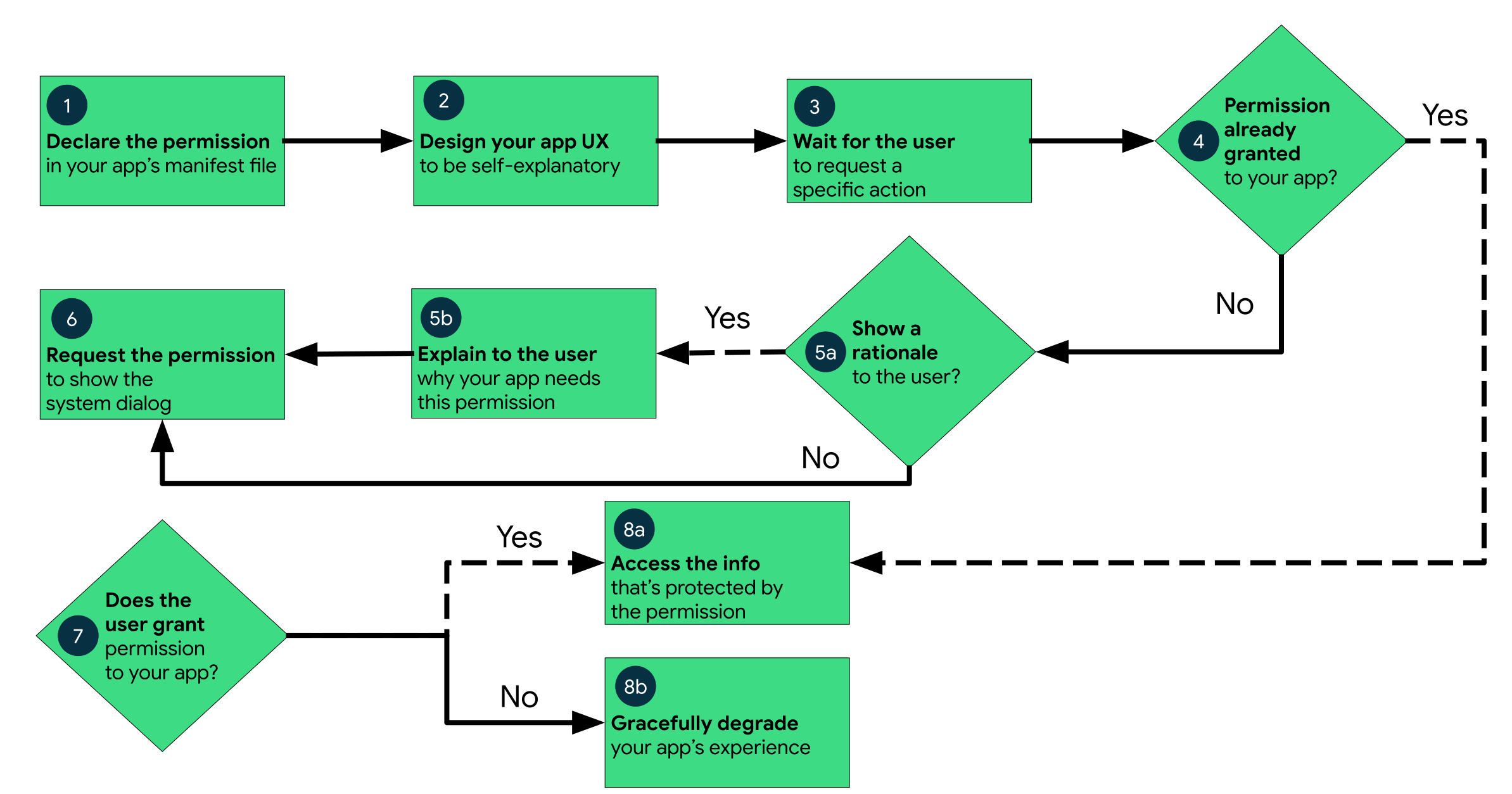
- Declare the permission in the manifest.
- Ask in context, when the user reaches the feature that needs it, not on a splash screen at launch. For SportMap, location is requested when the map opens (the map shows your position) and notifications when the user taps Start. Requests in context are granted far more often.
- Check whether you already have it:
ContextCompat.checkSelfPermission(context, permission). - If not, check whether the system suggests a rationale:
shouldShowRequestPermissionRationale(activity, permission). If it does, explain first in your own UI. - Request the permission and react to the answer.
- If it's denied, degrade gracefully: keep the rest of the app working and say clearly what doesn't work.
Permissions can be revoked at any time from the settings, and on Android 11+ automatically for apps not used for months. Check every time before use, not once at install.
Requesting from a composable
The activity-result API from classical Android works in Compose through rememberLauncherForActivityResult. It registers the launcher with the activity and keeps it across recompositions:
@Composable
fun NotificationPermissionButton() {
    val context = LocalContext.current
    val launcher = rememberLauncherForActivityResult(ActivityResultContracts.RequestPermission()) { granted ->
        // react to the answer
    }
    Button(onClick = {
        if (Build.VERSION.SDK_INT >= Build.VERSION_CODES.TIRAMISU &&
            ContextCompat.checkSelfPermission(context, Manifest.permission.POST_NOTIFICATIONS)
            != PackageManager.PERMISSION_GRANTED
        ) {
            launcher.launch(Manifest.permission.POST_NOTIFICATIONS)
        }
    }) { Text("Enable notifications") }
}
RequestPermission asks for one permission and returns a Boolean. RequestMultiplePermissions asks for several in one dialog sequence and returns a Map<String, Boolean>. Call launch only from an event: a click, or a LaunchedEffect that runs once, for example when a screen opens. Never call it directly in the composable body, because the body runs on every recomposition.
A small permission state model
shouldShowRequestPermissionRationale behaves in a way that confuses everybody:
| Situation | checkSelfPermission | shouldShowRequestPermissionRationale |
|---|---|---|
| never asked | denied | false |
| denied once | denied | true |
| denied twice (Android 11+), or "Don't ask again" | denied | false |
| granted | granted | false |
"Never asked" and "permanently denied" look identical. The difference is whether you have asked before. After two denials, launch returns "denied" immediately without showing the dialog. That's a permanent denial, and only the user can change it in the system settings.
Turn this into four states your UI can render:
enum class PermissionStatus { Granted, Denied, ShowRationale, PermanentlyDenied }

class PermissionsState(
    val status: PermissionStatus,
    private val onRequest: () -> Unit,
) {
    val isGranted get() = status == PermissionStatus.Granted
    fun request() = onRequest()
}

fun Context.hasPermission(permission: String): Boolean =
    ContextCompat.checkSelfPermission(this, permission) == PackageManager.PERMISSION_GRANTED

private fun permissionStatus(
    context: Context,
    activity: Activity?,
    permissions: List<String>,
    askedBefore: Boolean,
): PermissionStatus {
    val missing = permissions.filterNot { context.hasPermission(it) }
    return when {
        missing.isEmpty() -> PermissionStatus.Granted
        activity != null && missing.any { ActivityCompat.shouldShowRequestPermissionRationale(activity, it) } ->
            PermissionStatus.ShowRationale
        askedBefore -> PermissionStatus.PermanentlyDenied
        else -> PermissionStatus.Denied
    }
}

@Composable
fun rememberPermissionsState(
    permissions: List<String>,
    onResult: (PermissionStatus) -> Unit = {},
): PermissionsState {
    val context = LocalContext.current
    val activity = LocalActivity.current
    var askedBefore by rememberSaveable { mutableStateOf(false) }
    var status by remember { mutableStateOf(permissionStatus(context, activity, permissions, askedBefore)) }

    val launcher = rememberLauncherForActivityResult(
        ActivityResultContracts.RequestMultiplePermissions()
    ) { _ ->
        askedBefore = true
        status = permissionStatus(context, activity, permissions, askedBefore = true)
        onResult(status)
    }

    // The user may have changed permissions in the settings while we were in the background
    LifecycleResumeEffect(permissions) {
        status = permissionStatus(context, activity, permissions, askedBefore)
        onPauseOrDispose { }
    }

    return PermissionsState(status) { launcher.launch(permissions.toTypedArray()) }
}
LocalActivity.current(activity-compose) gives the hosting activity, whichshouldShowRequestPermissionRationaleneeds.LocalContextisn't always an activity.askedBeforeis arememberSaveable, so it survives rotation. After an app restart it'sfalseagain. The next request then returns immediately and the state becomesPermanentlyDenied, so the model corrects itself without persistent storage.LifecycleResumeEffect(lifecycle-runtime-compose, lecture 06) re-checks when the user comes back from the settings screen.
Older tutorials use rememberMultiplePermissionsState from the Accompanist permissions library. It has been experimental for years, and Accompanist itself is mostly retired. The 40 lines above do the same with official APIs, and you can explain every one of them at the defence.
Using it: location when the map opens
SportMap's start screen is the map, and the map's first job is to show where you are. Before any tracking starts, lecture 16 enables the "my location" dot while the map is visible. So the location permission is requested when the map screen opens, with your rationale first if the system suggests one. It's asked once per visit, not on every rotation:
val locationPermissions = listOf(
    Manifest.permission.ACCESS_FINE_LOCATION,
    Manifest.permission.ACCESS_COARSE_LOCATION,
)

@Composable
fun LocationPermissionOnOpen(location: PermissionsState) {
    var askedOnOpen by rememberSaveable { mutableStateOf(false) }
    var showRationale by rememberSaveable { mutableStateOf(false) }

    // Once per screen visit, not on every rotation
    LaunchedEffect(Unit) {
        if (askedOnOpen) return@LaunchedEffect
        askedOnOpen = true
        when (location.status) {
            PermissionStatus.Denied -> location.request()
            PermissionStatus.ShowRationale -> showRationale = true
            else -> Unit
        }
    }

    if (showRationale) {
        AlertDialog(
            onDismissRequest = { showRationale = false },
            title = { Text("Location is needed") },
            text = { Text("SportMap shows your position on the map and records your track, distance and pace. " +
                "Location is used only while the app is open or a session is running.") },
            confirmButton = {
                TextButton(onClick = { showRationale = false; location.request() }) { Text("Continue") }
            },
            dismissButton = { TextButton(onClick = { showRationale = false }) { Text("Not now") } },
        )
    }
}

fun Context.openAppSettings() {
    startActivity(
        Intent(Settings.ACTION_APPLICATION_DETAILS_SETTINGS, Uri.fromParts("package", packageName, null))
            .addFlags(Intent.FLAG_ACTIVITY_NEW_TASK)
    )
}
The rationale is your UI. Say concretely what the permission is for and when it's used, then call the real request. After a denial the map still works, just without your position, and a banner (below) explains what is missing. After a permanent denial, the banner offers the app settings. Google's guidance is to respect the choice: no nagging on every launch, no full-screen blockers, the rest of the app keeps working. Session history, settings and GPX export don't need location.
Location: precise vs approximate
Since Android 12, the location dialog offers Precise and Approximate:
| User chooses | Granted | Accuracy |
|---|---|---|
| Precise | fine + coarse | GPS, a few metres |
| Approximate | coarse only | deliberately blurred to an area of about 3 km² |
| Don't allow | nothing | - |
For a training track, approximate location is useless: every point lands hundreds of metres or more off. Detect it and explain:
enum class LocationAccess { None, Approximate, Precise }

fun Context.locationAccess(): LocationAccess = when {
    hasPermission(Manifest.permission.ACCESS_FINE_LOCATION) -> LocationAccess.Precise
    hasPermission(Manifest.permission.ACCESS_COARSE_LOCATION) -> LocationAccess.Approximate
    else -> LocationAccess.None
}

@Composable
fun LocationMissingBanner(location: PermissionsState, modifier: Modifier = Modifier) {
    val context = LocalContext.current
    Card(modifier) {
        Column(Modifier.padding(16.dp)) {
            Text(
                if (context.locationAccess() == LocationAccess.Approximate)
                    "Only approximate location is allowed - your position would be off by a kilometre or more."
                else "SportMap needs location to show your position and record the track."
            )
            if (location.status == PermissionStatus.PermanentlyDenied) {
                TextButton(onClick = context::openAppSettings) { Text("Open settings") }
            } else {
                TextButton(onClick = location::request) { Text("Allow") }
            }
        }
    }
}
With approximate only, rememberPermissionsState(locationPermissions) reports not granted, because fine location is missing. Requesting both again shows the system's "upgrade to precise" dialog, and the banner's Allow does exactly that.
Notifications: POST_NOTIFICATIONS
On Android 13 (API 33)+ apps start with notifications off, and you request POST_NOTIFICATIONS like any runtime permission. On API 30–32 there's nothing to request, and the permission check must not run there (it would report denied):
val notificationPermissions: List<String> =
    if (Build.VERSION.SDK_INT >= Build.VERSION_CODES.TIRAMISU) listOf(Manifest.permission.POST_NOTIFICATIONS)
    else emptyList()       // empty = always "Granted" in our model
If notifications are denied, a foreground service still runs. Its notification is not shown in the drawer or on the lock screen, but it's listed in the system's Task Manager (the quick settings "active apps"). So for SportMap, notification permission is optional but important. Tracking works without it, but the lock-screen controls required by the final project don't appear.
The notification is only needed for tracking, so ask when the user taps Start. Tracking starts whatever the answer. For that, rememberPermissionsState gets an optional onResult callback, called from the launcher's result lambda right after status is updated:
@Composable
fun rememberPermissionsState(
    permissions: List<String>,
    onResult: (PermissionStatus) -> Unit = {},
): PermissionsState {
    // ... as above, and in the launcher's result lambda:
    //     status = permissionStatus(context, activity, permissions, askedBefore = true)
    //     onResult(status)
}

@Composable
fun StartTrackingButton(location: PermissionsState, onStart: () -> Unit) {
    // Tracking starts whatever the answer - notifications only add the lock-screen controls
    val notifications = rememberPermissionsState(notificationPermissions, onResult = { onStart() })

    Button(
        enabled = location.isGranted,
        onClick = {
            when (notifications.status) {
                PermissionStatus.Denied, PermissionStatus.ShowRationale -> notifications.request()
                else -> onStart()
            }
        },
    ) { Text("Start") }
}
Later, for example in the settings screen, a small banner can remind the user once what they're missing:
@Composable
fun NotificationBanner() {
    val notifications = rememberPermissionsState(notificationPermissions)
    if (!notifications.isGranted) {
        Card {
            Column {
                Text("Without notifications you can't add CPs and WPs from the lock screen.")
                TextButton(onClick = notifications::request) { Text("Allow") }
            }
        }
    }
}
Putting it together on the map screen
@Composable
fun MapPermissions(onStart: () -> Unit) {
    val location = rememberPermissionsState(locationPermissions)
    LocationPermissionOnOpen(location)

    Column {
        // GoogleMap(... properties = MapProperties(isMyLocationEnabled = location.isGranted) ...)   lecture 16
        if (!location.isGranted) LocationMissingBanner(location)
        StartTrackingButton(location = location, onStart = onStart)
    }
}
Where should this logic live, in the composable or the ViewModel? Permission APIs need an activity, so requests belong in the UI layer. The ViewModel only receives the outcome (onStartClick() after the checks) and calls trackingCommands.start() (lecture 15). That keeps the ViewModel free of Android UI classes and testable. Before the service is started, lecture 13 adds one more check in the same chain: are location services switched on at all?
Permissions for a location foreground service
Lecture 15 runs GPS inside a foreground service. It needs:
FOREGROUND_SERVICEandFOREGROUND_SERVICE_LOCATION. Both are install-time, so you only declare them.android:foregroundServiceType="location"on the<service>element.- At runtime, before
startForeground():ACCESS_FINE_LOCATIONorACCESS_COARSE_LOCATIONgranted. Without it,startForeground()throws aSecurityException. Location services being switched on is not a precondition. The service starts, it just receives no fixes. For useful tracking they must be on, which is what lecture 13's location settings check makes sure of before Start. - The service must be started while the app is in the foreground, from the Start button. In lecture 15, Start calls
trackingCommands.start()only after the permission and location settings checks pass. Calling it without the permission makes the service'sstartForeground()throw aSecurityException. Location is a while-in-use permission. A location foreground service can't be started from the background (a broadcast, boot, a worker) without background location.
Once started from the foreground, the service keeps receiving locations with the screen off and the app in the background. The visible notification is what makes that legal.
Why not ACCESS_BACKGROUND_LOCATION
Background location is meant for apps that access location while nothing is visible to the user: geofencing, family location sharing, smart home triggers. It must be requested separately, after foreground location. On Android 11+ the user can only grant it in the settings ("Allow all the time"), and Google Play requires a policy declaration and a review video for it.
SportMap doesn't need it: the user starts tracking in the app, and the foreground service with its notification continues in the background. Don't declare ACCESS_BACKGROUND_LOCATION, because it only makes the app harder to install and to publish.
Testing permissions with adb
Inspect what the app has:
adb shell dumpsys package ee.taltech.sportmap | grep -A 30 "runtime permissions"
Grant or revoke a runtime permission (revoking kills the app, which is a quick process-death test too):
adb shell pm grant ee.taltech.sportmap android.permission.ACCESS_FINE_LOCATION
adb shell pm revoke ee.taltech.sportmap android.permission.ACCESS_FINE_LOCATION
Clear the "denied twice" flags, so the dialog appears again:
adb shell pm clear-permission-flags ee.taltech.sportmap android.permission.ACCESS_FINE_LOCATION user-set user-fixed
Start from scratch (all data and permissions gone):
adb shell pm clear ee.taltech.sportmap
adb uninstall ee.taltech.sportmap
On macOS, adb lives in ~/Library/Android/sdk/platform-tools/. Add it to your PATH.
Test every path at least once: grant, deny once (rationale), deny twice (settings hint), approximate only, revoke while the app is in the background (the app process restarts and the state must recover), and notifications denied.
In the final project
- The manifest declares fine and coarse location, notifications, internet, foreground service and foreground service location, and
uses-featureGPS. No background location. - Location is requested when the map screen opens (
LocationPermissionOnOpen), with a rationale when needed, so the map can show the user before tracking starts.LocationMissingBannerexplains denied or approximate-only access, and after a permanent denial offers the app settings. Everything except the position and tracking works without location. - Start is enabled only with location granted. It requests
POST_NOTIFICATIONS(API 33+) and starts tracking whatever the answer. Without it, the app explains that lock-screen controls are unavailable. trackingCommands.start()(lecture 15) is called only after location is granted, and only from the visible app.- Location services being switched off is a separate case, handled in lecture 13 with the location settings check.
Self preparation QA
- What are install-time, runtime and special permissions? Give a SportMap example of the first two. — Install-time permissions are granted at install (
INTERNET,FOREGROUND_SERVICE_LOCATION). Runtime permissions are granted by the user through a system dialog (ACCESS_FINE_LOCATION,POST_NOTIFICATIONS). Special ones are granted in a settings screen (overlay, exact alarms). - Why must you declare both fine and coarse location? — Since Android 12 the user can choose approximate location, and an app requesting only fine location gets no dialog and no permission.
- When does
shouldShowRequestPermissionRationalereturn true? — After the user has denied the permission once, but not permanently. It's false before the first request and after a permanent denial. - How can you tell "never asked" from "permanently denied"? — Both look the same: denied, with no rationale. You have to remember whether you already asked. After a request that comes back denied with no rationale, the denial is permanent.
- Why is
launchcalled from a click handler or a run-onceLaunchedEffect, and not in the composable body? — The body runs on every recomposition, so the dialog would be requested again and again. Requests must be triggered by events, such as a tap or the screen opening (guarded withrememberSaveableso rotation doesn't repeat it). - Why re-check permissions in
LifecycleResumeEffect? — The user can change permissions in the system settings while the app is in the background. On resume, the UI state must reflect the new reality. - What happens to the tracking service if the user denies
POST_NOTIFICATIONS? — It keeps running, but its notification is not shown in the drawer or on the lock screen, only in the Task Manager. The lock-screen controls are lost. - What must be true before a location foreground service calls
startForeground()? —FOREGROUND_SERVICE_LOCATIONand the location service type are declared, fine or coarse location is granted, and the app is in the foreground (unless it has background location). Location services being on isn't required to start, only to get fixes. - Why doesn't SportMap need
ACCESS_BACKGROUND_LOCATION? — Tracking is started by the user in the visible app, and the foreground service with its notification keeps receiving locations in the background. Background location is for access without anything visible, and it costs a Play policy review. - How do you make the system permission dialog appear again after testing "denied twice"? —
adb shell pm clear-permission-flags <package> <permission> user-set user-fixed, or clear the app data.