06 - State & Side Effects
Recap
In 05 - Compose Basics every composable was a function of its parameters. The board showed whatever cells it got, and clicks went out through onCellClick, but nothing ever changed. This lecture adds change. State is any value that can change over time and that the UI shows. Compose watches the state that composables read, and when it changes it calls those composables again. You'll learn how to keep state across recompositions and rotations, where to put it (hoisting), and how to run code that must not run during composition (side effects: timers, coroutines, listeners).
By the end of this lecture you should be able to:
- Explain composition, recomposition and skipping, and why a plain
varin a composable doesn't work. - Hold state with
remember+mutableStateOf(and its primitive variants) and update collections correctly. - Keep state across rotation and process death with
rememberSaveableand customSavers. - Hoist state into a parent, write stateless composables, and apply unidirectional data flow.
- Use
derivedStateOf, and recognise when you don't need it. - Pick the right side-effect API:
LaunchedEffect,rememberCoroutineScope,rememberUpdatedState,DisposableEffect,LifecycleResumeEffect,produceState,SideEffect. - Read and provide
CompositionLocals, and explain parameter stability.
Lecture demos: native-2026-fall
How Compose updates the screen
When setContent { } runs for the first time, Compose calls your composables and records what they emitted. That record is the composition, a tree of UI nodes. After that, Compose never rebuilds the whole tree. It does recomposition:
- Compose tracks reads. A composable that reads
count.valueis subscribed tocount, and one that doesn't read it isn't touched. - When a parent recomposes, a child whose parameters are equal to last time is skipped.
- A frame has three phases: composition (what to show), layout (where) and drawing (how). A state read inside a layout or draw lambda, such as
Modifier.offset { },Modifier.graphicsLayer { }ordrawBehind { }, only re-runs that phase. That's how a compass needle can rotate 60 times per second without recomposing anything (lecture 17).
That's why lecture 05 insisted that composables are fast and side-effect free: they run whenever Compose decides.
State: remember and mutableStateOf
A plain variable doesn't work:
@Composable
fun BrokenCounter() {
    var count = 0                                   // reset to 0 on every recomposition
    Button(onClick = { count++ }) {                 // Compose doesn't know count changed
        Text("Clicked $count times")
    }
}
Two problems at once. Compose doesn't know count changed, so nothing recomposes, and if something else triggers a recomposition, count starts from 0 again. The fix needs two parts:
@Composable
fun Counter() {
    var count by remember { mutableIntStateOf(0) }
    Button(onClick = { count++ }) {
        Text("Clicked $count times")
    }
}
mutableStateOf(value)creates an observable holder (MutableState<T>). Reading.valuesubscribes the reader, and writing.valueschedules recomposition of every reader.remember { }computes its value on the first composition, stores it in the composition and returns the same object on every recomposition.
mutableIntStateOf, mutableLongStateOf, mutableFloatStateOf and mutableDoubleStateOf avoid boxing primitives, and Android Studio suggests them.
The three ways to declare state are equivalent:
val countState = remember { mutableStateOf(0) }        // use countState.value
var count by remember { mutableStateOf(0) }            // delegate - reads/writes look like a plain var
val (text, setText) = remember { mutableStateOf("") }  // destructured - handy for value/onValueChange pairs
The by form needs import androidx.compose.runtime.getValue and setValue. Android Studio adds them on Alt+Enter.
remember(key) { } recomputes when the key changes:
val sortedResults = remember(results) { results.sortedBy { it.durationSec } }
remember forgetsA remembered value lives as long as the composable is in the composition. It's lost when the composable leaves it (for example the if branch it's in turns false) and when the activity is recreated, which includes rotation. For rotation see rememberSaveable.
Collections in state
The classic bug:
val moves = remember { mutableStateOf(mutableListOf<Move>()) }
moves.value.add(Move(0, 0, "X"))     // list content changed, the State object didn't - no recomposition
MutableState notices only when .value is assigned. Two correct options:
data class Move(val row: Int, val col: Int, val symbol: String)

// A: immutable list, replace it on every change
var moves by remember { mutableStateOf(listOf<Move>()) }
moves = moves + Move(0, 0, "X")

// B: observable list - add/remove/set are tracked
val moves = remember { mutableStateListOf<Move>() }
moves.add(Move(0, 0, "X"))
mutableStateMapOf is the map equivalent. Prefer A, immutable data that you replace, for anything bigger than a local list. It's what ViewModel UiState uses (lecture 10), it's easy to compare, and it can't be modified behind your back.
Surviving rotation: rememberSaveable
Rotation recreates the activity (lecture 02), so all remembered state is gone. rememberSaveable additionally writes the value into the saved-instance-state Bundle, the same mechanism as onSaveInstanceState in XML apps. It survives rotation and process death.
var nextPlayer by rememberSaveable { mutableStateOf("X") }
var selectedTab by rememberSaveable { mutableIntStateOf(0) }
It works out of the box for anything a Bundle can hold: primitives, String, arrays, Parcelable, Serializable. A data class can be made Parcelable with the parcelize plugin:
# libs.versions.toml
[plugins]
kotlin-parcelize = { id = "org.jetbrains.kotlin.plugin.parcelize", version.ref = "kotlin" }
// app/build.gradle.kts: plugins { alias(libs.plugins.kotlin.parcelize) }

@Parcelize
data class GameSettings(val rows: Int = 3, val cols: Int = 3, val winLength: Int = 3) : Parcelable

var settings by rememberSaveable { mutableStateOf(GameSettings()) }
For other types, write a Saver that converts to and from something saveable. listSaver and mapSaver cover most cases:
fun emptyBoard(rows: Int = 3, cols: Int = 3): List<List<String>> = List(rows) { List(cols) { "" } }

// Board as [cols, cell0, cell1, ...]
val BoardSaver = listSaver<List<List<String>>, Any>(
    save = { board -> listOf(board.first().size) + board.flatten() },
    restore = { saved ->
        val cols = saved.first() as Int
        saved.drop(1).map { it as String }.chunked(cols)
    }
)

data class GameClock(val startedAtMs: Long, val moves: Int)

val GameClockSaver = mapSaver(
    save = { mapOf("startedAtMs" to it.startedAtMs, "moves" to it.moves) },
    restore = { GameClock(it["startedAtMs"] as Long, it["moves"] as Int) }
)
var board by rememberSaveable(stateSaver = BoardSaver) { mutableStateOf(emptyBoard()) }
var clock by rememberSaveable(stateSaver = GameClockSaver) {
    mutableStateOf(GameClock(System.currentTimeMillis(), 0))
}
The saved-instance-state bundle has a limit of about 1 MB for the whole app, shared by everything. Going over it crashes with TransactionTooLargeException. A board, a dialog flag and a typed name are fine. A GPS track with thousands of points is not, and belongs in a ViewModel, a repository and the database (lectures 10, 18).
Stateful, stateless and state hoisting
The Board from lecture 05 is stateless: it shows cells and reports clicks. A stateful composable owns state. State hoisting moves state up to the caller and replaces it with two parameters, the value and an event:
@Composable
fun TicTacToeScreen(modifier: Modifier = Modifier) {
    var board by rememberSaveable(stateSaver = BoardSaver) { mutableStateOf(emptyBoard()) }
    var nextPlayer by rememberSaveable { mutableStateOf("X") }
    val winner = remember(board) { findWinner(board) }       // derived, not stored

    Column(modifier) {
        Text(winner?.let { "$it won" } ?: "$nextPlayer to move")
        Board(
            cells = board,                                    // state flows down
            onCellClick = { row, col ->                       // events flow up
                if (winner == null && board[row][col].isEmpty()) {
                    board = board.mapIndexed { r, cells ->
                        cells.mapIndexed { c, s -> if (r == row && c == col) nextPlayer else s }
                    }
                    nextPlayer = if (nextPlayer == "X") "O" else "X"
                }
            }
        )
    }
}
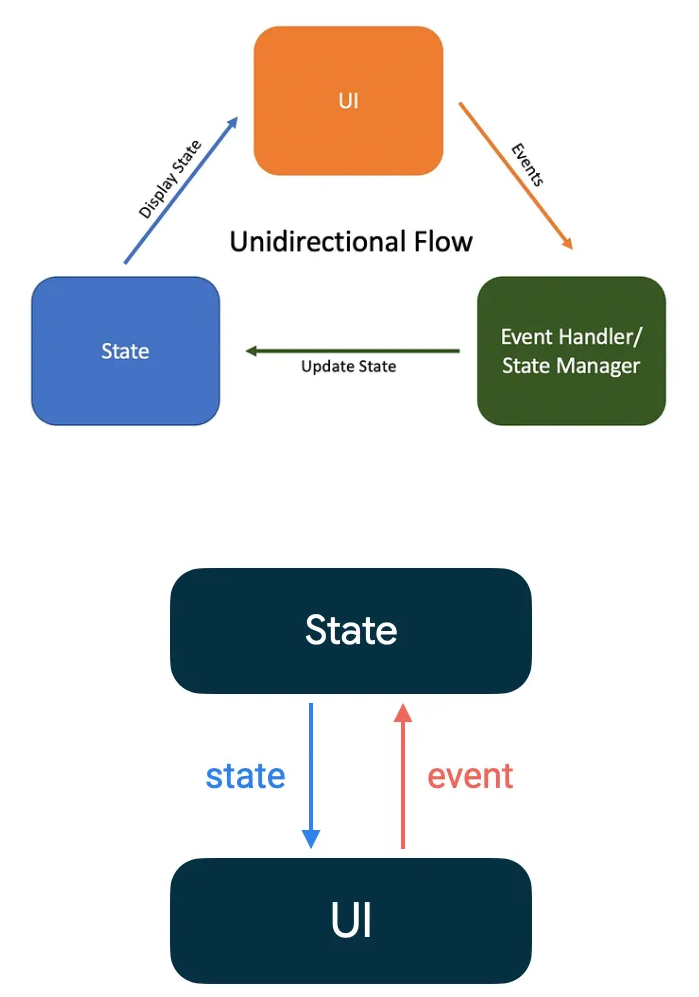
This is unidirectional data flow: state goes down as parameters, and events go up as lambdas. Only the owner changes the state.
Where to hoist:
- at least to the lowest common parent of every composable that reads the state;
- at least as high as the highest composable that changes it;
- into a ViewModel once real logic is involved (game rules, persistence, anything you want to unit-test). That's lecture 10. The
TicTacToeScreenabove is fine for learning, but the game rules don't belong in a composable.
You already know the pattern from TextField(value, onValueChange). Use the same naming in your own composables: checked/onCheckedChange, selected/onSelect.
Derived state
Don't store what you can compute. In TicTacToeScreen the winner is a function of the board. Store both and sooner or later they disagree. Compute it, and cache it with remember(board) if it's expensive.
derivedStateOf is for a different case: the input changes much more often than the result. Scrolling changes firstVisibleItemIndex dozens of times per second, but "show the scroll-to-top button" flips rarely:
@Composable
fun HistoryList(items: List<String>) {
    val listState = rememberLazyListState()
    val showScrollToTop by remember { derivedStateOf { listState.firstVisibleItemIndex > 0 } }
    val scope = rememberCoroutineScope()

    Scaffold(
        floatingActionButton = {
            if (showScrollToTop) {
                FloatingActionButton(onClick = { scope.launch { listState.animateScrollToItem(0) } }) {
                    Icon(Icons.Default.KeyboardArrowUp, contentDescription = "Scroll to top")
                }
            }
        }
    ) { innerPadding ->
        LazyColumn(state = listState, contentPadding = innerPadding) {
            items(items) { Text(it, Modifier.padding(16.dp)) }
        }
    }
}
The FAB area recomposes only when the boolean changes, not on every scrolled pixel.
When not to use it:
var name by remember { mutableStateOf("") }

// Pointless: the result changes exactly as often as the input
val upper by remember { derivedStateOf { name.uppercase() } }

// Just compute it
val upper = name.uppercase()
Side effects
A side effect is anything a composable does that's visible outside itself: starting a timer, calling the network, registering a listener, showing a snackbar, logging analytics. Composable bodies run unpredictably, so never do that directly in the body. The effect APIs tie the work to the composable's lifetime in the composition:
| API | Use it for |
|---|---|
LaunchedEffect(key) | a coroutine that runs while the composable is shown and restarts when the key changes |
rememberCoroutineScope() | coroutines started from event callbacks (onClick) |
rememberUpdatedState(value) | reading the latest value inside a long-running effect without restarting it |
DisposableEffect(key) | register on enter, unregister on leave or key change |
LifecycleResumeEffect / LifecycleStartEffect | work tied to the screen being resumed or started |
produceState | turning a non-Compose async source into State |
SideEffect | pushing Compose state into a non-Compose object after every successful recomposition |
LaunchedEffect
@Composable
fun GameTimer(isRunning: Boolean, modifier: Modifier = Modifier) {
    var elapsedSec by rememberSaveable { mutableIntStateOf(0) }

    LaunchedEffect(isRunning) {
        while (isRunning) {
            delay(1_000)
            elapsedSec++
        }
    }

    Text("%d:%02d".format(elapsedSec / 60, elapsedSec % 60), modifier)
}
- The block is a coroutine (lecture 08), so
delaydoesn't block anything. - It starts when
GameTimerenters the composition and is cancelled when it leaves. - When a key changes, the running coroutine is cancelled and a new one starts with the new value.
isRunning = falsetherefore stops the loop. LaunchedEffect(Unit)(or any constant key) runs once per entry into the composition.
A ticking counter is fine for display, but it drifts and pauses while the effect is cancelled. For statistics such as HW2's average game time or SportMap's session duration, store timestamps (start, end) and compute differences: System.currentTimeMillis() for wall-clock times, and SystemClock.elapsedRealtime() for durations that must ignore clock changes.
Loading data for a parameter, the correct version of an often-copied broken example:
@Composable
fun UserName(userId: String) {
    var userName by remember { mutableStateOf<String?>(null) }

    LaunchedEffect(userId) {                 // re-run when userId changes
        userName = fetchUserName(userId)     // suspend function
    }

    Text(userName ?: "Loading...")
}
In a real app the loading happens in a ViewModel (lecture 10) and the composable only shows its state.
rememberCoroutineScope
LaunchedEffect is driven by the composition. When an event should start a coroutine, for example showing a snackbar or scrolling a list on click, use a scope that's bound to the composable:
val snackbarHostState = remember { SnackbarHostState() }
val scope = rememberCoroutineScope()

Button(onClick = {
    scope.launch { snackbarHostState.showSnackbar("Checkpoint added") }
}) { Text("Add CP") }
The scope is cancelled when the composable leaves the composition. Never call scope.launch directly in the composable body. That's a side effect in the body, and it runs on every recomposition.
rememberUpdatedState
A long-running effect captures the values it saw when it started. If a callback parameter changes later, you want the new callback without restarting the timer:
@Composable
fun MoveTimeout(moveNumber: Int, onTimeout: () -> Unit) {
    val currentOnTimeout by rememberUpdatedState(onTimeout)

    LaunchedEffect(moveNumber) {          // restart only when a move is made
        delay(10_000)
        currentOnTimeout()                // calls the latest lambda
    }
}
DisposableEffect
For APIs with register/unregister pairs. onDispose is mandatory and runs when the composable leaves the composition or the key changes:
@Composable
fun LifecycleLogger(lifecycleOwner: LifecycleOwner = LocalLifecycleOwner.current) {
    DisposableEffect(lifecycleOwner) {
        val observer = LifecycleEventObserver { _, event ->
            Log.d("Lifecycle", "Event: $event")
        }
        lifecycleOwner.lifecycle.addObserver(observer)
        onDispose {
            lifecycleOwner.lifecycle.removeObserver(observer)
        }
    }
}
LocalLifecycleOwner is androidx.lifecycle.compose.LocalLifecycleOwner (the old androidx.compose.ui.platform one is deprecated).
LifecycleResumeEffect and LifecycleStartEffect
Lifecycle pairs are so common that lifecycle-runtime-compose (in the course catalog since lecture 05) has dedicated effects:
LifecycleResumeEffect(Unit) {
    Log.d("Map", "resumed - e.g. re-check permissions or location settings")
    onPauseOrDispose { Log.d("Map", "paused") }
}

LifecycleStartEffect(Unit) {
    Log.d("Map", "visible")
    onStopOrDispose { Log.d("Map", "not visible") }
}
This is the Compose replacement for overriding onResume/onPause in the activity. In lecture 12 you'll use it to re-check permissions after the user returns from system settings.
produceState
produceState launches a coroutine and exposes its result as State:
@Composable
fun HighScore() {
    val highScore by produceState<Int?>(initialValue = null) {
        value = loadHighScore()                       // suspend function
    }
    Text(highScore?.let { "High score: $it" } ?: "Loading...")
}

@Composable
fun Clock() {
    val now by produceState(initialValue = System.currentTimeMillis()) {
        while (true) {
            delay(1_000)
            value = System.currentTimeMillis()
        }
    }
    Text(DateFormat.getTimeInstance().format(Date(now)))
}
Most data in this course comes as a Flow from a ViewModel. For that you'll use collectAsStateWithLifecycle() (lecture 09), which is built on the same idea.
SideEffect
Runs after every successful recomposition. Use it to keep a non-Compose object in sync with Compose state:
@Composable
fun TrackScreen(analytics: Analytics, screenName: String) {
    SideEffect { analytics.currentScreen = screenName }
}
CompositionLocal
Some values are needed deep in the tree without passing them through every function: the theme, the context, the screen configuration. Compose provides them implicitly as CompositionLocals:
val context = LocalContext.current                         // Toast, startActivity, resources
val configuration = LocalConfiguration.current             // orientation, screen size (lecture 07)
val isLandscape = configuration.orientation == Configuration.ORIENTATION_LANDSCAPE
val strokePx = with(LocalDensity.current) { 4.dp.toPx() }  // dp to px conversions
val lifecycleOwner = LocalLifecycleOwner.current
MaterialTheme.colorScheme is a CompositionLocal too (lecture 07). You can define your own:
data class Spacing(val small: Dp = 4.dp, val medium: Dp = 8.dp, val large: Dp = 16.dp)

val LocalSpacing = staticCompositionLocalOf { Spacing() }

@Composable
fun SpacingDemo() {
    CompositionLocalProvider(LocalSpacing provides Spacing(large = 24.dp)) {
        Text("Spaced", Modifier.padding(LocalSpacing.current.large))
    }
}
staticCompositionLocalOf is for values that almost never change, since changing them recomposes everything below. compositionLocalOf tracks readers individually, for values that do change.
CompositionLocals are invisible dependencies. Use them for cross-cutting UI concerns (theme, spacing, units), not to smuggle data or ViewModels past function parameters. If a composable needs sessionName, give it a sessionName parameter.
Stability and skipping
A composable is skipped only when its parameters are "equal and stable". Compose considers a type stable when it can't change without Compose noticing: primitives, String, function types, enums, State, and classes whose public properties are all stable vals.
- Since Kotlin 2.0.20 strong skipping is on by default. Composables with unstable parameters are skippable too: stable parameters are compared with
equals, and unstable ones by instance (===). Lambdas are remembered automatically. List<T>is an interface, so it might be aMutableList, and Compose treats it as unstable. A new list instance with the same content therefore still recomposes, which is usually fine.- Classes from modules not compiled with Compose (like
java.time.Instant) count as unstable. You can declare them stable in a configuration file:
// app/build.gradle.kts
composeCompiler {
    stabilityConfigurationFiles.add(rootProject.layout.projectDirectory.file("compose_stability.conf"))
    reportsDestination = layout.buildDirectory.dir("compose_compiler")   // stability reports
}
// compose_stability.conf
java.time.Instant
@Immutable(never changes after construction) and@Stable(changes are observable) are promises to the compiler:
@Immutable
data class BoardState(val cells: List<List<String>>, val nextPlayer: String)
To see what actually happens, use Layout Inspector (Running Devices → Layout Inspector). It shows recomposition and skip counts per composable. Correctness first: optimise only what the inspector shows is hot, such as a list that recomposes completely on every location update.
In the final project
- Small UI element state uses
rememberSaveable, because the app must survive rotation: an open overflow menu, the selected tab of the session detail screen, an expanded statistics panel, the typed session name. The stop-confirmation flag is not one of these. The notification can request it from outside the UI, so it lives inMapViewModel(lecture 15). - The GPS track, statistics and settings are not composable state. They live in repositories and ViewModels (lecture 10), and the screen only shows them.
- Session duration is computed from timestamps. A
LaunchedEffectthat ticks every second only refreshes the displayed "now". LifecycleResumeEffectre-checks location permission and location settings when the user comes back from system settings (lectures 12, 13).- The compass needle animates through deferred reads (
graphicsLayer { rotationZ = ... }), so sensor updates don't recompose the map (lecture 17).
Self preparation QA
- Why doesn't
var count = 0inside a composable work as state? — Compose doesn't observe it, so changes trigger no recomposition, and every recomposition re-runs the function and resets it to 0. - What do
rememberandmutableStateOfeach contribute? —mutableStateOfmakes the value observable (reads subscribe, writes trigger recomposition).rememberkeeps the same object across recompositions. - Why does
mutableStateOf(mutableListOf())plusadd()not update the UI? — TheState's value (the list reference) isn't reassigned, so nothing is notified. Replace an immutable list or usemutableStateListOf. - What is the difference between
rememberandrememberSaveable? —rememberSaveablealso stores the value in the saved-instance-state bundle, so it survives rotation and process death. It needs bundle-compatible types or aSaver. - Why must you not put a GPS track into
rememberSaveable? — The saved-state bundle is limited (about 1 MB) and too much crashes withTransactionTooLargeException. Big data belongs in a ViewModel, repository or database. - What is state hoisting, and where should state be hoisted to? — Moving state to a caller and passing value + event lambda down. Hoist to the lowest common parent of all readers, at least as high as the highest writer, or to a ViewModel when business logic is involved.
- When is
derivedStateOfuseful? — When the derived result changes much less often than its input, like a boolean from a scroll position. If the result changes as often as the input, compute it directly. - What happens to a
LaunchedEffectwhen its key changes, and when its composable leaves the composition? — Key change: the running coroutine is cancelled and the block restarts. Leaving: the coroutine is cancelled. - When do you use
rememberCoroutineScopeinstead ofLaunchedEffect? — When an event callback such asonClickstarts the coroutine.LaunchedEffectis for work driven by being in the composition. - What is strong skipping? — The default mode since Kotlin 2.0.20: composables with unstable parameters can still be skipped, with unstable parameters compared by instance and lambdas remembered automatically.