10 - App Architecture, ViewModel & Hilt
Recap
09 - Kotlin Flow gave you StateFlow, stateIn and collectAsStateWithLifecycle. 06 - State & Side Effects gave you remember, rememberSaveable and state hoisting. Those tools are enough for state that belongs to one composable. A real app has more: game rules, settings, a session that is recorded while the screen is off, data shared by several screens and a service. This lecture decides where each piece of state and logic lives. It introduces the ViewModel, the repository, DataStore (the replacement for HW1's SharedPreferences) and dependency injection with Hilt.
By the end of this lecture you should be able to:
- Describe the recommended Android architecture: UI layer, data layer, optional domain layer, unidirectional data flow.
- Write a ViewModel that exposes an immutable
UiStateasStateFlowand handles UI events. - Split a screen into a stateful route and a stateless, previewable screen composable.
- Choose between
remember,rememberSaveable, ViewModel,SavedStateHandleand persistent storage. - Store settings and statistics with DataStore Preferences behind a repository.
- Set up Hilt: application, entry points,
@HiltViewModel, modules,@Binds/@Provides, scopes. - Explain the SportMap architecture used in the rest of the course.
Lecture demos: native-2026-fall
Why architecture
Put all the code into composables and MainActivity and you get the 2015-era Android problems back:
- Rotation recreates the activity. Everything not saved is lost (lecture 02).
- Process death. Android kills a backgrounded app to free memory, and when the user returns, the app is restored from saved state only.
- Untestable logic. Rules buried inside a composable can only be tested through the UI.
- Shared data. The map screen, the sessions list, the notification and the background service all need the same tracking data. Who owns it?
- Lifetimes differ. A composable lives for one screen, a ViewModel for a screen's lifetime, and a repository for the whole app process. A database outlives all of them.
Recommended app architecture
Google's guide to app architecture splits an app into layers:
Rules that make it work:
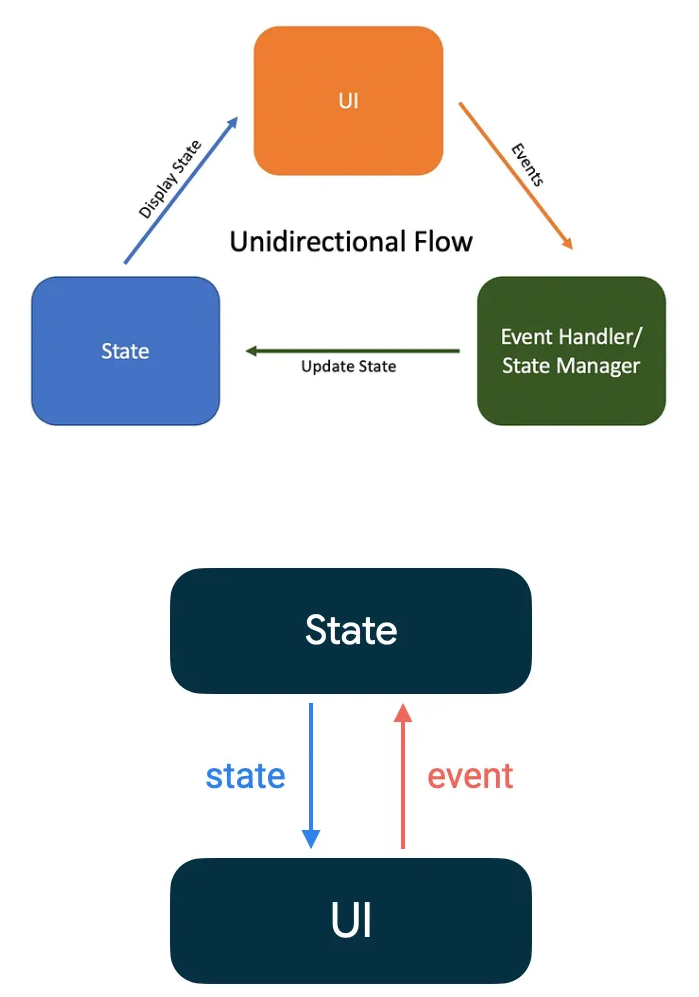
- Unidirectional data flow. State flows down and events flow up, the same principle as state hoisting in lecture 06, applied to the whole app.
- Single source of truth. Each piece of data has exactly one owner, which exposes it read-only, and only the owner modifies it.
- The data layer exposes streams. Repositories return
Flowfor data that changes andsuspendfunctions for one-shot operations. The UI observes. It never polls. - Dependencies point downwards. Composables know ViewModels and ViewModels know repositories. Repositories know nothing about the UI.
ViewModel
A ViewModel is a screen-level state holder. It:
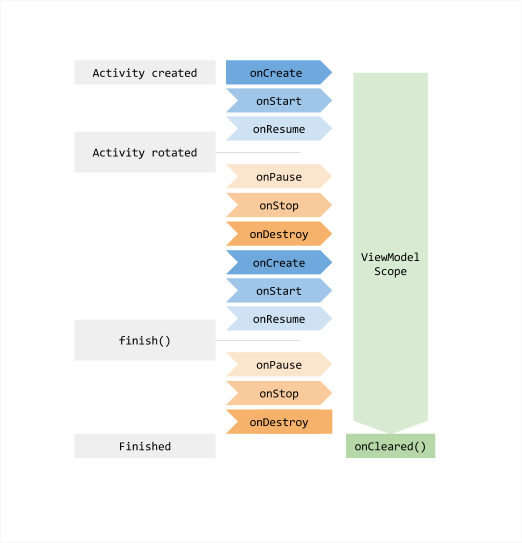
- survives configuration changes: the same instance is handed back after rotation;
- is scoped to a
ViewModelStoreOwner(an activity, or a navigation entry in lecture 11) and is cleared when that owner is finished for good; - has a
viewModelScopefor coroutines, which is cancelled automatically inonCleared(); - holds UI logic and exposes the screen's state, and delegates data work to repositories.
Context of an activity, Views, composables, Lifecycle. They are recreated on rotation, the ViewModel isn't, so the result is a memory leak. If you need the application context, inject it into a repository or data source instead (@ApplicationContext, below). AndroidViewModel exists, but with DI you don't need it.
Dependency (already in the course catalog):
androidx-lifecycle-viewmodel-compose = { group = "androidx.lifecycle", name = "lifecycle-viewmodel-compose", version.ref = "lifecycle" }
UiState and events
Model everything the screen shows as one immutable data class, and expose it as a read-only StateFlow:
data class GameUiState(
    val board: List<List<String>> = List(3) { List(3) { "" } },
    val nextPlayer: String = "X",
    val winner: String? = null,
    val moves: Int = 0,
)

class GameViewModel : ViewModel() {
    private val _uiState = MutableStateFlow(GameUiState())
    val uiState: StateFlow<GameUiState> = _uiState.asStateFlow()

    fun onCellClick(row: Int, col: Int) {
        _uiState.update { state ->
            if (state.winner != null || state.board[row][col].isNotEmpty()) return@update state
            val board = state.board.mapIndexed { r, cells ->
                cells.mapIndexed { c, symbol -> if (r == row && c == col) state.nextPlayer else symbol }
            }
            state.copy(
                board = board,
                nextPlayer = if (state.nextPlayer == "X") "O" else "X",
                moves = state.moves + 1,
                winner = findWinner(board),
            )
        }
    }

    fun onNewGame() {
        _uiState.value = GameUiState()
    }

    private fun findWinner(board: List<List<String>>): String? = null   // the game rules are your HW
}
_uiStateis private and mutable, anduiStateis public and read-only. Only the ViewModel changes the state.update { }is an atomic read-modify-write. It's safe even when two coroutines update at once.- Each change produces a new state object (
copy). Compose compares states, and immutable data makes that cheap and reliable (lecture 06, stability). - Events are plain functions named after what happened (
onCellClick), not after what should happen (setBoard).
Some teams model events as one sealed interface and a single entry point, which is handy when a screen has many events:
sealed interface GameEvent {
    data class CellClicked(val row: Int, val col: Int) : GameEvent
    data object NewGame : GameEvent
}

fun onEvent(event: GameEvent) = when (event) {
    is GameEvent.CellClicked -> onCellClick(event.row, event.col)
    GameEvent.NewGame -> onNewGame()
}
Route and screen
Split every screen in two:
// Stateful: knows about the ViewModel. Not previewable.
@Composable
fun GameRoute(viewModel: GameViewModel = viewModel()) {
    val state by viewModel.uiState.collectAsStateWithLifecycle()
    GameScreen(
        state = state,
        onCellClick = viewModel::onCellClick,
        onNewGame = viewModel::onNewGame,
    )
}

// Stateless: only data in, events out. Previewable and testable.
@Composable
fun GameScreen(
    state: GameUiState,
    onCellClick: (Int, Int) -> Unit,
    onNewGame: () -> Unit,
    modifier: Modifier = Modifier,
) {
    Column(modifier.padding(16.dp)) {
        Text(state.winner?.let { "$it won!" } ?: "${state.nextPlayer} to move")
        Board(cells = state.board, onCellClick = onCellClick, modifier = Modifier.weight(1f))
        Button(onClick = onNewGame) { Text("New game") }
    }
}

@Preview
@Composable
private fun GameScreenPreview() {
    GameScreen(state = GameUiState(winner = "X"), onCellClick = { _, _ -> }, onNewGame = {})
}
viewModel() (from lifecycle-viewmodel-compose) returns the ViewModel scoped to the nearest ViewModelStoreOwner. It creates it the first time and returns the same instance after rotation. collectAsStateWithLifecycle() stops collecting while the app is in the background (lecture 09).
One-off events
Some things the ViewModel wants to happen once: show a snackbar, navigate away after saving. Prefer to model them as state and let the UI report back:
data class SessionUiState(
    val name: String = "",
    val userMessage: String? = null,
)

// ViewModel
fun onSaved() = _uiState.update { it.copy(userMessage = "Session saved") }
fun onMessageShown() = _uiState.update { it.copy(userMessage = null) }

// Screen
state.userMessage?.let { message ->
    LaunchedEffect(message) {
        snackbarHostState.showSnackbar(message)
        onMessageShown()
    }
}
State can't be lost when nobody is listening, for example during rotation. If you really need a stream of events, use a Channel exposed with receiveAsFlow() and collect it in a LaunchedEffect. Don't use a SharedFlow without replay, because it drops events emitted while the UI is not collecting.
What survives what
| Stored in | Recomposition | Rotation | Process death | App restart |
|---|---|---|---|---|
| local variable in a composable | no | no | no | no |
remember | yes | no | no | no |
rememberSaveable | yes | yes | yes | no |
| ViewModel property | yes | yes | no | no |
ViewModel + SavedStateHandle | yes | yes | yes | no |
| DataStore / Room / file | yes | yes | yes | yes |
To test process death, put the app in the background and run adb shell am kill ee.taltech.sportmap, then reopen it from Recents.
SavedStateHandle is the ViewModel's own Bundle. Use it for small things the user would be annoyed to lose: a half-typed session name, the selected tab, the id of the item being edited.
class SessionNameViewModel(private val savedStateHandle: SavedStateHandle) : ViewModel() {
    val name: StateFlow<String> = savedStateHandle.getStateFlow("name", "")
    fun onNameChange(value: String) { savedStateHandle["name"] = value }
}
With Hilt (below) you simply add SavedStateHandle to the constructor and it's injected.
Data layer: repositories
A repository owns one type of data. It decides where the data comes from (memory, DataStore, database, network) and exposes it in one shape:
interface GameStatsRepository {
    val stats: Flow<GameStats>
    suspend fun recordResult(winner: String?, durationMs: Long)
    suspend fun reset()
}
- The interface lets you swap in a fake for tests and previews.
- The implementation hides the storage. Callers don't know whether it's DataStore today and Room tomorrow.
- Repositories are usually singletons, so every screen sees the same data.
DataStore Preferences
DataStore replaces SharedPreferences:
| SharedPreferences (HW1) | DataStore |
|---|---|
| synchronous API, can block the main thread | suspend writes, Flow reads, main-safe |
apply() silently drops errors | errors surface as exceptions |
| no notification of changes (listener API is clumsy) | data: Flow<Preferences> emits on every change |
| no transactions | edit { } is atomic read-modify-write |
# libs.versions.toml
androidx-datastore-preferences = { group = "androidx.datastore", name = "datastore-preferences", version.ref = "datastore" }
HW2: game statistics
data class GameStats(val xWins: Int = 0, val oWins: Int = 0, val draws: Int = 0, val totalTimeMs: Long = 0) {
    val gamesPlayed get() = xWins + oWins + draws
    val averageTimeMs get() = if (gamesPlayed == 0) 0 else totalTimeMs / gamesPlayed
}

class DataStoreGameStatsRepository(
    private val dataStore: DataStore<Preferences>
) : GameStatsRepository {

    private object Keys {
        val X_WINS = intPreferencesKey("x_wins")
        val O_WINS = intPreferencesKey("o_wins")
        val DRAWS = intPreferencesKey("draws")
        val TOTAL_TIME_MS = longPreferencesKey("total_time_ms")
    }

    override val stats: Flow<GameStats> = dataStore.data
        .catch { e -> if (e is IOException) emit(emptyPreferences()) else throw e }
        .map { prefs ->
            GameStats(
                xWins = prefs[Keys.X_WINS] ?: 0,
                oWins = prefs[Keys.O_WINS] ?: 0,
                draws = prefs[Keys.DRAWS] ?: 0,
                totalTimeMs = prefs[Keys.TOTAL_TIME_MS] ?: 0L,
            )
        }

    override suspend fun recordResult(winner: String?, durationMs: Long) {
        dataStore.edit { prefs ->
            val key = when (winner) {
                "X" -> Keys.X_WINS
                "O" -> Keys.O_WINS
                else -> Keys.DRAWS
            }
            prefs[key] = (prefs[key] ?: 0) + 1
            prefs[Keys.TOTAL_TIME_MS] = (prefs[Keys.TOTAL_TIME_MS] ?: 0L) + durationMs
        }
    }

    override suspend fun reset() {
        dataStore.edit { it.clear() }
    }
}
Creating the DataStore itself:
// Top level in a Kotlin file - exactly ONE instance per file name in the whole process
val Context.statsDataStore: DataStore<Preferences> by preferencesDataStore(name = "game_stats")
Never create two DataStore instances for the same file. DataStore throws when it detects that, and the data can get corrupted. The preferencesDataStore delegate or a @Singleton Hilt provider (below) guarantees a single instance. Use one or the other for a file, never both: a delegate and a Hilt provider for "game_stats" are two instances.
Preferences DataStore stores only primitives, strings and string sets. For structured objects, use the JSON/Proto-based typed DataStore. For lists and relations, use Room (lecture 18).
Dependency injection with Hilt
The GameViewModel above creates nothing. But a ViewModel that needs a repository, which needs a DataStore, which needs a Context, has to get those objects from somewhere. Dependency injection means a class receives its dependencies through the constructor, and a container builds the object graph. You know this from ASP.NET Core:
| ASP.NET Core | Hilt |
|---|---|
builder.Services.AddSingleton<IFoo, Foo>() | @Binds @Singleton in a module installed in SingletonComponent |
AddScoped (per request) | @ViewModelScoped, @ActivityRetainedScoped, @ServiceScoped (per owner) |
AddTransient | no scope annotation: a new instance per injection |
| constructor injection | @Inject constructor(...) |
IServiceProvider builds the graph at runtime | Hilt (Dagger) generates the graph at compile time, so missing bindings are build errors |
Hilt is built on Dagger and knows Android's classes: it creates the container per Application, Activity, ViewModel and Service at the right time.
Setup
# libs.versions.toml
[libraries]
hilt-android = { group = "com.google.dagger", name = "hilt-android", version.ref = "hilt" }
hilt-compiler = { group = "com.google.dagger", name = "hilt-android-compiler", version.ref = "hilt" }
androidx-hilt-lifecycle-viewmodel-compose = { group = "androidx.hilt", name = "hilt-lifecycle-viewmodel-compose", version.ref = "androidxHilt" }

[plugins]
ksp = { id = "com.google.devtools.ksp", version.ref = "ksp" }
hilt = { id = "com.google.dagger.hilt.android", version.ref = "hilt" }
// build.gradle.kts (top level) - add
alias(libs.plugins.ksp) apply false
alias(libs.plugins.hilt) apply false

// app/build.gradle.kts
plugins {
    alias(libs.plugins.android.application)
    alias(libs.plugins.kotlin.compose)
    alias(libs.plugins.ksp)
    alias(libs.plugins.hilt)
}

dependencies {
    implementation(libs.hilt.android)
    ksp(libs.hilt.compiler)
    implementation(libs.androidx.hilt.lifecycle.viewmodel.compose)
}
Application and entry points
@HiltAndroidApp
class SportMapApp : Application()
<application
    android:name=".SportMapApp"
    ... >
@AndroidEntryPoint
class MainActivity : ComponentActivity() { /* unchanged */ }
@HiltAndroidApp generates the app-wide container. @AndroidEntryPoint marks Android classes that receive injections: activities, services (lecture 15) and broadcast receivers. Hilt can't construct these with a constructor, because the system does, so it fills @Inject lateinit var fields instead.
Injectable classes and ViewModels
@Singleton
class TrackingRepository @Inject constructor() { /* ... */ }

@HiltViewModel
class GameStatsViewModel @Inject constructor(
    private val statsRepository: GameStatsRepository,
) : ViewModel() {

    val stats: StateFlow<GameStats> = statsRepository.stats
        .stateIn(viewModelScope, SharingStarted.WhileSubscribed(5_000), GameStats())

    fun onReset() {
        viewModelScope.launch { statsRepository.reset() }
    }
}
import androidx.hilt.lifecycle.viewmodel.compose.hiltViewModel

@Composable
fun StatsRoute(viewModel: GameStatsViewModel = hiltViewModel()) {
    val stats by viewModel.stats.collectAsStateWithLifecycle()
    StatsScreen(stats = stats, onReset = viewModel::onReset)
}
hiltViewModel() is viewModel() plus Hilt's factory: it constructs the ViewModel with all its dependencies.
Modules: when Hilt can't call a constructor
A class with an @Inject constructor needs nothing more. A module tells Hilt how to get everything else:
- interfaces: which implementation to use (
@Binds); - classes you don't own or that need a builder: DataStore, the database, the HTTP client (
@Provides).
@Module
@InstallIn(SingletonComponent::class)
object DataStoreModule {

    @Provides
    @Singleton
    fun provideStatsDataStore(@ApplicationContext context: Context): DataStore<Preferences> =
        PreferenceDataStoreFactory.create { context.preferencesDataStoreFile("game_stats") }
}

@Module
@InstallIn(SingletonComponent::class)
abstract class RepositoryModule {

    @Binds
    @Singleton
    abstract fun bindGameStatsRepository(impl: DataStoreGameStatsRepository): GameStatsRepository
}
For @Binds to work, the implementation needs an injectable constructor:
class DataStoreGameStatsRepository @Inject constructor(
    private val dataStore: DataStore<Preferences>
) : GameStatsRepository { /* as above */ }
@ApplicationContext is a built-in binding for the application Context, and it's always safe to keep. When two bindings have the same type, for example two DataStores, tell them apart with a qualifier. As soon as there's a second DataStore, both providers and both consumers get one:
@Qualifier @Retention(AnnotationRetention.BINARY) annotation class SettingsStore
@Qualifier @Retention(AnnotationRetention.BINARY) annotation class StatsStore

@Module
@InstallIn(SingletonComponent::class)
object DataStoreModule {

    @Provides @Singleton @StatsStore
    fun provideStatsDataStore(@ApplicationContext context: Context): DataStore<Preferences> =
        PreferenceDataStoreFactory.create { context.preferencesDataStoreFile("game_stats") }

    @Provides @Singleton @SettingsStore
    fun provideSettingsDataStore(@ApplicationContext context: Context): DataStore<Preferences> =
        PreferenceDataStoreFactory.create { context.preferencesDataStoreFile("settings") }
}

class DataStoreGameStatsRepository @Inject constructor(
    @StatsStore private val dataStore: DataStore<Preferences>
) : GameStatsRepository { /* ... */ }

class DataStoreSettingsRepository @Inject constructor(
    @SettingsStore private val dataStore: DataStore<Preferences>
) : SettingsRepository { /* ... */ }
Without the qualifiers Hilt fails at compile time with "DataStore is bound multiple times". Lecture 19 adds a third one, @AuthStore, for the login token.
Components and scopes
| Component | Lives as long as | Scope annotation |
|---|---|---|
SingletonComponent | the application process | @Singleton |
ActivityRetainedComponent | an activity, across rotations | @ActivityRetainedScoped |
ViewModelComponent | one ViewModel | @ViewModelScoped |
ActivityComponent | one activity instance | @ActivityScoped |
ServiceComponent | one service | @ServiceScoped |
Without a scope annotation, every injection gets a new instance. Repositories that hold state or wrap a DataStore/database must be @Singleton, or two screens will see two different "single sources of truth".
For HW2 Hilt is optional. A ViewModel with constructor parameters can be created with a factory:
val factory = viewModelFactory {
    initializer { GameStatsViewModel(DataStoreGameStatsRepository(context.statsDataStore)) }
}
val viewModel: GameStatsViewModel = viewModel(factory = factory)
Doing that by hand for every class is exactly the boilerplate Hilt removes. The final project uses Hilt.
Common Hilt errors:
- "... cannot be provided without an @Inject constructor or an @Provides-annotated method": a binding is missing. Add
@Inject constructoror a module. - "Hilt Activity must be attached to an @HiltAndroidApp Application": you forgot
android:namein the manifest. - A crash when creating a ViewModel: the activity is missing
@AndroidEntryPoint, or you usedviewModel()instead ofhiltViewModel()for a@HiltViewModel.
Testing a ViewModel
The interface pays off in tests: give the ViewModel a fake.
class FakeGameStatsRepository : GameStatsRepository {
    private val state = MutableStateFlow(GameStats(xWins = 3))
    override val stats: Flow<GameStats> = state
    override suspend fun recordResult(winner: String?, durationMs: Long) = Unit
    override suspend fun reset() { state.value = GameStats() }
}

@OptIn(ExperimentalCoroutinesApi::class)
class GameStatsViewModelTest {
    @Before fun setUp() = Dispatchers.setMain(UnconfinedTestDispatcher())
    @After fun tearDown() = Dispatchers.resetMain()

    @Test
    fun resetClearsStats() = runTest {
        val viewModel = GameStatsViewModel(FakeGameStatsRepository())
        backgroundScope.launch(UnconfinedTestDispatcher(testScheduler)) { viewModel.stats.collect {} }

        assertEquals(3, viewModel.stats.value.xWins)
        viewModel.onReset()
        assertEquals(0, viewModel.stats.value.xWins)
    }
}
viewModelScope runs on Dispatchers.Main, which doesn't exist in a unit test, so setMain replaces it. The background collector is needed because WhileSubscribed starts the upstream only while someone collects. Dependencies: testImplementation(libs.junit) and testImplementation(libs.kotlinx.coroutines.test) (catalog entry from lecture 08).
SportMap architecture
This is the structure the remaining lectures fill in. You don't have to copy it, but whatever you build, you must be able to explain at the defence who owns which state.
The key decision is in the middle. The service collects locations and writes them into TrackingRepository, a @Singleton. The map screen observes the same repository. The UI doesn't need the service to show data, the service doesn't need the UI to keep recording, and both survive the other going away.
Package layout:
ee.taltech.sportmap
├── SportMapApp.kt, MainActivity.kt
├── di/            DispatchersModule, CoroutineScopeModule, DataStoreModule, DatabaseModule, NetworkModule
├── domain/        GpsLocation, TrackingState, SectionStats, GpsSession, TrackMath, Format
├── data/
│   ├── settings/  SettingsRepository, DataStoreSettingsRepository
│   ├── tracking/  TrackingRepository
│   ├── location/  LocationClient, FusedLocationClient, LocationModule
│   ├── sensor/    CompassSensor
│   ├── db/        AppDatabase, SessionDao, entities, SessionRepository, RoomSessionRepository
│   └── network/   SportMapApi, DTOs, TokenStore, AuthRepository, SyncRepository, SyncWorker, SyncScheduler
├── service/       TrackingService, TrackingCommands, TrackingActions, TrackingNotification
└── ui/            theme/, navigation/, map/, sessions/, settings/, login/
App-wide modules live in di/. A module that only binds one feature's interface (such as LocationModule) can sit next to that feature. Pick one convention and keep it.
Domain model
These types appear in every later lecture:
// domain/Model.kt
enum class LocationType { LOC, WP, CP }      // same names as the backend's GpsLocationTypes

data class GpsLocation(
    val latitude: Double,
    val longitude: Double,
    val accuracy: Float,
    val altitude: Double?,
    val verticalAccuracy: Float?,
    val recordedAt: Instant,
    val type: LocationType = LocationType.LOC,
)

/** Statistics of one section: from start, from the last CP, or from the WP to now. */
data class SectionStats(
    val distanceM: Double = 0.0,     // travelled along the track
    val directM: Double = 0.0,       // straight line from the section start to the current position
    val durationMs: Long = 0,
) {
    /** Seconds per kilometre, null until there is enough distance to be meaningful. */
    val paceSecPerKm: Double?
        get() = if (distanceM < 10.0) null else (durationMs / 1000.0) / (distanceM / 1000.0)
}

data class TrackingState(
    val isTracking: Boolean = false,
    val sessionId: Long? = null,
    val startedAt: Instant? = null,
    val track: List<GpsLocation> = emptyList(),
    val checkpoints: List<GpsLocation> = emptyList(),
    val waypoint: GpsLocation? = null,         // only one at a time; stored as a WP row for GPX (lecture 18)
    val overall: SectionStats = SectionStats(),
    val fromCheckpoint: SectionStats? = null,
    val fromWaypoint: SectionStats? = null,
)
Instant is java.time.Instant, available without desugaring since minSdk 26.
TrackingRepository
@Singleton
class TrackingRepository @Inject constructor() {
    private val _state = MutableStateFlow(TrackingState())
    val state: StateFlow<TrackingState> = _state.asStateFlow()

    fun start(sessionId: Long, startedAt: Instant) {
        _state.value = TrackingState(isTracking = true, sessionId = sessionId, startedAt = startedAt)
    }

    fun onLocation(location: GpsLocation) {
        _state.update { it.copy(track = it.track + location) }   // statistics: lecture 13
    }

    fun addCheckpoint() { /* lecture 13 */ }
    fun addWaypoint() { /* lecture 13 */ }

    fun stop() {
        _state.update { it.copy(isTracking = false) }
    }
}
Settings
enum class MapOrientation { NORTH_UP, DIRECTION_UP, USER_CHOSEN }

data class Settings(
    val gpsIntervalMs: Long = 2_000,
    val syncIntervalSec: Int = 0,            // 0 = send every location immediately
    val paceMinSecPerKm: Int = 360,          // 6:00 min/km and faster -> green
    val paceMaxSecPerKm: Int = 720,          // 12:00 min/km and slower -> red
    val keepCentered: Boolean = true,
    val mapOrientation: MapOrientation = MapOrientation.NORTH_UP,
    val compassVisible: Boolean = false,
)

interface SettingsRepository {
    val settings: Flow<Settings>
    suspend fun update(transform: (Settings) -> Settings)
}

class DataStoreSettingsRepository @Inject constructor(
    @SettingsStore private val dataStore: DataStore<Preferences>
) : SettingsRepository {

    private object Keys {
        val GPS_INTERVAL = longPreferencesKey("gps_interval_ms")
        val SYNC_INTERVAL = intPreferencesKey("sync_interval_sec")
        val PACE_MIN = intPreferencesKey("pace_min")
        val PACE_MAX = intPreferencesKey("pace_max")
        val KEEP_CENTERED = booleanPreferencesKey("keep_centered")
        val ORIENTATION = stringPreferencesKey("map_orientation")
        val COMPASS = booleanPreferencesKey("compass_visible")
    }

    override val settings: Flow<Settings> = dataStore.data
        .catch { e -> if (e is IOException) emit(emptyPreferences()) else throw e }
        .map { it.toSettings() }

    override suspend fun update(transform: (Settings) -> Settings) {
        dataStore.edit { prefs ->
            val new = transform(prefs.toSettings())
            prefs[Keys.GPS_INTERVAL] = new.gpsIntervalMs
            prefs[Keys.SYNC_INTERVAL] = new.syncIntervalSec
            prefs[Keys.PACE_MIN] = new.paceMinSecPerKm
            prefs[Keys.PACE_MAX] = new.paceMaxSecPerKm
            prefs[Keys.KEEP_CENTERED] = new.keepCentered
            prefs[Keys.ORIENTATION] = new.mapOrientation.name
            prefs[Keys.COMPASS] = new.compassVisible
        }
    }

    private fun Preferences.toSettings(): Settings {
        val defaults = Settings()
        return Settings(
            gpsIntervalMs = this[Keys.GPS_INTERVAL] ?: defaults.gpsIntervalMs,
            syncIntervalSec = this[Keys.SYNC_INTERVAL] ?: defaults.syncIntervalSec,
            paceMinSecPerKm = this[Keys.PACE_MIN] ?: defaults.paceMinSecPerKm,
            paceMaxSecPerKm = this[Keys.PACE_MAX] ?: defaults.paceMaxSecPerKm,
            keepCentered = this[Keys.KEEP_CENTERED] ?: defaults.keepCentered,
            mapOrientation = this[Keys.ORIENTATION]
                ?.let { runCatching { MapOrientation.valueOf(it) }.getOrNull() }
                ?: defaults.mapOrientation,
            compassVisible = this[Keys.COMPASS] ?: defaults.compassVisible,
        )
    }
}
@HiltViewModel
class SettingsViewModel @Inject constructor(
    private val settingsRepository: SettingsRepository,
) : ViewModel() {

    val settings: StateFlow<Settings> = settingsRepository.settings
        .stateIn(viewModelScope, SharingStarted.WhileSubscribed(5_000), Settings())

    // One event per setting. Each one is a read-modify-write inside DataStore's edit transaction.
    fun onGpsIntervalChange(ms: Long) = update { it.copy(gpsIntervalMs = ms) }
    fun onSyncIntervalChange(sec: Int) = update { it.copy(syncIntervalSec = sec) }
    fun onPaceRangeChange(minSecPerKm: Int, maxSecPerKm: Int) =
        update { it.copy(paceMinSecPerKm = minSecPerKm, paceMaxSecPerKm = maxSecPerKm) }
    fun onKeepCenteredChange(value: Boolean) = update { it.copy(keepCentered = value) }
    fun onMapOrientationChange(value: MapOrientation) = update { it.copy(mapOrientation = value) }
    fun onCompassVisibleChange(value: Boolean) = update { it.copy(compassVisible = value) }

    private fun update(transform: (Settings) -> Settings) {
        viewModelScope.launch { settingsRepository.update(transform) }
    }
}
The settings screen is a stateless screen over Settings, built from the components of lecture 07. The option lists are the values the final project asks for: sync "when received, every 10 s, every 30 s", GPS frequency, and a pace range for track colouring.
private val gpsIntervals = listOf(1_000L to "1 s", 2_000L to "2 s", 5_000L to "5 s", 10_000L to "10 s")
private val syncIntervals = listOf(0 to "Live", 10 to "10 s", 30 to "30 s", 60 to "60 s")

private fun paceLabel(secPerKm: Int) = "%d:%02d".format(secPerKm / 60, secPerKm % 60)

@Composable
fun SettingsRoute(onLogin: () -> Unit, viewModel: SettingsViewModel = hiltViewModel()) {
    val settings by viewModel.settings.collectAsStateWithLifecycle()
    SettingsScreen(
        settings = settings,
        onGpsIntervalChange = viewModel::onGpsIntervalChange,
        onSyncIntervalChange = viewModel::onSyncIntervalChange,
        onPaceRangeChange = viewModel::onPaceRangeChange,
        onKeepCenteredChange = viewModel::onKeepCenteredChange,
        onMapOrientationChange = viewModel::onMapOrientationChange,
        onCompassVisibleChange = viewModel::onCompassVisibleChange,
        onLogin = onLogin,
    )
}

@Composable
fun SettingsScreen(
    settings: Settings,
    onGpsIntervalChange: (Long) -> Unit,
    onSyncIntervalChange: (Int) -> Unit,
    onPaceRangeChange: (Int, Int) -> Unit,
    onKeepCenteredChange: (Boolean) -> Unit,
    onMapOrientationChange: (MapOrientation) -> Unit,
    onCompassVisibleChange: (Boolean) -> Unit,
    onLogin: () -> Unit,
    modifier: Modifier = Modifier,
) {
    Column(
        modifier = modifier
            .fillMaxSize()
            .verticalScroll(rememberScrollState())
            .padding(16.dp),
        verticalArrangement = Arrangement.spacedBy(16.dp),
    ) {
        Text("GPS update interval", style = MaterialTheme.typography.titleSmall)
        SingleChoiceSegmentedButtonRow(Modifier.fillMaxWidth()) {
            gpsIntervals.forEachIndexed { index, (ms, label) ->
                SegmentedButton(
                    selected = settings.gpsIntervalMs == ms,
                    onClick = { onGpsIntervalChange(ms) },
                    shape = SegmentedButtonDefaults.itemShape(index, gpsIntervals.size),
                ) { Text(label) }
            }
        }

        Text("Sync to backend", style = MaterialTheme.typography.titleSmall)
        SingleChoiceSegmentedButtonRow(Modifier.fillMaxWidth()) {
            syncIntervals.forEachIndexed { index, (sec, label) ->
                SegmentedButton(
                    selected = settings.syncIntervalSec == sec,
                    onClick = { onSyncIntervalChange(sec) },
                    shape = SegmentedButtonDefaults.itemShape(index, syncIntervals.size),
                ) { Text(label) }
            }
        }

        // Local state while dragging, saved once when the finger lifts
        var paceRange by remember(settings.paceMinSecPerKm, settings.paceMaxSecPerKm) {
            mutableStateOf(settings.paceMinSecPerKm.toFloat()..settings.paceMaxSecPerKm.toFloat())
        }
        Text(
            "Track colours: green ≤ ${paceLabel(paceRange.start.toInt())}, " +
                "red ≥ ${paceLabel(paceRange.endInclusive.toInt())} min/km",
            style = MaterialTheme.typography.titleSmall,
        )
        RangeSlider(
            value = paceRange,
            onValueChange = { paceRange = it },
            onValueChangeFinished = {
                onPaceRangeChange(paceRange.start.toInt(), paceRange.endInclusive.toInt())
            },
            valueRange = 180f..1200f,          // 3:00 ... 20:00 min/km
            steps = (1200 - 180) / 15 - 1,     // 15 s steps
        )

        Text("Map orientation", style = MaterialTheme.typography.titleSmall)
        SingleChoiceSegmentedButtonRow(Modifier.fillMaxWidth()) {
            MapOrientation.entries.forEachIndexed { index, orientation ->
                SegmentedButton(
                    selected = settings.mapOrientation == orientation,
                    onClick = { onMapOrientationChange(orientation) },
                    shape = SegmentedButtonDefaults.itemShape(index, MapOrientation.entries.size),
                ) { Text(orientation.name.lowercase().replace('_', ' ')) }
            }
        }

        SettingSwitch("Keep map centered", settings.keepCentered, onKeepCenteredChange)
        SettingSwitch("Show compass", settings.compassVisible, onCompassVisibleChange)

        OutlinedButton(onClick = onLogin, modifier = Modifier.fillMaxWidth()) { Text("Account (log in / register)") }
    }
}

@Composable
private fun SettingSwitch(label: String, checked: Boolean, onCheckedChange: (Boolean) -> Unit) {
    Row(
        modifier = Modifier
            .fillMaxWidth()
            .toggleable(value = checked, role = Role.Switch, onValueChange = onCheckedChange),
        verticalAlignment = Alignment.CenterVertically,
    ) {
        Text(label, Modifier.weight(1f))
        Switch(checked = checked, onCheckedChange = null)   // the whole row handles the click
    }
}
- Every control shows
settingsand sends an event. When DataStore emits the newSettings, the screen recomposes with it. - The slider is the one exception. Every
editis a file write, so dragging would write dozens of times per second. The dragged range lives in local state and is saved once inonValueChangeFinished.remember(keys)resets it when the stored value changes. - The whole row toggles, not just the small switch.
toggleablewithRole.Switchalso makes TalkBack announce it correctly (lecture 05, accessibility). Settings.keepCenteredis the default for the map. A drag on the map turns following off only for that screen (lecture 16) and doesn't change the setting.
In the final project
- Every screen is a route plus a stateless screen, with a
@HiltViewModelbehind it. TrackingRepository(live session),SessionRepository(history, lecture 18),SettingsRepository(this lecture) andAuthRepository(lecture 19) are@Singletons and the single sources of truth.- The settings behind the requirements are configurable GPS update frequency, sync interval, pace colour range, keep-centered, map orientation and compass on/off. They all live in
Settingsand survive restarts. - The rotation requirement ("state has to be restored") is met by design: UI state is in ViewModels and repositories, and only small UI element state uses
rememberSaveable.
Self preparation QA
- What are the layers of the recommended Android architecture, and which way do dependencies point? — UI (composables + ViewModels), optional domain (pure logic), data (repositories + data sources). Dependencies point from the UI towards the data layer. State travels the other way, from the data layer to the UI as streams, and events travel from the UI to the ViewModel as calls. That's the same "state down, events up" rule as state hoisting, seen from the composable tree.
- Why does a ViewModel survive rotation while the activity doesn't? — It's stored in the activity's (or navigation entry's)
ViewModelStore, which is retained across configuration changes and cleared only when the owner finishes for good. - Why must a ViewModel not hold an activity
Context? — The activity is recreated on rotation but the ViewModel isn't, so it would keep the old activity alive (a leak) and use a dead context. - Why expose
StateFlow<UiState>and keepMutableStateFlowprivate? — Only the ViewModel may change state, which keeps a single source of truth and a unidirectional flow. The UI can only read and send events. - Why split a screen into a route and a stateless screen? — The stateless screen takes data and callbacks only, so it can be previewed and tested without a ViewModel, DI or Android runtime.
- Which storage survives process death? —
rememberSaveable,SavedStateHandleand persistent storage. Plainrememberand ordinary ViewModel properties don't. - What are DataStore's advantages over SharedPreferences? — Asynchronous main-safe API,
Flowof changes, atomicedittransactions and surfaced errors. - What is the difference between
@Bindsand@Provides? —@Bindsmaps an interface to an injectable implementation (abstract, no code).@Providesis a function that builds an object Hilt can't construct itself, such as DataStore, a database or an HTTP client. - What happens if
TrackingRepositoryis not@Singleton? — The service and the map screen would each get their own instance. The UI would never see the locations the service records. - Why do you need
Dispatchers.setMainin a ViewModel unit test? —viewModelScopeusesDispatchers.Main, which needs the Android main looper, so tests replace it with a test dispatcher.