06 - Razor Views
Views in ASP.NET Core MVC
- In the Model-View-Controller (MVC) pattern, the view encapsulates the presentation details of the user's interaction with the app.
- Views are HTML templates with embedded code that generate content to send to the client.
- Views use Razor syntax, which allows code to interact with HTML with minimal code or ceremony.
View files
- Views use .cshtml extension
- Are located in web project – Views folder
- Typically, each controller has its own folder within Views folder
- Typically, every action has its own view
\Views\<ControllerName>\<ActionName>.cshtml - Shared views are in folder \Views\Shared
- In addition to action specific views there are
- partial views
- layouts,
- special view files
- ...
Specify what view file to use
- Usually just return View() or return View(viewModel) is used
- View discovery process (unless concrete view is requested)
\Views\<ControllerName>\<ActionName>.cshtml
\Views\Shared\<ActionName>.cshtml - Returning some specific view
return View(“ViewName”,viewModel); // cshtml extension not required
return View(“/Views/CustomViews/ViewName.cshtml”,viewModel);
Passing data
Two widely used methods
- Using ViewModels (DTOs) (can be specific objects or domain objects)
- strongly typed – intellisense, compiler errors
- strongly recommended (required in this course!)
- Using ViewBag or ViewData
- loosely typed data, no compiler support
- errors can only be discovered during runtime
Passing data - ViewModel
return view(viewModel);- In view file specify model class
@model ModelTypeand access it with@Model - ViewModels are strongly typed, with full IntelliSense support. Views are precompiled by default on distribution build.
@model Domain.Person
<h2>Info</h2>
<div>
	@Model.FirstName<br/>
	@Model.LastName<br/>
</div>
Passing data - loosely typed
- ViewData or ViewBag - collection of data (objects)
- Accessible both in action methods and in views
- ViewData – string based dictionary
ViewData["key"] = someObject;
- ViewBag – dynamic object collection
ViewBag.otherKey = fooObject;
- ViewBag uses ViewData for its actual object storage.
So you can mix and match them.
ViewData["foo"] = "bar";
ViewBag.foo = ViewBag.foo + "barbar";
- No intellisense support, needs casting (except strings)
ViewModel best practices
- Prefer dedicated ViewModel classes over passing domain entities directly
- Domain entity may expose fields the view doesn't need (or shouldn't see)
- ViewModel can combine data from multiple sources into one object
- Prevents over-posting attacks (mass assignment) — ViewModel only has bindable properties
- For list/index views use
IEnumerable<T>as the model type
@model IEnumerable<MyApp.ViewModels.PersonViewModel>
@foreach (var person in Model)
{
    <div>@person.FirstName @person.LastName</div>
}
- Composite ViewModels — when a view needs data from multiple sources
public class DashboardViewModel
{
    public IEnumerable<OrderViewModel> RecentOrders { get; set; } = default!;
    public UserProfileViewModel Profile { get; set; } = default!;
}
Razor syntax
- Razor is markup syntax for embedding server based code into web pages.
- Razor syntax – Razor markup, C# code and HTML
- Default language in razor is HTML
@symbol is used to transition from HTML into C#- Razor expressions – any output is rendered to html output
- Implicit – generally spaces are not allowed
<div>@DateTime.Now</div>
<div>@DoSomething("Hello", "World")</div>
- Explicit -
@(...C#...)- spaces are ok
<div>@(DateTime.Now - TimeSpan.FromDays(7))</div>
Expression encoding
- C# expressions in Razor are converted to string
foobar.ToString()and encoded. - If C# expressions evaluates to IHtmlContent, then it is not converted and rendered directly
- Use html Raw helper to write out unencoded content
@Html.Raw("<span>Hello World</span>")
Security warning:
@Html.Raw()bypasses HTML encoding. Never use it with user-supplied content — this is a direct XSS (Cross-Site Scripting) vulnerability. Razor auto-encodes by default specifically to prevent XSS. Only use@Html.Raw()with content you fully control and trust.
@* DANGEROUS — if user.Bio contains <script>alert('xss')</script> it will execute *@
<div>@Html.Raw(user.Bio)</div>

@* SAFE — Razor auto-encodes, script tags become harmless text *@
<div>@user.Bio</div>
Razor code blocks
@{... c# statement; ...}- Default language in code block is C#
- Using html inside code block transitions language back to html
@{
    var inCSharp = true;
    <p>Now in HTML, was in C# @inCSharp</p>
}
- Explicit transition to html
- Use razor
<text></text>tags - Single line transition -
@:
@for (var i = 0; i < people.Length; i++)
{
    var person = people[i];
    @:Name: @person.Name
}
Control structures
- Conditionals
- @if, else if, else
- @switch
@if (value % 2 == 0)
{
    <p>The value was even</p>
}
else if (value >= 1337)
{
    <p>The value is large.</p>
}
else
{
    <p>The value was not large and is odd.</p>
}
- Looping
- @for
- @foreach
- @while
- @do while
- Compound
- @using
@using (Html.BeginForm())
{
    <div>
        email:
        <input type="email" id="Email" name="Email" value="" />
        <button type="submit"> Register </button>
    </div>
}
Note:
Html.BeginForm()is a legacy MVC5 pattern. In ASP.NET Core, prefer Tag Helper form syntax — covered in lecture 07.
Comments in razor
- Razor supports C# and HTML comments.
@{
    /* C# comment. */
    // Another C# comment.
}
<!-- HTML comment -->
- Razor comments
@* ... *@
 @*
    @{
        /* C# comment. */
        // Another C# comment.
    }
    <!-- HTML comment -->
*@
Razor directives
A directive will typically change the way a page is parsed or enable different functionality within your Razor page.
- @using
- @model
- @inherits
- @inject
- @functions
- @section
- @page — converts a .cshtml file into a Razor Page (different model from MVC views, has its own routing). Not used in MVC views.
Views are transformed into C# code/classes and compiled
@{
    var output = "Hello World";
}
<div>Output: @output</div>
Directives add some modifications into generated C# code
public class _Views_Something_cshtml : RazorPage<dynamic>
{
    public override async Task ExecuteAsync()
    {
        var output = "Hello World";

        WriteLiteral("\r\n<div>Output: ");
        Write(output);
        WriteLiteral("</div>");
    }
}
-
@using System.IO
adds using to the generated code -
@model SomeModelTypepublic class _Views_Test_cshtml : RazorPage<SomeModelType> -
@inject
Enables you to inject a service from your service container into your Razor page for use. -
@section
used in conjunction with the layout page to enable views to render content in different parts of the rendered HTML page. -
@functions { // C# Code }
@functions {
    public string GetHello()
    {
        return "Hello";
    }
}

<div>From method: @GetHello()</div>
public class _Views_Home_Test_cshtml : RazorPage<dynamic>
{
	public string GetHello()
    {
        return "Hello";
    }
	public override async Task ExecuteAsync()
    {
        WriteLiteral("<div>From method: ");
        Write(GetHello());
        WriteLiteral("</div>\r\n");
    }
...
Layout
Most web apps have a common layout that provides the user with a consistent experience as they navigate from page to page.
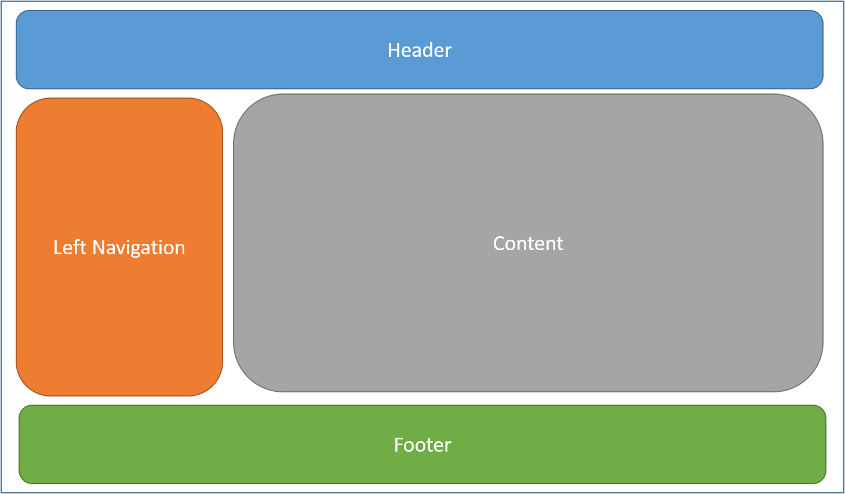
Default layout
-
Default layout is located at
Views\Shared\_Layout.cshtml -
Specifying an layout
- Can use partial name or full path
-
Every layout must call RenderBody()
Wherever RenderBody() is called, contents of the view will be rendered.
@{
    Layout = "_Layout";
}
Section
-
Defining placeholder in layout file
@RenderSection("Scripts", required: false) -
Then define the section in view
@section Scripts {
    @{await Html.RenderPartialAsync("_ValidationScriptsPartial");}
}
Shared directives
Directives can be placed in file
_ViewImports.cshtml
Supports only these:
- @addTagHelper
- @removeTagHelper
- @tagHelperPrefix
- @using
- @model
- @inherits
Views\_ViewImports.cshtml is shared location for all views
@using WebApp
@using WebApp.Models.AccountViewModels
@using WebApp.Models.ManageViewModels
@using Microsoft.AspNetCore.Identity
@addTagHelper *, Microsoft.AspNetCore.Mvc.TagHelpers
Initial code
- Place initial code in
_ViewStart.cshtml - Included in front of every view
- Hierarchical, like _ViewImports
- These are included in order, starting from the /View, then from /Controller
@{
    Layout = "_Layout";
}
_ViewImports vs _ViewStart
| _ViewImports.cshtml | _ViewStart.cshtml | |
|---|---|---|
| Purpose | Shared directives (@using, @addTagHelper, @model) | Executable code run before each view |
| Typical use | Import namespaces, register tag helpers | Set default Layout |
| Scoping | Hierarchical — applies to views in same folder and subfolders | Hierarchical — same scoping rules |
| Content type | Directives only | C# code blocks |
Partial views
A partial view is a view that is rendered within another view. The HTML output generated by executing the partial view is rendered into the calling (or parent) view.
Partial views do not include _ViewStart.cshtml
Partial tag helper.
<partial name="_PartialName" />
<partial name="_PartialName"  for="Model" view-data="ViewData"/>
<partial name="_PartialName"  model="Model" view-data="ViewData"/>
- for
- assigns model expression
- model
- assigns model instance
- view-data
- assigns ViewDataDictionary
Older, html helper partial (legacy approach — prefer <partial> tag helper above).
@Html.Partial("SomePartialView")
@await Html.PartialAsync("SomePartialViewWithAsyncCode")

@{
    Html.RenderPartial("SomePartialView");
    await Html.RenderPartialAsync("SomePartialViewWithAsyncCode");
}
Partial view discovery
/Areas/<Area-Name>/Views/<Controller-Name>
/Areas/<Area-Name>/Views/Shared
/Views/Shared
/Pages/Shared
Partial views can be chained—a partial view can call another partial view if a circular reference isn't formed by the calls. Relative paths are always relative to the current file, not to the root or parent of the file.
View Components
View Components are similar to partial views but are much more powerful. They have their own class with logic (like a mini-controller), support dependency injection, and are independently testable.
Use View Components when a partial view needs its own data-fetching logic (e.g., navigation menu, shopping cart widget, sidebar).
public class NavigationMenuViewComponent : ViewComponent
{
    private readonly ICategoryService _categoryService;

    public NavigationMenuViewComponent(ICategoryService categoryService)
    {
        _categoryService = categoryService;
    }

    public async Task<IViewComponentResult> InvokeAsync()
    {
        var categories = await _categoryService.GetAllAsync();
        return View(categories);
    }
}
View file location: Views/Shared/Components/NavigationMenu/Default.cshtml
Invoking in a view:
@await Component.InvokeAsync("NavigationMenu")

@* Or using tag helper syntax *@
<vc:navigation-menu></vc:navigation-menu>
Partial view vs View Component:
- Partial view — simple reusable HTML fragment, receives data from parent view
- View Component — has its own logic class, fetches its own data, supports DI
CSS isolation
ASP.NET Core supports scoped CSS for views — styles that only apply to a specific view.
Create a file with the same name as the view plus .css extension:
Views/Home/Index.cshtml.css
The framework rewrites selectors at build time to scope them, preventing style leaks between views.
Area
- Areas are used to organize related functionality into a group as a separate namespace (for routing) and folder structure (for views).
- Using areas creates a hierarchy for the purpose of routing by adding another route parameter, area, to controller and action.
- Effectively a separate MVC structure inside a web application
Folder structure
Typical folder structure
WebApp
- Areas
- Admin
- Controllers
- Views
- Models
- Client
- Controllers
- Views
- Models
- Admin
/Areas/<Area-Name>/Views/<Controller-Name>/<Action-Name>.cshtml
/Areas/<Area-Name>/Views/Shared/<Action-Name>.cshtml
/Views/Shared/<Action-Name>.cshtml
Area controllers
- Structure of views folder is important – compiled singly. Controllers and models can be anywhere – one dll.
- Assign controller to specific area using area attribute
namespace MyStore.Areas.Admin.Controllers;

[Area("Admin")]
public class HomeController : Controller {
    ...
}
Area routing
Set up convention-based routing
app.MapControllerRoute(
    name: "areas",
    pattern: "{area:exists}/{controller=Home}/{action=Index}/{id?}");
Area links
Inside the same area - no action needed, ambient value is used
To different area
<a asp-area="Admin" asp-controller="Home" asp-action="Index">Admin</a>
To no area
<a asp-area="" asp-controller="Home" asp-action="Index">Home</a>
Self preparation QA
Be prepared to explain topics like these:
- Why use strongly-typed ViewModels instead of ViewBag/ViewData? — ViewModels provide compile-time type checking and IntelliSense support. ViewBag/ViewData are loosely typed dictionaries where errors are only discovered at runtime.
- Why is HTML encoding important in Razor views? — Razor auto-encodes all
@expressionsto prevent XSS attacks. Using@Html.Raw()bypasses this protection and should never be used with user-supplied content. - What is the difference between partial views and View Components? — Partial views are simple reusable HTML fragments. View Components have their own C# class with logic, support DI, fetch their own data, and are independently testable.
- How does the view discovery process work? — When
return View()is called, Razor looks forViews/<ControllerName>/<ActionName>.cshtml, thenViews/Shared/<ActionName>.cshtml. - What is the purpose of
_ViewImports.cshtmlvs_ViewStart.cshtml? —_ViewImportsprovides shared directives (@using,@addTagHelper)._ViewStartcontains executable code run before each view, typically setting the default layout. Both are hierarchical. - Why use Areas in an MVC application? — Areas organize related functionality into separate MVC structures within a single application, providing namespace separation and folder isolation.
- Why prefer dedicated ViewModel classes over passing domain entities to views? — Domain entities may expose sensitive fields, contain navigation properties that cause serialization issues, and allow over-posting.