04 - Pipeline & Filters
Every HTTP request in ASP.NET Core flows through a request pipeline - a sequence of middleware components that process the request and produce a response. Understanding this pipeline is essential for reasoning about how your application behaves: where authentication happens, when errors are caught, how routing works, and why ordering matters. After the pipeline selects an MVC action, filters provide a second layer of processing specific to controllers and actions.
Request Pipeline
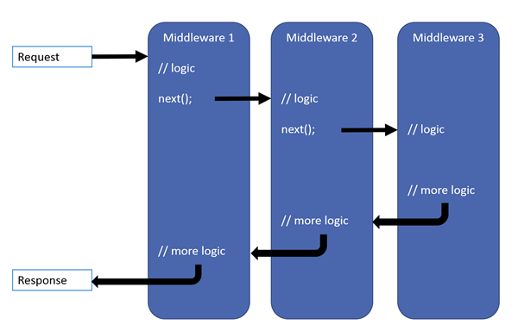
- Middleware is software that's assembled into an app pipeline to handle requests and responses
- Chooses whether to pass the request to the next component in the pipeline
- Can perform work before and after the next component in the pipeline
- Modify the request and response on the way
- Request delegates are used to build the request pipeline
- Configured with
run,mapanduseextension methods
- Configured with
Simplest aspnet middleware/app
var builder = WebApplication.CreateBuilder(args);
var app = builder.Build();

app.Run(
    async httpContext =>
    {
        await httpContext.Response.WriteAsync("Hello, World!");
    }
);

app.Run();
Chain multiple request delegates together with Use. The next parameter represents the next delegate in the pipeline.
var builder = WebApplication.CreateBuilder(args);
var app = builder.Build();
var rnd = new Random();

app.Use(async (context, next) =>
{
    // Do work that doesn't write to the Response.
    await next.Invoke();
    // Do logging or other work that doesn't write to the Response.
});

app.Use(async (httpContext, next) =>
{
    if (rnd.NextDouble() < 0.5)
    {
        await next.Invoke();
    }
    else
    {
        // short-circuit
        await httpContext.Response.WriteAsync("Shortcut executed");
    }
});

app.Run(
    async httpContext =>
    {
        await httpContext.Response.WriteAsync("Hello, World!");
    }
);

app.Run();
Don't call next.Invoke after the response has been sent to the client (terminal middleware).
Check httpContext.Response.HasStarted (true after response headers have been sent to client)!
Branching middleware
var builder = WebApplication.CreateBuilder(args);
var app = builder.Build();

app.Map("/do-first", HandleDoFirst);
app.Map("/do-second", HandleDoSecond);

app.Run(async context =>
{
    await context.Response.WriteAsync("<h1>Hello from non-Map delegate. </h1>");
});

app.Run();

static void HandleDoFirst(IApplicationBuilder app)
{
    app.Run(async context =>
    {
        await context.Response.WriteAsync("First");
    });
}

static void HandleDoSecond(IApplicationBuilder app)
{
    app.Run(async context =>
    {
        await context.Response.WriteAsync("Second");
    });
}
When Map is used, the matched path segments are removed from HttpRequest.Path and appended to HttpRequest.PathBase for each request.
Pipeline is configured with methods
- Run – short circuit, return
- Map - branch
- Use – Chaining middleware-s together
MapWhen branches the request pipeline based on the result of the given predicate.
- predicate of type
Func<HttpContext, bool>
app.MapWhen(context => context.Request.Query.ContainsKey("test"), HandleBranch);
UseWhen also branches the request pipeline based on the result of the given predicate, but branch is rejoined to the main pipeline (if it doesn't short-circuit).
app.UseWhen(context => context.Request.Query.ContainsKey("test"),
    appBuilder => HandleBranchAndRejoin(appBuilder));
Custom middleware
public class CustomMiddleware
{
    private readonly RequestDelegate _next;

    public CustomMiddleware(RequestDelegate next)
    {
        _next = next;
    }

    public async Task InvokeAsync(HttpContext context)
    {
        // Call the next delegate/middleware in the pipeline.
        await _next(context);
        // do something
    }
}

// extension method for registering
public static class CustomMiddlewareExtensions
{
    public static IApplicationBuilder UseCustomMiddleware(
        this IApplicationBuilder builder)
    {
        return builder.UseMiddleware<CustomMiddleware>();
    }
}
And inject it into pipeline
app.UseCustomMiddleware();
app.Run();
NB! Dependency injection and scoped dependencies
Middleware is singleton, use constructor DI.
For scoped and transient DI use InvokeAsync additional parameters.
Middleware ordering
Middlewares are called in order they are added. So the ordering is important/critical for several reasons - security, performance, and functionality.
app.UseExceptionHandler("/Home/Error"); // Call first to catch exceptions
                                        // thrown in the following middleware.

app.UseStaticFiles();                   // Return static files and short-circuit.

app.UseRouting();                       // Match request to an endpoint.

app.UseAuthentication();                // Authenticate before you access
                                        // secure resources.
app.UseAuthorization();                 // Check the rights.

app.MapControllerRoute(                 // Execute the matched endpoint.
    name: "default",
    pattern: "{controller=Home}/{action=Index}/{id?}");
ASP.NET Middleware
Typical ASP.NET Core MVC pipeline
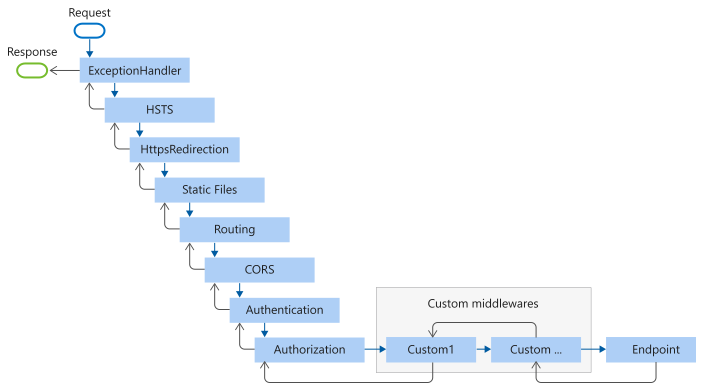
// catch errors, redirect to error page
app.UseExceptionHandler("/Error");
//  redirects HTTP requests to HTTPS
app.UseHsts();
app.UseHttpsRedirection();
// returns static files and short-circuits
app.UseStaticFiles();
// GDPR
app.UseCookiePolicy();
// endpoint routing
app.UseRouting();
// authenticate user
app.UseAuthentication();
// check the rights
app.UseAuthorization();
// maintain session state
app.UseSession();
// mvc routing
app.MapControllerRoute(
    name: "default",
    pattern: "{controller=Home}/{action=Index}/{id?}");
// razor pages support
app.MapRazorPages();
Endpoint routing
UseRouting() and Map*() work together as a pair:
UseRouting()- marks the point where the routing decision is made (which endpoint matches the request). It does NOT execute the endpoint.Map*()(e.g.MapControllerRoute,MapRazorPages) - registers and executes the matched endpoint.
Any middleware placed between UseRouting() and the endpoint execution can inspect which endpoint was selected:
app.UseRouting();

// This middleware runs AFTER routing decision but BEFORE endpoint execution
app.Use(async (context, next) =>
{
    var endpoint = context.GetEndpoint();
    // endpoint is null if no route matched
    // endpoint?.DisplayName shows the matched route
    await next();
});

app.UseAuthentication();  // can see which endpoint will run
app.UseAuthorization();   // can check [Authorize] on the matched endpoint

app.MapControllerRoute(
    name: "default",
    pattern: "{controller=Home}/{action=Index}/{id?}");
This is why UseAuthentication() and UseAuthorization() must go between routing and endpoint execution - they need to know which endpoint was matched to check its authorization requirements.
Request lifecycle walkthrough
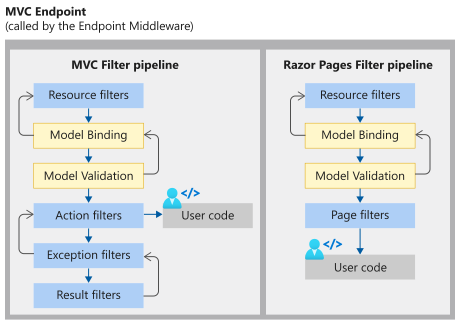
When an HTTP request arrives, it flows through the pipeline like this:
- ExceptionHandler - wraps everything in a try/catch, redirects to error page on failure
- HSTS / HTTPS Redirection - enforces HTTPS
- Static Files - if the request matches a static file (css, js, images), serve it and short-circuit (no further middleware runs)
- Routing (
UseRouting) - examines the URL and determines which endpoint matches - CORS - applies Cross-Origin Resource Sharing headers (if configured)
- Authentication - identifies WHO the user is (reads cookies/tokens)
- Authorization - checks WHETHER the user has permission for the matched endpoint
- Session - loads session state
- Endpoint execution (
Map*) - runs the matched controller action or Razor page
The response then flows back through the same middleware in reverse order. Each middleware gets a chance to modify the response on the way out (e.g., adding headers, logging, compressing).
If any middleware short-circuits (doesn't call next()), the remaining middleware never executes.
Filters in ASP.NET Core
- The filter pipeline runs after ASP.NET Core selects the action to execute
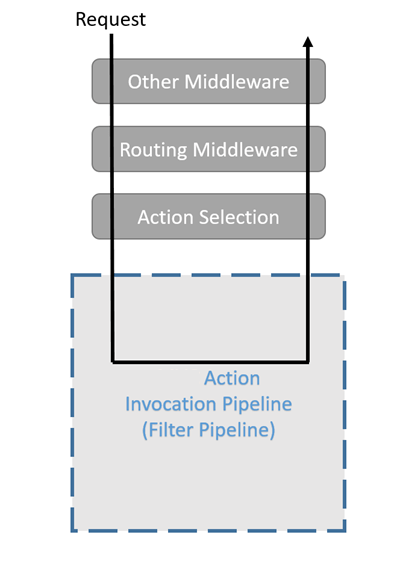
- Filters allow code to run before or after specific stages in the request processing pipeline.
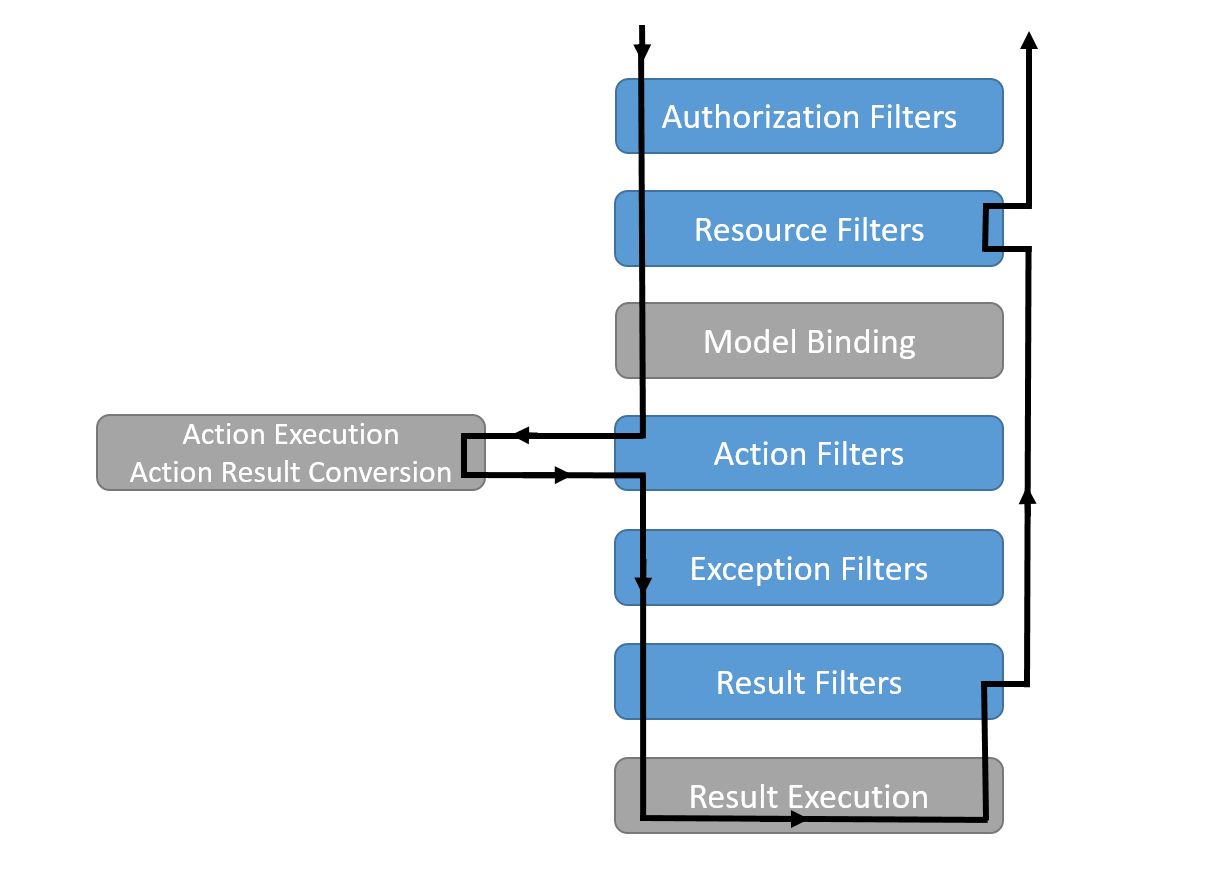
Filter types
- Authorization filters:
- Run first.
- Determine whether the user is authorized for the request.
- Short-circuit the pipeline if the request is not authorized.
- Resource filters:
- Run after authorization.
- OnResourceExecuting runs code before the rest of the filter pipeline. For example, OnResourceExecuting runs code before model binding.
- OnResourceExecuted runs code after the rest of the pipeline has completed.
- Action filters:
- Run immediately before and after an action method is called.
- Can change the arguments passed into an action.
- Can change the result returned from the action.
- Endpoint filters:
- Run immediately before and after an action method is called.
- Can change the arguments passed into an action.
- Can change the result returned from the action.
- Can be invoked on both actions and route handler-based endpoints.
- Result filters:
- Run immediately before and after the execution of action results.
- Run only when the action method executes successfully.
- Are useful for logic that must surround view or formatter execution.
- Exception filters:
- Apply global policies to unhandled exceptions that occur before the response body has been written to.
Action and Endpoint filter are not supported in Razor Pages.
Middleware vs Filters - when to use which?
| Middleware | Filters | |
|---|---|---|
| Scope | Every HTTP request | Only MVC/API actions |
| Context | HttpContext only (raw HTTP) | Action context, model binding, action arguments |
| Knowledge of MVC | None - doesn't know about controllers or actions | Full - knows which action, its parameters, model state |
| Use for | Cross-cutting HTTP concerns: logging, CORS, authentication, static files, error handling | Action-specific logic: validation, caching results, transforming action arguments |
| Short-circuit | Don't call next() | Set context.Result in OnActionExecuting |
Rule of thumb: If you need to work with raw HTTP requests/responses regardless of MVC - use middleware. If you need to work with controller actions, model binding, or action results - use filters.
Filter execution order
Filters execute in a specific order. Understanding this is critical for knowing when your code runs relative to model binding and action execution.
Order: Authorization -> Resource (before) -> Model Binding -> Action (before) -> ACTION -> Action (after) -> Exception -> Result (before) -> RESULT -> Result (after) -> Resource (after)
Scope levels (each level wraps the next):
- Global filters - registered in
AddControllersWithViews(options => options.Filters.Add(...)) - Controller filters -
[TypeFilter(typeof(...))]on controller class - Action filters - attribute on action method
"Before" methods run Global -> Controller -> Action (outside-in). "After" methods run Action -> Controller -> Global (inside-out).
Use the Order property (default 0) to override execution order within the same scope.
Short-circuiting in filters
An action filter can prevent the action from executing by setting context.Result:
public class ValidateModelFilter : IActionFilter
{
    public void OnActionExecuting(ActionExecutingContext context)
    {
        if (!context.ModelState.IsValid)
        {
            // Short-circuit - action method never runs
            context.Result = new BadRequestObjectResult(context.ModelState);
        }
    }

    public void OnActionExecuted(ActionExecutedContext context) { }
}
Filters and Attributes
Both allow injecting filters into pipeline. Injection method differs:
public class LogActionFilter : ActionFilterAttribute
{
    // Filter logic here
}

[LogActionFilter]
public IActionResult Index()
{
    // Controller action method logic here
}
public class LogActionFilter : IActionFilter
{}

builder.Services.AddControllersWithViews(options =>
  {
    // global filter
    options.Filters.Add(typeof(LogActionFilter));
  });

// controller level filter
[TypeFilter(typeof(LogActionFilter))]
public class HomeController : Controller
{
// Controller action methods here
}
Filter attributes to inherit from:
- ActionFilterAttribute
- ExceptionFilterAttribute
- ResultFilterAttribute
- FormatFilterAttribute
- ServiceFilterAttribute (DI)
- TypeFilterAttribute (DI)
Action filter
public class ActionFilter : IActionFilter
{
    public void OnActionExecuting(ActionExecutingContext context)
    {
        // Do something before the action executes.
    }

    public void OnActionExecuted(ActionExecutedContext context)
    {
        // Do something after the action executes.
    }
}

public class AsyncActionFilter : IAsyncActionFilter
{
    public async Task OnActionExecutionAsync(
        ActionExecutingContext context, ActionExecutionDelegate next)
    {
        // Do something before the action executes.
        await next();
        // Do something after the action executes.
    }
}
- Implement only one type of filter. When both are present, only async version is called.
- When using abstract class ActionFilterAttribute - override only one type
Exception filter
- Implement IExceptionFilter or IAsyncExceptionFilter.
public class ExceptionFilter : IExceptionFilter
{
    private readonly IHostEnvironment _hostEnvironment;

    public ExceptionFilter(IHostEnvironment hostEnvironment) =>
        _hostEnvironment = hostEnvironment;

    public void OnException(ExceptionContext context)
    {
        if (!_hostEnvironment.IsDevelopment())
        {
            // Don't display exception details unless running in Development.
            return;
        }

        context.Result = new ContentResult
        {
            Content = context.Exception.ToString()
        };
    }
}
To handle an exception,
- set the ExceptionHandled property to true
OR
- assign the Result property.
This stops propagation of the exception. An exception filter can't turn an exception into a "success". Only an action filter can do that.
Result filter
Implement an interface:
- IResultFilter or IAsyncResultFilter
- IAlwaysRunResultFilter or IAsyncAlwaysRunResultFilter
public class ResultFilter : IResultFilter
{
    public void OnResultExecuting(ResultExecutingContext context)
    {
        // Do something before the result executes.
    }

    public void OnResultExecuted(ResultExecutedContext context)
    {
        // Do something after the result executes.
    }
}
Some examples
using System.Diagnostics;
using Microsoft.AspNetCore.Mvc.Filters;

public class LogActionFilter : IAsyncActionFilter
{
    public async Task OnActionExecutionAsync(
        ActionExecutingContext context, ActionExecutionDelegate next)
    {
        var stopwatch = Stopwatch.StartNew();

        await next();

        stopwatch.Stop();
        var message = $"Action took {stopwatch.ElapsedMilliseconds} ms to execute.";
        Debug.WriteLine(message);
    }
}
public class ResponseHeaderAttribute : ActionFilterAttribute
{
    private readonly string _name;
    private readonly string _value;

    public ResponseHeaderAttribute(string name, string value) =>
        (_name, _value) = (name, value);

    public override void OnResultExecuting(ResultExecutingContext context)
    {
        context.HttpContext.Response.Headers.Append(_name, _value);

        base.OnResultExecuting(context);
    }
}

[ResponseHeader("Filter-Header", "Filter Value")]
public class ResponseHeaderController : ControllerBase
{

}
DI example
public class LoggingResponseHeaderFilterService : IResultFilter
{
    private readonly ILogger _logger;

    public LoggingResponseHeaderFilterService(
            ILogger<LoggingResponseHeaderFilterService> logger) =>
        _logger = logger;

    public void OnResultExecuting(ResultExecutingContext context)
    {
        _logger.LogInformation(
            $"- {nameof(LoggingResponseHeaderFilterService)}.{nameof(OnResultExecuting)}");

        context.HttpContext.Response.Headers.Append(
            nameof(OnResultExecuting), nameof(LoggingResponseHeaderFilterService));
    }

    public void OnResultExecuted(ResultExecutedContext context)
    {
        _logger.LogInformation(
            $"- {nameof(LoggingResponseHeaderFilterService)}.{nameof(OnResultExecuted)}");
    }
}


builder.Services.AddScoped<LoggingResponseHeaderFilterService>();


[ServiceFilter<LoggingResponseHeaderFilterService>]
public IActionResult WithServiceFilter() =>
    Content($"- {nameof(FilterDependenciesController)}.{nameof(WithServiceFilter)}");
Self preparation QA
Be prepared to explain topics like these:
- Why does middleware ordering matter? — Middleware executes in registration order. Placing authentication after authorization means authorization always sees an anonymous user. Incorrect ordering causes security holes or broken functionality.
- What is short-circuiting and when is it used? — Short-circuiting means a middleware does not call
next(), so subsequent middleware never runs. Static file middleware short-circuits when it finds a matching file. Authorization filters short-circuit when a user lacks permission. - What is the difference between middleware and filters? — Middleware operates on every HTTP request with only
HttpContextavailable. Filters run only for MVC/API actions and have access to action context, model binding, and action arguments. Use middleware for cross-cutting HTTP concerns; use filters for action-specific logic. - Why do
UseRouting()andMap*()work as a pair? —UseRouting()makes the routing decision (which endpoint matches) but does not execute it.Map*()executes the matched endpoint. Middleware placed between them can inspect the matched endpoint to enforce security before execution. - How does the filter execution order work? — Filters run: Authorization, Resource (before), Model Binding, Action (before), ACTION, Action (after), Exception, Result (before), RESULT, Result (after), Resource (after). "Before" methods run outside-in; "after" methods run inside-out.
- Why is middleware singleton but filters can be scoped? — Middleware is instantiated once at startup and shared across all requests. Filters created via
[ServiceFilter]or[TypeFilter]are resolved from DI per request, allowing scoped dependencies. - How do you create custom middleware? — Implement a class with a constructor accepting
RequestDelegateand anInvokeAsync(HttpContext)method. Register it via an extension method onIApplicationBuilder. The class is singleton, so avoid mutable instance state.