10 - i18n DateTime
Somewhat outdated tech (js part), but still relevant. Use vite instead of webpack. But problems with DateTime types are really valid and common still. Timezones are still a huge problem.
EF Changes
In model classes, use attributes
- DataType(DataType.DateTime)
- DataType(DataType.Date)
- DataType(DataType.Time)
[DataType(DataType.DateTime)]
public DateTime DateTime { get; set; }

[DataType(DataType.Date)]
public DateTime Date { get; set; }

[DataType(DataType.Time)]
public DateTime Time { get; set; }
<input
    class="form-control"
    type="datetime"
    data-val="true"
    data-val-required="The DateAndTime field is required."
    id="FooBar_DateAndTime"
    name="FooBar.DateAndTime"
    value="" />
Browsers 1
- Chrome/Edge adds html5 support
- Can't submit, will usually not validate on serverside (format mismatch between server and browser)
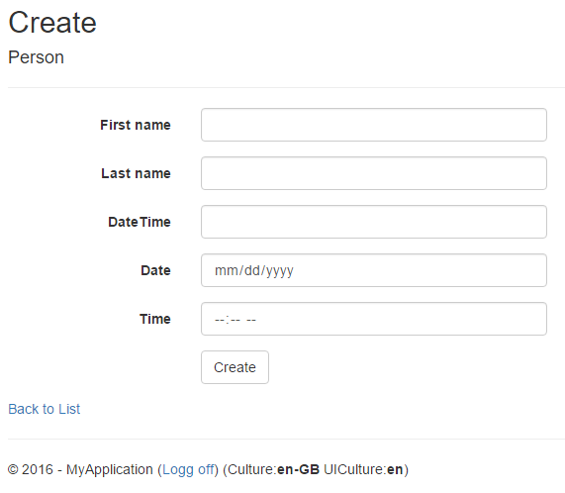
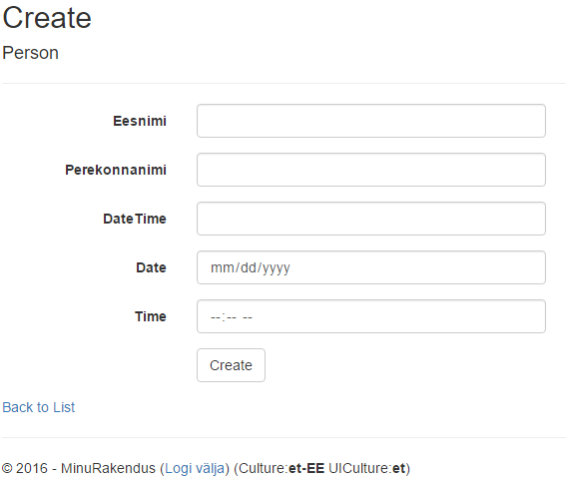
Browsers 2
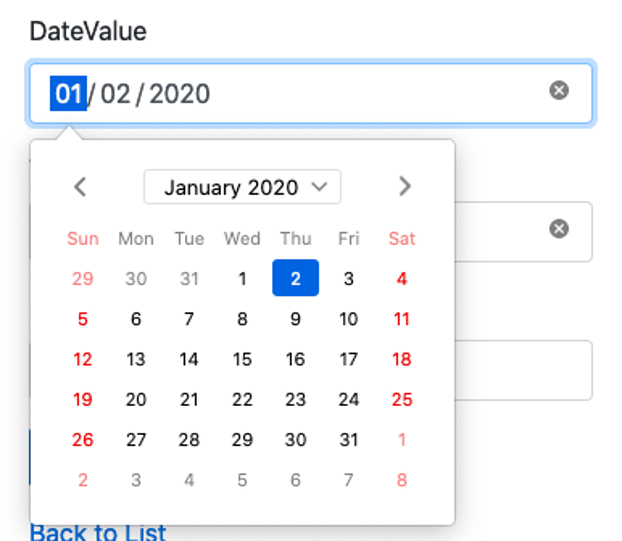
Firefox – Dropdown on date (US)
Time and DateTime - nothing
Unobtrusive (jquery) validation also fails
Browser solutions
- Use simple text fields and dropdowns, skip clientside datetime validation
- Can be problematic, different regions are used to their own way of seeing culture support (money, time, commas, etc)
- Use js plugins to generate html and validate inputs – jquery
- Hard to setup correctly
- Jquery unobtrusive validate initially supports only en-US
- Several jquery/bootstrap/standalone plugins to generate html inputs for datetime types
- Hard to setup correctly
JS
-
Using bower/npm/libman to setup js build mechanism – lots of manual configuring, hard to maintain
-
Implement full JS frontend build pipeline with WebPack – hard to setup, later much easier
-
CLDR – specs for all languages/regions – numbers, dates, etc
-
Globalize – js lib for i18n
webpack.config.js
-
Entry points
-
Different loaders – ts, css, images, fonts
-
Files to look for
-
Output files
-
Plugin
- File copy
const path = require('path');
const webpack = require('webpack');
// const HtmlPlugin = require('html-webpack-plugin');
const CopyPlugin = require("copy-webpack-plugin");
const { CleanWebpackPlugin } = require('clean-webpack-plugin');
const MiniCssExtractPlugin = require('mini-css-extract-plugin');
const TerserPlugin = require("terser-webpack-plugin");

module.exports = {
    mode: 'production',
    entry: {
        site: "./src/site.ts",
        'jquery.validate.globalize': './src/jquery.validate.globalize.js',
        'subPrograms': './src/subPrograms.js',
    },
    output: {
        path: path.resolve(__dirname, 'dist'),
        filename: "[name].js",
        publicPath: '',
    },
    optimization: {
        minimize: true,
        minimizer: [
            new TerserPlugin({
                extractComments: false,
            }),
        ],
    },
    module: {
        rules: [{
                test: /\.tsx?$/,
                use: 'ts-loader',
                exclude: /node_modules/,
            },
            {
                test: /\.css$/i,
                use: [MiniCssExtractPlugin.loader, 'css-loader'],
            },
            {
                test: /\.exec\.js$/,
                use: 'script-loader'
            },
            {
                test: /\.(png|jpg|gif)$/i,
                use: [{
                    loader: 'url-loader',
                    options: {
                        limit: 10240,
                    },
                }, ],
            },
            {
                test: /\.woff(\?v=[0-9]\.[0-9]\.[0-9])?$/i,
                use: [{
                    loader: 'url-loader',
                    options: {
                        limit: 10240,
                        mimetype: 'application/font-woff'
                    },
                }, ],
            },
            {
                test: /\.woff2(\?v=[0-9]\.[0-9]\.[0-9])?$/i,
                use: [{
                    loader: 'url-loader',
                    options: {
                        limit: 10240,
                        mimetype: 'application/font-woff2'
                    },
                }, ],
            },

            {
                test: /\.ttf(\?v=[0-9]\.[0-9]\.[0-9])?$/i,
                use: [{
                    loader: 'url-loader',
                    options: {
                        limit: 10240,
                        mimetype: 'application/octet-stream'
                    },
                }, ],
            },
            {
                test: /\.svg(\?v=[0-9]\.[0-9]\.[0-9])?$/i,
                use: [{
                    loader: 'url-loader',
                    options: {
                        limit: 10240,
                        mimetype: 'image/svg+xml'
                    },
                }, ],
            }, {
                test: /\.(eot|otf)(\?v=[0-9]\.[0-9]\.[0-9])?$/i,
                use: [{
                    loader: 'file-loader',
                    options: {
                        esModule: false
                    },
                }, ],
            },

        ],
    },
    resolve: {
        extensions: ['.tsx', '.ts', '.js'],
        alias: {
            'cldr$': 'cldrjs',
            'cldr': 'cldrjs/dist/cldr'
        },
    },
    plugins: [
        /*
        new HtmlPlugin({
            template: "./src/index.html",
            inject: "body",
            minify: false,
        }),
        */
        new MiniCssExtractPlugin(),
        new CleanWebpackPlugin(),
        new CopyPlugin({
            patterns: [
                { from: 'node_modules/cldr-core/supplemental/likelySubtags.json', to: 'cldr-core/supplemental' },
                { from: 'node_modules/cldr-core/supplemental/numberingSystems.json', to: 'cldr-core/supplemental' },
                { from: 'node_modules/cldr-core/supplemental/timeData.json', to: 'cldr-core/supplemental' },
                { from: 'node_modules/cldr-core/supplemental/weekData.json', to: 'cldr-core/supplemental' },

                { from: 'node_modules/cldr-numbers-modern/main/et/', to: 'cldr-numbers-modern/main/et/' },
                { from: 'node_modules/cldr-dates-modern/main/et/', to: 'cldr-dates-modern/main/et/' },

                { from: 'node_modules/cldr-numbers-modern/main/en-GB/', to: 'cldr-numbers-modern/main/en/' },
                { from: 'node_modules/cldr-dates-modern/main/en-GB/', to: 'cldr-dates-modern/main/en/' },

                { from: 'node_modules/cldr-numbers-modern/main/ru/', to: 'cldr-numbers-modern/main/ru/' },
                { from: 'node_modules/cldr-dates-modern/main/ru/', to: 'cldr-dates-modern/main/ru/' },
            ]
        }),

    ]
}
site.ts
- script-loader!...
- Load all the js libs globally
- Import all the css etc
console.log("JS Startup");

import 'script-loader!jquery';
import 'script-loader!jquery-validation/dist/jquery.validate.min';
import 'script-loader!jquery-validation-unobtrusive/dist/jquery.validate.unobtrusive.min';

import 'script-loader!bootstrap/dist/js/bootstrap.bundle.min.js';

import 'script-loader!cldrjs/dist/cldr.js';
import 'script-loader!cldrjs/dist/cldr/event.js';
import 'script-loader!cldrjs/dist/cldr/supplemental.js';
import 'script-loader!cldrjs/dist/cldr/unresolved.js';

import 'script-loader!globalize/dist/globalize.js';

import 'script-loader!globalize/dist/globalize/number.js';
import 'script-loader!globalize/dist/globalize/currency.js';
import 'script-loader!globalize/dist/globalize/date.js';
import 'script-loader!globalize/dist/globalize/message.js';
import 'script-loader!globalize/dist/globalize/plural.js';
import 'script-loader!globalize/dist/globalize/relative-time.js';
import 'script-loader!globalize/dist/globalize/unit.js';

import 'script-loader!flatpickr/dist/flatpickr.min';
import 'script-loader!flatpickr/dist/l10n/ru.js';
import 'script-loader!flatpickr/dist/l10n/et.js';

import 'script-loader!autocompleter/autocomplete.min.js';
import 'autocompleter/autocomplete.min.css';

// import 'bootstrap/dist/css/bootstrap.min.css';
import "bootswatch/dist/superhero/bootstrap.min.css";
import 'font-awesome/css/font-awesome.min.css';
import 'flatpickr/dist/flatpickr.min.css';
import './main.css'

import './pagedlist.css'
globalize.js in asp.net
- Set up i18n for clientside js in your templates.
- Replace html5 date/time fields with regular textfields
- Attach some js lib for date/time unified UX in all browsers
- Use globalize.js in jquery-validation
js in asp template
<script src="~/js/site.js" asp-append-version="true"></script>
<script src="~/js/jquery.validate.globalize.js" asp-append-version="true"></script>
@{
	var currentCultureCode = Thread.CurrentThread.CurrentCulture.Name.Split('-')[0];

    // map .net datetime format strings to flatpick/momentjs format

    // https://flatpickr.js.org/formatting/
    // d - day of month,2 digits
    // j - day of month, no leading zero
    // m - month, 2 digits
    // n - mont, no leading zero
    // y - 2 digit year, Y - 4 digit year

    // https://docs.microsoft.com/en-us/dotnet/api/system.globalization.datetimeformatinfo?view=netcore-3.1
    // dd.MM.yyyy or dd/MM/yyyy

    var datePattern = Thread.CurrentThread.CurrentUICulture.DateTimeFormat.ShortDatePattern;
    datePattern = datePattern
        .Replace("dd", "d")
        .Replace("MM", "m")
        .Replace("yyyy", "Y");

    // LongTimePattern and ShortTimePattern HH:mm for 23:59,  h:mm tt for 11:59 PM
    var timePattern = Thread.CurrentThread.CurrentUICulture.DateTimeFormat.ShortTimePattern;
    var clock24H = timePattern.Contains("tt") == false;
    timePattern = timePattern
        .Replace("HH", "H")
        .Replace("mm", "i")
        .Replace("ss", "S")
        .Replace("tt", "K");
    var dateTimePattern = timePattern + " " + datePattern;
}
set up globalize in template
- Load the cldr data for current locale
- Initialize Globalize to use cldr data
<script>
    // https://github.com/globalizejs/globalize#installation
    $.when(
        $.get("/js/cldr-core/supplemental/likelySubtags.json", null, null, "json"),
        $.get("/js/cldr-core/supplemental/numberingSystems.json", null, null, "json"),
        $.get("/js/cldr-core/supplemental/timeData.json", null, null, "json"),
        $.get("/js/cldr-core/supplemental/weekData.json", null, null, "json"),

        $.get("/js/cldr-numbers-modern/main/@currentCultureCode/numbers.json", null, null, "json"),
        $.get("/js/cldr-numbers-modern/main/@currentCultureCode/currencies.json", null, null, "json"),

        $.get("/js/cldr-dates-modern/main/@currentCultureCode/ca-generic.json", null, null, "json"),
        $.get("/js/cldr-dates-modern/main/@currentCultureCode/ca-gregorian.json", null, null, "json"),
        $.get("/js/cldr-dates-modern/main/@currentCultureCode/dateFields.json", null, null, "json"),
        $.get("/js/cldr-dates-modern/main/@currentCultureCode/timeZoneNames.json", null, null, "json")
    ).then(function () {
        return [].slice.apply(arguments, [0]).map(function (result) {
            Globalize.load(result[0]);
        });
    }).then(function () {
        // Initialise Globalize to the current culture
        Globalize.locale('@currentCultureCode');
    });
</script>
add js plugin for datetime fields
Replace browser html5 inputs with custom js library - flatpickr here
<script>
    $(function () {
        $('[type="datetime-local"]').each(function (index, value) {
            $(value).attr('type', 'text');
            $(value).val(value.defaultValue);
		    $(value).flatpickr({
		        locale: "@currentCultureCode",
		        enableTime: true,
	    	    altFormat: "@dateTimePattern",
	    	    altInput: true,
	    	    // dateFormat: "Z", // iso format (causes -3h during summer)
	    	    // use direct conversion, let backend deal with utc/whatever conversions
	    	    dateFormat: "Y-m-d H:i:s",
	    	    disableMobile: true,
	    	    time_24hr: @(clock24H.ToString().ToLower()),
		    });
        });

        $('[type="time"]').each(function (index, value) {
            $(value).attr('type', 'text');
            $(value).val(value.defaultValue);
		    $(value).flatpickr({
	    	    locale: "@currentCultureCode",
	    	    enableTime: true,
	    	    noCalendar: true,

	    	    altFormat: "@timePattern",
	    	    altInput: true,
	    	    dateFormat: "H:i", // 24h HH:mm
	    	    disableMobile: true,

	    	    time_24hr: @(clock24H.ToString().ToLower()),
		    });
        });

        $('[type="date"]').each(function (index, value) {
		    $(value).attr('type', 'text');
		    $(value).val(value.defaultValue);
		    $(value).flatpickr({
    		    locale: "@currentCultureCode",
	    	    altFormat: "@datePattern",
	    	    altInput: true,
                disableMobile: true,
	    	    dateFormat: "Y-m-d", // YYYY-MM-DD
		    });
        });
    });
</script>
replace validation functionality in jquery
jquery.validate.globalize.js
Include it after other jquery scripts
/*!
** An extension to the jQuery Validation Plugin which makes it use Globalize.js for number and date parsing
** by Andres Käver, based on work by John Reilly
*/

(function ($, Globalize) {

    // Clone original methods we want to call into
    var originalMethods = {
        min: $.validator.methods.min,
        max: $.validator.methods.max,
        range: $.validator.methods.range
    };

    // Globalize options
    // Users can customise this to suit them
    // https://github.com/jquery/globalize/blob/master/doc/api/date/date-formatter.md
    $.validator.methods.dateGlobalizeOptions = { dateParseFormat: [{ skeleton: "yMd" }, { skeleton: "yMMMd" }, { date: "short" }, { date: "medium" }, { date: "long" }, { date: "full" }] };
    $.validator.methods.timeGlobalizeOptions = { dateParseFormat: [{ skeleton: "Hm" }, { skeleton: "hm" }, { time: "short" }, { time: "medium" }, { time: "long" }, { time: "full" }] };
    $.validator.methods.datetimeGlobalizeOptions = {
        dateParseFormat: [{ skeleton: "yMdHm" }, { skeleton: "yMdhm" }, { datetime: "short" }, { datetime: "medium" }, { datetime: "long" }, { datetime: "full" },
        { raw: "d.M.y H:m" }, { raw: "dd/MM/y HH:mm" }]
    };


    // Tell the validator that we want dates parsed using Globalize
    $.validator.methods.date = function (value, element) {
        // is it optional
        if (this.optional(element) === true) return true;

        //TODO: this is an hack
        if ($(element).attr("type") === "datetime") return true;

        // remove spaces just in case
        value = value.trim();
        var res = false;
        var val;
        // console.log("date validation: ", value);
        // console.log(element);
        for (var i = 0; i < $.validator.methods.dateGlobalizeOptions.dateParseFormat.length; i++) {
            val = Globalize.parseDate(value, $.validator.methods.dateGlobalizeOptions.dateParseFormat[i]);
            // console.log($.validator.methods.dateGlobalizeOptions.dateParseFormat[i], val, Globalize.dateFormatter($.validator.methods.dateGlobalizeOptions.dateParseFormat[i])(new Date(2016, 1, 1, 0, 0, 0)));
            res = res || (val instanceof Date);
            // console.log(res);
            if (res === true) return res;
        }
        return res;
    };

    // additional method
    $.validator.methods.time = function (value, element) {
        // is it optional
        if (this.optional(element) === true) return true;

        // remove spaces just in case
        value = value.trim();
        var res = false;
        var val;

        // console.log("time validation: ", value);
        // console.log(element);
        for (var i = 0; i < $.validator.methods.timeGlobalizeOptions.dateParseFormat.length; i++) {
            val = Globalize.parseDate(value, $.validator.methods.timeGlobalizeOptions.dateParseFormat[i]);
            console.log($.validator.methods.timeGlobalizeOptions.dateParseFormat[i], val, Globalize.dateFormatter($.validator.methods.timeGlobalizeOptions.dateParseFormat[i])(new Date(2016, 1, 1, 0, 0, 0)));
            res = res || (val instanceof Date);
            console.log(res);
            if (res === true) return res;
        }
        return res;
    };

    // additional method
    $.validator.methods.datetime = function (value, element) {
        // is it optional
        if (this.optional(element) === true) return true;

        // remove spaces just in case
        value = value.trim();
        var res = false;
        var val;

        // console.log("datetime validation: ", value);
        // console.log(element);
        for (var i = 0; i < $.validator.methods.datetimeGlobalizeOptions.dateParseFormat.length; i++) {
            val = Globalize.parseDate(value, $.validator.methods.datetimeGlobalizeOptions.dateParseFormat[i]);
            // console.log($.validator.methods.datetimeGlobalizeOptions.dateParseFormat[i], val, Globalize.dateFormatter($.validator.methods.datetimeGlobalizeOptions.dateParseFormat[i])(new Date(2016, 1, 1, 1, 1, 1)));
            res = res || (val instanceof Date);
            // console.log(res);
            if (res === true) return res;
        }
        return res;
    };

    // Tell the validator that we want numbers parsed using Globalize
    $.validator.methods.number = function (value, element) {
        var val = Globalize.parseNumber(value.replace(".", ","));
        if (!isFinite(val)){
            val = Globalize.parseNumber(value.replace(",", "."));
        }
        var res = this.optional(element) || isFinite(val);
        return res;
    };

    // Tell the validator that we want numbers parsed using Globalize,
    // then call into original implementation with parsed value

    $.validator.methods.min = function (value, element, param) {
        var val = Globalize.parseNumber(value);
        return originalMethods.min.call(this, val, element, param);
    };

    $.validator.methods.max = function (value, element, param) {
        var val = Globalize.parseNumber(value);
        return originalMethods.max.call(this, val, element, param);
    };

    $.validator.methods.range = function (value, element, param) {
        var val = Globalize.parseNumber(value);
        return originalMethods.range.call(this, val, element, param);
    };

    //create adapters for new type - so they will be attached automatically
    //this depends on attribute data-val-time, data-val-datetime

    $.validator.unobtrusive.adapters.addBool('time');
    $.validator.unobtrusive.adapters.addBool('datetime');

}(jQuery, Globalize));
., in decimals
Add custom model binder – replace the default floating point binder. Allow both “.” and “,” as decimal separator. (what about thousands separator)...
using System;
using System.Threading;
using System.Threading.Tasks;
using Microsoft.AspNetCore.Mvc.ModelBinding;
using Microsoft.Extensions.DependencyInjection;
using Microsoft.Extensions.Logging;

namespace WebApp.Helpers
{
    public class CustomFloatingPointBinderProvider : IModelBinderProvider
    {
        public IModelBinder? GetBinder(ModelBinderProviderContext context)
        {
            if (context == null)
            {
                throw new ArgumentNullException(nameof(context));
            }

            if (context.Metadata.ModelType == typeof(decimal) ||
                context.Metadata.ModelType == typeof(float) ||
                context.Metadata.ModelType == typeof(double))
            {
                var loggerFactory = context.Services.GetRequiredService<ILoggerFactory>();
                return new FloatingPointModelBinder(loggerFactory, context.Metadata.ModelType);
            }

            return null;
        }
    }


    public class FloatingPointModelBinder : IModelBinder
    {
        private readonly ILogger<FloatingPointModelBinder>? _logger;
        private readonly Type _floatType;

        public FloatingPointModelBinder(ILoggerFactory? loggerFactory, Type floatType)
        {
            _logger = loggerFactory?.CreateLogger<FloatingPointModelBinder>();
            _floatType = floatType;
        }

        public Task BindModelAsync(ModelBindingContext bindingContext)
        {
            if (bindingContext == null)
            {
                throw new ArgumentNullException(nameof(bindingContext));
            }

            var valueProviderResult = bindingContext.ValueProvider.GetValue(bindingContext.ModelName);

            if (valueProviderResult == ValueProviderResult.None)
            {
                return Task.CompletedTask;
            }

            var value = valueProviderResult.FirstValue;

            if (string.IsNullOrEmpty(value))
            {
                return Task.CompletedTask;
            }

            // Remove unnecessary commas and spaces
            //value = value.Replace(",", string.Empty).Trim();

            _logger?.LogDebug($"Floating point number: {value}");
            value = value.Trim();

            value = value.Replace(",", Thread.CurrentThread.CurrentCulture.NumberFormat.NumberDecimalSeparator);
            value = value.Replace(".", Thread.CurrentThread.CurrentCulture.NumberFormat.NumberDecimalSeparator);

            if (_floatType == typeof(decimal))
            {
                if (!decimal.TryParse(value, out var resultValue))
                {
                    bindingContext.ModelState.TryAddModelError(
                        bindingContext.ModelName,
                        $"Could not parse decimal {value}.");
                    return Task.CompletedTask;
                }

                bindingContext.Result = ModelBindingResult.Success(resultValue);
            }
            else if (_floatType == typeof(float))
            {
                if (!float.TryParse(value, out var resultValue))
                {
                    bindingContext.ModelState.TryAddModelError(
                        bindingContext.ModelName,
                        $"Could not parse float {value}.");
                    return Task.CompletedTask;
                }

                bindingContext.Result = ModelBindingResult.Success(resultValue);
            }
            else if (_floatType == typeof(double))
            {
                if (!double.TryParse(value, out var resultValue))
                {
                    bindingContext.ModelState.TryAddModelError(
                        bindingContext.ModelName,
                        $"Could not parse double {value}.");
                    return Task.CompletedTask;
                }

                bindingContext.Result = ModelBindingResult.Success(resultValue);
            }

            return Task.CompletedTask;
        }
    }
}
Plug factory into MVC
services
    .AddControllersWithViews(options =>
    {
        options.ModelBinderProviders.Insert(0, new CustomFloatingPointBinderProvider());
    })
Model binding inner translations
builder.Services.AddSingleton<IConfigureOptions<MvcOptions>, ConfigureModelBindingLocalization>();
public class ConfigureModelBindingLocalization : IConfigureOptions<MvcOptions>
{
    private readonly IServiceScopeFactory _serviceFactory;

    public ConfigureModelBindingLocalization(IServiceScopeFactory serviceFactory)
    {
        _serviceFactory = serviceFactory;
    }

    public void Configure(MvcOptions options)
    {

        options.ModelBindingMessageProvider.SetAttemptedValueIsInvalidAccessor((x, y) =>
            string.Format(Resources.Base.Common.ErrorMessage_AttemptedValueIsInvalid, x, y));

        options.ModelBindingMessageProvider.SetMissingBindRequiredValueAccessor((x) =>
            string.Format(Resources.Base.Common.ErrorMessage_MissingBindRequiredValue, x));

        // localizer["A value for the '{0}' parameter or property was not provided.", x]);

        options.ModelBindingMessageProvider.SetMissingKeyOrValueAccessor(() =>
            Resources.Base.Common.ErrorMessage_MissingKeyOrValue);

        // localizer["A value is required."]);

        options.ModelBindingMessageProvider.SetMissingRequestBodyRequiredValueAccessor(() =>
            Resources.Base.Common.ErrorMessage_MissingRequestBodyRequiredValue);

        // localizer["A non-empty request body is required."]);

        options.ModelBindingMessageProvider.SetNonPropertyAttemptedValueIsInvalidAccessor((x) =>
            string.Format(Resources.Base.Common.ErrorMessage_NonPropertyAttemptedValueIsInvalid, x));
        // localizer["The value '{0}' is not valid.", x]);

        options.ModelBindingMessageProvider.SetNonPropertyUnknownValueIsInvalidAccessor(() =>
            Resources.Base.Common.ErrorMessage_NonPropertyUnknownValueIsInvalid);
        // localizer["The supplied value is invalid."]);

        options.ModelBindingMessageProvider.SetNonPropertyValueMustBeANumberAccessor(() =>
            Resources.Base.Common.ErrorMessage_NonPropertyValueMustBeANumber);
        // localizer["The field must be a number."]);

        options.ModelBindingMessageProvider.SetUnknownValueIsInvalidAccessor((x) =>
            string.Format(Resources.Base.Common.ErrorMessage_UnknownValueIsInvalid, x));
        //  localizer["The supplied value is invalid for {0}.", x]);

        options.ModelBindingMessageProvider.SetValueIsInvalidAccessor((x) =>
            string.Format(Resources.Base.Common.ErrorMessage_ValueIsInvalid, x));
        //  localizer["The value '{0}' is invalid.", x]);

        options.ModelBindingMessageProvider.SetValueMustBeANumberAccessor((x) =>
            string.Format(Resources.Base.Common.ErrorMessage_ValueMustBeANumber, x));
        //  localizer["The field {0} must be a number.", x]);

        options.ModelBindingMessageProvider.SetValueMustNotBeNullAccessor((x) =>
            string.Format(Resources.Base.Common.ErrorMessage_ValueMustNotBeNull, x));
        //  localizer["The value '{0}' is invalid.", x]);
    }
}
Self preparation QA
Be prepared to explain topics like these:
- Why are DateTime inputs problematic across browsers and cultures? — Different browsers render HTML5 date/time inputs inconsistently. Client-side validation defaults to en-US format, which fails for other cultures.
- Why use a JavaScript date picker library (Flatpickr) instead of native HTML5 inputs? — Flatpickr provides consistent cross-browser behavior and uses a standardized format for form submission regardless of display format.
- Why create a custom model binder for floating-point numbers? — Different cultures use different decimal separators (
.vs,). The default model binder may reject valid input from a non-US culture. - How do you replace the default model binder? — Implement
IModelBinderProviderandIModelBinder. The provider checks the model type and returns the custom binder. Register viaModelBinderProviders.Insert(0, ...)for highest priority. - Why localize model binding error messages? — Default model binding messages are in English.
ConfigureModelBindingLocalizationreplaces them with translated messages using resource files. - What is the role of Globalize.js in client-side validation? — Globalize.js uses CLDR data to parse and validate dates/numbers according to the current culture, replacing jQuery validation's default US-only parsing.