40 - Public API
This lecture covers how to make your REST API production-ready: API controllers, REST conventions, versioning, documentation, cross-origin support, and standardized error handling. These topics build on the API controllers from lecture 31 and the layered architecture from lectures 20-24.
Public REST API
See the Microsoft REST API guidelines:
From the guidelines:
All APIs compliant with the Microsoft REST API Guidelines MUST support explicit versioning.
It's critical that clients can count on services to be stable over time, and it's critical that services can add features and make changes.
API controllers
API controllers in ASP.NET Core inherit from ControllerBase, not Controller. The Controller class adds View support (Razor) that REST APIs do not need. Use ControllerBase for leaner API controllers.
The [ApiController] attribute
The [ApiController] attribute enables several API-specific behaviors:
- Automatic HTTP 400 responses -- when
ModelStateis invalid, the framework automatically returns a400 Bad Requestwith aValidationProblemDetailsbody. You do not need to checkModelState.IsValidmanually. - Binding source inference --
[FromBody]is inferred for complex types,[FromRoute]/[FromQuery]for simple types. You can still specify them explicitly. - Problem Details for error responses -- error status codes (400+) automatically produce RFC 9457 Problem Details responses.
- Attribute routing required -- conventional routing is not supported. You must use
[Route]on the controller or action.
[ApiController]
[Route("api/[controller]")]
public class PersonsController : ControllerBase
{
    // ControllerBase provides: Ok(), NotFound(), BadRequest(), CreatedAtAction(), NoContent(), etc.
    // Controller (base for MVC) adds: View(), PartialView(), Json(), ViewBag, ViewData, TempData
}
REST conventions -- HTTP methods and status codes
REST APIs use HTTP methods to indicate the operation and status codes to indicate the result.
| HTTP Method | Operation | Typical Success Code | Notes |
|---|---|---|---|
| GET | Read | 200 OK | Returns resource or collection |
| POST | Create | 201 Created | Returns created resource + Location header |
| PUT | Full update | 200 OK or 204 No Content | Replaces entire resource |
| PATCH | Partial update | 200 OK or 204 No Content | Updates specific fields |
| DELETE | Remove | 204 No Content | Returns empty body |
Common error status codes:
| Code | Meaning | When to use |
|---|---|---|
| 400 Bad Request | Invalid input | Validation failures, malformed request body |
| 401 Unauthorized | Not authenticated | Missing or invalid JWT token |
| 403 Forbidden | Not authorized | Authenticated but lacks required role/permission |
| 404 Not Found | Resource not found | Entity with given ID does not exist |
| 409 Conflict | State conflict | Duplicate email, concurrent edit conflict |
Versioning
Three common approaches to API versioning:
URL path (recommended for this course -- most explicit, works well with Swagger):
https://api.contoso.com/v1.0/products/users
Query string parameter:
https://api.contoso.com/products/users?api-version=1.0
Custom HTTP header:
x-api-version: 1.0
Or combine multiple approaches using ApiVersionReader.Combine().
When to version? Services MUST increment their version number in response to any breaking API change.
Breaking changes
Examples of breaking changes:
- Removing or renaming APIs or API parameters
- Changes in behavior for an existing API
- Changes in error codes and fault contracts
- Anything that would violate the Principle of Least Astonishment
Examples of non-breaking changes (no new version needed):
- Adding new optional query parameters or request fields
- Adding new fields to a response DTO
- Adding entirely new endpoints
- Adding new enum values (if clients handle unknown values gracefully)
Principle of Least Astonishment
The principle means that a component of a system should behave in a way that most users will expect it to behave; the behavior should not astonish or surprise users.
Versioning in ASP.NET
Versioning in ASP.NET Core MVC: https://github.com/dotnet/aspnet-api-versioning
Add via NuGet:
Asp.Versioning.Mvc
Configure in Program.cs:
builder.Services.AddApiVersioning(options =>
{
    options.ReportApiVersions = true;
    // in case of no explicit version
    options.DefaultApiVersion = new ApiVersion(1, 0);
    options.AssumeDefaultVersionWhenUnspecified = true;
});
ReportApiVersions adds api-supported-versions and api-deprecated-versions response headers. AssumeDefaultVersionWhenUnspecified allows clients that do not send a version to still reach the default version -- without this, unversioned requests return 400 Bad Request.
Controller configuration
[ApiVersion("1.0")]
[ApiController]
[Route("api/v{version:apiVersion}/[controller]")]
public class PersonsController : ControllerBase
{
    [HttpGet]
    public async Task<ActionResult<IEnumerable<Person>>> GetAll()
    {
        // return list of persons
        return Ok(new[] { new Person() });
    }
}
Update your CreatedAtAction calls (in POST action methods) to include the version:
return CreatedAtAction(nameof(GetPerson), new
{
    version = HttpContext.GetRequestedApiVersion()!.ToString(),
    id = person.Id
}, person);
Deprecated API versions
Mark old API versions as deprecated. This adds a api-deprecated-versions response header so clients know the version is being phased out.
[ApiVersion("1.0", Deprecated = true)]
public class PersonsController : ControllerBase
{
    ...
DTOs for public API
Public API DTOs must be separate from domain entities and BLL DTOs. This is the versioned contract your API exposes to clients. When the API version changes, the DTO namespace changes:
App.DTO.v1_0.PersonResponse   -->  [ApiVersion("1.0")]
App.DTO.v2_0.PersonResponse   -->  [ApiVersion("2.0")]
Separate request and response DTOs:
namespace App.DTO.v1_0;

public class PersonCreateRequest
{
    [Required]
    [StringLength(128, MinimumLength = 1)]
    public string FirstName { get; set; } = default!;

    [Required]
    [StringLength(128, MinimumLength = 1)]
    public string LastName { get; set; } = default!;
}

public class PersonResponse
{
    public Guid Id { get; set; }
    public string FirstName { get; set; } = default!;
    public string LastName { get; set; } = default!;
}
Using separate DTOs means you can:
- Change internal domain models without breaking the API contract
- Have different shapes for create (no
Id) vs response (withId) - Version DTOs independently per API version
- Avoid exposing internal fields (navigation properties, audit fields) to clients
The mapping between layers (Domain <-> BLL DTO <-> Public DTO) uses AutoMapper or manual mapping, as covered in lecture 23.
Input validation
With [ApiController], validation is automatic. Add data annotations to your DTOs:
public class PersonCreateRequest
{
    [Required]
    [StringLength(128, MinimumLength = 1)]
    public string FirstName { get; set; } = default!;

    [Required]
    [EmailAddress]
    public string Email { get; set; } = default!;

    [Range(1, 150)]
    public int? Age { get; set; }
}
When validation fails, [ApiController] automatically returns a 400 Bad Request with ValidationProblemDetails:
{
    "type": "https://tools.ietf.org/html/rfc9110#section-15.5.1",
    "title": "One or more validation errors occurred.",
    "status": 400,
    "errors": {
        "FirstName": ["The FirstName field is required."],
        "Email": ["The Email field is not a valid e-mail address."]
    }
}
You do not need to check ModelState.IsValid manually in API controllers -- [ApiController] handles this before your action method is called.
Problem Details (RFC 9457)
ASP.NET Core supports standardized error responses using the Problem Details format (RFC 9457). This gives API consumers a consistent, machine-readable error structure.
builder.Services.AddProblemDetails();
app.UseExceptionHandler();
app.UseStatusCodePages();
Problem Details fields:
| Field | Description |
|---|---|
type | URI reference identifying the problem type |
title | Short human-readable summary |
status | HTTP status code |
detail | Human-readable explanation specific to this occurrence |
instance | URI reference identifying the specific occurrence |
Example error response:
{
    "type": "https://tools.ietf.org/html/rfc9110#section-15.5.5",
    "title": "Not Found",
    "status": 404
}
Note: The RestApiErrorResponse DTO used in lecture 31's AccountController is a custom error format. For new API endpoints, prefer the built-in Problem Details format. Use RestApiErrorResponse only if you need to maintain consistency with existing identity endpoints.
https://learn.microsoft.com/en-us/aspnet/core/web-api/handle-errors
API documentation
Once you have a versioned API with proper error handling, you need to document it.
OpenAPI Specification (formerly Swagger): https://swagger.io/resources/open-api/
Add web-based API explorer and testing functionality to your API project:
Asp.Versioning.Mvc.ApiExplorerSwashbuckle.AspNetCore
After configuration, the Swagger UI is available at https://localhost:<port>/swagger.
Swagger minimal config
builder.Services.AddControllersWithViews();

builder.Services.AddApiVersioning();
builder.Services.AddEndpointsApiExplorer();
builder.Services.AddSwaggerGen();

app.UseSwagger();
app.UseSwaggerUI();
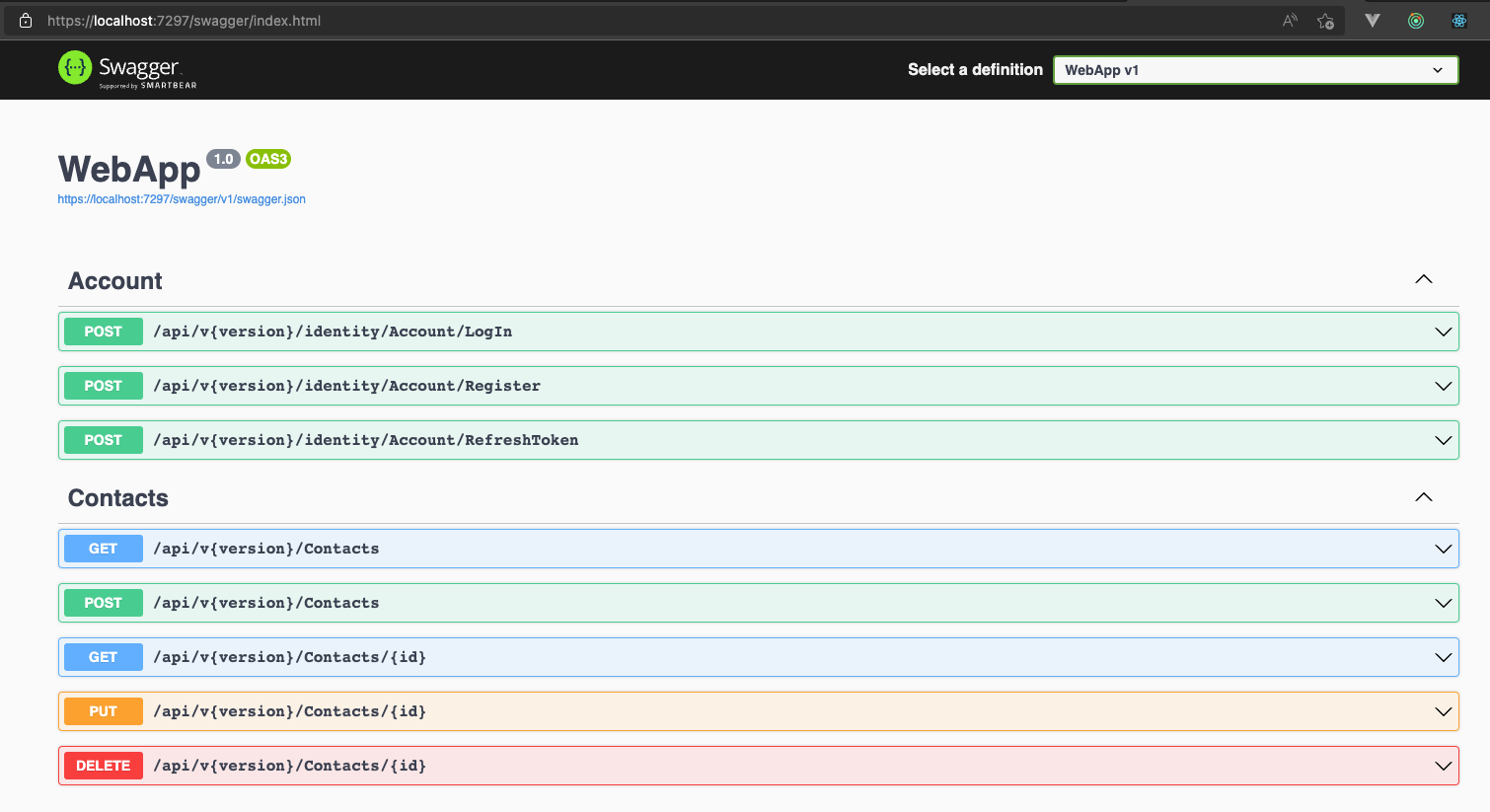
Swagger advanced config
Support multiple versions, add descriptions, etc.
Swagger generation configuration:
public class ConfigureSwaggerOptions : IConfigureOptions<SwaggerGenOptions>
{
    private readonly IApiVersionDescriptionProvider _provider;

    public ConfigureSwaggerOptions(IApiVersionDescriptionProvider provider) =>
        _provider = provider;

    public void Configure(SwaggerGenOptions options)
    {
        // add all possible api versions found
        foreach (var description in _provider.ApiVersionDescriptions)
        {
            options.SwaggerDoc(
                description.GroupName,
                new OpenApiInfo()
                {
                    Title = $"API {description.ApiVersion}",
                    Version = description.ApiVersion.ToString()
                    // Description, TermsOfService, Contact, License, ...
                });
        }
    }
}
Register versioning with API Explorer in Program.cs:
var apiVersioningBuilder = builder.Services.AddApiVersioning(options =>
{
    options.ReportApiVersions = true;
    options.DefaultApiVersion = new ApiVersion(1, 0);
    options.AssumeDefaultVersionWhenUnspecified = true;
});

apiVersioningBuilder.AddApiExplorer(options =>
{
    // add the versioned api explorer, which also adds IApiVersionDescriptionProvider service
    // format: 'v'major[.minor][-status]  e.g. "v1.0", "v2.0-beta"
    options.GroupNameFormat = "'v'VVV";

    // substitute the version in the URL template (only needed for URL path versioning)
    options.SubstituteApiVersionInUrl = true;
});

builder.Services.AddEndpointsApiExplorer();
builder.Services.AddTransient<IConfigureOptions<SwaggerGenOptions>, ConfigureSwaggerOptions>();
builder.Services.AddSwaggerGen();
app.UseSwagger();
app.UseSwaggerUI(options =>
{
    var provider = app.Services.GetRequiredService<IApiVersionDescriptionProvider>();
    foreach (var description in provider.ApiVersionDescriptions)
    {
        options.SwaggerEndpoint(
            $"/swagger/{description.GroupName}/swagger.json",
            description.GroupName.ToUpperInvariant()
        );
    }
    // serve from root
    // options.RoutePrefix = string.Empty;
});
Decorate controllers
Use XML comments and [ProducesResponseType] to document API responses in Swagger:
/// <summary>
/// Represents a RESTful people service.
/// </summary>
[ApiController]
[ApiVersion("1.0")]
[ApiVersion("0.9", Deprecated = true)]
[Route("api/v{version:apiVersion}/[controller]")]
public class PeopleController : ControllerBase
{
    /// <summary>
    /// Gets a single person.
    /// </summary>
    /// <param name="id">The requested person identifier.</param>
    /// <returns>The requested person.</returns>
    /// <response code="200">The person was successfully retrieved.</response>
    /// <response code="404">The person does not exist.</response>
    [HttpGet("{id:int}")]
    [Produces("application/json")]
    [ProducesResponseType<Person>(StatusCodes.Status200OK)]
    [ProducesResponseType(StatusCodes.Status404NotFound)]
    public async Task<ActionResult<Person>> Get(int id)
    {
        // lookup person by id...
        return Ok(new Person { Id = id, FirstName = "John", LastName = "Doe" });
    }
}
The [Produces("application/json")] attribute declares the response content type. This appears in the Swagger documentation and restricts content negotiation to JSON.
Document your code
Enable XML documentation creation in WebApp.csproj:
<PropertyGroup>
    <GenerateDocumentationFile>true</GenerateDocumentationFile>
</PropertyGroup>
To disable XML comment warnings (CS1591 -- "Missing XML comment for publicly visible type or member") for the whole project, include:
<NoWarn>$(NoWarn);1591</NoWarn>
To disable warnings per file, include at the top of the file:
#pragma warning disable 1591
https://learn.microsoft.com/en-us/dotnet/csharp/codedoc
Swagger and comments
Update Swagger configuration to include XML comments and show full class/namespace on objects:
public class ConfigureSwaggerOptions : IConfigureOptions<SwaggerGenOptions>
{
    private readonly IApiVersionDescriptionProvider _provider;

    public ConfigureSwaggerOptions(IApiVersionDescriptionProvider provider) =>
        _provider = provider;

    public void Configure(SwaggerGenOptions options)
    {

        ...

        // include xml comments (enable creation in csproj file)
        var xmlFile = $"{Assembly.GetExecutingAssembly().GetName().Name}.xml";
        var xmlPath = Path.Combine(AppContext.BaseDirectory, xmlFile);
        options.IncludeXmlComments(xmlPath);

        // use FullName for schemaId - avoids conflicts between classes using the same name
        // (which are in different namespaces, e.g. App.DTO.v1_0.Person vs App.DTO.v2_0.Person)
        options.CustomSchemaIds(i => i.FullName);
    }
}
Swagger and auth
Most API endpoints need Bearer authentication. Configuration to enable Swagger authorization token support:
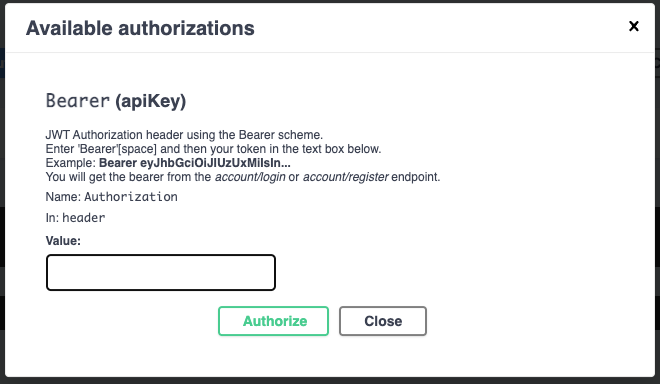
Add inside the Configure method of ConfigureSwaggerOptions:
options.AddSecurityDefinition("Bearer", new OpenApiSecurityScheme()
{
    Description =
        "JWT Authorization header using the Bearer scheme.\r\n<br/>" +
        "Enter 'Bearer'[space] and then your token in the text box below.\r\n<br/>" +
        "Example: <b>Bearer eyJhbGciOiJIUzUxMiIsIn...</b>\r\n<br/>" +
        "You will get the bearer from the <i>account/login</i> or <i>account/register</i> endpoint.",
    Name = "Authorization",
    In = ParameterLocation.Header,
    Type = SecuritySchemeType.ApiKey,
    Scheme = "Bearer"
});

options.AddSecurityRequirement(new OpenApiSecurityRequirement()
{
    {
        new OpenApiSecurityScheme()
        {
            Reference = new OpenApiReference()
            {
                Type = ReferenceType.SecurityScheme,
                Id = "Bearer"
            },
            Scheme = "oauth2",
            Name = "Bearer",
            In = ParameterLocation.Header
        },
        Array.Empty<string>()
    }
});
This adds an "Authorize" button in Swagger UI. After calling the Login endpoint, copy the JWT from the response and paste it as Bearer <token>. All subsequent requests from Swagger UI will include the Authorization header.
CORS (Cross-Origin Resource Sharing)
Browsers enforce the same-origin policy: JavaScript on https://frontend.com cannot make requests to https://api.backend.com by default. This is a security measure to prevent malicious scripts from accessing APIs on behalf of authenticated users.
CORS is the mechanism that allows servers to explicitly permit cross-origin requests. When a browser makes a cross-origin request, it first sends a preflight OPTIONS request. The server responds with headers like Access-Control-Allow-Origin, Access-Control-Allow-Methods, and Access-Control-Allow-Headers. Only if the server permits the origin does the browser proceed with the actual request.
For development (allow everything):
builder.Services.AddCors(options =>
{
    options.AddPolicy("CorsAllowAll", policy =>
    {
        policy.AllowAnyHeader();
        policy.AllowAnyMethod();
        policy.AllowAnyOrigin();
    });
});
app.UseCors("CorsAllowAll");
For production, restrict origins instead of using AllowAnyOrigin():
policy.WithOrigins("https://yourdomain.com");
Important notes:
AllowAnyOrigin()andAllowCredentials()cannot be used together -- ASP.NET Core throws an exception.- Middleware ordering matters:
UseCors()must come afterUseRouting()but beforeUseAuthorization(). - CORS is also covered briefly in lecture 31 in the context of JWT authentication.
Complete CRUD controller example
A reference implementation showing all standard REST operations with proper async patterns, status codes, and response types:
[ApiVersion("1.0")]
[ApiController]
[Route("api/v{version:apiVersion}/[controller]")]
public class PersonsController : ControllerBase
{
    private readonly IPersonService _personService;

    public PersonsController(IPersonService personService)
    {
        _personService = personService;
    }

    // GET: api/v1/persons
    [HttpGet]
    [ProducesResponseType<IEnumerable<PersonResponse>>(StatusCodes.Status200OK)]
    public async Task<ActionResult<IEnumerable<PersonResponse>>> GetAll()
    {
        var persons = await _personService.GetAllAsync();
        return Ok(persons);
    }

    // GET: api/v1/persons/5
    [HttpGet("{id:guid}")]
    [ProducesResponseType<PersonResponse>(StatusCodes.Status200OK)]
    [ProducesResponseType(StatusCodes.Status404NotFound)]
    public async Task<ActionResult<PersonResponse>> Get(Guid id)
    {
        var person = await _personService.GetByIdAsync(id);
        if (person == null) return NotFound();
        return Ok(person);
    }

    // POST: api/v1/persons
    [HttpPost]
    [ProducesResponseType<PersonResponse>(StatusCodes.Status201Created)]
    [ProducesResponseType(StatusCodes.Status400BadRequest)]
    public async Task<ActionResult<PersonResponse>> Create(
        [FromBody] PersonCreateRequest request)
    {
        // validation is automatic via [ApiController] + data annotations on DTO
        var person = await _personService.CreateAsync(request);
        return CreatedAtAction(nameof(Get), new
        {
            version = HttpContext.GetRequestedApiVersion()!.ToString(),
            id = person.Id
        }, person);
    }

    // PUT: api/v1/persons/5
    [HttpPut("{id:guid}")]
    [ProducesResponseType<PersonResponse>(StatusCodes.Status200OK)]
    [ProducesResponseType(StatusCodes.Status400BadRequest)]
    [ProducesResponseType(StatusCodes.Status404NotFound)]
    public async Task<ActionResult<PersonResponse>> Update(Guid id,
        [FromBody] PersonUpdateRequest request)
    {
        var person = await _personService.UpdateAsync(id, request);
        if (person == null) return NotFound();
        return Ok(person);
    }

    // DELETE: api/v1/persons/5
    [HttpDelete("{id:guid}")]
    [ProducesResponseType(StatusCodes.Status204NoContent)]
    [ProducesResponseType(StatusCodes.Status404NotFound)]
    public async Task<IActionResult> Delete(Guid id)
    {
        var success = await _personService.DeleteAsync(id);
        if (!success) return NotFound();
        return NoContent();
    }
}
Note how:
- All methods are
asyncand use the BLL service layer (not the repository directly) [FromBody]is inferred by[ApiController]for complex types but can be explicit for clarity- POST returns
201 Createdwith aLocationheader viaCreatedAtAction - DELETE returns
204 No Content(empty body on success) - Validation is handled automatically -- no
ModelState.IsValidchecks
Middleware ordering
The order of middleware in Program.cs matters. A typical ordering for an API project:
var app = builder.Build();

app.UseExceptionHandler();     // catch unhandled exceptions
app.UseStatusCodePages();      // Problem Details for empty error responses

if (app.Environment.IsDevelopment())
{
    app.UseSwagger();
    app.UseSwaggerUI(/* ... */);
}

app.UseHttpsRedirection();

app.UseCors("CorsAllowAll");   // after UseRouting (implicit), before UseAuthorization

app.UseAuthentication();
app.UseAuthorization();

app.MapControllers();
External links
-
Microsoft REST API guidelines
-
ASP.NET API versioning wiki
-
API versioning samples
-
Problem Details RFC 9457
-
ASP.NET Core Web API documentation
Integration testing of API endpoints is covered in lecture 60 using WebApplicationFactory<T>. Deployment with Docker is covered in lecture 50.
Full Swagger configuration
Below is the complete ConfigureSwaggerOptions class combining all the fragments shown above:
using System.Reflection;
using Asp.Versioning.ApiExplorer;
using Microsoft.Extensions.Options;
using Microsoft.OpenApi;
using Swashbuckle.AspNetCore.SwaggerGen;

namespace WebApp;

public class ConfigureSwaggerOptions : IConfigureOptions<SwaggerGenOptions>
{
    private readonly IApiVersionDescriptionProvider _descriptionProvider;

    public ConfigureSwaggerOptions(IApiVersionDescriptionProvider descriptionProvider)
    {
        _descriptionProvider = descriptionProvider;
    }


    public void Configure(SwaggerGenOptions options)
    {
        foreach (var description in _descriptionProvider.ApiVersionDescriptions)
        {
            options.SwaggerDoc(
                description.GroupName,
                new OpenApiInfo()
                {
                    Title = $"API {description.ApiVersion}",
                    Version = description.ApiVersion.ToString(),
                    // Description = , TermsOfService = , Contact = , License =
                }
            );
        }

        // use fqn for dto descriptions
        options.CustomSchemaIds(t => t.FullName);


        // include xml comments (enable creation in csproj file)
        var xmlFile = $"{Assembly.GetExecutingAssembly().GetName().Name}.xml";
        var xmlPath = Path.Combine(AppContext.BaseDirectory, xmlFile);
        // options.IncludeXmlComments(xmlPath);

        options.AddSecurityDefinition("Bearer", new OpenApiSecurityScheme()
        {
            Description =
                "JWT Authorization header using the Bearer scheme.\r\n<br/>" +
                "Enter your token in the text box below.\r\n<br/>" +
                "You will get the bearer from the <i>account/login</i> or <i>account/register</i> endpoint.",
            Name = "Authorization",
            In = ParameterLocation.Header,
            Type = SecuritySchemeType.Http,
            Scheme = "Bearer",
            BearerFormat = "JWT"
        });

        options.DocumentFilter<BearerSecurityRequirementDocumentFilter>();
    }
}

public class BearerSecurityRequirementDocumentFilter : IDocumentFilter
{
    public void Apply(OpenApiDocument swaggerDoc, DocumentFilterContext context)
    {
        swaggerDoc.Security = new List<OpenApiSecurityRequirement>
        {
            new OpenApiSecurityRequirement
            {
                [new OpenApiSecuritySchemeReference("Bearer", swaggerDoc)] = new List<string>()
            }
        };
    }
}
Self preparation QA
Be prepared to explain topics like these:
- Why is API versioning mandatory for public APIs? — Clients depend on a stable contract. Breaking changes would break existing clients. Versioning lets you evolve the API while maintaining backward compatibility.
- What constitutes a breaking change vs. a non-breaking change? — Breaking: removing/renaming endpoints or parameters, changing behavior. Non-breaking: adding optional parameters, adding fields to responses, adding new endpoints.
- Why separate public API DTOs from domain entities and BLL DTOs? — Public DTOs are the versioned contract visible to clients. They must not expose internal fields. Internal model changes should not break the public API.
- What does
[ApiController]give you that plain controllers do not? — Automatic 400 responses on invalid ModelState, binding source inference, and Problem Details error format. - Why use Problem Details (RFC 9457) for error responses? — Problem Details provides a standardized, machine-readable error format. API consumers can parse errors uniformly.
- Why does CORS matter for REST APIs? — Browsers enforce same-origin policy. CORS headers permit cross-origin requests. Without CORS, frontend applications on different domains cannot reach the API.
- Why return
201 Createdwith aLocationheader for POST? — REST convention: the response tells the client where the newly created resource lives viaCreatedAtAction.