21 - Dependency Injection
Dependency Inversion Principle
- Theory was first formalized by Robert C. Martin, 1996
- High-level modules should not depend on low-level modules. Both should depend on abstractions.
- Abstractions should not depend upon details. Details should depend upon abstractions.
- Real-world example – the myriad of chargers for small electronic devices (before USB-C standardization, every manufacturer had its own connector; USB-C is the "interface" everyone now depends on)
Hard dependencies
- Every module has its own interface
- Higher module must support them all separately
- Modules are not reusable
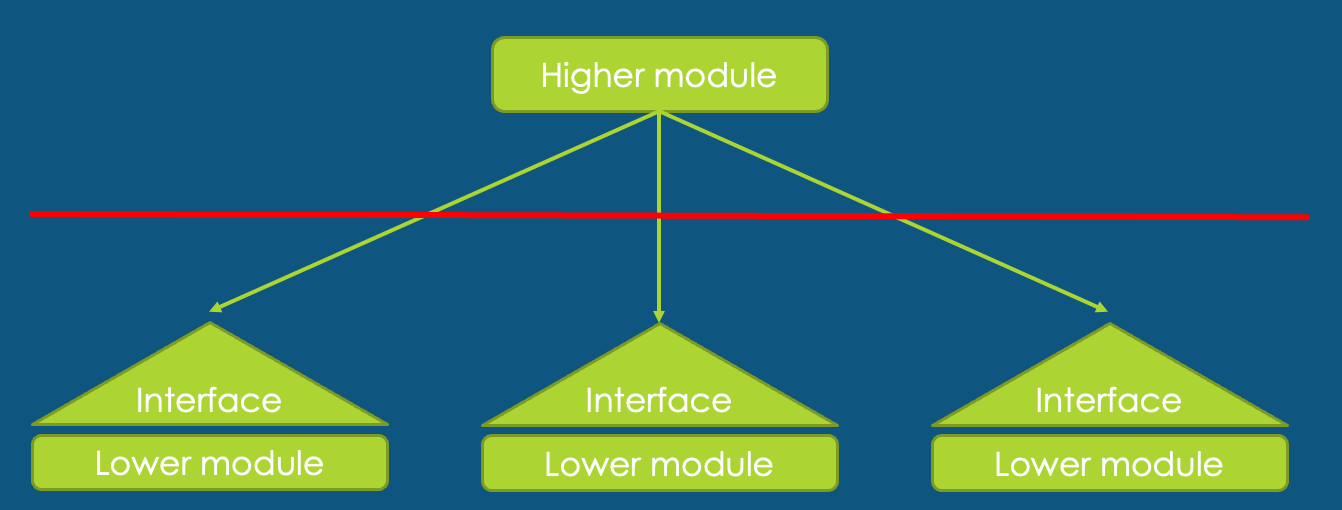
Dependency Inversion
- Higher module specifies the required interface
- All modules depend on the same interface
- Modules are reusable
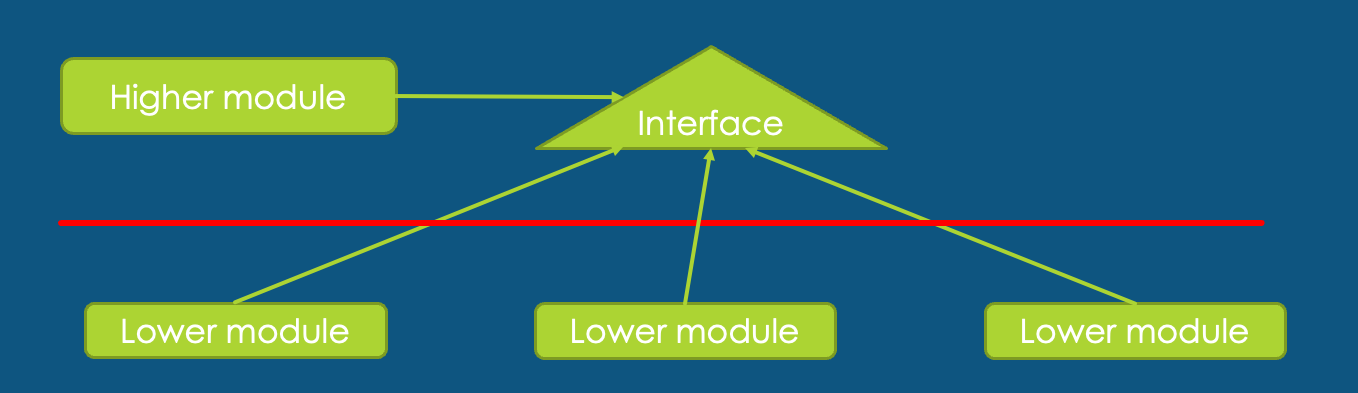
Inversion of Control
Software development pattern
Implements the Dependency Inversion principle
- Control over how different systems interface with each other
- Control over program events (command line vs graphical UI)
- Control over dependency creation and binding
Dependency Injection
- Implementation of IoC (DIP -> IoC -> DI)
- Dependency creation and resolving of them is moved outside of dependent class
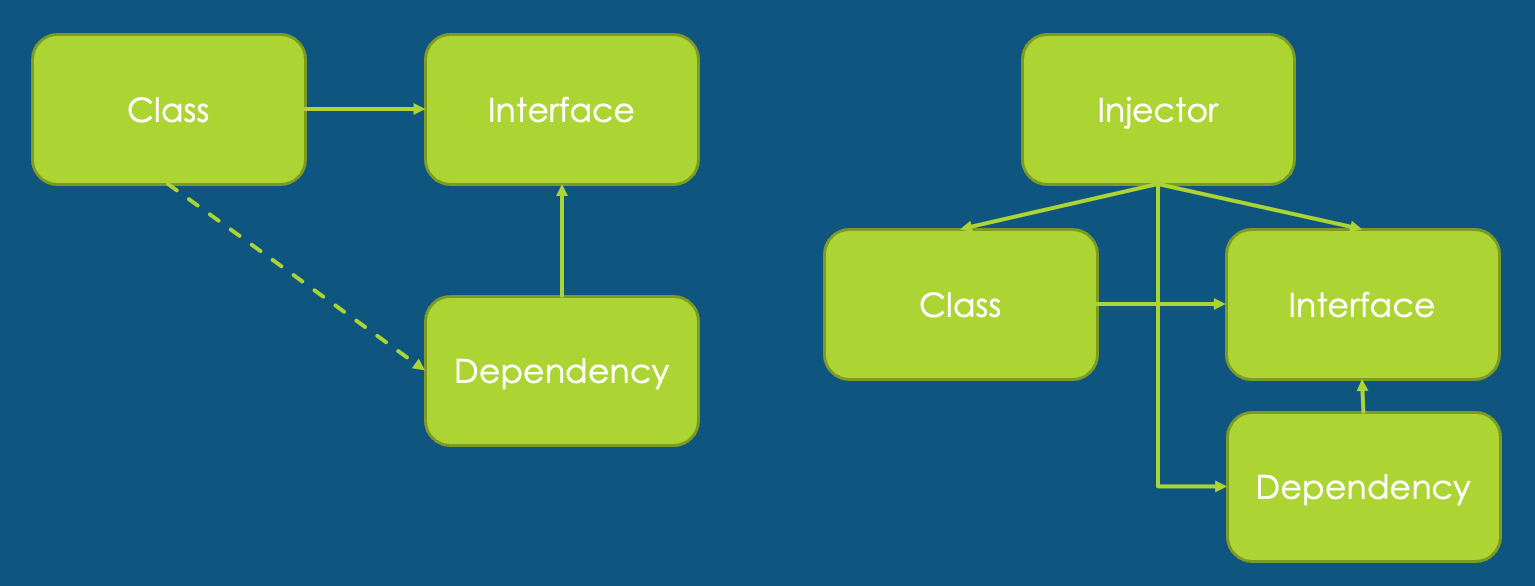
Caution
- Internal principles of class behavior will be exposed
- Dependencies are created before they are needed
- Don't overuse – is it needed for everything?
Meta example
Using constructor injection — the caller creates the dependency and passes it in:
IRepo xmlRepo = new XMLRepo();
Controller cnt = new Controller(xmlRepo);

public class Controller
{
    private readonly IRepo _repo;

    public Controller(IRepo repo)
    {
        _repo = repo;
    }
}
Meta example MVC — historical approach
Note: This pattern ("poor man's DI") was used before DI containers became standard. In modern ASP.NET Core, the container always provides dependencies — you do not need optional parameters or default constructors. Shown here for historical context only.
- During testing you can supply a different implementation of repository
- In regular use the default constructor is used and dependency is created internally
public class PersonController : Controller
{
    private readonly IRepo _repo;

    public PersonController(IRepo? repo = null)
    {
        _repo = repo ?? new PersonRepository();
    }

    public PersonController() : this(null) { }
}
Dependency Injection Container
- Framework that manages object creation and lifetime
- Registers interfaces and their implementations
- Resolves dependencies and provides (injects) correct implementation
- Lifecycle management of created objects
- Several implementations exist. Widely used ones:
- ASP.NET Core – has built-in lightweight solution out-of-the-box (sufficient for most projects)
- Autofac – feature-rich third-party container (decorators, modules, property injection)
- Scrutor – not a container itself, but adds assembly scanning to the built-in container
Composition Root
The Composition Root is the single place in your application where all DI registrations happen. In ASP.NET Core, this is Program.cs.
All builder.Services.Add...() calls live here. No other part of the application should reference the DI container directly — services receive their dependencies through constructor injection, not by asking the container.
// Program.cs — the Composition Root
var builder = WebApplication.CreateBuilder(args);

// Register DbContext
builder.Services.AddDbContext<AppDbContext>(o => o.UseNpgsql(connStr));

// Register DAL
builder.Services.AddScoped<IAppUOW, AppUOW>();

// Register BLL services
builder.Services.AddScoped<IPersonService, PersonService>();

// Register framework services
builder.Services.AddControllersWithViews();

var app = builder.Build();
This is where you connect the interfaces from lectures 21 (Repository/UoW) and 24 (BLL) to their implementations. The rest of the application only knows about interfaces.
ASP.NET Core DI - Lifetime
- Transient (
AddTransient<TInterface, TImpl>())- A new instance is created each time the service is requested. Best for lightweight, stateless services (validators, mappers, formatters).
- Scoped (
AddScoped<TInterface, TImpl>())- One instance per HTTP request. All classes within the same request share the same instance. Best for anything that touches DbContext or per-request state (repositories, services, UoW).
- Singleton (
AddSingleton<TInterface, TImpl>())- One instance for the entire application lifetime. Best for expensive-to-create, thread-safe services (caches, HttpClient factory, configuration).
- Don't implement the singleton design pattern yourself; let the container manage the object's lifetime.
90% of the time it's AddScoped.
| Lifetime | Use for | Example |
|---|---|---|
| Scoped | Anything touching DbContext or per-request state | Repositories, Services, UoW |
| Transient | Lightweight, stateless, cheap to create | Validators, mappers, formatters |
| Singleton | Expensive to create, thread-safe, shared state | Cache, HttpClient factory, config |
Lifetime dependency rule
A service can only depend on services with equal or longer lifetime:
Singleton -> can inject: Singleton only
Scoped    -> can inject: Scoped, Singleton
Transient -> can inject: Transient, Scoped, Singleton
Violating this creates a captive dependency — for example, a Singleton holding a Scoped DbContext will reuse the same DbContext across all requests, leading to stale data, threading issues, and hard-to-debug production failures.
ASP.NET Core catches this in Development mode when ValidateScopes is enabled (on by default). It will throw an InvalidOperationException at startup. In Production, it silently breaks.
// These options are enabled by default in Development
builder.Host.UseDefaultServiceProvider(options =>
{
    options.ValidateScopes = true;   // catches captive dependencies
    options.ValidateOnBuild = true;  // catches missing registrations at startup
});
ASP.NET Core DI - EF
- Entity Framework contexts should be added to the service container using the scoped lifetime.
- This is handled automatically with a call to the
AddDbContext<>method when registering the database context. - Services that use the database context should also use the scoped lifetime.
ASP.NET Core DI - Constructor injection
Services can be resolved by two mechanisms:
- IServiceProvider
- ActivatorUtilities – Permits object creation without service registration in the dependency injection container. ActivatorUtilities is used with user-facing abstractions, such as Tag Helpers, MVC controllers, and model binders.
- Constructors can accept arguments that aren't provided by dependency injection, but the arguments must assign default values.
- When services are resolved by IServiceProvider or ActivatorUtilities, constructor injection requires a public constructor.
- When services are resolved by ActivatorUtilities, constructor injection requires that only one applicable constructor exists. Constructor overloads are supported, but only one overload can exist whose arguments can all be fulfilled by dependency injection.
Controller with DI — putting it all together
This is what the controller from lecture 21 looks like with proper DI. The container creates IAppUOW and injects it — no new keyword anywhere in the controller:
public class PersonController : Controller
{
    private readonly IAppUOW _uow;

    // The container sees IAppUOW in the constructor,
    // looks up the registration, and provides AppUOW
    public PersonController(IAppUOW uow)
    {
        _uow = uow;
    }

    public async Task<IActionResult> Index()
    {
        var persons = await _uow.PersonRepo.AllAsync();
        return View(persons);
    }

    [HttpPost]
    public async Task<IActionResult> Create(PersonCreateViewModel vm)
    {
        if (!ModelState.IsValid) return View(vm);

        var entity = new Person { FirstName = vm.FirstName, LastName = vm.LastName };
        _uow.PersonRepo.Add(entity);
        await _uow.SaveChangesAsync();
        return RedirectToAction(nameof(Index));
    }
}
For this to work, Program.cs needs:
builder.Services.AddDbContext<AppDbContext>(o => o.UseNpgsql(connStr));
builder.Services.AddScoped<IAppUOW, AppUOW>();
That's it. The framework handles the rest — creating AppDbContext, passing it to AppUOW, passing AppUOW to the controller.
DI enables testability
DI's most practical benefit: you can substitute real dependencies with fakes in tests. No database, no network, no file system — just the logic you want to test.
[Fact]
public async Task Index_ReturnsAllPersons()
{
    // Arrange — create a mock UoW with fake data
    var mockUow = new Mock<IAppUOW>();
    var mockRepo = new Mock<IPersonRepo>();
    mockRepo.Setup(r => r.AllAsync())
            .ReturnsAsync(new List<Person>
            {
                new() { FirstName = "Juku", LastName = "Tamm" }
            });
    mockUow.Setup(u => u.PersonRepo).Returns(mockRepo.Object);

    var controller = new PersonController(mockUow.Object);

    // Act
    var result = await controller.Index() as ViewResult;

    // Assert
    var model = result?.Model as IEnumerable<Person>;
    Assert.Single(model!);
}
Without DI, the controller would create its own AppUOW internally and you'd need a real database to test it.
Service Locator — the anti-pattern
The Service Locator pattern is the opposite of DI: instead of declaring dependencies in the constructor, you ask the container for them at runtime.
// BAD — Service Locator anti-pattern
public class PersonService
{
    private readonly IServiceProvider _provider;

    public PersonService(IServiceProvider provider)
    {
        _provider = provider;
    }

    public void DoWork()
    {
        // hidden dependency — not visible in constructor signature
        var repo = _provider.GetRequiredService<IPersonRepo>();
        repo.All();
    }
}
Why this is bad:
- Dependencies are hidden — you can't tell what the class needs by looking at the constructor
- Harder to test — you need to set up an entire service provider instead of just passing a mock
- Fails at runtime instead of startup — missing registrations only blow up when the code path executes
When is IServiceProvider acceptable?
- Factory patterns where you need to create scoped instances on demand (
IServiceScopeFactory) - Middleware constructors (which are Singleton but may need Scoped services per request)
- Framework code that must resolve services dynamically
For application code (controllers, services, repositories) — always use constructor injection.
Multiple implementations of the same interface
What if you have multiple classes implementing the same interface?
builder.Services.AddScoped<INotificationSender, EmailSender>();
builder.Services.AddScoped<INotificationSender, SmsSender>();
Last registration wins when injecting a single INotificationSender. But you can inject all of them:
public class NotificationService
{
    private readonly IEnumerable<INotificationSender> _senders;

    public NotificationService(IEnumerable<INotificationSender> senders)
    {
        _senders = senders; // contains both EmailSender and SmsSender
    }

    public async Task NotifyAll(string message)
    {
        foreach (var sender in _senders)
            await sender.SendAsync(message);
    }
}
This is the Strategy pattern powered by DI — useful for notification channels, validators, discount calculators, etc.
In .NET 8+, keyed services let you register and resolve by name:
builder.Services.AddKeyedScoped<INotificationSender, EmailSender>("email");
builder.Services.AddKeyedScoped<INotificationSender, SmsSender>("sms");

public class OrderService
{
    public OrderService([FromKeyedServices("email")] INotificationSender sender)
    {
        // gets EmailSender specifically
    }
}
Automatic registration to DI
When your project grows to dozens of services, registering each one manually in Program.cs becomes tedious. Assembly scanning tools automate this by discovering classes and their interfaces through conventions.
- Scrutor — adds assembly scanning and decoration to the built-in container. Most popular option.
- NetCore.AutoRegisterDi — convention-based auto-registration
Example with Scrutor:
builder.Services.Scan(scan => scan
    .FromAssemblyOf<PersonService>()
    .AddClasses(classes => classes.AssignableTo<IScopedService>())
    .AsImplementedInterfaces()
    .WithScopedLifetime());
This registers every class implementing IScopedService (a marker interface) with its interfaces as Scoped. No more manual AddScoped<>() for each service.
Self preparation QA
Be prepared to explain topics like these:
- What is the difference between Dependency Inversion Principle, Inversion of Control, and Dependency Injection? — DIP is the principle (depend on abstractions). IoC is the software pattern implementing DIP. DI is the specific mechanism where dependencies are resolved via constructor injection.
- Why is constructor injection preferred over Service Locator? — Constructor injection makes dependencies explicit. Service Locator hides dependencies, makes testing harder, and fails at runtime instead of startup when a registration is missing.
- What is a captive dependency and why is it dangerous? — A captive dependency occurs when a longer-lived service (Singleton) holds a shorter-lived service (Scoped). The Scoped service is reused across all requests, causing stale data and threading issues.
- Why is DbContext registered as Scoped? — DbContext tracks entity changes per request. If Singleton, all requests share the same change tracker. If Transient, multiple services in the same request get different DbContexts, breaking transactional consistency.
- What are the three DI lifetimes and when do you use each? — Scoped: one instance per HTTP request (90% of cases). Transient: new instance each time (lightweight, stateless). Singleton: one instance for the app lifetime (caches, configuration).
- What is the Composition Root? — The single place where all DI registrations happen (
Program.cs). No other part of the application should reference the DI container directly. - How does Scrutor help with DI registration? — Scrutor adds assembly scanning to the built-in DI container, automatically registering classes implementing marker interfaces with the appropriate lifetime.