31 - Identity in REST API
Lecture 30 covered ASP.NET Core Identity for server-rendered applications using cookie-based authentication. This lecture extends that to REST APIs, where cookies are not practical. Instead, we use JSON Web Tokens (JWT) to authenticate API requests. The same Identity infrastructure (UserManager, SignInManager, claims) is reused, but the transport mechanism changes from cookies to tokens sent in HTTP headers.
REST Identity
Traditional cookie-based authentication does not work well with AJAX/fetch requests and REST API clients. ASP.NET Core Identity for some time did not provide built-in REST API controllers for registration, login, or token management. You had to implement these yourself. Now there is basic support: https://learn.microsoft.com/en-us/aspnet/core/security/authentication/identity-api-authorization?view=aspnetcore-10.0. Still it is useful to understand the underlying principles and try to implement a JWT-based authentication system yourself.
For production systems, consider industrial-strength identity providers instead of rolling your own:
- https://www.keycloak.org
- authentik
- Authelia
- Zitadel
These implement the full OAuth 2.0 / OpenID Connect (OIDC) specification. JWT is a token format; OAuth 2.0 is an authorization framework; OpenID Connect adds authentication on top of OAuth 2.0. This lecture implements a simplified JWT-based approach suitable for learning and smaller projects.
JWT
REST APIs use JSON Web Tokens (JWT) instead of cookies — RFC 7519. This can be confusing when a single server handles both MVC views (cookies) and REST API endpoints (JWT).
- Inspect and verify tokens at https://jwt.io
- Tokens are digitally signed (not encrypted) using HMAC, RSA, or ECDSA
- HTTPS is mandatory — the token payload is readable by anyone who intercepts it
JWT Format
A JWT consists of three parts separated by dots, each Base64Url-encoded:
Header.Payload.Signature
- Header — token type (
"JWT") and signing algorithm (e.g.,"HS256") - Payload — claims about the user (registered claims like
iss,exp,sub; public claims; private/custom claims) - Signature —
HMACSHA256(base64UrlEncode(header) + "." + base64UrlEncode(payload), secret)
JWT-based authentication flow
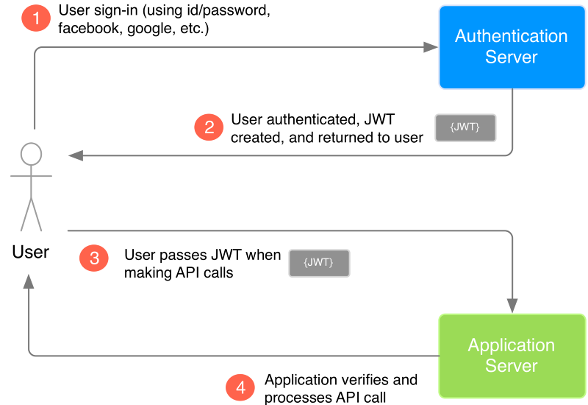
When the user successfully logs in with their credentials, the server returns a JWT. Since tokens are credentials, they must be handled with care.
To access a protected endpoint, the client sends the JWT in the Authorization header using the Bearer scheme:
Authorization: Bearer <token>
Because the token is sent in a header (not a cookie), Cross-Origin Resource Sharing (CORS) is not a problem for authentication — unlike cookie-based auth, which requires CORS cookie configuration.
Token authentication — simple flow
JWT security considerations
- Signed, not encrypted — all information in the token payload is visible to anyone who has the token. Never put sensitive data (passwords, SSNs, internal IDs that leak business logic) in the payload. Users cannot modify the payload without invalidating the signature, but they can read it.
- Key strength — for HMAC-SHA256, the signing key must be at least 256 bits (32 bytes). Short keys are vulnerable to brute-force attacks.
- Token lifetime — keep JWT lifetimes short (seconds to minutes for high-security apps). A stolen JWT cannot be revoked server-side without adding a token blacklist that is checked on every request — which defeats the stateless advantage of JWT.
- HTTPS is mandatory — without TLS, tokens can be intercepted in transit.
- Timing attacks — on failed login, add a small random delay before responding. Without this, an attacker can measure response times to determine whether an email exists in the system (user enumeration).
JWT configuration
Add a JWT section to appsettings.json:
"JWT": {
    "key": "some_secret_password_dont_share.at" +
           "_least_32_bytes_long_for_HS256!",
    "issuer": "itcollege.taltech.ee",
    "audience": "itcollege.taltech.ee",
    "expiresInSeconds": 1800
}
The key must be kept secret and should be at least 32 characters for HMAC-SHA256. In production, store it in environment variables or a secrets manager — never commit it to source control.
Add JWT authentication support in Program.cs
Install via NuGet: Microsoft.AspNetCore.Authentication.JwtBearer
When both cookie auth (for MVC) and JWT auth (for API) are needed:
JwtSecurityTokenHandler.DefaultInboundClaimTypeMap.Clear(); // => remove default claims
builder.Services
    .AddAuthentication()
    .AddCookie(options => { options.SlidingExpiration = true; })
    .AddJwtBearer(cfg =>
    {
        cfg.RequireHttpsMetadata = false; // TODO: set to true in production!
        cfg.SaveToken = true;
        cfg.TokenValidationParameters = new TokenValidationParameters
        {
            ValidIssuer = builder.Configuration["JWT:Issuer"],
            ValidAudience = builder.Configuration["JWT:Audience"],
            IssuerSigningKey = new SymmetricSecurityKey(
                Encoding.UTF8.GetBytes(builder.Configuration["JWT:Key"]!)),
            ClockSkew = TimeSpan.Zero // remove delay of token when expire
        };
    });
DefaultInboundClaimTypeMap.Clear() removes the default mapping that converts short JWT claim names (like sub, email) to long .NET claim type URIs. Without this, claim lookups by ClaimTypes.Email may fail.
If no cookie support is needed, make JWT the default authentication scheme:
// =============== JWT support ===============
JwtSecurityTokenHandler.DefaultInboundClaimTypeMap.Clear(); // => remove default claims
builder.Services
    .AddAuthentication(options =>
    {
        options.DefaultAuthenticateScheme = JwtBearerDefaults.AuthenticationScheme;
        options.DefaultScheme = JwtBearerDefaults.AuthenticationScheme;
        options.DefaultChallengeScheme = JwtBearerDefaults.AuthenticationScheme;
    })
    .AddCookie(options => { options.SlidingExpiration = true; })
    .AddJwtBearer(cfg =>
    {
        cfg.RequireHttpsMetadata = false; // TODO: set to true in production!
        cfg.SaveToken = true;
        cfg.TokenValidationParameters = new TokenValidationParameters
        {
            ValidIssuer = builder.Configuration["JWT:Issuer"],
            ValidAudience = builder.Configuration["JWT:Audience"],
            IssuerSigningKey = new SymmetricSecurityKey(
                Encoding.UTF8.GetBytes(builder.Configuration["JWT:Key"]!)),
            ClockSkew = TimeSpan.Zero // remove delay of token when expire
        };
    });
Without setting the default scheme, [Authorize] will try cookie authentication first, which will fail for API requests and return a redirect to a login page instead of a 401 Unauthorized.
IdentityHelpers — JWT generation and validation
Create a helper class for generating and validating JWT tokens. This belongs in a shared Helpers project in your solution.
using System.IdentityModel.Tokens.Jwt;
using System.Security.Claims;
using System.Text;
using Microsoft.IdentityModel.Tokens;

namespace Helpers;

public static class IdentityHelpers
{
    public static string GenerateJwt(
        IEnumerable<Claim> claims,
        string key,
        string issuer,
        string audience,
        int expiresInSeconds)
    {
        var signingKey = new SymmetricSecurityKey(Encoding.UTF8.GetBytes(key));
        var signingCredentials = new SigningCredentials(signingKey, SecurityAlgorithms.HmacSha256);
        var expires = DateTime.UtcNow.AddSeconds(expiresInSeconds);
        var token = new JwtSecurityToken(
            issuer: issuer,
            audience: audience,
            claims: claims,
            expires: expires,
            signingCredentials: signingCredentials
        );
        return new JwtSecurityTokenHandler().WriteToken(token);
    }

    /// <summary>
    /// Validate JWT token signature and issuer/audience.
    /// Ignores expiration — used during token refresh where the JWT is allowed to be expired.
    /// </summary>
    public static bool ValidateJWT(
        string jwt,
        string key,
        string issuer,
        string audience)
    {
        var tokenHandler = new JwtSecurityTokenHandler();
        var validationParameters = new TokenValidationParameters
        {
            ValidIssuer = issuer,
            ValidAudience = audience,
            IssuerSigningKey = new SymmetricSecurityKey(Encoding.UTF8.GetBytes(key)),
            ValidateLifetime = false // allow expired tokens during refresh
        };

        try
        {
            tokenHandler.ValidateToken(jwt, validationParameters, out _);
            return true;
        }
        catch (Exception)
        {
            return false;
        }
    }
}
GenerateJwt creates a signed JWT containing the user's claims with the specified expiration. ValidateJWT verifies the token's signature, issuer, and audience but intentionally skips lifetime validation — this is needed during token refresh, where the client sends an expired JWT along with a valid refresh token.
Using the token in API requests
On every API request, include the token in the Authorization header:
Authorization: Bearer eyJhbGciOiJIUzI1NiIsI.....
In Web API controllers, use the same authorization attributes as in MVC:
[Authorize]will use the default authentication scheme. If multiple schemes are registered, it tries them in registration order (cookie first — bad for REST).- To force a specific authentication scheme:
[Authorize(AuthenticationSchemes = JwtBearerDefaults.AuthenticationScheme)]
When the JWT is missing or expired, the API returns 401 Unauthorized. When the user is authenticated but lacks the required role, the API returns 403 Forbidden. The client should handle both: 401 triggers a token refresh or login redirect; 403 shows an access denied message.
Token authentication with refresh

The JWT will eventually expire. In more secure applications, the token lifetime is very short (1-5 minutes). To avoid forcing the user to log in constantly, a second token is used — the refresh token (typically a random GUID).
The refresh token has a much longer lifetime (days or weeks) and is stored server-side in the database. Here is the flow:
- When the JWT expires, the client sends the expired JWT + refresh token to the refresh endpoint.
- The server validates the JWT signature (ignoring expiration), extracts the user identity from the claims.
- The server looks up the refresh token in the database and verifies it has not expired.
- If valid, the server issues a new JWT and a new refresh token (refresh token rotation).
- The old refresh token is kept valid for a short grace period (up to 60 seconds) to handle race conditions where multiple concurrent requests use the same token.
- If the user logs in from multiple devices, each device gets its own refresh token — hence a collection of refresh tokens per user.
DTO classes
The API controller uses several DTOs (Data Transfer Objects) for request and response bodies. These belong in your DTO/Public API project.
namespace App.DTO.v1_0.Identity;

public class RegisterInfo
{
    public string Email { get; set; } = default!;
    public string Password { get; set; } = default!;
    public string Firstname { get; set; } = default!;
    public string Lastname { get; set; } = default!;
}

public class LoginInfo
{
    public string Email { get; set; } = default!;
    public string Password { get; set; } = default!;
}

public class JWTResponse
{
    public string Jwt { get; set; } = default!;
    public string RefreshToken { get; set; } = default!;
}

public class TokenRefreshInfo
{
    public string Jwt { get; set; } = default!;
    public string RefreshToken { get; set; } = default!;
}

public class LogoutInfo
{
    public string RefreshToken { get; set; } = default!;
}
namespace App.DTO.v1_0;

public class RestApiErrorResponse
{
    public System.Net.HttpStatusCode Status { get; set; }
    public string Error { get; set; } = default!;
}
Domain entities for refresh tokens
The refresh token is stored in the database as a separate entity with a foreign key to AppUser. The base class provides token rotation support with PreviousRefreshToken and PreviousExpirationDT.
using System.ComponentModel.DataAnnotations;

namespace Base.Domain;

public class BaseRefreshToken : BaseRefreshToken<Guid>
{
}

public class BaseRefreshToken<TKey> : BaseEntityId<TKey>
    where TKey : IEquatable<TKey>
{
    [MaxLength(64)]
    public string RefreshToken { get; set; } = Guid.NewGuid().ToString();
    public DateTime ExpirationDT { get; set; } = DateTime.UtcNow.AddDays(7);

    [MaxLength(64)]
    public string? PreviousRefreshToken { get; set; }
    public DateTime PreviousExpirationDT { get; set; } = DateTime.UtcNow.AddDays(7);
}
using Base.Domain;

namespace App.Domain.Identity;

public class AppRefreshToken : BaseRefreshToken
{
    public Guid AppUserId { get; set; }
    public AppUser? AppUser { get; set; }
}
Add RefreshTokens navigation property to AppUser:
public class AppUser : IdentityUser<Guid>
{
    public string FirstName { get; set; } = default!;
    public string LastName { get; set; } = default!;

    public ICollection<AppRefreshToken>? RefreshTokens { get; set; }
}
Register the DbSet in your AppDbContext:
public DbSet<AppRefreshToken> RefreshTokens { get; set; } = default!;
ASP.NET Core Identity methods used in the API controller
These are the same Identity services from lecture 30, reused in the REST context:
// Find user by email
var appUser = await _userManager.FindByEmailAsync(dto.Email);

// Verify password without creating a cookie (CheckPasswordSignInAsync, not PasswordSignInAsync)
var result = await _signInManager.CheckPasswordSignInAsync(appUser, dto.Password, false);

// Create new user account
var result = await _userManager.CreateAsync(appUser, dto.Password);

// Build ClaimsPrincipal from user — same claims that would go into a cookie
var claimsPrincipal = await _signInManager.CreateUserPrincipalAsync(appUser);
Note the use of CheckPasswordSignInAsync instead of PasswordSignInAsync — the former only validates the password without issuing a cookie, which is what we want for REST APIs.
Full API identity controller
Implementation with token refresh support. The controller handles four endpoints: Register, Login, RefreshTokenData, and Logout.
using System.IdentityModel.Tokens.Jwt;
using System.Net;
using System.Security.Claims;
using App.DAL.EF;
using App.Domain.Identity;
using App.DTO.v1_0;
using App.DTO.v1_0.Identity;
using Asp.Versioning;
using Helpers;
using Microsoft.AspNetCore.Authentication.JwtBearer;
using Microsoft.AspNetCore.Authorization;
using Microsoft.AspNetCore.Identity;
using Microsoft.AspNetCore.Mvc;
using Microsoft.EntityFrameworkCore;

namespace WebApp.ApiControllers.Identity;

[ApiVersion("1.0")]
[ApiVersion("0.9", Deprecated = true)]
[ApiController]
[Route("/api/v{version:apiVersion}/identity/[controller]/[action]")]
public class AccountController : ControllerBase
{
    private readonly UserManager<AppUser> _userManager;
    private readonly ILogger<AccountController> _logger;
    private readonly SignInManager<AppUser> _signInManager;
    private readonly IConfiguration _configuration;
    private readonly AppDbContext _context;

    public AccountController(UserManager<AppUser> userManager, ILogger<AccountController> logger,
        SignInManager<AppUser> signInManager, IConfiguration configuration, AppDbContext context)
    {
        _userManager = userManager;
        _logger = logger;
        _signInManager = signInManager;
        _configuration = configuration;
        _context = context;
    }


    /// <summary>
    /// Register new local user into app.
    /// </summary>
    /// <param name="registrationData">Username and password. And personal details.</param>
    /// <param name="expiresInSeconds">Override jwt lifetime for testing.</param>
    /// <returns>JWTResponse - jwt and refresh token</returns>
    [HttpPost]
    [Produces("application/json")]
    [Consumes("application/json")]
    [ProducesResponseType<JWTResponse>((int) HttpStatusCode.OK)]
    [ProducesResponseType<RestApiErrorResponse>((int) HttpStatusCode.BadRequest)]
    public async Task<ActionResult<JWTResponse>> Register(
        [FromBody]
        RegisterInfo registrationData,
        [FromQuery]
        int expiresInSeconds)
    {
        if (expiresInSeconds <= 0) expiresInSeconds = int.MaxValue;
        expiresInSeconds = expiresInSeconds < _configuration.GetValue<int>("JWT:expiresInSeconds")
            ? expiresInSeconds
            : _configuration.GetValue<int>("JWT:expiresInSeconds");


        // is user already registered
        var appUser = await _userManager.FindByEmailAsync(registrationData.Email);
        if (appUser != null)
        {
            _logger.LogWarning("User with email {} is already registered", registrationData.Email);
            return BadRequest(
                new RestApiErrorResponse()
                {
                    Status = HttpStatusCode.BadRequest,
                    Error = $"User with email {registrationData.Email} is already registered"
                }
            );
        }

        // register user
        var refreshToken = new AppRefreshToken();
        appUser = new AppUser()
        {
            Email = registrationData.Email,
            UserName = registrationData.Email,
            FirstName = registrationData.Firstname,
            LastName = registrationData.Lastname,
            RefreshTokens = new List<AppRefreshToken>() {refreshToken}
        };
        refreshToken.AppUser = appUser;

        var result = await _userManager.CreateAsync(appUser, registrationData.Password);
        if (!result.Succeeded)
        {
            return BadRequest(
                new RestApiErrorResponse()
                {
                    Status = HttpStatusCode.BadRequest,
                    Error = result.Errors.First().Description
                }
            );
        }

        // save into claims also the user full name
        result = await _userManager.AddClaimsAsync(appUser, new List<Claim>()
        {
            new(ClaimTypes.GivenName, appUser.FirstName),
            new(ClaimTypes.Surname, appUser.LastName)
        });

        if (!result.Succeeded)
        {
            return BadRequest(
                new RestApiErrorResponse()
                {
                    Status = HttpStatusCode.BadRequest,
                    Error = result.Errors.First().Description
                }
            );
        }

        // get full user from system with fixed data (maybe there is something generated by identity that we might need
        appUser = await _userManager.FindByEmailAsync(appUser.Email);
        if (appUser == null)
        {
            _logger.LogWarning("User with email {} is not found after registration", registrationData.Email);
            return BadRequest(
                new RestApiErrorResponse()
                {
                    Status = HttpStatusCode.BadRequest,
                    Error = $"User with email {registrationData.Email} is not found after registration"
                }
            );
        }

        var claimsPrincipal = await _signInManager.CreateUserPrincipalAsync(appUser);
        var jwt = IdentityHelpers.GenerateJwt(
            claimsPrincipal.Claims,
            _configuration.GetValue<string>("JWT:key"),
            _configuration.GetValue<string>("JWT:issuer"),
            _configuration.GetValue<string>("JWT:audience"),
            expiresInSeconds
        );
        var res = new JWTResponse()
        {
            Jwt = jwt,
            RefreshToken = refreshToken.RefreshToken,
        };
        return Ok(res);
    }


    [HttpPost]
    public async Task<ActionResult<JWTResponse>> Login(
        [FromBody]
        LoginInfo loginInfo,
        [FromQuery]
        int expiresInSeconds
    )
    {
        if (expiresInSeconds <= 0) expiresInSeconds = int.MaxValue;
        expiresInSeconds = expiresInSeconds < _configuration.GetValue<int>("JWT:expiresInSeconds")
            ? expiresInSeconds
            : _configuration.GetValue<int>("JWT:expiresInSeconds");

        // verify user
        var appUser = await _userManager.FindByEmailAsync(loginInfo.Email);
        if (appUser == null)
        {
            _logger.LogWarning("WebApi login failed, email {} not found", loginInfo.Email);
            // TODO: random delay to prevent user enumeration timing attacks
            return NotFound("User/Password problem");
        }

        // verify password
        var result = await _signInManager.CheckPasswordSignInAsync(appUser, loginInfo.Password, false);
        if (!result.Succeeded)
        {
            _logger.LogWarning("WebApi login failed, password for email {} was wrong",
                loginInfo.Email);
            // TODO: random delay to prevent user enumeration timing attacks
            return NotFound("User/Password problem");
        }

        var claimsPrincipal = await _signInManager.CreateUserPrincipalAsync(appUser);
        if (claimsPrincipal == null)
        {
            _logger.LogWarning("WebApi login failed, claimsPrincipal null");
            // TODO: random delay to prevent user enumeration timing attacks
            return NotFound("User/Password problem");
        }

        // clean up expired refresh tokens
        // EF Core InMemory provider does not support ExecuteDeleteAsync, so skip during integration tests
        if (!_context.Database.ProviderName!.Contains("InMemory"))
        {
            var deletedRows = await _context.RefreshTokens
                .Where(t => t.AppUserId == appUser.Id && t.ExpirationDT < DateTime.UtcNow)
                .ExecuteDeleteAsync();
            _logger.LogInformation("Deleted {} refresh tokens", deletedRows);
        }


        var refreshToken = new AppRefreshToken()
        {
            AppUserId = appUser.Id
        };
        _context.RefreshTokens.Add(refreshToken);
        await _context.SaveChangesAsync();

        var jwt = IdentityHelpers.GenerateJwt(
            claimsPrincipal.Claims,
            _configuration.GetValue<string>("JWT:key"),
            _configuration.GetValue<string>("JWT:issuer"),
            _configuration.GetValue<string>("JWT:audience"),
            expiresInSeconds
        );

        var responseData = new JWTResponse()
        {
            Jwt = jwt,
            RefreshToken = refreshToken.RefreshToken
        };

        return Ok(responseData);
    }

    [HttpPost]
    public async Task<ActionResult<JWTResponse>> RefreshTokenData(
        [FromBody]
        TokenRefreshInfo tokenRefreshInfo,
        [FromQuery]
        int expiresInSeconds
    )
    {
        if (expiresInSeconds <= 0) expiresInSeconds = int.MaxValue;
        expiresInSeconds = expiresInSeconds < _configuration.GetValue<int>("JWT:expiresInSeconds")
            ? expiresInSeconds
            : _configuration.GetValue<int>("JWT:expiresInSeconds");

        // extract jwt object
        JwtSecurityToken? jwt;
        try
        {
            jwt = new JwtSecurityTokenHandler().ReadJwtToken(tokenRefreshInfo.Jwt);
            if (jwt == null)
            {
                return BadRequest(
                    new RestApiErrorResponse()
                    {
                        Status = HttpStatusCode.BadRequest,
                        Error = "No token"
                    }
                );
            }
        }
        catch (Exception e)
        {
            return BadRequest(new RestApiErrorResponse()
                {
                    Status = HttpStatusCode.BadRequest,
                    Error = "No token"
                }
            );
        }

        // validate jwt, ignore expiration date

        if (!IdentityHelpers.ValidateJWT(
                tokenRefreshInfo.Jwt,
                _configuration.GetValue<string>("JWT:key"),
                _configuration.GetValue<string>("JWT:issuer"),
                _configuration.GetValue<string>("JWT:audience")
            ))
        {
            return BadRequest("JWT validation fail");
        }

        var userEmail = jwt.Claims.FirstOrDefault(x => x.Type == ClaimTypes.Email)?.Value;
        if (userEmail == null)
        {
            return BadRequest(
                new RestApiErrorResponse()
                {
                    Status = HttpStatusCode.BadRequest,
                    Error = "No email in jwt"
                }
            );
        }

        var appUser = await _userManager.FindByEmailAsync(userEmail);
        if (appUser == null)
        {
            return NotFound($"User with email {userEmail} not found");
        }

        // load and compare refresh tokens
        await _context.Entry(appUser).Collection(u => u.RefreshTokens!)
            .Query()
            .Where(x =>
                (x.RefreshToken == tokenRefreshInfo.RefreshToken && x.ExpirationDT > DateTime.UtcNow) ||
                (x.PreviousRefreshToken == tokenRefreshInfo.RefreshToken &&
                 x.PreviousExpirationDT > DateTime.UtcNow)
            )
            .ToListAsync();

        if (appUser.RefreshTokens == null || appUser.RefreshTokens.Count == 0)
        {
            return NotFound(
                new RestApiErrorResponse()
                {
                    Status = HttpStatusCode.NotFound,
                    Error = $"RefreshTokens collection is null or empty - {appUser.RefreshTokens?.Count}"
                }
            );
        }

        if (appUser.RefreshTokens.Count != 1)
        {
            return NotFound("More than one valid refresh token found");
        }


        // get claims based user
        var claimsPrincipal = await _signInManager.CreateUserPrincipalAsync(appUser);
        if (claimsPrincipal == null)
        {
            _logger.LogWarning("Could not get ClaimsPrincipal for user {}", userEmail);
            return NotFound(
                new RestApiErrorResponse()
                {
                    Status = HttpStatusCode.BadRequest,
                    Error = "User/Password problem"
                }
            );
        }

        // generate jwt
        var jwtResponseStr = IdentityHelpers.GenerateJwt(
            claimsPrincipal.Claims,
            _configuration.GetValue<string>("JWT:key"),
            _configuration.GetValue<string>("JWT:issuer"),
            _configuration.GetValue<string>("JWT:audience"),
            expiresInSeconds
        );

        // make new refresh token, keep old one still valid for some time
        var refreshToken = appUser.RefreshTokens.First();
        if (refreshToken.RefreshToken == tokenRefreshInfo.RefreshToken)
        {
            refreshToken.PreviousRefreshToken = refreshToken.RefreshToken;
            refreshToken.PreviousExpirationDT = DateTime.UtcNow.AddMinutes(1);

            refreshToken.RefreshToken = Guid.NewGuid().ToString();
            refreshToken.ExpirationDT = DateTime.UtcNow.AddDays(7);

            await _context.SaveChangesAsync();
        }

        var res = new JWTResponse()
        {
            Jwt = jwtResponseStr,
            RefreshToken = refreshToken.RefreshToken,
        };

        return Ok(res);
    }

    [Authorize(AuthenticationSchemes = JwtBearerDefaults.AuthenticationScheme)]
    [HttpPost]
    public async Task<ActionResult> Logout(
        [FromBody]
        LogoutInfo logout)
    {
        // delete the refresh token - so user is kicked out after jwt expiration
        // We do not invalidate the jwt on serverside - that would require pipeline modification and checking against db on every request
        // so client can actually continue to use the jwt until it expires (keep the jwt expiration time short ~1 min)

        var userIdStr = _userManager.GetUserId(User);
        if (userIdStr == null)
        {
            return BadRequest(
                new RestApiErrorResponse()
                {
                    Status = HttpStatusCode.BadRequest,
                    Error = "Invalid refresh token"
                }
            );
        }

        if (!Guid.TryParse(userIdStr, out var userId))
        {
            return BadRequest("Deserialization error");
        }

        var appUser = await _context.Users
            .Where(u => u.Id == userId)
            .SingleOrDefaultAsync();
        if (appUser == null)
        {
            return NotFound(
                new RestApiErrorResponse()
                {
                    Status = HttpStatusCode.NotFound,
                    Error = "User/Password problem"
                }
            );
        }

        await _context.Entry(appUser)
            .Collection(u => u.RefreshTokens!)
            .Query()
            .Where(x =>
                (x.RefreshToken == logout.RefreshToken) ||
                (x.PreviousRefreshToken == logout.RefreshToken)
            )
            .ToListAsync();

        foreach (var appRefreshToken in appUser.RefreshTokens!)
        {
            _context.RefreshTokens.Remove(appRefreshToken);
        }

        var deleteCount = await _context.SaveChangesAsync();

        return Ok(new {TokenDeleteCount = deleteCount});
    }
}
CORS configuration
When your REST API and frontend are served from different origins (e.g., API on localhost:5000, frontend on localhost:3000), the browser blocks cross-origin requests by default. Configure CORS in Program.cs:
builder.Services.AddCors(options =>
{
    options.AddPolicy("CorsAllowAll", policy =>
    {
        policy.AllowAnyHeader();
        policy.AllowAnyMethod();
        policy.AllowAnyOrigin();
    });
});

// ... after Build()

app.UseCors("CorsAllowAll");
In production, replace AllowAnyOrigin() with specific allowed origins. The permissive policy above is for development only. For a deeper explanation of CORS (preflight requests, same-origin policy, middleware ordering), see lecture 40.
Swagger / OpenAPI JWT integration
To test JWT-protected endpoints in Swagger UI, configure Swagger to show a JWT authentication button. Full Swagger configuration with versioning, XML comments, and auth is covered in lecture 40. A minimal JWT-only setup:
builder.Services.AddSwaggerGen(options =>
{
    options.AddSecurityDefinition("Bearer", new OpenApiSecurityScheme
    {
        Description = "JWT Authorization: Bearer {token}",
        Name = "Authorization",
        In = ParameterLocation.Header,
        Type = SecuritySchemeType.ApiKey,
        Scheme = "Bearer"
    });

    options.AddSecurityRequirement(new OpenApiSecurityRequirement
    {
        {
            new OpenApiSecurityScheme
            {
                Reference = new OpenApiReference
                {
                    Type = ReferenceType.SecurityScheme,
                    Id = "Bearer"
                }
            },
            Array.Empty<string>()
        }
    });
});
This adds an "Authorize" button in the Swagger UI. After calling the Login endpoint, copy the JWT from the response and paste it into the authorization dialog. All subsequent requests from Swagger UI will include the Authorization: Bearer header.
Client-side token storage
Where the client stores the JWT affects security:
| Storage | XSS vulnerable | CSRF vulnerable | Notes |
|---|---|---|---|
localStorage | Yes | No | Persists across tabs and browser restarts. Accessible by any JS on the page. |
sessionStorage | Yes | No | Cleared when tab closes. Still accessible by JS. |
| In-memory (JS variable) | Harder | No | Lost on page refresh. Most secure against XSS but worst UX. |
| HttpOnly cookie | No | Yes | Not accessible by JS, but then you're back to cookie-based auth with CSRF concerns. |
For most student projects, localStorage or sessionStorage is acceptable. For high-security applications, consider in-memory storage with refresh tokens to re-acquire the JWT after page refresh.
Identity in the REST API architecture
Where REST API identity components fit in a layered / clean architecture:
| Layer | Components |
|---|---|
| Domain | AppUser, AppRole, AppRefreshToken, BaseRefreshToken |
| DAL | AppDbContext (with DbSet<AppRefreshToken>), migrations |
| DTO / Public API contracts | JWTResponse, RegisterInfo, LoginInfo, TokenRefreshInfo, LogoutInfo, RestApiErrorResponse |
| Helpers | IdentityHelpers (JWT generation/validation) |
| WebApp / API | AccountController, JWT middleware configuration in Program.cs, Swagger config |
The AccountController is in the Web/API layer because it handles HTTP concerns (request/response). The IdentityHelpers class is in a shared Helpers project because it contains pure logic (no HTTP dependency) and may be used by integration tests as well. DTOs are in the public API contracts project — they define the API surface visible to clients.
Self preparation QA
Be prepared to explain topics like these:
- Why use JWT instead of cookies for REST APIs? — JWTs are sent in the
Authorizationheader, work with any HTTP client, and avoid CSRF concerns. Cookies are tied to browser behavior and same-origin policy. - What are the three parts of a JWT and what does each contain? — Header (token type + signing algorithm), Payload (claims), and Signature (HMAC/RSA/ECDSA proving the token was not tampered with).
- Why is a JWT signed but not encrypted, and what does that mean? — Anyone who has the token can read the payload (Base64-decoded). Users cannot modify the payload without invalidating the signature. Never put sensitive data in the payload.
- Why should JWT lifetimes be short, and how does refresh token rotation solve this? — A stolen JWT cannot be revoked server-side. Short lifetimes limit the abuse window. Refresh token rotation invalidates old tokens, limiting replay attacks.
- What is a timing attack in the context of login, and how do you mitigate it? — An attacker measures response times to determine whether an email exists. Adding a small random delay before responding to failed logins prevents user enumeration.
- Why use
CheckPasswordSignInAsyncinstead ofPasswordSignInAsyncfor APIs? —PasswordSignInAsyncvalidates the password AND issues a cookie. For REST APIs, you only want password validation; the token is the authentication mechanism. - Why clear
DefaultInboundClaimTypeMapwhen configuring JWT? — The default mapping converts short JWT claim names to long .NET claim type URIs. Without clearing it, looking up claims by standard names fails.