05 - Controllers, Routing
MVC
Just a reminder
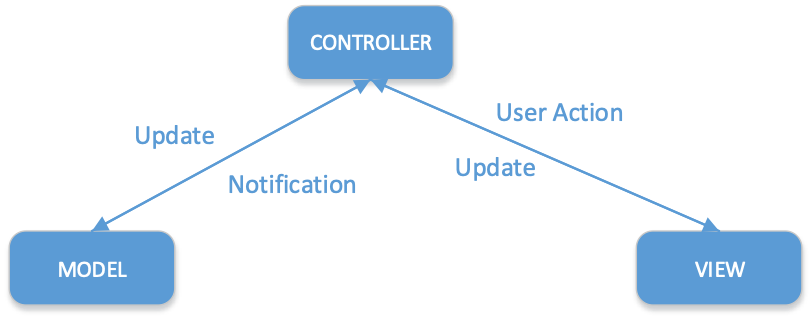
- Model
- Business logic and its persistence
- View
- Template for displaying data
- Controller
- Communication between Model, View and end-user
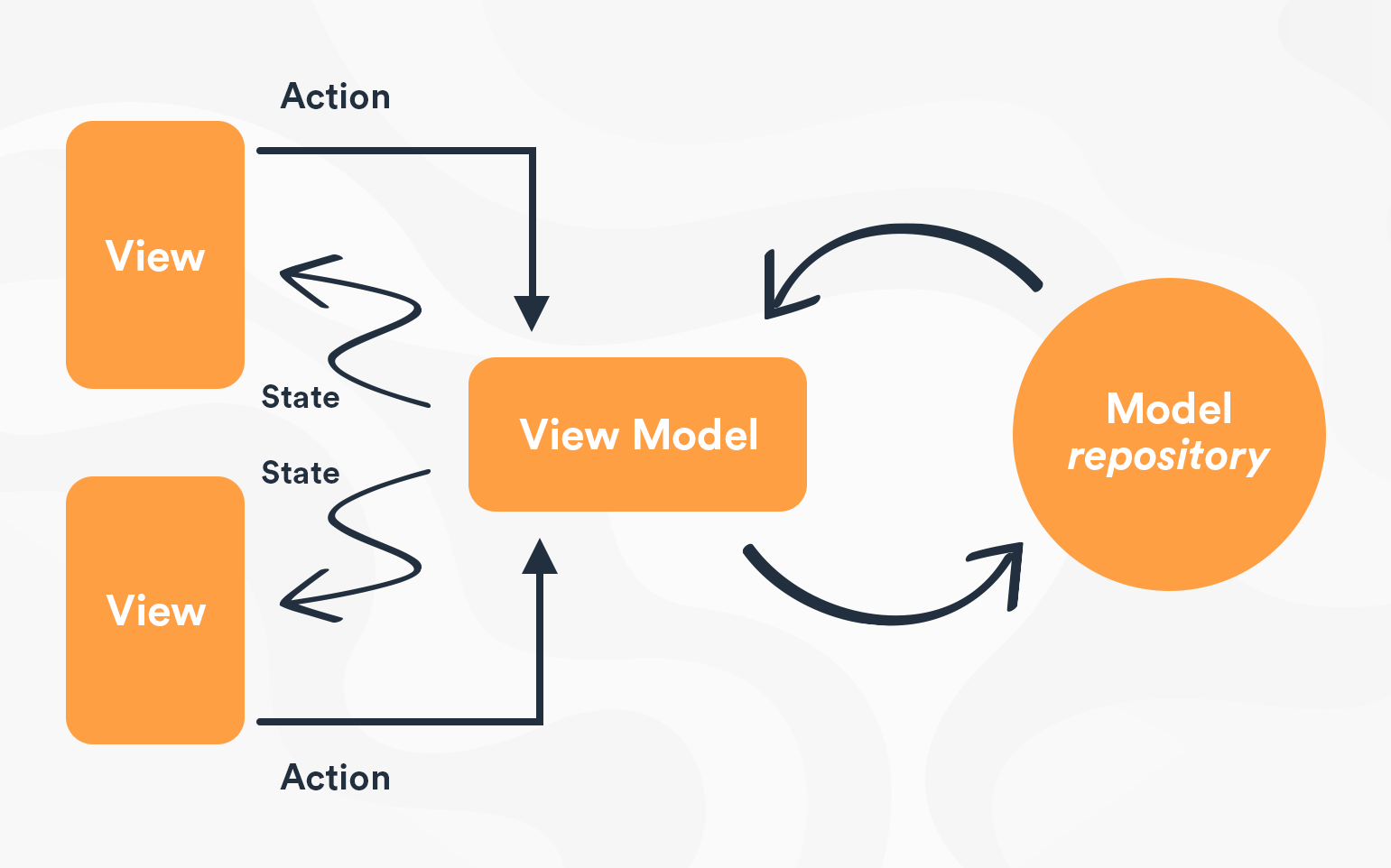
- ViewModel
- Models used for supplying views with complex (strongly typed) data
- MVC Viewmodels vs MVVM (Model-View-ViewModel - WPF, Mobile, two-way data binding)
Controller
- Controllers define and group actions (or action methods) for servicing incoming web requests.
- A controller can be any class that ends in “Controller” or inherits from a class that ends with “Controller”
- By convention (but not required)
- Controllers are located in "Controllers" folder
- Controllers inherit from Microsoft.AspNetCore.Mvc.Controller
- The Controller is a UI level abstraction. Its responsibility is to ensure incoming request data is valid and to choose which view or result should be returned.
In well-factored apps it will not directly include data access or business logic, but instead will delegate to services handling these responsibilities.
Inheriting from base Controller (MVC) or ControllerBase (Api) gives lots of helpful methods and properties
Most importantly returning various responses
- View
- return View(viewModel);
- HTTP Status Code
- return BadRequest();
- Formatted Response
- return Json(someObject);
- Content negotiated response
- return Ok();
- Redirect
- return RedirectToAction(“Complete”, viewModel);
public abstract class Controller : ControllerBase
{
    public dynamic ViewBag { get; }
    public virtual ViewResult View(object model) { }
    // more View support stuff
}
Dependency Injection in Controllers
Controllers are created per-request (transient). Services are injected via constructor injection — the DI container resolves all dependencies automatically.
public class ProductsController : Controller
{
    private readonly IProductService _productService;

    public ProductsController(IProductService productService)
    {
        _productService = productService;
    }

    public async Task<IActionResult> Index()
    {
        var products = await _productService.GetAllAsync();
        return View(products);
    }
}
Controllers should be thin — they validate input, call services, and return results. Business logic belongs in the service layer, not in controllers.
Since controllers are transient, you can safely inject scoped and transient services. Avoid injecting singletons that hold mutable state.
Routing
Recall from the pipeline lecture: UseRouting() makes the routing decision (which endpoint matches), and MapControllerRoute() executes the matched endpoint. Authentication and authorization middleware sit between them.
Routing middleware is used to match incoming requests to suitable controller and action
Actions are routed by convention or by attribute
Routing middleware (sets up the convention)
app.MapControllerRoute(
    name: "default",
    pattern: "{controller=Home}/{action=Index}/{id?}");
By "classic" convention, request should take this form
.../SomeController/SomeAction/ID_VALUE
Multiple routes
app.MapControllerRoute(
    name: "article",
    pattern: "article/{name}/{id}",
    defaults: new {controller = "Blog", action = "Article"}
    );
app.MapControllerRoute(
    name: "default",
    pattern: "{controller=Home}/{action=Index}/{id?}");
- Routes are matched from top-down
- On first match corresponding controller.action is called
Multiple matching action
When multiple actions match, MVC must select suitable action
Use HTTP verbs to select correct action
public class ProductsController : Controller
{
    [HttpGet]
    public IActionResult Edit(int id) {
        return View();
    }

    [HttpPost]
    public IActionResult Edit(int id, Product product) {
        return RedirectToAction("Index");
    }
}
If not possible to choose, exception is thrown.
HTTP verb attributes: [HttpGet], [HttpPost], [HttpPut], [HttpDelete], [HttpPatch]
Async actions
In practice, most actions are async since they call services/databases. Use async Task<IActionResult> as the return type:
public class ProductsController : Controller
{
    private readonly IProductService _productService;

    public ProductsController(IProductService productService)
    {
        _productService = productService;
    }

    [HttpGet]
    public async Task<IActionResult> Edit(int id)
    {
        var product = await _productService.GetByIdAsync(id);
        if (product == null) return NotFound();
        return View(product);
    }

    [HttpPost]
    public async Task<IActionResult> Edit(int id, ProductEditViewModel viewModel)
    {
        if (!ModelState.IsValid) return View(viewModel);

        await _productService.UpdateAsync(id, viewModel);
        return RedirectToAction("Index");
    }
}
Post-Redirect-Get (PRG) pattern
show form -> submit form -> redirect pattern is common.
Why? If the user refreshes the browser after a POST, the form would be resubmitted (duplicate order, duplicate record, etc.). Redirecting after a successful POST turns the final response into a GET — safe to refresh.
[HttpGet]
public IActionResult Create()
{
    return View();
}

[HttpPost]
public async Task<IActionResult> Create(ProductCreateViewModel viewModel)
{
    if (!ModelState.IsValid) return View(viewModel);

    await _productService.CreateAsync(viewModel);
    TempData["Message"] = "Product created successfully!";
    return RedirectToAction("Index");
}

public IActionResult Index()
{
    // TempData["Message"] is available here after redirect, then auto-cleared
    return View();
}
TempData
TempDatais a dictionary that survives one redirect — data is available in the next request, then automatically removed- Backed by cookies or session (configured in
Program.cs) - Use it to pass confirmation messages, error info, or small data across a redirect
- For complex objects, serialize to JSON first
Routing attributes
With attribute routing, controller and action name have no role!
Typically attribute based routing is used in api programming
public class AttributeRouteController : Controller
{
    [Route("")]
    [Route("Home")]
    [Route("Home/Index")]
    public IActionResult MyIndex()
    {
        return View("Index");
    }

    [Route("Home/About")]
    public IActionResult MyAbout()
    {
        return View("About");
    }

    [Route("Home/Contact")]
    public IActionResult MyContact()
    {
        return View("Contact");
    }
}
Route token replacement
Use [controller], [action], and [area] tokens to avoid hardcoding names in attribute routes. These are replaced with the actual controller/action/area name at runtime.
[Route("[controller]/[action]")]
public class ProductsController : Controller
{
    public IActionResult List() => View();   // matches: /Products/List
    public IActionResult Detail() => View(); // matches: /Products/Detail
}
[Route] on the controller class sets a prefix for all actions in that controller. Common pattern for APIs:
[Route("api/[controller]")]
public class ProductsController : ControllerBase
{
    [HttpGet]         // matches: GET api/Products
    public IActionResult GetAll() { ... }

    [HttpGet("{id}")] // matches: GET api/Products/5
    public IActionResult GetById(int id) { ... }
}
Route Template
-
{ }– define route parameters
Can specify multiple, must be separated by literal value
Must have a name, may have additional attributes -
*- catch all parameter
blog/{*foo}would match any URI that started with/blogand had any value following it (which would be assigned to thefooroute value). -
Route parameters may have default values -
{controller=Home} -
name?– may be optional -
name:int– use : to specify a route constraintblog/{article:minlength(10)}
Route constraints
Avoid using constraints for input validation, because doing so means that invalid input will result in a 404 (Not Found) instead of a 400 with an appropriate error message.
Route constraints should be used to disambiguate between similar routes, not to validate the inputs for a particular route.
Constraints are
- int, bool, datetime, decimal, double, float, guid, long
- minlength(value), maxlength(value), length(value), length(min,max)
- min(value), max(value), range(min, max),
- alpha, regex(expression)
- required
Model Binding
- Maps data from HTTP request to action parameters
- Order of binding
- Form values (POST)
- Route values
- Query string (…foo/?bar=fido)
Route: {controller=Home}/{action=Index}/{id?}
request: .../movies/edit/2
public IActionResult Edit(int? id)
Model binding also works on complex types – reflection, recursion – type must have default constructor
Model binding attributes
- BindRequired – adds a model state error if property cannot be bound (
int Foofor example) - BindNever – switch off binder for this parameter
If you want to modify the default binding source order:
FromHeader,FromQuery,FromRoute,FromForm– select sourceFromBody– from request body, use formatter based on content type (json, xml)
public class BookOrder
{
    [Required]
    public string Title { get; set; } = default!;

    [BindRequired]
    public int Quantity { get; set; } // 0 is assigned by default, BindRequired checks actual form data
}
Over-posting (mass assignment)
Model binding will bind any matching form field to a model property. This is a security risk.
If your domain model has an IsAdmin property and you bind directly from form data, a malicious user can add IsAdmin=true to the POST body:
<!-- attacker adds hidden field or modifies request -->
<input type="hidden" name="IsAdmin" value="true" />
Solution: Use ViewModels (DTOs) that contain only the properties the user should be able to set. This is the primary reason ViewModels are required in this course.
// BAD - binds directly to domain model, all properties exposed
[HttpPost]
public IActionResult Edit(Person person) { ... }

// GOOD - ViewModel contains only editable fields
[HttpPost]
public IActionResult Edit(PersonEditViewModel viewModel) { ... }
View scaffolding
Use [ScaffoldColumn(false)] attribute in your model to exclude some property from scaffolding.
Not a proper way to approach this, use correct ViewModels instead (DTO).
Model validation
- Validation attributes mostly in
System.ComponentModel.DataAnnotations [Required],[MaxLength()], etc.- Model validation occurs prior to action invocation
- Action has to inspect
ModelState.IsValid - If needed, call
TryValidateModel(someModel)again [ValidateNever]- indicates that a property or parameter should be excluded from validation
Custom validation, client-side validation, remote validation...
ModelState
-
ModelState builds up metadata representation of your viewmodel
-
When repopulating view with data in postback (Edit/Post) ModelState values are used first by tag-helpers/html helper, if not found then values from actual viewmodel. (ie when re-rendering edit view due to validation errors)
-
So, if you need update viewmodel data in Post method, remove responding fields from ModelState
ModelState.Remove("FirstName");
person.FirstName = "Foo Bar";
API Controllers
For building REST APIs, use ControllerBase with the [ApiController] attribute instead of Controller (which adds view support you don't need).
[ApiController]
[Route("api/[controller]")]
public class ProductsController : ControllerBase
{
    private readonly IProductService _productService;

    public ProductsController(IProductService productService)
    {
        _productService = productService;
    }

    [HttpGet]
    public async Task<ActionResult<IEnumerable<Product>>> GetAll()
    {
        return Ok(await _productService.GetAllAsync());
    }

    [HttpGet("{id}")]
    public async Task<ActionResult<Product>> Get(int id)
    {
        var product = await _productService.GetByIdAsync(id);
        if (product == null) return NotFound();
        return Ok(product);
    }

    [HttpPost]
    public async Task<ActionResult<Product>> Create(ProductCreateDto dto)
    {
        var product = await _productService.CreateAsync(dto);
        return CreatedAtAction(nameof(Get), new { id = product.Id }, product);
    }
}
[ApiController] gives you
- Automatic model validation — if
ModelState.IsValidis false, returns 400 automatically (no manual check needed) - Binding source inference —
[FromBody]is inferred for complex types,[FromRoute]/[FromQuery]for simple types - Problem details responses — standardized error response format (RFC 7807)
Controller vs ControllerBase
ControllerBase | Controller | |
|---|---|---|
| Use for | APIs | MVC with views |
| Returns | Data (JSON/XML) | Views + data |
| View support | No (View(), ViewBag, etc.) | Yes |
| Inherits from | — | ControllerBase |
ActionResult<T> vs IActionResult
IActionResult— use in MVC controllers, return type is not documented in API metadataActionResult<T>— use in API controllers, enables Swagger/OpenAPI to document the response type automatically
Self preparation QA
Be prepared to explain topics like these:
- Why should controllers be thin? — Controllers are UI-level abstractions. Business logic in controllers cannot be reused by other presentation layers and is harder to unit test.
- What is over-posting (mass assignment) and how do you prevent it? — Model binding binds any matching form field to a model property. If you bind directly to a domain entity, an attacker can set properties like
IsAdmin=true. Prevention: use ViewModels/DTOs that contain only the properties the user should be able to set. - Why use the Post-Redirect-Get (PRG) pattern? — After a successful POST, redirecting to a GET prevents form resubmission if the user refreshes the browser. Without PRG, refreshing would duplicate the operation.
- What is the difference between convention-based and attribute-based routing? — Convention-based uses URL patterns defined in
MapControllerRoute. Attribute routing uses[Route]and[HttpGet]on controllers/actions, decoupling URL structure from naming. API controllers typically use attribute routing. - Why use
async Task<IActionResult>for action methods? — Most actions call services or databases, which are I/O-bound. Async actions release the thread during the I/O wait, allowing the server to handle more concurrent requests. - What is the difference between
ControllerandControllerBase? —Controllerinherits fromControllerBaseand adds view support. API controllers should inherit fromControllerBasesince they return data, not views. - What does
[ApiController]give you? — Automatic model validation (returns 400 without manualModelState.IsValidcheck), binding source inference, and standardized Problem Details error responses (RFC 7807). - Why use route constraints for disambiguation, not validation? — Route constraints like
{id:int}help the routing engine choose between ambiguous routes. Invalid input matching a constraint returns 404 instead of 400, which is confusing for API clients.