JS 01 - basics
High level, single threaded, garbage collected, interpreted or just-in-time compiled, prototype based, multi-paradigm, dynamic language with a non-blocking event loop made famous for building web sites. (JS in 100 seconds)
Anything that can be written in JavaScript, will eventually be written in JavaScript. - Jeff Atwood.
History
- First version written by Brendan Eich, May 1995. In 10 days. Initially called Mocha, later LiveScript, finally JavaScript.
- June 1997 ECMAScript 1 standard (European Computer Manufacturers Association)
- June 1998 ECMAScript 2
- December 1999 ECMAScript 3
- Microsoft doing their own thing (JScript), ECMAScript 4 was never released. Browser wars.
- December 2009 – ECMAScript 5
- June 2015 – ECMAScript 2015 – ES6
- June 2016 – ECMAScript 2016 – ES7
- June 2017 – ECMAScript 2017 – ES8
- June 2018 – ECMAScript 2018 – ES9
- June 2019 – ECMAScript 2019 – ES10
- June 2020 – ECMAScript 2020 – ES11 (optional chaining
?., nullish coalescing??,BigInt,Promise.allSettled, dynamicimport()) - June 2021 – ECMAScript 2021 – ES12 (
String.replaceAll,Promise.any, logical assignment??=,||=,&&=) - June 2022 – ECMAScript 2022 – ES13 (top-level
await,.at(),Object.hasOwn(), class fields,structuredClone) - June 2023 – ECMAScript 2023 – ES14 (
Array.findLast,Array.findLastIndex, hashbang grammar) - June 2024 – ECMAScript 2024 – ES15 (
Object.groupBy,Promise.withResolvers,ArrayBuffer.resize) - ESNext – whatever is currently in Stage 4. Stages 1–3 are an incubator of new features, and features reaching Stage 4 are finalized as part of the new standard
What is really supported in browsers?
- Browsers pick and choose what features to support
- Use TypeScript!!!
- Use polyfills where needed
- https://caniuse.com/
Strict mode
ES5 introduced Strict mode.
Eliminates some JavaScript silent errors by changing them to throw errors.
Fixes mistakes that make it difficult for JavaScript engines to perform optimizations: strict mode code can sometimes be made to run faster than identical code that's not in strict mode.
Prohibits some syntax likely to be defined in future versions of ECMAScript.
"use strict";
x = 3.14;
Error - x is not declared
Always use strict mode!
Type system
JS dynamically typed!
| left operand | operator | right operand | result |
|---|---|---|---|
[] (empty array) | + | [] (empty array) | "" (empty string) |
{} (empty object) | + | [] (empty array) | 0 (number) in console, "[object Object]" in expression context |
[] (empty array) | + | {} (empty object) | "[object Object]" (string) |
false (boolean) | + | [] (empty array) | "false" (string) |
"123" (string) | + | 1 (number) | "1231" (string) |
"123" (string) | - | 1 (number) | 122 (number) |
- Certain types implicitly cast depending on the operation used. Inconsistently!
- When adding a number to a string, the number will be cast to a string before performing concatenation, but when subtracting a number from a string, the string is cast to a number before performing subtraction.
- Type is associated with value (not with variable)!
Value vs Reference
Primitive types (value) - Boolean, String, Number, Symbol, BigInt, null, undefined
Objects (reference) - Array, Function, Object
Variables
Modern way:
let x = 5;          // number
const y = "foobar"; // constant, can't change
let z;              // undefined
let w = undefined;  // undefined
- The name must contain only letters, digits, or the symbols
$and_. - The first character must not be a digit.
- JS is case sensitive. Default naming convention is camelCase for variables/functions, PascalCase for classes.
Don't use var! Don't use "foobar = 5;"
Constant naming – UPPERCASE for hardcoded values.
var problems:
    var greeter = "hey hi";
    var times = 4;

    if (times > 3) {
        var greeter = "say Hello instead";
    }

    console.log(greeter); // "say Hello instead"
let is block scoped
let greeting = "say Hi";
let times = 4;

if (times > 3) {
  let hello = "say Hello instead";
  console.log(hello);// "say Hello instead"
}
console.log(hello) // hello is not defined
console.log(greeting) // "say Hi"
- var declarations are globally scoped or function scoped while let and const are block scoped.
- var variables can be updated and re-declared within its scope; let variables can be updated but not re-declared; const variables can neither be updated nor re-declared.
- While var and let can be declared without being initialized, const must be initialized during declaration.
Datatypes - primitives
-
7 primitive types
- string
- number
- boolean
- null
- undefined
- symbol
- bigint (ES2020)
-
Object
- Is capable of storing multiple values as properties (similar to dictionary).
- Can be created with
{ }, for instance:{ name: "John", age: 30 }.
There are other kinds of objects in JavaScript: functions, for example, are objects.
Datatypes – primitives/object
There are many things one would want to do with a primitive like a string or a number. It would be great to access them as methods.
But - primitives must be as fast and lightweight as possible (objects are slow).
- The language allows access to methods and properties of strings, numbers, booleans and symbols.
- In order for that to work, a special "object wrapper" that provides the extra functionality is created, and then is destroyed.
- The "object wrappers" are different for each primitive type and are called: String, Number, Boolean and Symbol.
- null/undefined have no wrappers/methods
Constructors String/Number/Boolean are for internal use only!
- Possible for historical reasons, but highly unrecommended
- Unexpected results in various use cases
- alert( typeof 0 ); // "number"
- alert( typeof new Number(0) ); // "object"!
Using the same functions String/Number/Boolean without new is OK!
- Convert a value to the corresponding type
- Number("123") - 123
Datatypes - Number
-
Float, int – number
-
Special numeric values: Infinity, -Infinity, NaN
- NaN – Not an Number
-
Math operations are safe – no crashes (NaN is returned)
-
Max safe integer is 2^53 (-2^53 for negatives) – ca 16 decimal digits
-
Stored as 64bit, double precision floating point numbers (IEEE-754)
-
Big or small numbers (with many zeroes)
- let billion = 1e9 (1000000000)
- 1 and 9 zeroes
- let microsecond = 1e-6
- (0.000001) - six zeroes to the left from 1
- let billion = 1e9 (1000000000)
-
Hex
- 0xff, 0xFF – case does not matter
-
Binary
- 0b11111111 - 255
-
Octal
- 0o377 – 255
So four numerical bases are directly supported – binary, octal, decimal (default), hex
- numericvariable.toString(base) – return string representation of value, using base (default – 10, max 36)
- Calling it directly on number
- 123456..toString(36) – notice two dots. Single dot is decimal separator.
- (123456).toString(36)
Rounding
Math.floor, Math.ceil, Math.round, Math.trunc
Math.floor | Math.ceil | Math.round | Math.trunc | |
|---|---|---|---|---|
3.1 | 3 | 4 | 3 | 3 |
3.6 | 3 | 4 | 4 | 3 |
–1.1 | –2 | –1 | –1 | –1 |
–1.6 | –2 | –1 | –2 | –1 |
numericvariable.toFixed(decimalPlaces) – returns string, rounds, decimals padded right with zeroes to get required length.
12.345.toFixed(5) // "12.34500"
isFinite and isNaN
isNaN(value)converts its argument to a number and then tests it for being NaNisFinite(value)converts its argument to a number and returns true if it's a regular number, not NaN/Infinity/-Infinity- Prefer
Number.isNaN(value)andNumber.isFinite(value)— these do NOT perform type coercion, making them more predictableisNaN("abc")→true(string coerced to NaN)Number.isNaN("abc")→false(not NaN, it's a string)
The value NaN is unique in that it does not equal anything, including itself – you have to use isNaN or Number.isNaN function
Parsing
- parseInt(string [, radix]) and parseFloat(string)
- Converts the string to a number (until possible) and returns resulting number.
- parseInt('100px') – 100
- parseFloat('12.5em') – 12.5
- parseInt('a123') – NaN
Math fn
Other Math functions
- Math.max(a, b, c...) / Math.min(a, b, c...)
- Math.random() – 0..<1
- Math.pow(n, power)
- Math.abs()
Don't forget, that underlying data type is 64bit float
- 1.35.toFixed(1) – 1.4, 1.35.toFixed(20) - 1.35000000000000008882
- 6.35.toFixed(1) – 6.3, 6.35.toFixed(20) - 6.34999999999999964473
Datatypes - String
Surrounded by quotes.
3 types of quotes are in use.
- Double quotes: "Hello".
- Single quotes: 'Hello'.
- Backticks: `Hello`.
Backticks are "extended functionality" quotes - allow to embed variables and expressions into a string by wrapping them in ${…}
alert(`the result is ${1 + 2}`);
No character type!
Backticks allow a string to span multiple lines
let guestList = `Guests:
* John
* Pete
* Mary
`;
Special characters
| Character | Description |
|---|---|
\n | New line |
\r | Carriage return: not used alone. Windows text files use a combination of two characters \r\n to represent a line break. |
\', \" | Quotes |
\\ | Backslash |
\t | Tab |
\b, \f, \v | Backspace, Form Feed, Vertical Tab – kept for compatibility, not used nowadays. |
\xXX | Unicode character with the given hexadecimal unicode XX, e.g. '\x7A' is the same as 'z'. |
\uXXXX | A unicode symbol with the hex code XXXX in UTF-16 encoding, for instance \u00A9 – is a unicode for the copyright symbol ©. It must be exactly 4 hex digits. |
\u{X…XXXXXX} (1 to 6 hex characters) | A unicode symbol with the given UTF-32 encoding. Some rare characters are encoded with two unicode symbols, taking 4 bytes. This way we can insert long codes. |
The length property has the string length
To get a character at position pos, use square brackets [pos] or call the method str.charAt(pos).
The first character starts from the zero position
Difference between them is that if no character is found, [] returns undefined, and charAt returns an empty string
Iterate over string chars
for (let char of "Hello") {
}
Strings are immutable!
Commonly used string methods
str.toUpperCase(),str.toLowerCase()– case conversionstr.trim(),str.trimStart(),str.trimEnd()– remove whitespacestr.replace(substr, newSubstr),str.replaceAll(substr, newSubstr)– replace occurrencesstr.split(separator)– split into arraystr.repeat(count)– repeat the stringstr.padStart(targetLength, padString),str.padEnd(targetLength, padString)– pad to target length
Searching in strings
-
str.indexOf(substr, pos)
It looks for the substr in str, starting from the given position pos, and returns the position where the match was found or -1 if nothing can be found. -
str.lastIndexOf(substr, position)
searches from the end of a string to its beginning. -
str.includes(substr, pos) returns true/false depending on whether str contains substr within.
-
str.startsWith and str.endsWith
do exactly what they say -
str.slice(start [, end])
Returns the part of the string from start to (but not including) end. Negative values for start/end are also possible - position is counted from the string end -
str.substring(start [, end])
Returns the part of the string between start and end.
This is almost the same as slice, but it allows start to be greater than end. -
str.substr(start [, length])- deprecated, usestr.slice()orstr.substring()instead Returns the part of the string from start, with the given length.
Strings are compared character-by-character in alphabetical order.
"a" > "Z"; // true
- str.codePointAt(pos)
- String.fromCodePoint(code)
Correct string comparison:
referenceStr.localeCompare(compareString[, locales[, options]])
Datatypes - Boolean
- Only two values
- true
- false
Datatypes - null
- Special type. Only one value
- null
- Has no special meaning.
Datatypes - undefined
- Special type, only one value
- undefined
The meaning of undefined is "value is not assigned".
If a variable is declared, but not assigned, then its value is undefined
let x;
alert(x); // shows "undefined"
It's possible to assign undefined to variable.
Not recommended, use null instead.
Datatypes – Object and Symbol
- Objects are used to store collections of data and more complex entities.
- The
symboltype is used to create unique identifiers for objects.
We will look at them more deeply soon…
typeof operator
typeof x; // returns string
typeof x;

typeof undefined; // "undefined"
typeof 0; // "number"
typeof 10n; // "bigint"
typeof true; // "boolean"
typeof "foo"; // "string"
typeof Symbol("id"); // "symbol"
typeof Math; // "object"  - Math is built-in object
typeof null; // "object"  - official error in typeof, kept for compatibility
typeof alert; // "function"  - actually object, but typeof treats them differently. Not correct, but useful.
Summary of types
-
7+1 basic types
numberfor numbers of any kind: integer or floating-point, integers are limited by ±2^53.stringfor strings. A string may have one or more characters, there's no separate single-character type.booleanfor true/false.nullfor unknown values – a standalone type that has a single value null.undefinedfor unassigned values – a standalone type that has a single value undefined.objectfor more complex data structures.symbolfor unique identifiers.bigintis for integer numbers of arbitrary length.
-
The
typeofoperator allows us to see which type is stored in a variable.- Two forms:
typeof xortypeof(x). - Returns a string with the name of the type.
typeof nullreturns "object" – this is an error in the language, it's not actually an object.
- Two forms:
Array
Arrays are list-like objects whose prototype has methods to perform traversal and mutation operations.
Neither the length of a JavaScript array nor the types of its elements are fixed.
let arr = new Array();
let arr = [];
let fruits = ["Apple", "Orange", "Plum"];
- 0 indexed
alert(fruits[0]); // Apple
- pop() push()
- map(), filter(), reduce(), forEach(), find(), findIndex(), includes(), some(), every(), etc.
- length
Most important array function
- splice(fromIndex, elementCountToDelete)
- splice(fromIndex, elementCountToDelete, newElementsToInsert)
Iterate over array
for (let fruit of fruits) {
}
No built-in multidimensional arrays. Use arrays of arrays (jagged arrays) instead.
someArray.length = 5; // set length (truncate elements)

let arr = [];
// misuse
arr[5] = "foo";
map()
The map() method iterates over an array, applying a callback function to each element and returning a new array of modified elements.
// Syntax
myArray.map(callbackFn)
For example:
let scores = [45, 71, 65, 80, 47];

let newScores = scores.map((score) => score + 5);

console.log(newScores); // Output: [50, 76, 70, 85, 52]
filter()
The filter() method traverses the entire array, selecting elements that meet a specified condition, and returns them in a new array.
// Syntax
myArray.filter(callbackFn)
In the callback function, you have access to each element, its index, and the original array itself. For example:
let students = [
    { name: "John Doe", age: 22 },
    { name: "Jane Doe", age: 33 },
    { name: "Karl Don", age: 21 }
];

console.log(students.filter((student) => student.age < 30));
This will output:
[
    { "name": "John Doe", "age": 22 },
    { "name": "Karl Don", "age": 21 }
]
Note: filter() doesn't execute the function for empty elements.
reduce()
The reduce() method applies a reducer function to each element of an array and returns a single output. The reducer function iterates through all elements in the array and returns the result of the previous element’s calculation.
// Syntax
myArray.reduce(callbackFn, initialValue)
For example:
let staff = [
    { name: "John Doe", salary: 120 },
    { name: "Jane Doe", salary: 350 },
    { name: "Karl Don", salary: 710 }
];

const totalSalary = staff.reduce((total, staffPerson) => {
    total += staffPerson.salary;
    return total;
}, 0);

console.log(totalSalary); // Output: 1180
Set()
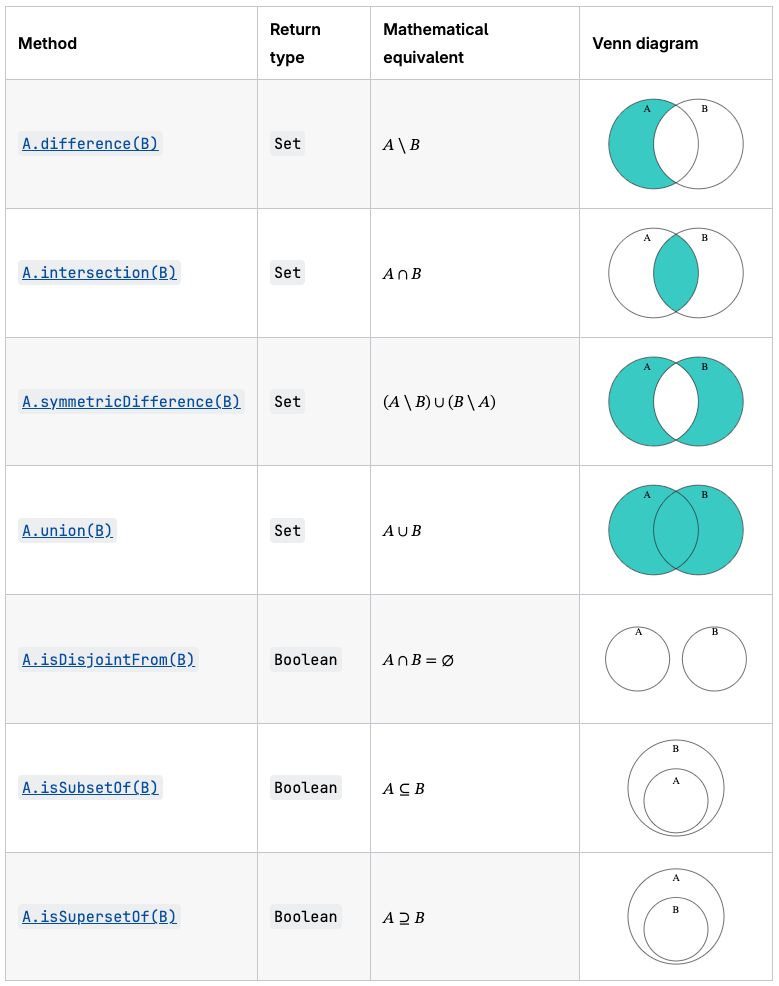
Set objects are collections of values. A value in the set may only occur once; it is unique in the set's collection.
const mySet1 = new Set();

mySet1.add(1); // Set(1) { 1 }
mySet1.add(5); // Set(2) { 1, 5 }
mySet1.add(5); // Set(2) { 1, 5 }
mySet1.add("some text"); // Set(3) { 1, 5, 'some text' }
const o = { a: 1, b: 2 };
mySet1.add(o);

mySet1.add({ a: 1, b: 2 }); // o is referencing a different object, so this is okay

mySet1.has(1); // true
mySet1.has(3); // false, since 3 has not been added to the set
mySet1.has(5); // true
mySet1.has(Math.sqrt(25)); // true
mySet1.has("Some Text".toLowerCase()); // true
mySet1.has(o); // true

mySet1.size; // 5

mySet1.delete(5); // removes 5 from the set
mySet1.has(5); // false, 5 has been removed

mySet1.size; // 4, since we just removed one value

mySet1.add(5); // Set(5) { 1, 'some text', {...}, {...}, 5 } - a previously deleted item will be added as a new item, it will not retain its original position before deletion

console.log(mySet1); // Set(5) { 1, "some text", {…}, {…}, 5 }
Map()
The Map object holds key-value pairs and remembers the original insertion order of the keys. Any value (both objects and primitive values) may be used as either a key or a value.
A key in the Map may only occur once;
const map = new Map();

map.set("a", 1);
map.set("b", 2);
map.set("c", 3);

console.log(map.get("a"));
// Expected output: 1

map.set("a", 97);

console.log(map.get("a"));
// Expected output: 97

console.log(map.size);
// Expected output: 3

map.delete("b");

console.log(map.size);
// Expected output: 2
Object is similar to Map—both let you set keys to values, retrieve those values, delete keys, and detect whether something is stored at a key. For this reason (and because there were no built-in alternatives), Object has been used as Map historically.
NB! Map does not contain any keys by default. It only has what is explicitly put into it. This is different from Object, where there is always a prototype chain. Setting Object properties works for Map objects as well, and can cause considerable confusion.
const wrongMap = new Map();
wrongMap["bla"] = "blaa";

wrongMap.has("bla"); // false
wrongMap.delete("bla"); // false
Type Conversions (primitives)
String conversion happens when we need the string form of a value.
String conversion is mostly obvious.
A false becomes "false", null becomes "null"
Numeric conversion happens in mathematical functions and expressions automatically.
"6" / "3"; //2
- undefined – NaN
- null – 0
- true - 1
- false – 0
- string – trimmed first
- empty string - 0
Type Conversions (primitives) - Boolean
Values that are "empty", like 0, an empty string, null, undefined, and NaN, become false.
Everything else is true (any non empty string, objects, [], , negative numbers)
- Boolean("") – false
- Boolean("0") – true
- Boolean(" ") – true
This conversion or principle is called Truthy-Falsy
Operators – equality, non-equality
Equality and non-equality
== and !=
But, they will try convert values to same type
1 == "1"; // true
Type and value equality – strict equality
=== and !==
1 === "1"; // false
Operators - unary
- --var; ++var; // variable gets incremented and then used (prefix)
- var--; var++; // variable gets used and then incremented (postfix)
- +var; //convert string to number – does not change sign
- -var; // changes sign of number
Operators - logical
Typical C – && - and, || - or, ! – boolean not
let x = predicate ? trueValue : falseValue;
Careful with operator priority – && has higher precedence than || (and vs or)
// && binds higher than ||, so these are equivalent:
if (firstRun == true || selectedCategory != undefined && selectedState != undefined) {
}
if (firstRun == true || (selectedCategory != undefined && selectedState != undefined)) {
}

// Different meaning - parentheses change grouping:
if ((firstRun == true || selectedCategory != undefined) && selectedState != undefined) {
}
Generally
- Grouping: ()
- Member access . or [...]
- Not: !
- Comparison, e.g. < , >= , === , !=, ...
- Logical AND && (its multiplication 0 * 1 = 0 => FALSE)
- Logical OR || (its adding 0 + 1 = 1 => TRUE)
Common use outside if
settings = userSettings || defaultSettings;
or
settings = userSettings ?? defaultSettings;
If userSettings is falsy, then defaultSettings is assigned to settings.
Operators - relational
Classical
><<=>=- Careful with string comparison!
"Z" < "z"
Operators - assignment
- =
- += -= /= *= %=
Advanced bitwise logic
- var1 << 1; // shift 1 bit to left
- var1 >> 1; // shift 1 bit to right, keep sign
- var1 >>> 1; // shift 1 bit to right, zero fill
- & - and, | - or, ^ - xor, ~ - not,
Operators - ?? and ?.
- ?? and ?. – same as in C#
- ?? - nullish coalescing operator
- ?. - optional chaining operator (ES2020)
Nullish – null or undefined
// ?? returns right-hand side when left is null or undefined
let name = null;
let displayName = name ?? "Anonymous"; // "Anonymous"

// Different from || which checks for any falsy value
let count = 0;
let result1 = count || 10;  // 10 (0 is falsy)
let result2 = count ?? 10;  // 0  (0 is not null/undefined)

// ?. stops evaluation if left side is null/undefined
let user = { address: { street: "Main St" } };
let street = user?.address?.street;   // "Main St"
let zip = user?.address?.zip;         // undefined (no error)
let city = user?.location?.city;      // undefined (no error)
JS Comparisons 1
When comparing different types, JS converts values to numbers:
0 == false; // true
"" == false; // true
"01" == 1; // true
Problems:
Boolean(0); // false
Boolean("0"); // true
0 == "0"; // true
JS Comparison 2
null and undefined
null === undefined; // false, different types
null == undefined; // true
In equality:
null > 0; // false
null == 0; // false - special case. Null and undefined equal only eachother
null >= 0; // true
JS Comparisons 3
undefined > 0; // false
undefined < 0; // false
undefined == 0; //false
undefined gets converted to NaN, NaN returns false for all comparisons. In equality check – undefined only equals null, undefined and no other value.
JS Comparisons 4
- Comparison operators return a boolean value.
- Strings are compared letter-by-letter in the "dictionary" order.
- When values of different types are compared, they get converted to numbers (with the exclusion of a strict equality check).
- The values null and undefined equal == each other and do not equal any other value.
- Be careful when using comparisons like > or < with variables that can occasionally be null/undefined. Checking for null/undefined separately is a good idea.
isNaN(value)– forNaNchecking
Dialogs
alert(message)– Modal dialog, OK button.result = prompt(title, [default])– modal, with input field with default value and OK/Cancel.Result === nullif canceled.Result = confirm(question)– modal, OK/Cancel. Result istruefor OK,falseotherwise.
Console
The console object provides access to the browser's debugging console (or terminal in Node.js). It is used to log information, debug code, and interact with the runtime environment during development.
console.log("Hello, World!");
console.warn("This is a warning message.");
console.info('%cThis is a styled info message!', 'color: blue; font-size: 16px; font-weight: bold;');
console.table([{name: "Amit", age: 30}, {name: "Jatin", age: 25}]);

const car = "Dodge Charger";
const someObject = { str: "Some text", id: 5 };
console.info("My first car was a", car, ". The object is:", someObject);
console.dir()
Displays an interactive listing of the properties of a specified JavaScript object. This listing lets you use disclosure triangles to examine the contents of child objects.
console.dirxml()
Displays an XML/HTML Element representation of the specified object if possible or the JavaScript Object view if it is not possible.
https://developer.mozilla.org/en-US/docs/Web/API/console
Switch
- Mostly normal
- When first match is found, execution continues to next break.
- Any expression can be switch/case argument.
- Switch uses strict equality checks (===).
Loops
while– check condition, then execute.do..while– execute, then check condition.for (begin; condition; step)– begin, then check condition, then execute, then step.break– break out of loop.continue– skip to next iteration.for..in– iterate over object properties.for..of– iterate over iterable objects (arrays, strings, etc).
JSON
All properties and methods of JSON are static.
JSON is a syntax for serializing objects, arrays, numbers, strings, booleans, and null.
JSON.parse
Parse a piece of string text as JSON, optionally transforming the produced value and its properties, and return the value.
JSON.parse("{}"); // {}
JSON.parse("true"); // true
JSON.parse('"foo"'); // "foo"
JSON.parse('[1, 5, "false"]'); // [1, 5, "false"]
JSON.parse("null"); // null
JSON.stringify
Return a JSON string corresponding to the specified value, optionally including only certain properties or replacing property values in a user-defined manner.
JSON.stringify(value)
JSON.stringify(value, replacer)
JSON.stringify(value, replacer, space)
console.log(JSON.stringify({ a: 2 }, null, "    "));
/*
{
    "a": 2
}
*/
https://developer.mozilla.org/en-US/docs/Web/JavaScript/Reference/Global_Objects/JSON
setTimeout and setInterval
setTimeout is a JavaScript function that allows you to schedule a piece of code to be executed once after a specified delay in milliseconds. Can be stopped with clearTimeout.
setInterval also takes two parameters: the function to execute and the interval time in milliseconds between each execution. This interval continues indefinitely until it is cleared with clearInterval.
setTimeout(function() {
  console.log('Print once after 2 seconds');
}, 2000);


const handle = setInterval(function() {
  console.log('Printing every 5 seconds');
}, 5000);

const clearHandle = setInterval(function() {
  console.log('Printing every 6 seconds'); // should print only once
  clearInterval(handle);
  clearInterval(clearHandle);
}, 6000);
Defence Preparation
Be prepared to explain topics like these:
- What does "use strict" do, and why is it recommended? — Strict mode catches common coding mistakes by turning silent errors into thrown errors. It forbids things like using undeclared variables, assigning to read-only properties, and duplicate parameter names. In modules and classes, strict mode is enabled automatically.
- What is the difference between
let,const, andvar? Why should you avoidvar? —letandconstare block-scoped (limited to the nearest{ }block), whilevaris function-scoped and gets hoisted to the top of the function.varallows re-declaration and can lead to surprising bugs when used in loops or conditionals.constprevents reassignment of the variable binding (but does not make objects immutable). Useconstby default,letwhen reassignment is needed, and avoidvarentirely. - Explain the difference between value types (primitives) and reference types (objects). What happens when you assign an object to a new variable? — Primitives (string, number, boolean, null, undefined, symbol, bigint) are copied by value — changing one variable does not affect another. Objects, arrays, and functions are reference types — assigning an object to a new variable copies the reference, not the data. Both variables point to the same object in memory, so changes through one variable are visible through the other.
- Why does
===behave differently from==? Give an example where they produce different results. —===(strict equality) compares both value and type without any conversion.==(loose equality) performs type coercion before comparing, which produces counterintuitive results like0 == ""beingtrue,null == undefinedbeingtrue, and"0" == falsebeingtrue. Always use===to avoid accidental type coercion bugs. - What are truthy and falsy values in JavaScript? List all falsy values. — A falsy value is one that evaluates to
falsein a boolean context (like anifcondition). The complete list of falsy values is:false,0,-0,0n(BigInt zero),""(empty string),null,undefined, andNaN. Everything else is truthy, including empty arrays[]and empty objects{}, which is a common source of confusion. - What is the difference between
??(nullish coalescing) and||(logical OR) when providing default values? —||returns the right-hand side when the left side is any falsy value (including0,"", andfalse).??returns the right-hand side only when the left side isnullorundefined. This matters when0or""are valid values —quantity || 10would replace0with10, whilequantity ?? 10would correctly keep0. - Explain
map(),filter(), andreduce()on arrays. How do they differ from aforloop? —map()transforms each element and returns a new array of the same length.filter()returns a new array containing only elements that pass a test function.reduce()accumulates all elements into a single value (sum, object, array, etc.) using an accumulator. Unlikeforloops, these methods do not mutate the original array, return new values, and can be chained together for readable data transformations. - What are the limitations of
JSON.stringify()andJSON.parse()? —JSON.stringify()silently dropsundefined, functions, and symbols from objects. It cannot handle circular references (throws an error). Dates are converted to strings butJSON.parse()does not convert them back to Date objects.Map,Set,RegExp, and other special types are serialized as empty objects. For deep cloning objects,structuredClone()is generally a better choice.