Vue 02 - Components
Components
Components are reusable building blocks. Each component is a .vue SFC file with its own template, logic, and styles.
Creating and using a component
ButtonCounter.vue
<script setup lang="ts">
import { ref } from "vue";

const count = ref(0);

const increment = () => {
  count.value++;
};
</script>

<template>
  <button @click="increment">Count is: {{ count }}</button>
</template>
App.vue — import and use the component as a custom HTML tag:
<script setup lang="ts">
import ButtonCounter from "./components/ButtonCounter.vue";
</script>

<template>
  <h1>My App</h1>
  <ButtonCounter />
  <ButtonCounter />
</template>
Each <ButtonCounter /> instance maintains its own independent state.
Props
Props pass data from parent to child. Use defineProps with a TypeScript interface for type safety.
<script setup lang="ts">
interface Props {
  foo: string;
  bar?: number;
}

const props = defineProps<Props>();
</script>
Default values
Use withDefaults to provide default values for optional props:
export interface Props {
  msg?: string;
  labels?: string[];
}

const props = withDefaults(defineProps<Props>(), {
  msg: "hello",
  labels: () => ["one", "two"],
});
Using props in parent
<script setup lang="ts">
import ButtonCounter from "./components/ButtonCounter.vue";
</script>

<template>
  <!-- Static prop -->
  <ButtonCounter msg="Hello" />

  <!-- Dynamic prop (bound to a variable or expression) -->
  <ButtonCounter :msg="greeting" :labels="['a', 'b']" />
</template>
Custom events (emits)
Child components communicate back to parents through events. Use defineEmits for type-safe event declarations.
<script setup lang="ts">
const emit = defineEmits<{
  (e: "change", id: number): void;
  (e: "update", value: string): void;
}>();

const handleClick = () => {
  emit("change", 42);
};
</script>

<template>
  <button @click="handleClick">Change</button>
  <!-- Or emit directly in template -->
  <button @click="$emit('update', 'new value')">Update</button>
</template>
Parent listens to the event:
<MyComponent @change="(id) => console.log(id)" @update="handleUpdate" />
Unlike native DOM events, component emitted events do not bubble.
Component v-model
v-model on a component creates two-way binding. Since Vue 3.4, use the defineModel macro for the simplest approach:
<script setup lang="ts">
const title = defineModel<string>("title");
</script>

<template>
  <input type="text" v-model="title" />
</template>
Parent usage:
<MyComponent v-model:title="bookTitle" />
The older pattern (before 3.4) uses defineProps + defineEmits with update:propName:
<script setup lang="ts">
defineProps<{ title: string }>();
defineEmits<{ (e: "update:title", value: string): void }>();
</script>

<template>
  <input
    type="text"
    :value="title"
    @input="$emit('update:title', ($event.target as HTMLInputElement).value)"
  />
</template>
Slots
Slots let a parent inject content into a child component's template. The child defines where the content appears with <slot>.
<!-- Parent -->
<FancyButton>
  Click me!
</FancyButton>

<!-- FancyButton.vue -->
<template>
  <button class="fancy-btn">
    <slot>
      Submit
      <!-- fallback content if nothing provided -->
    </slot>
  </button>
</template>
Named slots
For multiple content areas, use named slots:
<!-- Parent -->
<PageLayout>
  <template #header>
    <h1>Page Title</h1>
  </template>
  <template #default>
    <p>Main content here</p>
  </template>
  <template #footer>
    <p>Footer content</p>
  </template>
</PageLayout>

<!-- PageLayout.vue -->
<template>
  <header><slot name="header"></slot></header>
  <main><slot></slot></main>
  <footer><slot name="footer"></slot></footer>
</template>
Slot content has access to the parent's scope, not the child's.
Template refs
For direct access to DOM elements, use template refs.
<script setup lang="ts">
import { ref, onMounted } from "vue";

const inputRef = ref<HTMLInputElement | null>(null);

onMounted(() => {
  inputRef.value?.focus();
});
</script>

<template>
  <input ref="inputRef" />
</template>
Vue Lifecycle
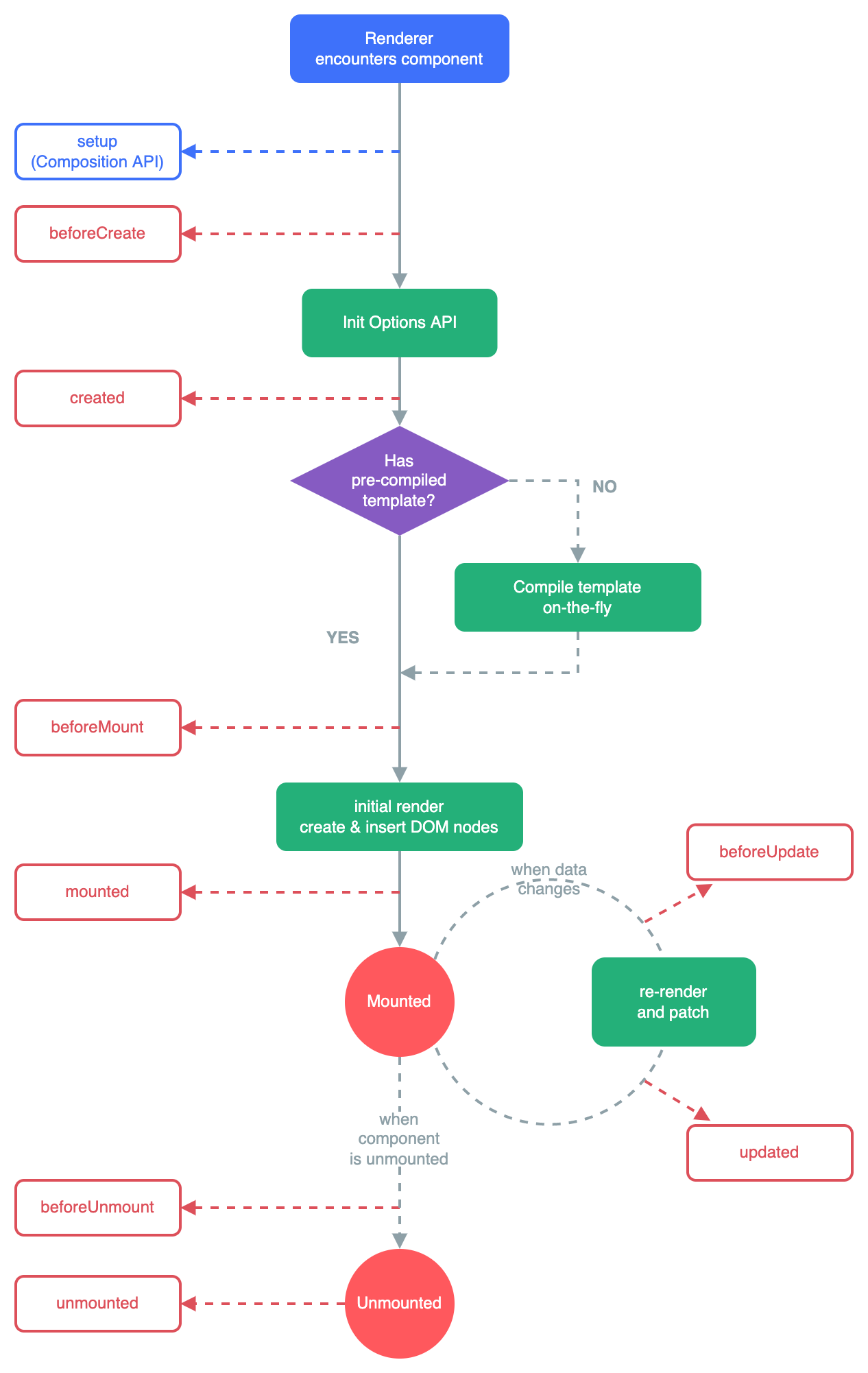
Key lifecycle hooks in Composition API:
import {
  onMounted,
  onUpdated,
  onUnmounted,
  onBeforeMount,
  onBeforeUpdate,
  onBeforeUnmount,
  onErrorCaptured,
  onRenderTracked,
  onRenderTriggered,
  onActivated,
  onDeactivated,
  onServerPrefetch,
} from "vue";

onMounted(() => {
  // Component is mounted to DOM — access DOM elements, start timers, fetch data
});

onUnmounted(() => {
  // Cleanup — remove event listeners, clear timers
});
Most commonly used: onMounted (initial data fetching, DOM access) and onUnmounted (cleanup).
Defence Preparation
Be prepared to explain topics like these:
- How do you define type-safe props in Vue with
defineProps? What happens if a required prop is missing? — UsedefineProps<{ title: string; count?: number }>()with a TypeScript generic to declare prop types. Required props (without?) trigger a Vue runtime warning if the parent does not provide them. For default values on optional props, wrap withwithDefaults(defineProps<Props>(), { count: 0 }). TypeScript checks prop types at compile time, and Vue validates them at runtime in development mode. - How do Vue component events (
defineEmits) differ from native DOM events? — Vue component events are custom events emitted withemit('eventName', payload)and declared withdefineEmits. They do not bubble — only the direct parent that renders the component can listen with@eventName. Native DOM events bubble up through the DOM tree. Component events enforce an explicit parent-child communication contract, making data flow easier to trace than native events that can be caught by any ancestor. - What is
defineModel()and how does it simplify two-way binding on components? —defineModel()(Vue 3.4+) creates a ref that is automatically synced with the parent'sv-model. BeforedefineModel, you had to manually declare a prop and emit anupdate:propNameevent — three pieces of boilerplate. WithdefineModel, the component just reads and writes a ref, and Vue handles the prop/emit synchronization automatically. The parent uses<Child v-model="value" />as usual. - How do slots work in Vue? What is the difference between default and named slots? — Slots let a parent component pass template content into a child component's rendering. A default
<slot />renders whatever the parent puts between the component's opening and closing tags. Named slots (<slot name="header" />) accept targeted content using<template #header>. Slot content is rendered in the parent's scope — it can access the parent's data but not the child's, unless the child passes data back via scoped slots. - When would you use template refs (
ref="...") instead of reactive data? — Template refs give direct access to a DOM element or child component instance. Use them when you need to interact with the DOM imperatively — focusing an input, measuring element size, integrating with non-Vue libraries (charts, maps), or calling a method on a child component. Prefer reactive data and declarative template bindings for normal rendering. Template refs are an escape hatch, not the primary way to manage state. - What are the most important Vue lifecycle hooks, and when does each run? —
onMountedruns after the component is inserted into the DOM — use it for initial data fetching, setting up third-party libraries, or accessing DOM elements.onUnmountedruns when the component is removed — use it for cleanup (clearing timers, removing event listeners, canceling requests).onUpdatedruns after a reactive state change causes a re-render.onBeforeUnmountruns just before removal, useful for saving state or confirming navigation. - What is the order of lifecycle hooks when a parent and child component both mount? — The parent's setup runs first, then the child's setup runs. The child's
onMountedfires before the parent'sonMounted— because the parent cannot be considered "mounted" until all its children are mounted. On unmount, the reverse happens: parent'sonBeforeUnmountfires first, then children unmount, then parent'sonUnmounted. Understanding this order matters when coordinating initialization between parent and child.