Promises, Event loop
Classical, event based
var img1 = document.querySelector(".img-1");

function loaded() {
  // woo yey image loaded
}

if (img1.complete) {
  loaded();
} else {
  img1.addEventListener("load", loaded);
}

img1.addEventListener("error", function () {
  // argh everything's broken
});
Promise way
img1.ready().then(function() {
    // loaded
}, function() {
    // failed
});

// and ...
Promise.all([img1.ready(), img2.ready()]).then(function() {
    // all loaded
}), function() {
    // one or more failed
});
Promise lifecycle
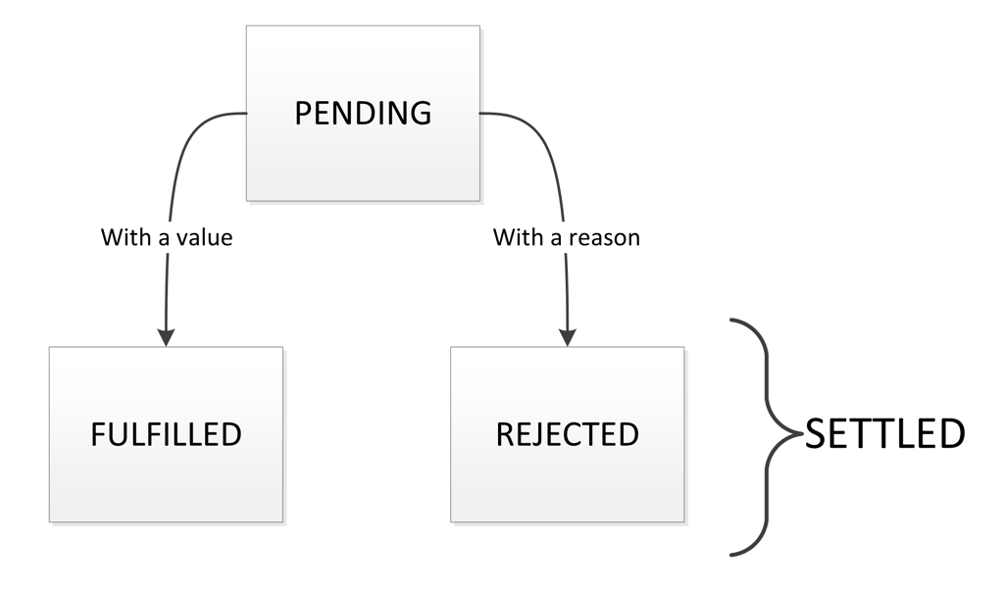
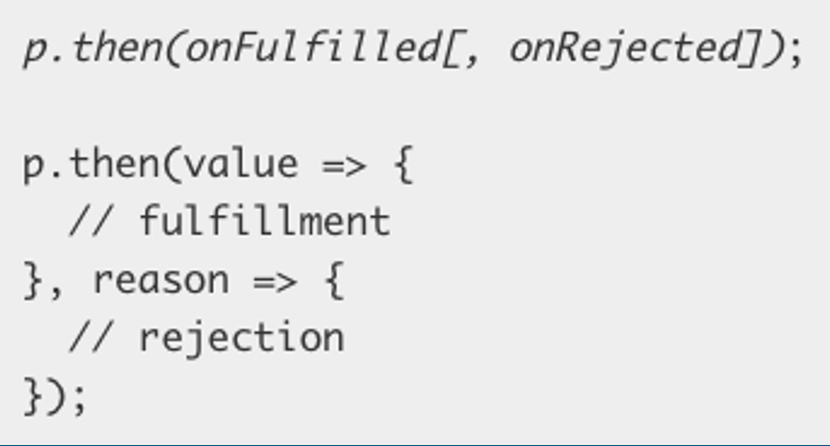
- A promise can be:
- fulfilled - The action relating to the promise succeeded
- rejected - The action relating to the promise failed
- pending - Hasn't fulfilled or rejected yet
- settled - Has fulfilled or rejected
Create your own
const promise = new Promise(function(resolve, reject) {
    // do a thing, possibly async, then ...

    if (/* everything returned out fine */) {
        resolve('Stuff worked');
    } else {
        reject(new Error('It broke'));
    }
});
promise.then(
  function (result) {
    console.log(result); // "Stuff worked"
  },
  function (err) {
    console.log(err); // Error: "It broke"
  }
);
In practice, it is often desirable to catch rejected promises rather than use then's two case syntax.
Fail and success of a promise
A promise can only succeed or fail once. It cannot succeed or fail twice, neither can it switch from success to failure or vice versa. If a promise has succeeded or failed and you later add a success/failure callback, the correct callback will be called, even though the event took place earlier.
Handling result
The promise fate can be subscribed to using .then (if resolved) or .catch (if rejected).
const promise = new Promise((resolve, reject) => {
  resolve(123);
});

promise.then((res) => {
  console.log("I get called:", res === 123); // I get called: true
});

promise.catch((err) => {
  // This is never called
});
const promise = new Promise((resolve, reject) => {
  reject(new Error("Something awful happened"));
});

promise.then((res) => {
  // This is never called
});

promise.catch((err) => {
  console.log("I get called: ", err.message); // I get called: Something awful happened
});
Quickly creating an already resolved promise: Promise.resolve(result)
Quickly creating an already rejected promise: Promise.reject(error)
Chaining
- Chaining - Queueing asynchronous actions
- When you return something from a then() callback, it's a bit magic.
- If you return a value, the next then() is called with that value.
- If you return something promise-like, the next then() waits on it, and is only called when that promise settles (succeeds/fails)
var promise = new Promise(function (resolve, reject) {
  resolve(1);
});

promise
  .then(function (val) {
    console.log(val); // 1
    return val + 2;
  })
  .then(function (val) {
    console.log(val); // 3
  });
Promise.resolve(123)
  .then((res) => {
    console.log(res); // 123
    return 456;
  })
  .then((res) => {
    console.log(res); // 456
    return Promise.resolve(123); // Notice that we are returning a Promise
  })
  .then((res) => {
    console.log(res); // 123 : Notice that this 'then' is called when resolved
    return 123;
  });
.finally()
The finally() method of Promise instances schedules a function to be called when the promise is settled (either fulfilled or rejected). It immediately returns another Promise object, allowing you to chain calls to other promise methods.
function checkMail() {
  return new Promise((resolve, reject) => {
    if (Math.random() > 0.5) {
      resolve("Mail has arrived");
    } else {
      reject(new Error("Failed to arrive"));
    }
  });
}

checkMail()
  .then((mail) => {
    console.log(mail);
  })
  .catch((err) => {
    console.error(err);
  })
  .finally(() => {
    console.log("Experiment completed");
  });
Error handling
- Aggregate the error handling of any preceding portion of the chain with a single catch
- The catch actually returns a new promise (effectively creating a new promise chain)
- Any synchronous errors thrown in a then (or catch) result in the returned promise to fail
- Only the relevant (nearest tailing) catch is called for a given error (as the catch starts a new promise chain)
Promise.reject(new Error("Something bad happened"))
  .then((res) => {
    console.log(res); // 123
    return 456;
  })
  .then((res) => {
    console.log(res); // 456
    return Promise.resolve(123); // Notice that we are returning a Promise
  })
  .then((res) => {
    console.log(res); // 123 : Notice that this 'then' is called when resolved
    return 123;
  })
  .catch((err) => {
    console.log(err); // Something bad happened
  });
Parallel control flow
- static
Promise.allfunction that you can use to wait for N number of promises to fulfill. - static
Promise.racefunction that can be used to wait for the first of N promises to settle (fulfill or reject) - static
Promise.allSettled- waits for all promises to settle (either fulfill or reject) - static
Promise.any- waits for first promises to fulfill
Async
- Async functions - making promises more friendly
- They allow you to write promise-based code as if it were synchronous, but without blocking the main thread. They make your asynchronous code less "clever" and more readable.
- Use the
asynckeyword before a function definition, then use await within the function. When you await a promise, the function is paused in a non-blocking way until the promise settles. If the promise fulfills, you get the value back. If the promise rejects, the rejected value is thrown.
async function myFirstAsyncFunction() {
  try {
    const fulFilledValue = await promise;
  } catch (rejectedValue) {
    // ...
  }
}
Comparison
function logFetch(url) {
  return fetch(url)
    .then((response) => response.text())
    .then((text) => {
      console.log(text);
    })
    .catch((err) => {
      console.error("fetch failed", err);
    });
}
async function logFetch(url) {
  try {
    const response = await fetch(url);
    console.log(await response.text());
  } catch (err) {
    console.error("fetch failed", err);
  }
}
Event loop
At its core, the JavaScript event loop is responsible for managing the execution of code, collecting and processing events, and executing queued tasks. JavaScript operates in a single-threaded environment, meaning only one piece of code runs at a time. The event loop ensures that tasks are executed in the correct order, enabling asynchronous programming.

Components of the Event Loop
- Call Stack: Keeps track of function calls. When a function is invoked, it is pushed onto the stack. When the function finishes execution, it is popped off.
- Web APIs: Provides browser features like setTimeout, DOM events, and HTTP requests. These APIs handle asynchronous operations.
- Task Queue (Callback Queue): Stores tasks waiting to be executed after the call stack is empty. These tasks are queued by setTimeout, setInterval, or other APIs.
- Microtask Queue: A higher-priority queue for promises and MutationObserver callbacks. Microtasks are executed before tasks in the task queue.
- Event Loop: Continuously checks if the call stack is empty and pushes tasks from the microtask queue or task queue to the call stack for execution.
How It Works
- Main Task: JavaScript executes code line by line in a single thread (like following a recipe). This is called the call stack.
- Waiting Tasks (Events): Some tasks take time (e.g., fetching data from the internet, timers). Instead of blocking progress, these tasks are sent to “wait in line” in a queue (known as the event queue).
- The Manager (Event Loop): The event loop constantly checks:
- Is the main task (call stack) empty?
- Are there any tasks waiting in the queue?
- If yes, it picks a task from the queue and moves it to the stack for execution.
Types of Tasks in JavaScript
- Synchronous Tasks: Executed immediately on the call stack (e.g., function calls, variable declarations).
- Microtasks: High-priority asynchronous tasks, such as Promise callbacks and queueMicrotask.
- Macrotasks: Lower-priority asynchronous tasks, like setTimeout, setInterval, and DOM events.
Order of Execution
- Execute all synchronous tasks on the call stack.
- Process all microtasks in the microtask queue.
- Process the first task in the macrotask queue.
- Repeat.
setTimeout(() => {
  console.log('Timer 1');
  Promise.resolve().then(() => {
    console.log('Microtask 1');
    Promise.resolve().then(() => {
      console.log('Microtask 2');
    });
  });
}, 0);

Promise.resolve().then(() => {
  console.log('Microtask 3');
});

console.log('Main Task');
Output:
- Main Task (Synchronous)
- Microtask 3 (Microtask from Promise)
- Timer 1 (Macrotask from setTimeout)
- Microtask 1 (Microtask within setTimeout)
- Microtask 2 (Chained Microtask from Microtask 1)
Recap
JavaScript is single-threaded. One call stack, one thing at a time. The event loop is how it handles async work without blocking.
How it works:
- Call stack — executes your synchronous code, one frame at a time
- Web APIs — when you hit something async (
setTimeout,fetch, DOM events), the browser handles it in the background - Callback queues — when the async work finishes, its callback gets queued
- Event loop — constantly checks: "Is the call stack empty? If yes, grab the next callback from the queue and push it onto the stack."
Two queues, different priority:
- Microtask queue (higher priority) —
Promise.then,queueMicrotask,MutationObserver. Drained completely after every task. - Macrotask queue (lower priority) —
setTimeout,setInterval, DOM events,fetchcallbacks. One per loop iteration.
Classic gotcha:
console.log('1');
setTimeout(() => console.log('2'), 0);
Promise.resolve().then(() => console.log('3'));
console.log('4');
// Output: 1, 4, 3, 2
Sync first (1, 4), then microtask (3), then macrotask (2). Zero ms timeout doesn't mean immediate — it means "as soon as the stack is clear and microtasks are done."
Stack empties → microtasks drain → one macrotask → repeat.
Defence Preparation
Be prepared to explain topics like these:
- What are the three states of a promise, and what does "settled" mean? — A promise starts as
pending, meaning the async operation is still in progress. It transitions tofulfilled(resolved with a value) on success, orrejected(with a reason/error) on failure. Once fulfilled or rejected, a promise is "settled" — its state is final and cannot change. Attaching.then()or.catch()to an already-settled promise still works; the callback is queued as a microtask. - How does promise chaining work? What happens when you return a value from
.then()? — Each.then()returns a new promise. If the callback returns a plain value, the next.then()receives that value. If the callback returns a promise, the chain waits for it to settle before continuing. This lets you sequence multiple async operations without nesting callbacks. Errors propagate down the chain until a.catch()handles them. - What is the difference between
Promise.all()andPromise.allSettled()? —Promise.all()resolves when all input promises fulfill, but rejects immediately if any one promise rejects — you lose the results of promises that did succeed.Promise.allSettled()waits for all promises to settle (fulfill or reject) and returns an array of{ status, value/reason }objects for each. Useallwhen every result is required; useallSettledwhen you want partial results even if some fail. - How does
async/awaitrelate to promises? Can you mix them with.then()? —asyncfunctions always return a promise.awaitpauses execution inside the function until the awaited promise settles, then unwraps its value (or throws if rejected). Under the hood, it is syntactic sugar over.then()chaining. You can freely mix them — call anasyncfunction and attach.then()to the result, orawaita function that returns a promise via the constructor. - Explain the JavaScript event loop. What is the call stack, and what are the task queues? — JavaScript is single-threaded — it has one call stack where functions execute. When an async operation (setTimeout, fetch, etc.) completes, its callback is placed in a task queue. The event loop continuously checks: if the call stack is empty, it first drains all microtasks, then picks one macrotask from the queue and pushes it onto the stack. This cycle repeats, giving the illusion of concurrency while running one thing at a time.
- What is the difference between microtasks and macrotasks? Give examples of each. — Microtasks include
Promise.then/catch/finallycallbacks,queueMicrotask(), andMutationObserver. Macrotasks includesetTimeout,setInterval, DOM event callbacks, and I/O operations. After each macrotask completes, the entire microtask queue is drained before the next macrotask runs. This means a resolved promise callback always runs before a pendingsetTimeout(..., 0)callback, even though both are "asynchronous." - How do you handle errors in
async/awaitcode? What happens if you forget to handle a rejection? — Wrapawaitcalls intry/catchblocks to handle rejections. Thecatchblock receives the rejection reason as the error. If you do not handle a rejection (no try/catch and no.catch()on the returned promise), it becomes an unhandled promise rejection, which logs a warning and may crash the process in Node.js. For multiple independent operations, considerPromise.allSettled()so one failure does not lose all results.