92 - Spec Driven Development
The landscape of software development is undergoing a rapid, AI-driven transformation.
Competing philosophies — Vibe Coding, AI assisted coding and Spec Coding (or Spec-Driven Development) are emerging.
- Vibe-Coding is a new approach to software development that focuses on the emotional and social aspects of coding. Usually no technical background is required.
- AI-assisted coding is a more traditional approach to software development, where AI is used to assist developers in writing code. Ask Questions, simple agent usage.
- Spec-Driven Development is a new approach to software development that focuses on the technical aspects of coding. It is a more structured approach to software development, where the developer writes a specification for the code they want to write, and then the AI writes the code for them.
Most developers write code first and document later. Spec-driven development inverts this approach.
In traditional development, your code is the source of truth. Writing specs is something you do later (often as an afterthought).
Spec-driven development flips the script. Your spec becomes the source of truth, and you let AI handle the implementation details and write the code. This way, your specifications become executable, thanks to AI coding agents.
There are several tools available to help you with spec-driven development:
- BMAD
- Spec-Kit
- OpenSpec
and some others...
Spec-Kit
GitHub Spec-Kit: The "Keep It Simple" Option.
Spec-Kit is ideal for developers or small teams who want to improve the quality of AI-generated code by adding more structure; it's straightforward, uses your existing tools, and is backed by GitHub. It works best for small to medium-sized projects or features where you need a clear, structured way to define new functionality without the overhead of a full project management system.
Use Spec-Kit if:
- You're building something new from scratch
- You want structure but don't want to spend a week learning a framework
- You're already using Copilot, Claude Code, or similar tools
- You're just one dev or a small team
- You've never tried spec-driven dev before and want to ease into it
OpenSpec
OpenSpec: The "I Have Legacy Code" Option.
OpenSpec adds a lightweight specification workflow that locks intent before implementation, giving you deterministic, reviewable outputs, and is designed to work with the AI tools you already use through custom slash commands where supported and context rules everywhere else. OpenSpec is purpose-built for brownfield (existing codebases), with its lightweight, change-centric design avoiding the friction of imposing greenfield workflows on legacy code.
Go with OpenSpec if:
- You're working with an existing codebase (this is the big one)
- You want to move fast without a ton of ceremony
- You need good change tracking and versioning
- You hate bloated tooling
- Your workflow is basically: propose change → implement → done
BMAD
BMAD: The "I'm Building the Death Star" Option.
BMAD-Method is a comprehensive framework for agentic agile AI-driven development that uses specialized AI agents and personas to transform domains beyond just software development, built on agentic collaboration principles and known as the Breakthrough Method of Agile AI-Driven Development. BMAD is a multi-agent framework that acts like an entire AI development team, representing a very different philosophy from lightweight toolkits.
This is the nuclear option. BMAD doesn't just help you write specs—it simulates an entire development team.
BMAD makes sense if:
- You're working on a massive, complex project
- You need enterprise-level project management
- You're managing multiple repos
- You have time to invest in learning it (it's not trivial)
- You need it to work across different domains, not just code
- Your project is complicated enough that having AI agents debate architecture actually helps
So Which One Should I Pick?
For pioneering greenfield projects, choose between BMAD's deep role-planning and spec-kit's structured rigor: for complex domain logic and early architecture debates, BMAD excels, while for straightforward architecture but strict compliance, spec-kit is safer; for modernizing legacy systems, OpenSpec is purpose-built for brownfield with its lightweight, change-centric design.
| OpenSpec. | Spec-Kit. | BMAD | |
|---|---|---|---|
| Setup Time | 5 minutes | 30 minutes. | "Why did I do this" |
| Best For. | Existing codebases | New projects | Enterprise stuff |
| Complexity | Low. | Medium. | High. |
| Workflow. | 2 steps | 4 steps. | Multi-agent chaos |
| Who's in Charge | You | You. | You + AI agents. |
| Overhead. | Almost none. | Manageable. | Significant |
Pick OpenSpec if:
- You've got legacy code (this is 90% of us, let's be real)
- You want to try this spec-driven thing without committing your life to it
- Fast iteration > comprehensive process
- You just want it to work
Pick Spec-Kit if:
- You're starting something new
- You want something GitHub-official that won't disappear
- You're cool with a bit more structure
- You're new to this whole spec-driven thing
- You want good documentation and community support
Pick BMAD if:
- Your project is legitimately huge
- You need full project management, not just spec management
- You have time to learn a complex system
- You're tired of coordinating between multiple repos
- You work at a place that actually uses words like "comprehensive framework"
OpenSpec
Let's start with the simplest option. OpenSpec is a lightweight, change-centric approach to spec-driven development.
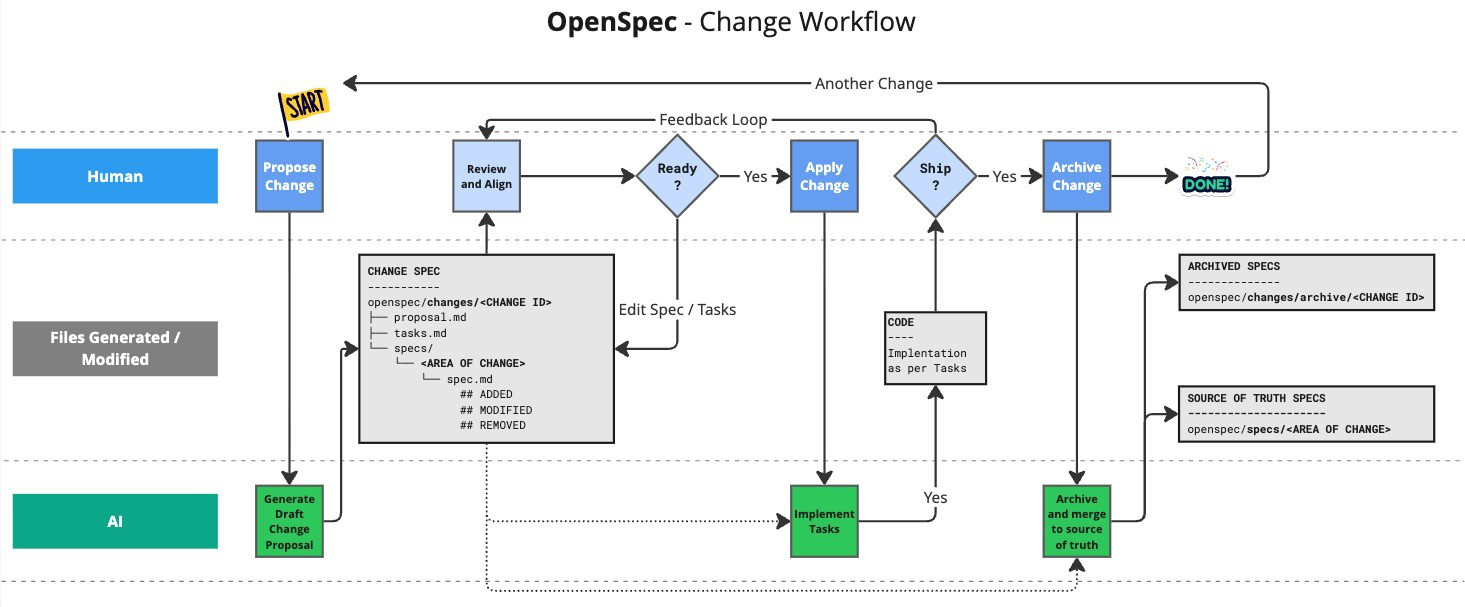
Needs Node.js >= 20.19.0.
Install with > npm install -g @fission-ai/openspec@latest
Then (ide closed)
cd my-project
openspec init
And follow the instructions.
Now open your IDE and start a chat with Kilo Code and OpenSpec.
3 prompts are sugested:
- Learn the OpenSpec workflow:
Please explain the OpenSpec workflow from openspec/AGENTS.md
and how I should work with you on this project
- Populate your project context:
Please read openspec/project.md and help me fill it out
with details about my project, tech stack, and conventions
- Create your first change proposal:
I want to add [YOUR FEATURE HERE]. Please create an OpenSpec
change proposal for this feature
Command line usage:
openspec list               # View active change folders
openspec view               # Interactive dashboard of specs and changes
openspec show <change>      # Display change details (proposal, tasks, spec updates)
openspec validate <change>  # Check spec formatting and structure
openspec archive <change> [--yes|-y]   # Move a completed change into archive/ (non-interactive with --yes)
Supported slash commands in Kilo Code chat:
/openspec-proposal.md/openspec-apply.md/openspec-archive.md
this is based on .kilocode/workflows/
First prompt (architect mode)
Please read openspec/project.md and help me fill it out
with details about my project, tech stack, and conventions
Add feature plan (architect mode)
Add banner to webapp front page, showing nice TIC-TAC-TOE logo.
Please create an OpenSpec change proposal for this feature.
Read the plan and fix it. Prompt again to add more features.
Finally apply the changes (try orchestrator mode. or code)
/openspec-apply.md add-homepage-logo-banner
If you want to add more features (after manual testing), just prompt again. Go back to same session, and ask to add more features or fix something. New ToDo tasks will be added to the change proposal. And then trigger the apply again.
When feature is done and tested - archive the change (go to code mode)
/openspec-archive.md add-homepage-logo-banner