91 - Vibe coding
Actually, it's more of "AI assisted coding".
LLMs are here to stay. And you as a developer are expected to know how to use them effectively - how to use them to write code, how to use them to debug code, how to use them to learn new concepts, etc.
Some discussions about future of software engineering
- Siim Vene, in estonian
- https://x.com/niconley/status/1966505076849074618?s=46&t=PS1Kx0D2JS9LvarPHKugng
Siim Vene is from SMIT (estonian internal affairs it house. architect. police, border etc)
Tools to use:
- Cursor
- Google Antigravity
- Claude Code
- Open Code
- Copilot
- Continue Dev
- Roo
- Cline
- Aider
- Kilo Code
- v0
- Bolt
- Base 44
- Windsurf
- Lovable.ai
- Replit
- and many, many, many more
And my favorite - Chad Ide (first agentic brainrot ide).
https://www.ycombinator.com/launches/OgV-chad-ide-the-first-brainrot-ide.
Many of these are VS Code plugins or forks. Many are commercial. Roo, Cline, Aider, Kilo - open source. Many of these tools are specific to one LLM model. Some try to be model agnostic.
But what is common - they all are just convenient prompt engineering tools and good at picking up commands from llm response. Constructs comprehensive prompts, asks for structured response and parses it for final answer or for automatic next request.
All LLMs are stateless (and frozen in their knowledge) - every request starts from scratch. So the prompt is the only thing that defines the context. And context has size limit. Usually in your LLM conversation - context will grow and grow. All user messages and LLM responses are added to context.
Prompt engineering is the key to effective use of LLMs. Usually LLMs start to lose quality at about 75% of context size (plus context poisoning). And since pricing is based on tokens (word parts, ca 4 characters) - big contexts are very expensive. So start a new session often - as soon as your task is completed. When you start to add/ask for irrelevant information on top of completed lengthy task - costs will go up and quality will go down.
When you see "compressing context" - system is trying to reduce context size by removing irrelevant information. Details will be lost.
Since in C# dev we are using Rider, there are few options. Currently, we are focusing on Kilo Code - model agnostic, open source, and has decent Jetbrains plugin.
Kilo Code
Kilo code is open-source plugin for VS Code. Model agnostic - you can use almost any LLM provider, including self hosted ones. And Kilo is highly customizable - you can define your own modes/prompts, use MCP tools, index the codebase, etc.
And most important - one of the few that has up-to-date plugin for Jetbrain IDE's (including Rider).
Model to use
Really-really complex decision. Different models are used for different tasks (price, speed, capability).
Currently Anthropic's Opus 4.5 seem to be the best. But expensive.
Then gpt5 and gemini 3.
And then many open wieight/source models - GLM air, Qwen, Minimax etc.
And many different providers - some models are accessible only directly, some are accessible via proxy provider (openrouter, kilo code). Different pricing models - monthly subscription, pay per use, etc.
Self hosting
If you have enough resources - you can host your own LLM. There are many options - Ollama, LM Studio, etc. Lots of resources required - fast RAM (gpu). Minimal requirements - ca 48+ gb of free GPU/shared memory. (I'm on MacBook pro m1 max - unified 64gb ram. Main local modal - Qwen3-coder instruct 30b a3b 8bit MLX).
HPC provided access
Taltech HPC is providing some access to locally hosted LLMs (we have 2 bigger gpu servers). Access is provided via LiteLLM proxy - you will receive the api key in email (for current semester).
Access is via vpn (or in taltech network)
Kilo Code Basics
Modes
Kilo code provides several modes (customizable) for different tasks.
- Ask
- Code
- Debug
- Architect
- Orchestrator
Ask
- A knowledgeable technical assistant focused on answering questions without changing your codebase.
- Limited access: read, browser, mcp only (cannot edit files or run commands)
- Code explanation, concept exploration, and technical learning
- Optimized for informative responses without modifying your project
Code
- A skilled software engineer with expertise in programming languages, design patterns, and best practices
- Full access to all tool groups: read, edit, browser, command, mcp
- Writing code, implementing features, debugging, and general development
- No tool restrictions—full flexibility for all coding tasks
Architect
- An experienced technical leader and planner who helps design systems and create implementation plans
- Access to read, browser, mcp, and restricted edit (markdown files only)
- System design, high-level planning, and architecture discussions
- Follows a structured approach from information gathering to detailed planning
Debug
- An expert problem solver specializing in systematic troubleshooting and diagnostics
- Full access to all tool groups: read, edit, browser, command, mcp
- Tracking down bugs, diagnosing errors, and resolving complex issues
- Uses a methodical approach of analyzing, narrowing possibilities, and fixing issues
Orchestrator
- A strategic workflow orchestrator who coordinates complex tasks by delegating them to appropriate specialized modes
- Limited access to create new tasks and coordinate workflows
- Breaking down complex projects into manageable subtasks assigned to specialized modes
- Uses the new_task tool to delegate work to other modes
So basically - customized prompt and tool access. You can create your own modes and use specific prompts.
Tools
Kilo code has many tools:
Read Group - Code exploration and analysis
- File system reading and searching
- read_file, search_files, list_files, list_code_definition_names
Edit Group - Code changes and file manipulation
- File system modifications
- apply_diff, delete_file, write_to_file
Browser Group - Web testing and interaction
- Web automation
- browser_action
Command Group - Running scripts, building projects
- System command execution
- execute_command
MCP Group - Specialized functionality through external servers
- External tool integration
- use_mcp_tool, access_mcp_resource
Workflow Group - Context switching and task organization
- Mode and task management
- switch_mode, new_task, ask_followup_question, attempt_completion, update_todo_list
Simple kilo code usage
Start with ask mode, and start to explore the codebase (or ask whatever). Ask natural questions.
For example:
- Open up your solution in Rider, go to Kilo code plugin, select ask mode
What is this solution about?
After several operations this output was produced (2025 demo code, tic-tac-toe):
Based on my analysis of the codebase, this appears to be a Tic-Tac-Toe game implementation with both console and web interfaces, along with configuration management. To provide you with a comprehensive understanding of what this solution is about, I'd like to know: Is there a specific aspect of this solution you'd like me to focus on explaining in more detail, or would you prefer a general overview of the entire system?
Using local modal via lm studio, you can log the model access with:
lms log stream --source model --filter input,output
Model session is here: model_session2.txt
Final result:
## Tic-Tac-Toe Solution Overview

This is a comprehensive Tic-Tac-Toe game implementation with both console and web interfaces, built using C# and .NET technologies. The solution demonstrates modern software architecture principles with a clean separation of concerns across multiple layers.

### Solution Architecture

The solution follows a layered architecture pattern with the following main components:

1. **BLL (Business Logic Layer)** - Contains core game logic and domain models
   - `GameBrain.cs`: Main game engine that handles board state, move processing, and win detection
   - `GameConfiguration.cs`: Configuration class for game parameters (board size, win condition)
   - `ECellState.cs` and `EPlayerType.cs`: Enumerations for game state management

2. **DAL (Data Access Layer)** - Handles data persistence and configuration management
   - `IRepository.cs`: Interface defining CRUD operations for game configurations
   - `ConfigRepositoryJson.cs`: JSON-based configuration storage implementation
   - `ConfigRepositoryEF.cs`: Entity Framework-based database implementation (commented out in main code)

3. **Console Application** - Traditional console interface
   - `ConsoleApp/Program.cs`: Main entry point with menu system
   - `ConsoleController.cs`: Game loop controller
   - `ConsoleUI/Ui.cs`: Console-based user interface

4. **Web Application** - ASP.NET Core Razor Pages implementation
   - `WebApp/Program.cs`: Application startup and dependency injection configuration
   - Razor Pages for game flow: Index, NewGame, GamePlay

5. **Menu System** - Shared menu infrastructure
   - `MenuSystem/Menu.cs`: Menu navigation system

### Main Features and Functionality

- **Multi-Interface Support**: Play the game through both console and web interfaces
- **Configurable Game Settings**: Adjustable board size, win conditions, and game names
- **Game State Management**: Complete tracking of board state, player turns, and win detection
- **Configuration Persistence**: Save/load game configurations in JSON format or database
- **Cross-Platform Compatibility**: Works on Windows, macOS, and Linux

### System Design and Data Flow

The system follows a clear data flow pattern:
1. User interacts through either console or web interface
2. Interface calls the GameController/GamePlay controller
3. Controller instantiates GameBrain with configuration parameters
4. GameBrain processes moves and determines game state
5. Results are returned to the UI for display
6. Configuration data flows through IRepository between UI and storage layers

The solution demonstrates good separation of concerns with clear boundaries between user interface, business logic, and data access layers. It also includes proper error handling and validation mechanisms.

### Technical Implementation Details

- Uses C# 12 with nullable reference types enabled
- Implements Entity Framework Core for database operations (SQLite)
- Features dependency injection for loose coupling
- Includes both synchronous and asynchronous data access patterns
- Follows SOLID principles with clear interfaces and abstractions
NB! LLMs are sycophants. Trained to be positive. They will lie to you.
Simpler example:
list all options in @/BLL/ECellState.cs
Response
Based on the content of BLL/ECellState.cs, the ECellState enum contains the following five options:

1. Empty
2. X
3. O
4. XWin
5. OWin

These are the complete set of enum values defined in the file.
Model session: model_session1.txt
More complex workflow
Switch over to architect mode, to plan new features.
User prompt
Plan to implement all not yet implemented methods in @/DAL/ConfigRepositoryEF.cs
If architect mode is too agressive, edit the prompt to your liking.
1. Do some information gathering (using provided tools) to get more context about the task.

2. You should also ask the user clarifying questions to get a better understanding of the task.

3. Once you've gained more context about the user's request, break down the task into clear, actionable steps and create a todo list using the `update_todo_list` tool. Each todo item should be:
   - Specific and actionable
   - Listed in logical execution order
   - Focused on a single, well-defined outcome
   - Clear enough that another mode could execute it independently

   **Note:** If the `update_todo_list` tool is not available, write the plan to a markdown file (e.g., `plan.md` or `todo.md`) instead.

4. As you gather more information or discover new requirements, update the todo list to reflect the current understanding of what needs to be accomplished.

5. Ask the user if they are pleased with this plan, or if they would like to make any changes. Think of this as a brainstorming session where you can discuss the task and refine the todo list.

6. Include Mermaid diagrams if they help clarify complex workflows or system architecture. Please avoid using double quotes ("") and parentheses () inside square brackets ([]) in Mermaid diagrams, as this can cause parsing errors.

7. Use the switch_mode tool to request that the user switch to another mode to implement the solution.

**IMPORTANT: Focus on creating clear, actionable todo lists rather than lengthy markdown documents. Use the todo list as your primary planning tool to track and organize the work that needs to be done.**
Context window
The context window includes:
- The system prompt (instructions from Kilo Code).
- Full conversation history (the session).
- The content of any files you mention using @.
- The output of any commands or tools Kilo Code uses.
Context managament - prompt engineering
Often agentic tools do not understand the project fully. Do get better understanding, they try to use tools to gather more info to build up better context.
All this is expensive and slow (and is redone in every session). Plus context windows are limited in size. And usually start to hallucinate at about 75% full.
To avoid this repetetive context buildup - write down specification for project that kilo code can include into every project.
List the code style, libraries used, dev patterns, project descriptions etc.
Usually this is a markdown file in the root of the project, called agents.md or something similar.
Memory bank
Kilo code has feature called memory bank.
NB! Use heavyweight models for this (gemini, sonnet, opus, etc).
Memory Bank is built on Kilo Code's Custom Rules feature, providing a specialized framework for project documentation. Memory Bank files are standard markdown files stored in .kilocode/rules/memory-bank folder within your project repository.
At the start of every task, Kilo Code reads all Memory Bank files to build a comprehensive understanding of your project.
Memory bank files:
- brief.md - created manually. The foundation of your project. High level overview. Requirements and goals.
- product.md - why project exists, problems solved, how should it work, ux goals.
- context.md - current foocus and changes, next steps
- architecture.md - architecture, patterns, component relations
- tech.md - tech stack, dev setup, tool usage patterns
How to start:
- Create a .kilocode/rules/memory-bank/ folder in your project
- Write a basic project brief in .kilocode/rules/memory-bank/brief.md
- Create a file .kilocode/rules/memory-bank-instructions.md and paste there this document
- Switch to Architect mode
- Check if a best available AI model is selected, don't use "lightweight" models
- Ask Kilo Code to "initialize memory bank"
- Wait for Kilo Code to analyze your project and initialize the Memory Bank files
- Verify the content of the files to see if the project is described correctly. Update the files if necessary.
Prompt to generate brief.md:
Provide a concise and comprehensive description of this project,
highlighting its main objectives, key features, used technologies and significance.
Then, write this description into a text file named appropriately to reflect
the project's content, ensuring clarity and professionalism in the writing.
Stay brief and short.
Reanalyze the memoy bank again with update memory bank.
Context Mentions
Context mentions are a powerful way to provide Kilo Code with specific information about your project, allowing it to perform tasks more accurately and efficiently.
You can use mentions to refer to files, folders, problems, and Git commits.
Context mentions start with the @ symbol.
Type
- file -
@/path/to/file.tsIncludes file contents in request context - Explain the function in @/src/utils.ts - folder -
@/path/to/folderProvides directory structure in tree format - What files are in @/src/components/? - url -
@https://example.comImports website content - "Summarize @https://docusaurus.io/"
NB! Always start from workspace root in file or folder mentions.
MCP
MCP (Model Context Protocol) is an open-source standard for connecting AI applications to external systems - like usbc for AI.
- The AI assistant (client) connects to MCP servers
- Each server provides specific capabilities (file access, database queries, API integrations)
- The AI uses these capabilities through a standardized interface
- Communication occurs via JSON-RPC 2.0 messages
{
	"tools": [
		{
			"name": "readFile",
			"description": "Reads content from a file",
			"parameters": {
				"path": { "type": "string", "description": "File path" }
			}
		},
		{
			"name": "createTicket",
			"description": "Creates a ticket in issue tracker",
			"parameters": {
				"title": { "type": "string" },
				"description": { "type": "string" }
			}
		}
	]
}
Basically - kilo code will scan the list of allowed mcp tools and add their description to context. Llm can then decide to when to use them.
Some useful mcp tools:
- git(hub) - full git access
- postgres - ro sql access, schema discovery
- context7 - up to date documentation for most libraries (free for public libraries). https://context7.com/
NB! Control what mode is using what tool and what tools are enabled - context grows.
Kilo code has MCP marketplace - settings/mcp servers.
NB! Kilo code just configures and enables the tool calling - does not install actual mcp server anywhere.
For running local mcp servers - use docker.
https://docs.docker.com/ai/mcp-catalog-and-toolkit/dynamic-mcp/
Info
Progression of complexity
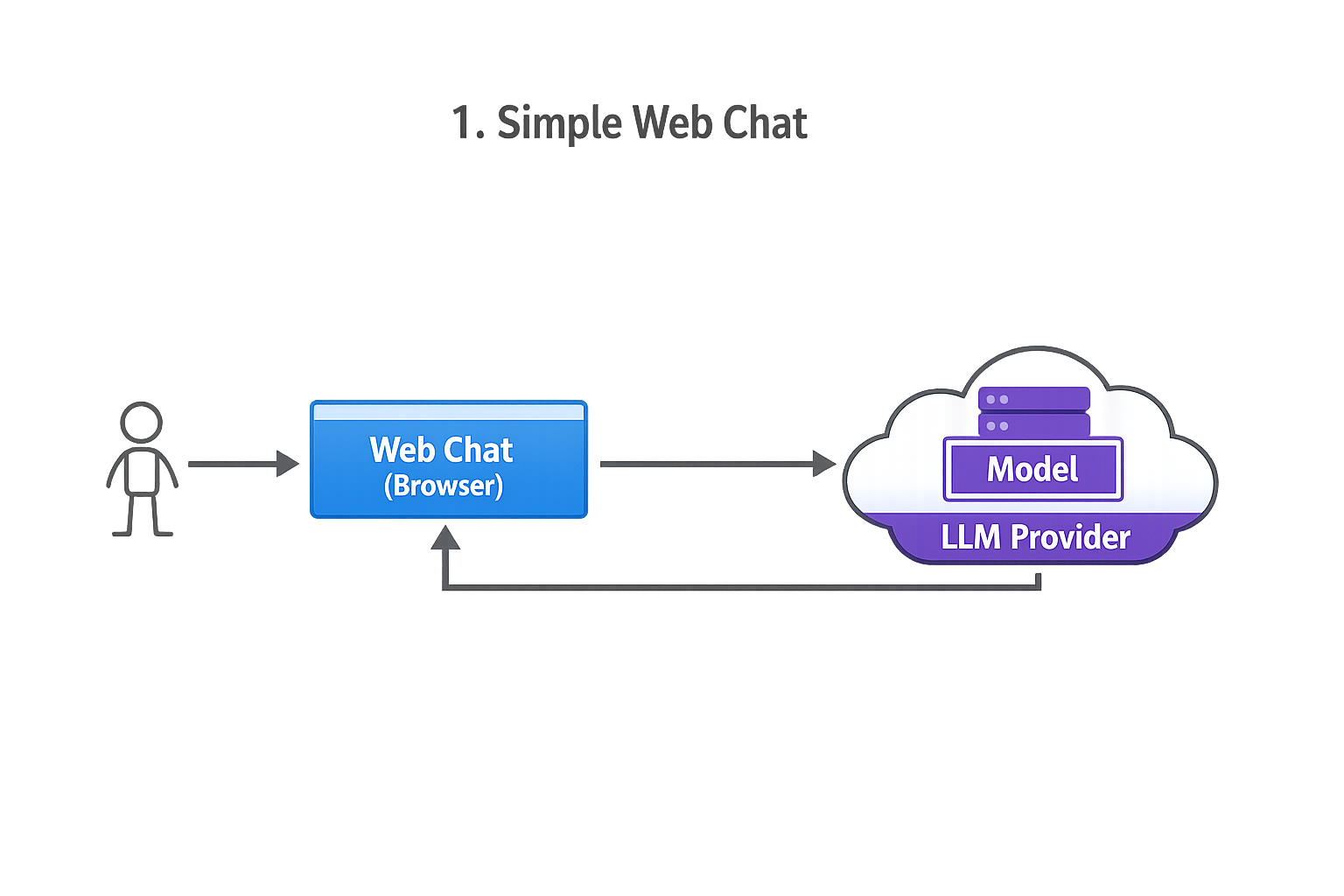
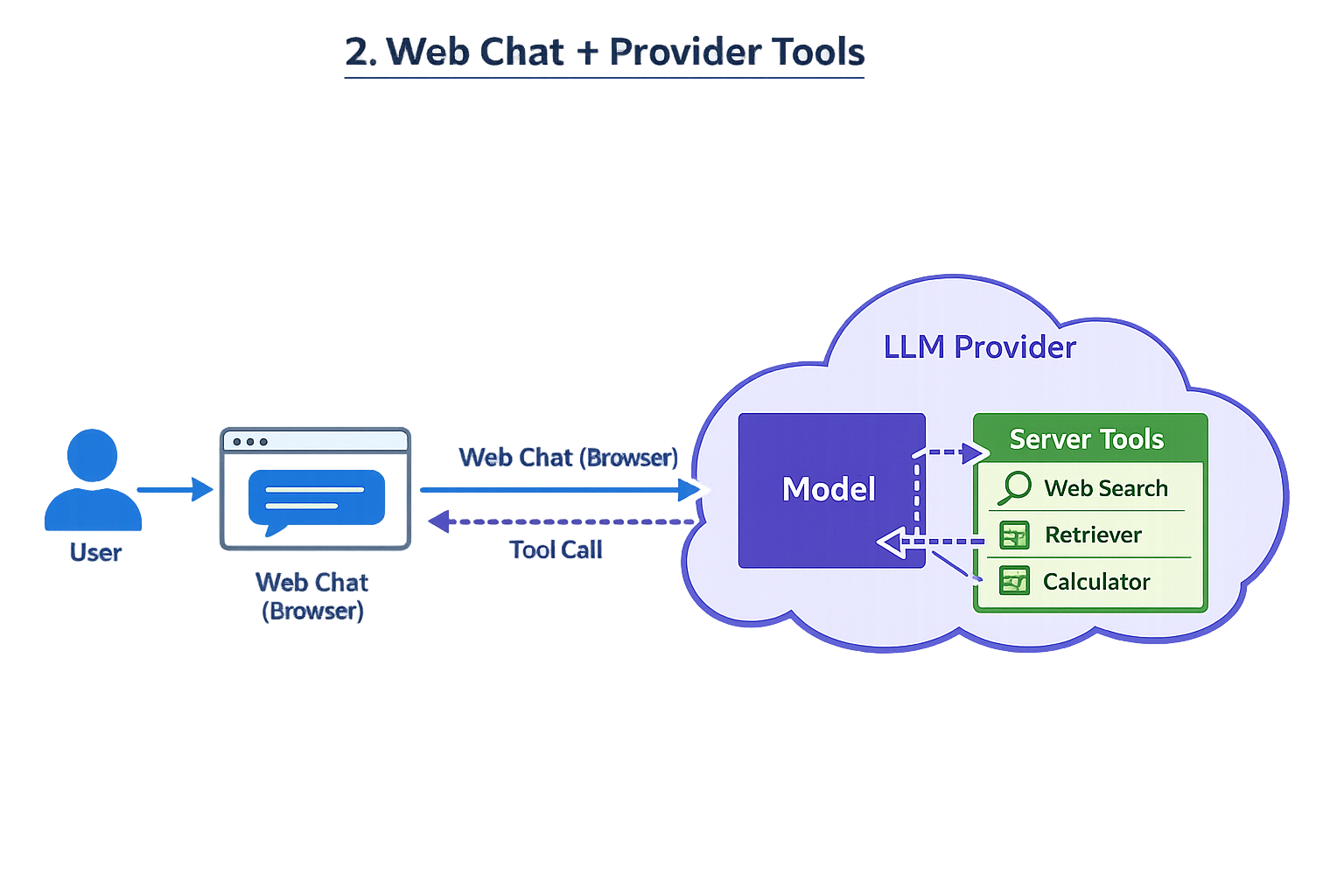
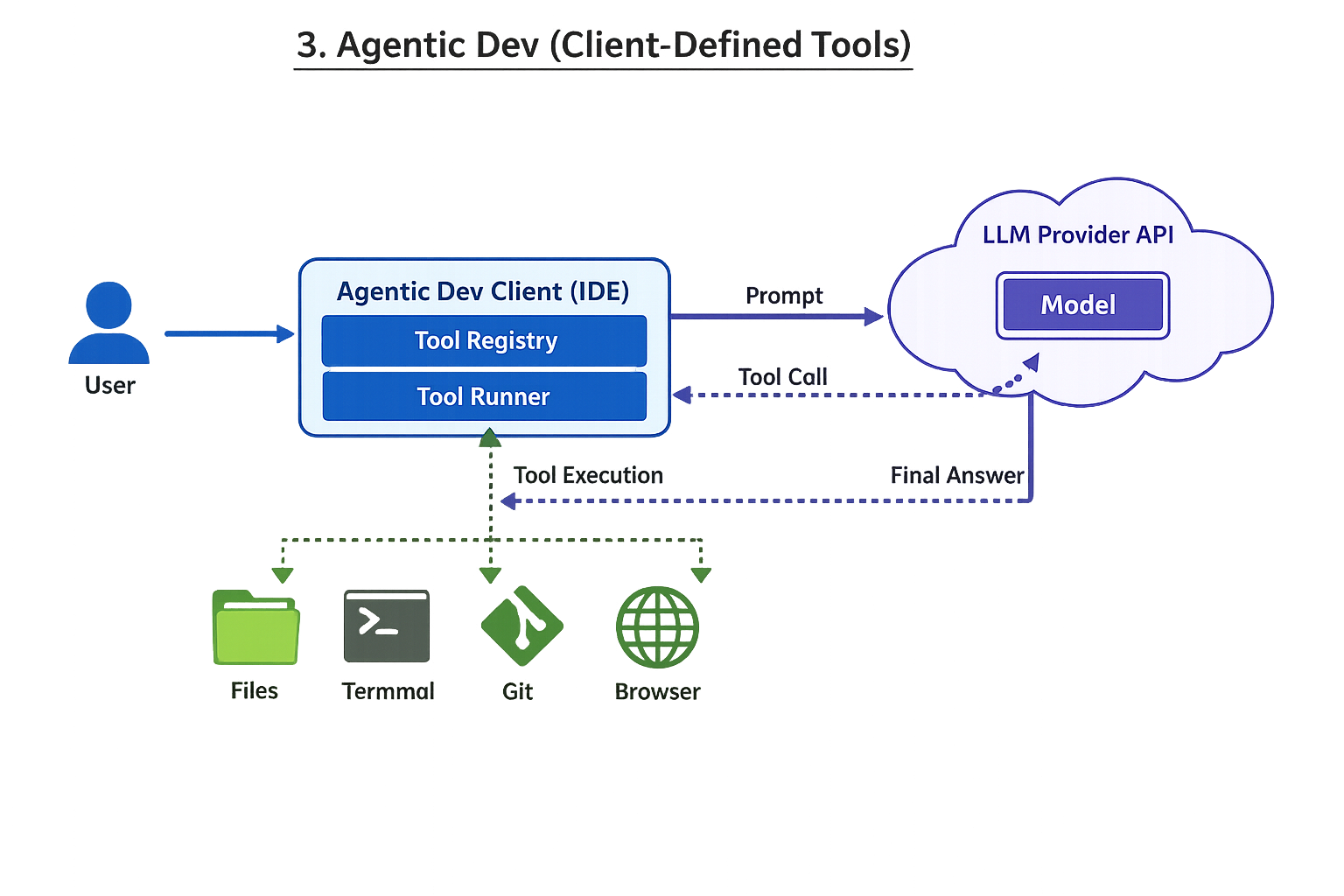
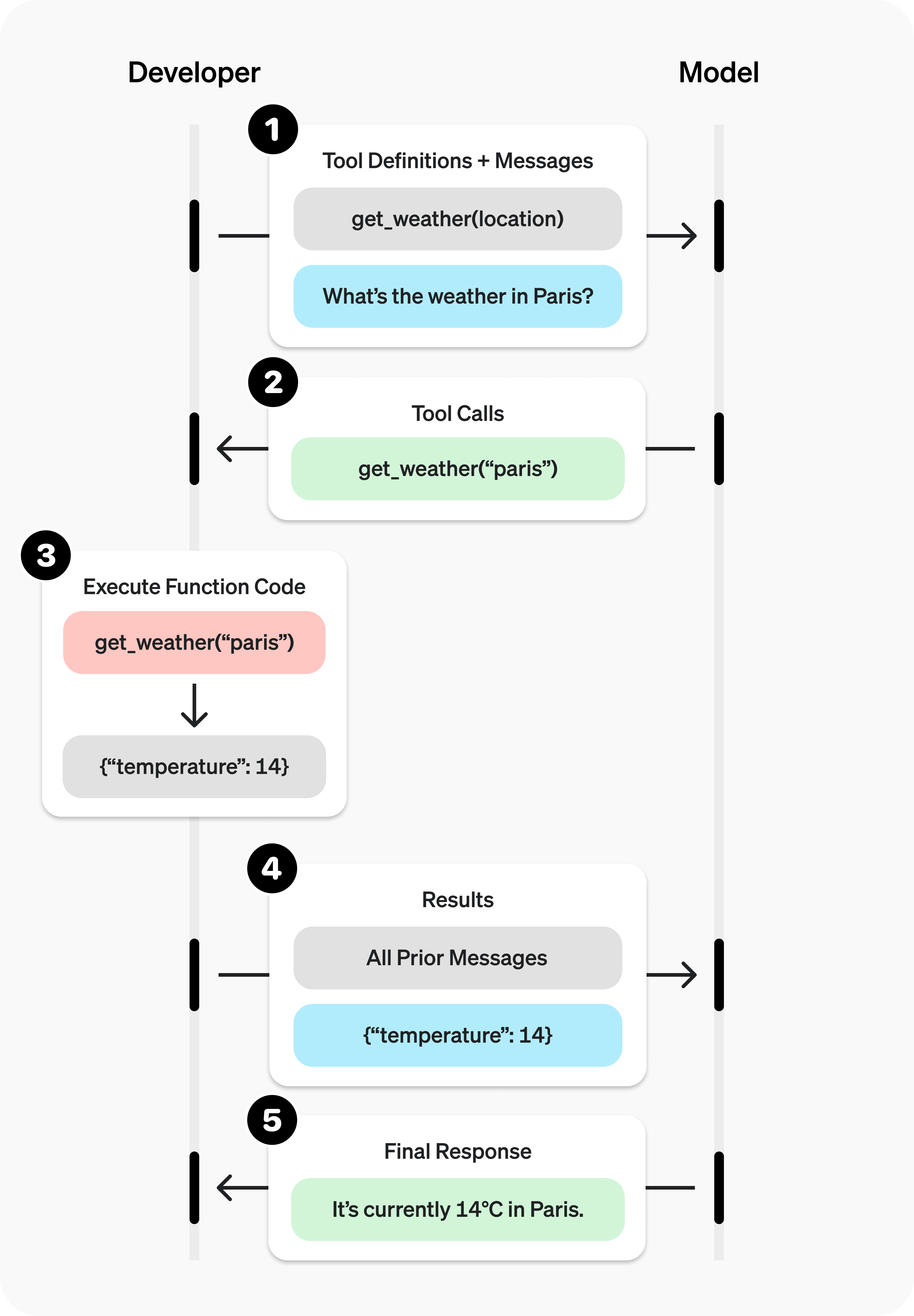
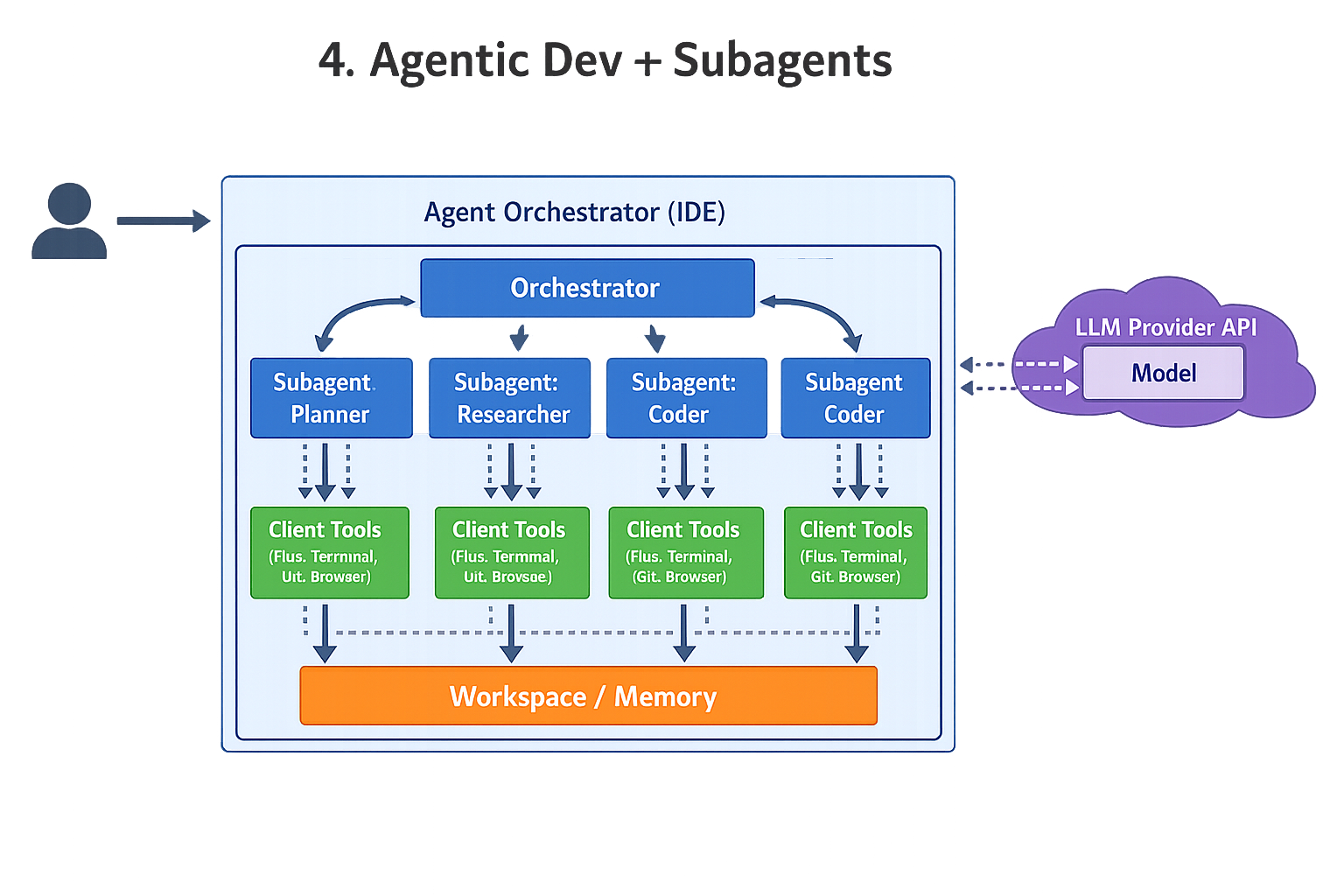
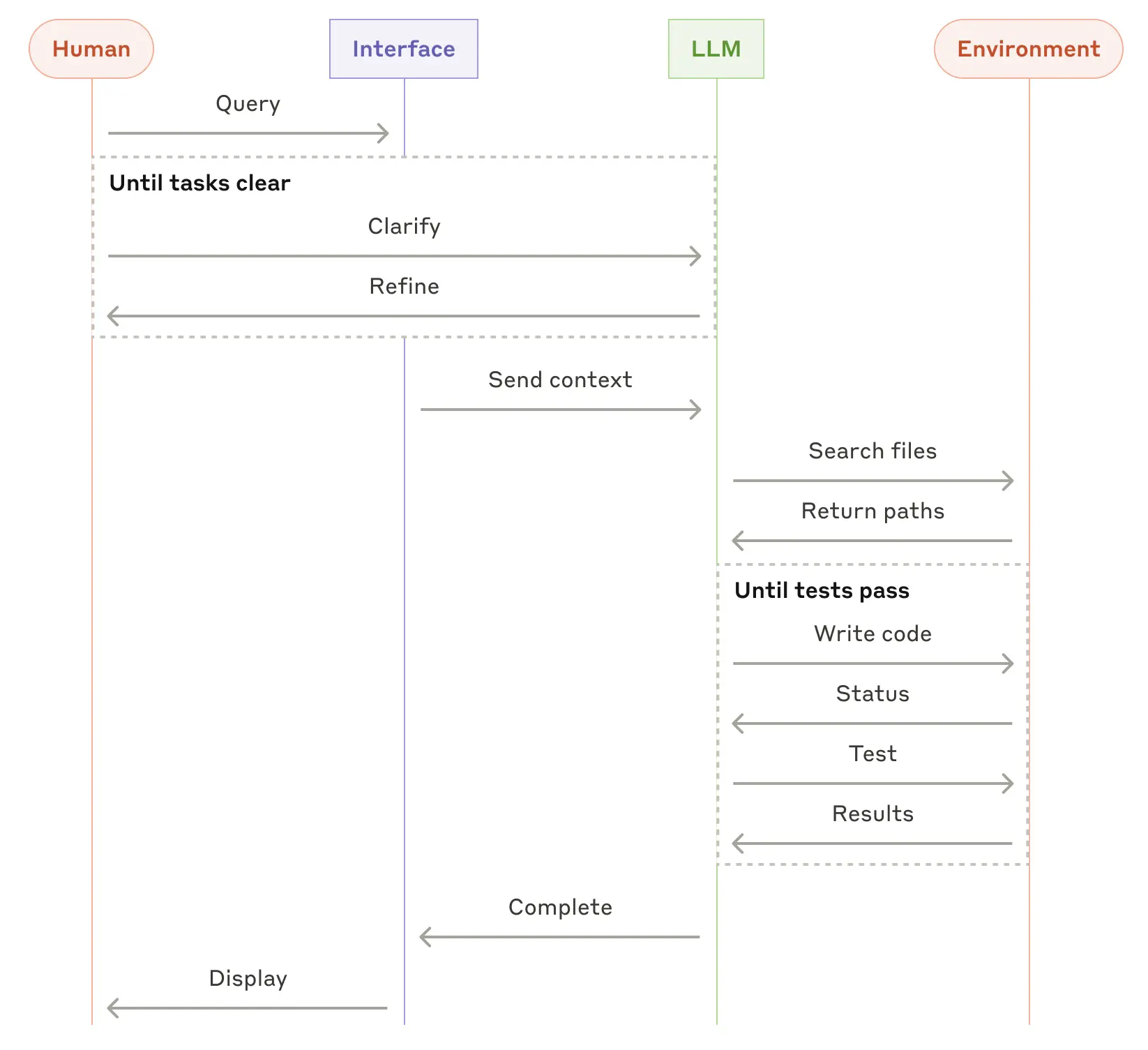
1) Simple web-based chat
2) Web chat where provider has server-side tools (web search, etc.)
3) Agentic development environment (tools defined on client side)
(Interpretation: the “provider” mostly supplies the model; the client runtime owns tool definitions, permissions, and execution.)