23 - OpenSpec
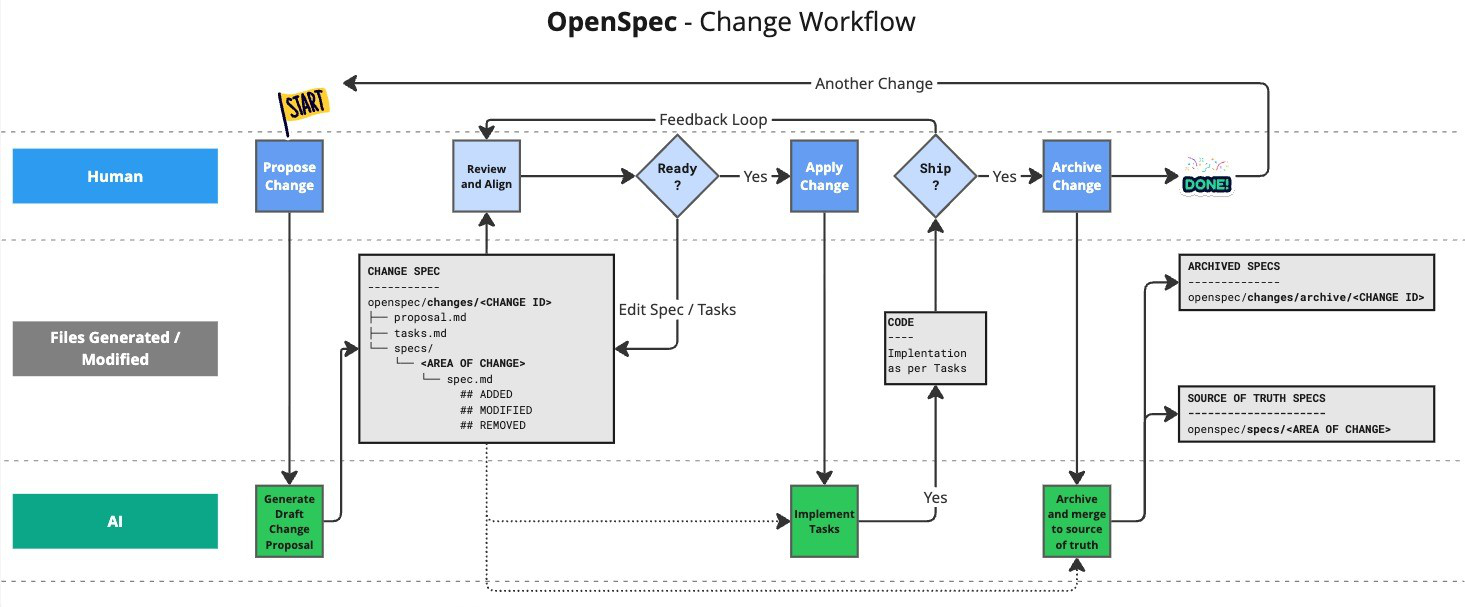
Let's start with the simplest option. OpenSpec is a lightweight, change-centric approach to spec-driven development.
Needs Node.js >= 20.19.0.
Install with > npm install -g @fission-ai/openspec@latest
Then (ide closed)
cd my-project
openspec init
And follow the instructions.
Now open your IDE and start a chat with Kilo Code and OpenSpec.
Your project rules go to openspec/config.yaml
schema: spec-driven

context: |
  Tech stack
  - ASP.NET Core 10 (MVC + Razor Pages)
  - Entity Framework Core 10 with PostgreSQL
  - ASP.NET Core Identity (authentication/authorization)
  - OpenAI SDK (v2.7.0) for LLM integration
  - CsvHelper for data import/export
  - X.PagedList for pagination
  - Bootstrap (via wwwroot libs)

  Code Style
  - Nullable reference types enabled, warnings treated as errors
  - Primary constructors for classes
  - File-scoped namespaces
  - `default!` for required string properties in entities
  - Use ViewModels when the view needs more data than a direct domain entity or `IEnumerable<Entity>` (e.g., Create/Edit views needing `SelectList` for foreign-key dropdowns, or Index views with pagination/filter state). Simple views that only need the entity itself can use the domain entity directly. `ViewBag` and `ViewData` must not be used.

  Architecture Patterns
  - Layered architecture: WebApp → App.BLL → App.DAL.EF → App.Domain
  - Domain entities inherit from `BaseEntity` (provides `Guid Id`)
  - Cascade delete disabled globally; manage relationships explicitly
  - All DateTime values auto-converted to UTC in EF Core
  - Areas support for admin/user separation (Admin area planned)

  Entity Framework Core - No Tracking Mode (CRITICAL)
  **DbContext uses `QueryTrackingBehavior.NoTrackingWithIdentityResolution`**

  This means entities retrieved from database queries are NOT automatically tracked by the change tracker. When updating existing entities:

  ```csharp
  // WRONG - changes will NOT be saved
  var entity = await _context.Entities.FirstOrDefaultAsync(e => e.Id == id);
  entity.Property = newValue;
  await _context.SaveChangesAsync(); // Nothing happens!

  // CORRECT - explicitly attach and mark as modified
  var entity = await _context.Entities.FirstOrDefaultAsync(e => e.Id == id);
  entity.Property = newValue;
  _context.Entities.Update(entity); // Required!
  await _context.SaveChangesAsync(); // Changes saved
  ```

  - `Add()` for new entities works as expected
  - `Update()` is REQUIRED for modifying existing entities
  - `Remove()` works for deletes (entity gets attached if needed)
Commands
Main commands to use:
/opsx:propose description- Create a change and generate planning artifacts in one step (use architect/plan mode)/opsx:apply spec-name- implement proposal (start new task in orchestrator mode)/opsx:archive spec-name- archive proposal (move to archive folder)`
And /opsx:explore to think through ideas before committing to a change. Ie run this first, if you are unsure what to do.
Read through OpenSpec Workflows.
The default global profile is core (these 4 main commands). To enable expanded workflow commands, run openspec config profile, select workflows, then run openspec update in your project.
Best Practices
Keep Changes Focused
One logical unit of work per change. If you're doing "add feature X and also refactor Y", consider two separate changes.
Command reference
| Command | Purpose | When to Use |
|---|---|---|
/opsx:propose | Create change + planning artifacts | Fast default path (core profile) |
/opsx:explore | Think through ideas | Unclear requirements, investigation |
/opsx:new | Start a change scaffold | Expanded mode, explicit artifact control |
/opsx:continue | Create next artifact | Expanded mode, step-by-step artifact creation |
/opsx:ff | Create all planning artifacts | Expanded mode, clear scope |
/opsx:apply | Implement tasks | Ready to write code |
/opsx:verify | Validate implementation | Expanded mode, before archiving |
/opsx:sync | Merge delta specs | Expanded mode, optional |
/opsx:archive | Complete the change | All work finished |
/opsx:bulk-archive | Archive multiple changes | Expanded mode, parallel work |
Why Structure Specs This Way
Requirements are the "what" — they state what the system should do without specifying implementation.
Scenarios are the "when" — they provide concrete examples that can be verified. Good scenarios:
- Are testable (you could write an automated test for them)
- Cover both happy path and edge cases
- Use Given/When/Then or similar structured format
RFC 2119 keywords (SHALL, MUST, SHOULD, MAY) communicate intent Gherkin syntax:
- MUST/SHALL — absolute requirement
- SHOULD — recommended, but exceptions exist
- MAY — optional
What a Spec Is (and Is Not)
A spec is a behavior contract, not an implementation plan.
Good spec content:
- Observable behavior users or downstream systems rely on
- Inputs, outputs, and error conditions
- External constraints (security, privacy, reliability, compatibility)
- Scenarios that can be tested or explicitly validated
Avoid in specs:
- Internal class/function names
- Library or framework choices
- Step-by-step implementation details
- Detailed execution plans (those belong in
design.mdortasks.md)
Quick test:
- If implementation can change without changing externally visible behavior, it likely does not belong in the spec.
Spec example
auto-assign-user-role-microsoft-auth
proposal.md
## Why

Users registering via Microsoft authentication are not automatically assigned to any role, leaving them unable to access role-protected features. New users should be granted the "user" role by default to have baseline access to the application.

## What Changes

- Scaffold ASP.NET Core Identity `ExternalLogin.cshtml.cs` page to customize external login behavior
- Add automatic role assignment logic in the external login confirmation flow
- When a new user is created via Microsoft auth, automatically add them to the "user" role

## Capabilities

### New Capabilities

- `external-auth-role-assignment`: Automatic role assignment for users registering via external authentication providers (Microsoft). Ensures new users get the "user" role upon account creation.

### Modified Capabilities

None - this is a new capability that doesn't change existing spec requirements.

## Impact

- **Code**: Scaffolded Identity pages (`Areas/Identity/Pages/Account/ExternalLogin.cshtml.cs`)
- **Dependencies**: UserManager and RoleManager services (already available via Identity)
- **Security**: Users gain "user" role access upon Microsoft auth registration (expected behavior)
- **Testing**: May need integration tests for external login flow with role verification
spec.md
## ADDED Requirements

### Requirement: Auto-assign user role on external registration

The system SHALL automatically assign the "user" role to any new user account created through Microsoft authentication.

#### Scenario: New user registers via Microsoft auth

- **WHEN** a user authenticates with Microsoft for the first time and completes account creation
- **THEN** the system creates a new user account AND assigns the "user" role to that account

#### Scenario: Role assignment failure handling

- **WHEN** a user authenticates with Microsoft and account creation succeeds but role assignment fails
- **THEN** the system SHALL log the error and display an appropriate error message to the user

### Requirement: Existing users unaffected

The system SHALL NOT modify role assignments for users who already have an account when they sign in via Microsoft.

#### Scenario: Existing user signs in via Microsoft

- **WHEN** a user with an existing account signs in via Microsoft authentication
- **THEN** the system authenticates the user without modifying their role assignments

### Requirement: Role assignment occurs during registration only

The system SHALL assign the "user" role only during the initial account creation process, not on subsequent logins.

#### Scenario: Returning user login

- **WHEN** a user who previously registered via Microsoft signs in again
- **THEN** the system authenticates the user without adding duplicate role assignments
design.md
## Context

ASP.NET Core Identity with Microsoft Account authentication is configured in `WebApp/Program.cs`. The default Identity scaffolded pages handle external login via `Areas/Identity/Pages/Account/ExternalLogin.cshtml.cs`, but the project currently only has `_ViewStart.cshtml` in that area - no custom pages have been scaffolded.

When a user registers via Microsoft auth:
1. They click "Microsoft" on the login page
2. They authenticate with Microsoft
3. If no local account exists, they're prompted to create one (ExternalLogin page)
4. A new `AppUser` is created, but **no role is assigned**

The application has three roles seeded in `InitialData.cs`: `admin`, `user`, `root`. Users need at least the `user` role to access standard features.

## Goals / Non-Goals

**Goals:**
- Automatically assign the "user" role to new users created via Microsoft authentication
- Maintain consistency with existing role management patterns
- Keep the solution simple and maintainable

**Non-Goals:**
- Changing role behavior for regular email/password registration
- Adding UI for role selection during registration
- Supporting configurable default roles (hardcoded "user" is acceptable)
- Applying to other external auth providers (only Microsoft is configured)

## Decisions

### Decision 1: Scaffold Identity ExternalLogin page

**Choice**: Scaffold the `ExternalLogin.cshtml.cs` page using `dotnet aspnet-codegenerator identity`

**Rationale**:
- ASP.NET Core Identity uses Razor Pages for account management
- The `OnPostConfirmationAsync` method is where new users are created from external logins
- Scaffolding gives us a customization point without rewriting the entire auth flow

**Alternatives considered**:
- Events/callbacks: Identity doesn't provide clean extensibility points for external login user creation
- Custom middleware: Too invasive; would need to intercept the entire flow
- Database trigger: Not portable, goes against application architecture patterns

### Decision 2: Add role in OnPostConfirmationAsync after successful user creation

**Choice**: Call `UserManager.AddToRoleAsync(user, "user")` immediately after `CreateAsync` succeeds

**Rationale**:
- Clean integration point in the existing flow
- UserManager already available via DI
- Role name "user" matches existing seeded role in `InitialData.cs`
- Transaction scope: user creation and role assignment happen in same request

**Alternatives considered**:
- Separate background job: Unnecessary complexity for a synchronous operation
- Event handler pattern: Identity events don't cover this specific case cleanly

### Decision 3: Use hardcoded role name "user"

**Choice**: Directly reference `"user"` string in code

**Rationale**:
- Matches the role name in `InitialData.cs`
- Simple and explicit
- Project doesn't have role constants elsewhere

**Alternatives considered**:
- Role constants class: Over-engineering for single use case
- Configuration-based: Adds complexity without clear benefit

## Risks / Trade-offs

**[Risk]** Role "user" doesn't exist at runtime → **Mitigation**: Role is seeded on startup via `AppDataInit.SeedIdentity()`. Fail fast with clear error if role assignment fails.

**[Risk]** Scaffolded page diverges from framework updates → **Mitigation**: Scaffolded code is minimal and well-isolated. Only `OnPostConfirmationAsync` needs modification.

**[Trade-off]** Coupling to specific role name → Acceptable given the application's simple role structure. Can be refactored to constants if more roles need similar treatment.
tasks.md
## 1. Scaffold Identity Pages

- [x] 1.1 Scaffold ExternalLogin Identity page using dotnet aspnet-codegenerator identity command
- [x] 1.2 Verify scaffolded files are created at `WebApp/Areas/Identity/Pages/Account/ExternalLogin.cshtml` and `ExternalLogin.cshtml.cs`

## 2. Implement Role Assignment

- [x] 2.1 Modify `OnPostConfirmationAsync` method to add role assignment after successful user creation
- [x] 2.2 Add call to `_userManager.AddToRoleAsync(user, "user")` after `CreateAsync` succeeds
- [x] 2.3 Add error handling for role assignment failure with appropriate logging

## 3. Testing

- [ ] 3.1 Manually test Microsoft auth registration flow to verify user role is assigned
- [ ] 3.2 Verify existing users signing in via Microsoft are not affected
- [ ] 3.3 Verify role is only assigned once (no duplicates on subsequent logins)
Openspec vs plan/architect
Claude Code's plan mode is a built-in, read-only feature that generates Markdown implementation plans by analyzing your codebase, ideal for rapid, native AI planning without extra setup. OpenSpec is an external, structured toolkit for managing the full lifecycle of specs (creation,, tracking, implementation). While plan mode is faster for small tasks, OpenSpec offers more robust, structured workflow management for complex, team-based, spec-driven development.