01 - Introduction
What Is a Large Language Model?
A Large Language Model (LLM) is a neural network trained to predict the next token in a sequence. That's it. Strip away the hype and you have a very sophisticated autocomplete engine - one trained on trillions of tokens of text, code, and structured data, which gives it emergent capabilities that look like reasoning, planning, and understanding.
The key architectural insight is the transformer Attention Is All You Need - Vaswani et al., 2017: a model that processes input tokens in parallel using self-attention mechanisms, allowing it to weigh relationships between all tokens in a sequence simultaneously. The result is a function that takes a sequence of tokens and produces a probability distribution over what comes next.
Everything else - chat interfaces, system prompts, tool calling, agents - is engineering built on top of this core capability.
LLMs Are Stateless
This is the single most important thing to internalize before building agentic systems: LLMs have no memory between calls. Every API request is independent. The model does not remember your previous conversation. It does not "know" you. It has no persistent state.
What feels like a conversation is actually the client sending the entire conversation history with every single request. When you see a chat interface with 20 messages, the 21st API call includes all 20 previous messages as input. The model processes the full context from scratch every time.
This has direct engineering consequences:
- Context windows have hard token limits (e.g., 200K tokens for Claude). Exceed them and you must truncate or summarize.
- Cost scales with input size - you pay for re-sending the entire history on every turn.
- The model can be "confused" by contradictory earlier messages it has no ability to selectively forget.
- There is no hidden state, no session, no server-side memory. If it's not in the input, the model doesn't know about it.
- One token is approximately 4 characters on average.
- Context window must fit both input and output.
- Pricing:
- in $5 / MTok, out $25 / MTok (Opus).
- in $1.15 / MTok, out $8 / MTok (Kimi K2 turbo).
- in $0.6 / MTok, out $3 / MTok (Kimi K2.5).
- in $0.4 / MTok, out $2 / MTok (Devstral2).
- in $0.25 / MTok, out $0.38 / MTok (Deepseek 3.2).
Model comparison for price/performance: swe-rebench
The API Is Syntactic Sugar for Text In, Text Out
Every LLM API - OpenAI, Anthropic, Google - presents a structured JSON API interface. But underneath, it all compiles down to a single text stream that gets fed to the model. The structured API is a convenience layer.
What You Send (Anthropic Messages API)
{
  "model": "claude-sonnet-4-20250514",
  "max_tokens": 1024,
  "system": "You are a helpful coding assistant.",
  "messages": [
    {"role": "user", "content": "What is the capital of Estonia?"},
    {"role": "assistant", "content": "The capital of Estonia is Tallinn."},
    {"role": "user", "content": "What is the population?"}
  ]
}
What the Model Actually Sees (Approximation)
The API server converts this structured JSON into a formatted text prompt that the model processes. The exact internal format varies by provider, but conceptually it looks something like this:
[S] You are a helpful coding assistant. [/S]

[H] What is the capital of Estonia? [/H]

[A] The capital of Estonia is Tallinn. [/A]

[H] What is the population? [/H]

[A]
The model then generates tokens that follow [A] - it is literally completing text. The "assistant" role, the "system" prompt, the multi-turn conversation structure - these are all serialized into a single text stream with special delimiter tokens. The JSON structure exists so you don't have to manually manage these delimiters, but it's critical to understand that the model itself just sees a sequence of tokens and predicts what comes next.
This means:
- "System prompts" aren't privileged or protected - they're just text at the beginning of the sequence that the model has been trained to follow. They can be overridden or ignored.
- "Roles" (user, assistant) are delimiter conventions, not fundamental concepts.
- Multi-turn conversation is an illusion created by re-sending all previous turns.
- The model doesn't "switch modes" between system/user/assistant - it processes one continuous token sequence.
Tool Calling: Teaching Models to Use External Systems
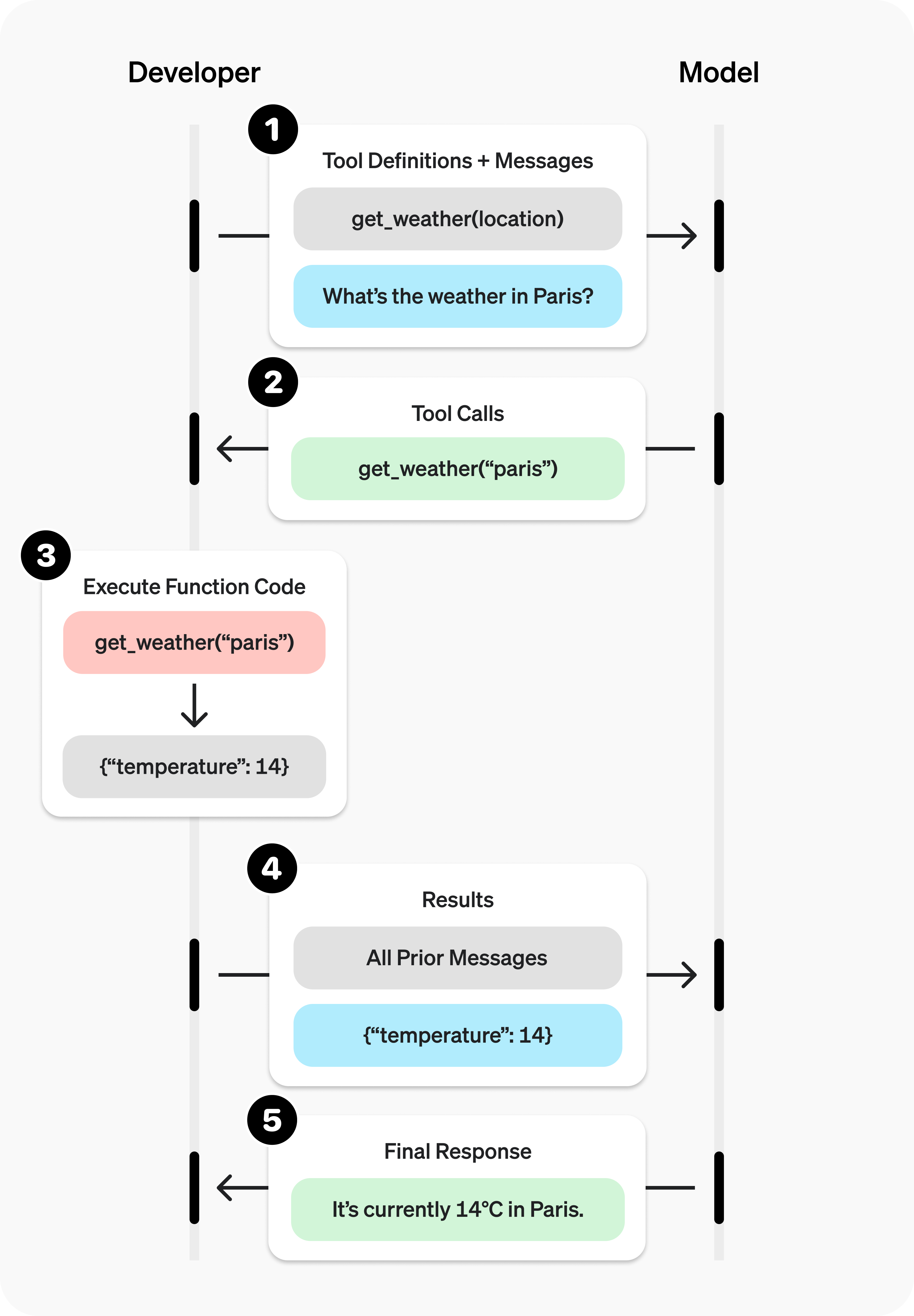
Here's where it gets interesting for building agents. Raw LLMs can only produce text. They can't browse the web, query databases, execute code, or call APIs. Tool calling (also called function calling) is the mechanism that bridges this gap.
How It Works
Tool calling is not magic. It's a structured output convention where:
- You describe available tools (functions) in the system prompt or a dedicated tools parameter.
- The model generates a specially formatted response indicating it wants to call a tool.
- Your code parses this response, executes the actual function, and sends the result back.
- The model generates its final response incorporating the tool result.
The model never actually executes anything. It produces structured text that says "I want to call function X with arguments Y." Your application code does the actual execution.
Example: Tool Calling Flow
Step 1 - Define tools and send request:
{
  "model": "claude-sonnet-4-20250514",
  "max_tokens": 1024,
  "tools": [
    {
      "name": "get_weather",
      "description": "Get current weather for a city",
      "input_schema": {
        "type": "object",
        "properties": {
          "city": {"type": "string", "description": "City name"}
        },
        "required": ["city"]
      }
    }
  ],
  "messages": [
    {"role": "user", "content": "What's the weather in Tallinn?"}
  ]
}
Step 2 - Model responds with a tool use request (not a direct answer):
{
  "role": "assistant",
  "content": [
    {
      "type": "tool_use",
      "id": "call_001",
      "name": "get_weather",
      "input": {"city": "Tallinn"}
    }
  ],
  "stop_reason": "tool_use"
}
Step 3 - Your code executes the function and sends the result back:
{
  "messages": [
    {"role": "user", "content": "What's the weather in Tallinn?"},
    {"role": "assistant", "content": [
      {"type": "tool_use", "id": "call_001", "name": "get_weather", "input": {"city": "Tallinn"}}
    ]},
    {"role": "user", "content": [
      {"type": "tool_result", "tool_use_id": "call_001", "content": "Tallinn: -5°C, light snow, wind 3 m/s NW"}
    ]}
  ]
}
Step 4 - Model generates final response using the tool result:
{
  "role": "assistant",
  "content": [
    {
      "type": "text",
      "text": "It's currently -5°C in Tallinn with light snow and a gentle northwest wind at 3 m/s."
    }
  ]
}
Notice: the entire exchange is just messages going back and forth. The model produced structured JSON requesting a function call. Your code ran the function. You fed the result back as another message. The model then composed a human-readable answer. At no point did the model execute code or access any external system.
What the Model Actually Sees with Tools
Again, the tool definitions get serialized into the text stream. Conceptually:
[S] You are a helpful assistant.

You have access to the following tools:

Tool: get_weather
Description: Get current weather for a city
Parameters: {"city": string (required)}

When you need to use a tool, respond with a tool_use block. [/S]

[H] What's the weather in Tallinn? [/H]

[A] <tool_use>{"name": "get_weather", "input": {"city": "Tallinn"}}</tool_use> [/A]

[TOOL_RESULT] Tallinn: -5°C, light snow, wind 3 m/s NW [/TOOL_RESULT]

[A] It's currently -5°C in Tallinn with light snow and a gentle northwest wind at 3 m/s. [/A]
The tool schema is injected as text. The model's "decision" to call a tool is just generating tokens that match the expected tool-calling format. The tool result is injected as text. It's text all the way down.
How Models Learn Tool Calling
Models don't inherently know how to call tools. This capability is built through a multi-stage training process.
Stage 1: Pre-training (Foundation)
The base model is trained on massive text corpora - web pages, books, code repositories, documentation, academic papers. During pre-training, the model learns:
- Language structure, grammar, and semantics
- World knowledge encoded in text
- Code patterns, API documentation formats, JSON/XML structure
- Reasoning patterns from mathematical proofs, scientific papers, and structured arguments
Pre-training is self-supervised: the model simply learns to predict the next token. No human labels are involved. The model at this stage can generate coherent text and code, but it doesn't follow instructions reliably and doesn't know how to use tools in a structured way.
The scale is staggering - trillions of tokens, thousands of GPUs, months of compute. This is the most expensive and foundational phase.
Stage 2: Supervised Fine-Tuning (SFT)
After pre-training, the model is fine-tuned on curated datasets of high-quality examples. For tool calling, this includes thousands of examples showing:
- When to call a tool vs. answer directly
- How to format tool calls correctly (exact JSON structure)
- How to interpret tool results and synthesize them into responses
- How to chain multiple tool calls when needed
- How to handle tool errors gracefully
These examples are created by human annotators or generated synthetically and validated. The model learns the specific conventions and formats that the API will expect.
Stage 3: Reinforcement Learning from Human Feedback (RLHF) / Constitutional AI
The final stage aligns the model with human preferences. For tool calling, this means:
- Preferring to call tools when the question requires real-time or external data
- Avoiding hallucinating information that should come from a tool
- Choosing the right tool when multiple are available
- Using appropriate parameters and handling edge cases
- Knowing when NOT to use a tool - when it already has sufficient knowledge
A reward model (itself trained on human preference data) scores the fine-tuned model's outputs, and the model is further optimized to produce responses that score highly.
The Result
After these stages, the model has internalized tool calling as a behavioral pattern. When it sees tool definitions in its context, it "knows" (statistically speaking) that:
- It can and should use these tools when appropriate
- Tool calls must follow the exact specified format
- Tool results should be incorporated naturally into responses
- Multiple tools can be chained for complex queries
But - and this is critical - this is all learned statistical behavior. The model isn't "deciding" to use a tool through deliberate reasoning. It's generating the most likely next tokens given its training, the context, and the tool definitions. The sophistication of the output obscures the simplicity of the underlying mechanism.
From Tool Calling to Agents
An agent is just a loop:
while not done:
    response = llm.call(messages, tools)
    if response.wants_tool_call:
        result = execute_tool(response.tool_call)
        messages.append(response)
        messages.append(tool_result(result))
    else:
        done = True
        return response.text
That's the entire architecture. An LLM agent is a while loop that:
- Sends the conversation + tool definitions to the model
- Checks if the model wants to call a tool
- If yes - executes it, appends everything to the conversation, loops back
- If no - returns the final text response
The sophistication of modern agents (planning, reflection, multi-step reasoning, error recovery) emerges from clever prompt engineering, tool design, and orchestration logic - not from any fundamental architectural complexity. The model is always just predicting the next token. Engineering is what turns that into useful work.
What This Course Covers
In this course, you will build agentic systems from the ground up. You will:
- Understand the mechanical reality of LLMs - no mysticism, no anthropomorphism
- Design effective tool schemas that models can use reliably
- Build agent loops with proper error handling, context management, and state tracking
- Work with real coding agents (Kilo Code, Claude Code) and understand what they're doing under the hood
- Implement multi-step workflows where agents plan, execute, verify, and iterate
- Handle the hard engineering problems: context window management, cost optimization, failure recovery, and evaluation
- Critically assess when agentic approaches are appropriate and when they're overengineered nonsense
The goal is not to be impressed by AI. The goal is to engineer with it - understanding exactly what's happening at every layer so you can build systems that are reliable, debuggable, and actually useful.
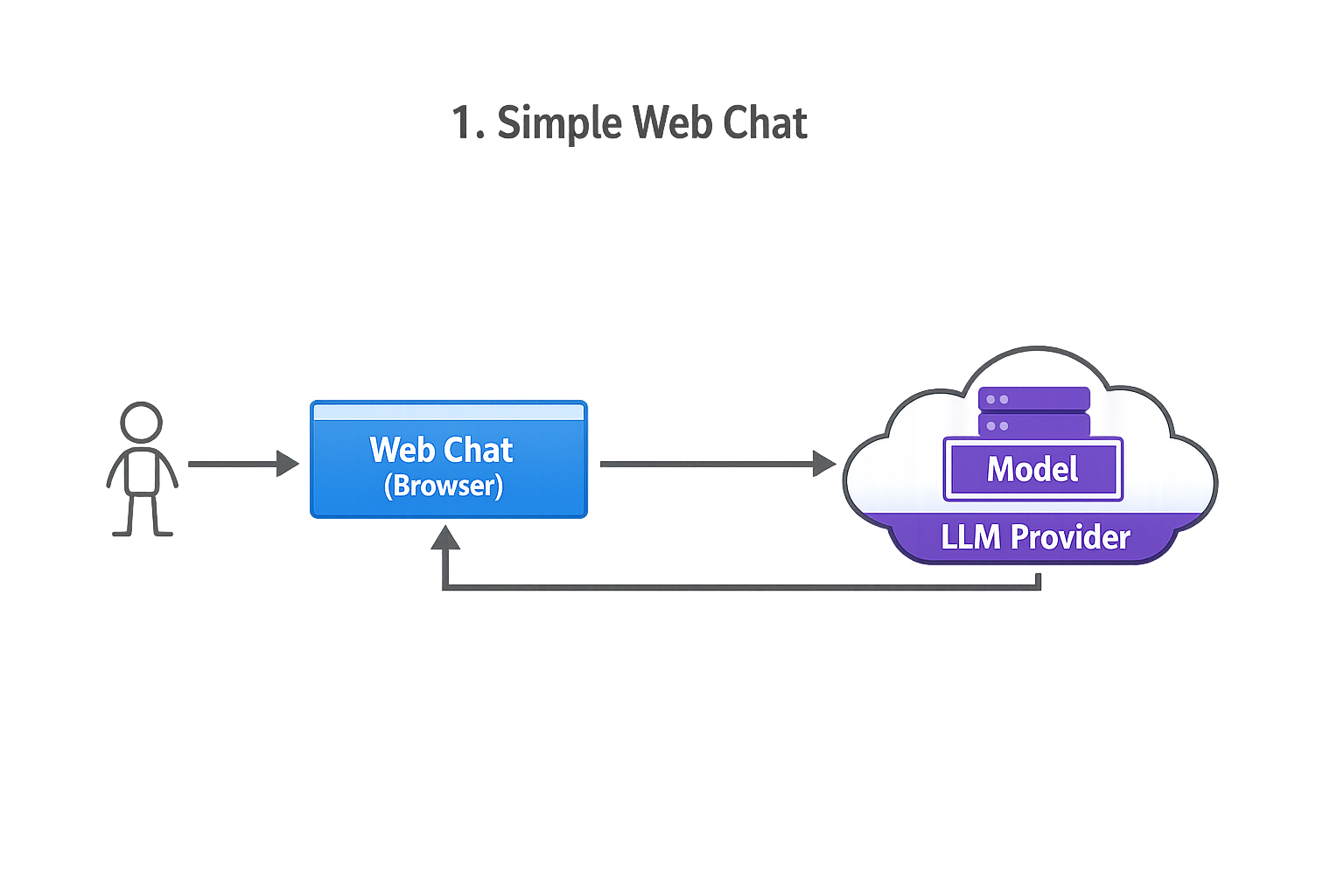
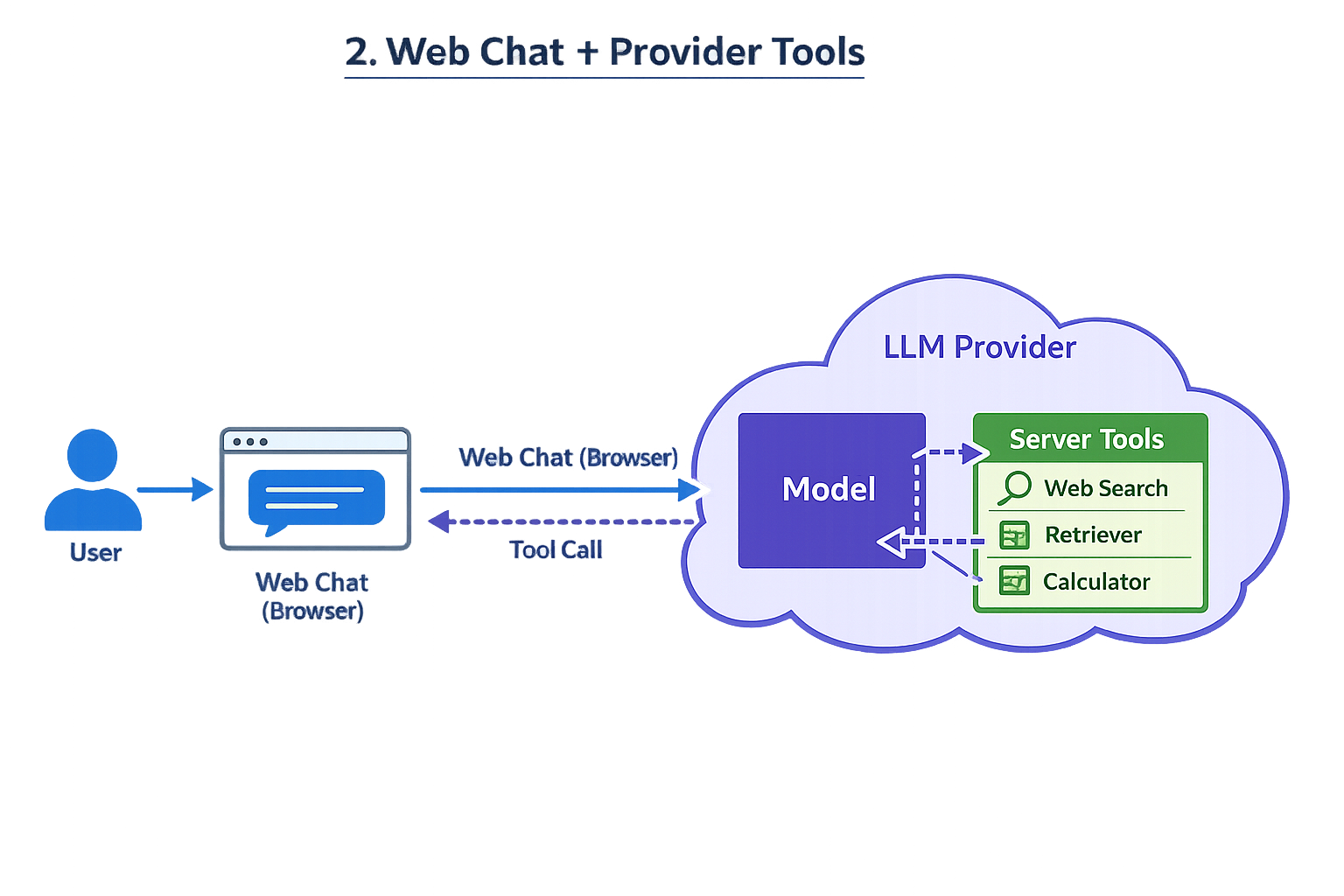
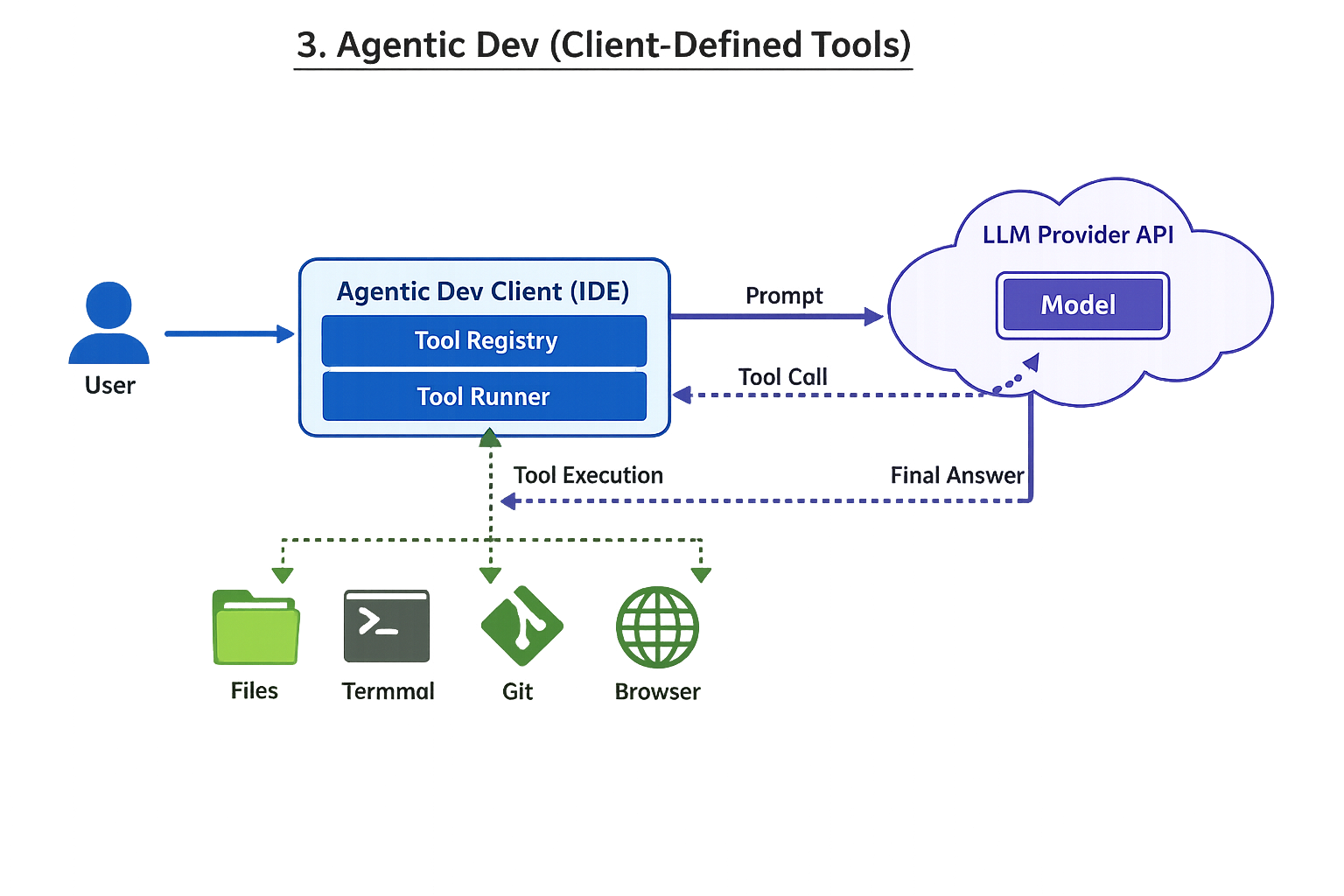
Progression of complexity
{
  "model" : "claude-opus-4-5",
  "max_tokens" : 64000,
  "system" : "# Current Time\nCurrent time in ISO 8601 UTC format: 2026-01-31T18:38:55.1171520Z\n\nJust follow user instructions.",
  "messages" : [ {
    "role" : "user",
    "content" : [ {
      "type" : "document",
      "source" : {
        "type" : "file",
        "file_id" : "file_011CXfwaoLmSKu19DZZcNmrc"
      }
    }, {
      "type" : "text",
      "text" : "course code is?"
    } ]
  } ],
  "tools" : [ {
    "name" : "WebSearch",
    "description" : "Search the web for current information. Returns the top search result with url, title, and content.",
    "input_schema" : {
      "type" : "object",
      "properties" : {
        "query" : {
          "type" : "string",
          "description" : "The search query to look up on the web"
        }
      },
      "required" : [ "query" ]
    }
  }, {
    "name" : "WebFetch",
    "description" : "Fetch the content of a web page from a URL. Returns the page content as markdown (default) or raw HTML.",
    "input_schema" : {
      "type" : "object",
      "properties" : {
        "url" : {
          "type" : "string",
          "description" : "The URL of the web page to fetch"
        },
        "outputFormat" : {
          "type" : "string",
          "enum" : [ "markdown", "html" ],
          "description" : "Output format: 'markdown' (default) or 'html'"
        }
      },
      "required" : [ "url" ]
    }
  }, {
    "name" : "ImageGeneration",
    "description" : "Generate images from text descriptions using AI. Can create one or multiple images (up to 10) with customizable size and background options. Returns URLs of the generated images that must be displayed to the user.",
    "input_schema" : {
      "type" : "object",
      "properties" : {
        "prompt" : {
          "type" : "string",
          "description" : "A detailed text description of the image to generate. Be specific about style, content, colors, and composition for best results."
        },
        "size" : {
          "type" : "string",
          "enum" : [ "1024x1024", "1536x1024", "1024x1536" ],
          "description" : "Image dimensions. Use 1024x1024 for square images, 1536x1024 for landscape, or 1024x1536 for portrait."
        },
        "background" : {
          "type" : "string",
          "enum" : [ "auto", "transparent", "opaque" ],
          "description" : "Background style: 'auto' lets the AI decide, 'transparent' for PNG with transparency, 'opaque' for solid background."
        },
        "count" : {
          "type" : "integer",
          "minimum" : 1,
          "maximum" : 10,
          "description" : "Number of images to generate (1-10). Default is 1."
        }
      },
      "required" : [ "prompt" ]
    }
  }, {
    "name" : "AskUser",
    "description" : "Present a multiple-choice question to the user with clickable options. Use this to ask clarification questions, create quiz interactions, or guide users through workflows. Each option can either immediately send the response (action: 'send') or copy it to the input field for editing (action: 'copy'). The user's selection will be sent as their next message. Question is presented after tool call completion, so its last in visible message sequence. Indicate in Question instructions this with: Please select your answer for Question <X> below.",
    "input_schema" : {
      "type" : "object",
      "properties" : {
        "question" : {
          "type" : "string",
          "description" : "The question or prompt to display to the user."
        },
        "options" : {
          "type" : "array",
          "description" : "List of options for the user to choose from (minimum 2, maximum 10).",
          "items" : {
            "type" : "object",
            "properties" : {
              "text" : {
                "type" : "string",
                "description" : "The text content of this option that will be shown to the user and sent as their message if selected."
              },
              "action" : {
                "type" : "string",
                "enum" : [ "send", "copy" ],
                "description" : "How clicking this option behaves: 'send' immediately sends it as a message, 'copy' puts it in the input field for editing. Default is 'send'."
              }
            },
            "required" : [ "text" ]
          },
          "minItems" : 2,
          "maxItems" : 10
        }
      },
      "required" : [ "question", "options" ]
    }
  } ],
  "thinking" : {
    "type" : "enabled",
    "budget_tokens" : 44800
  }
}
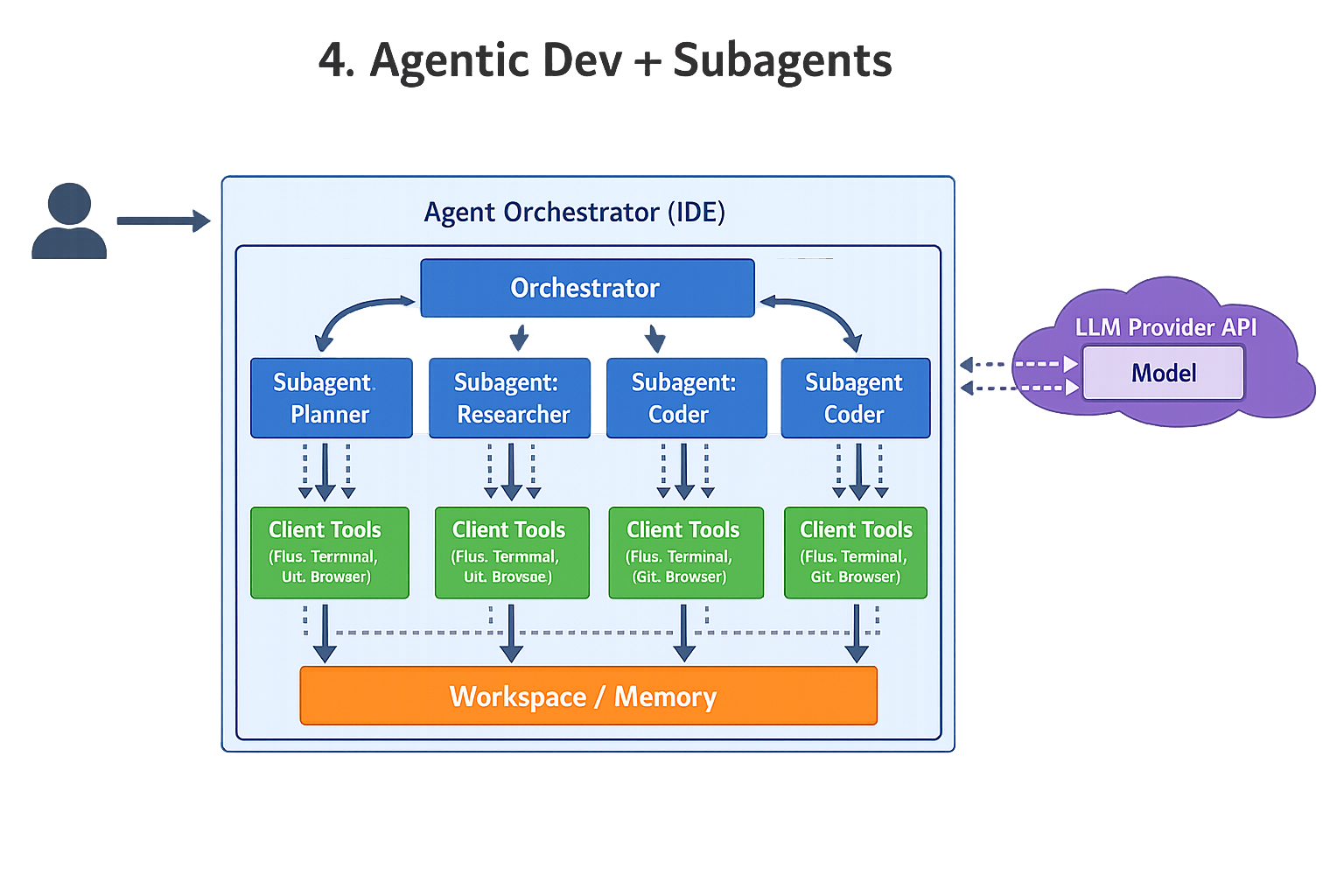
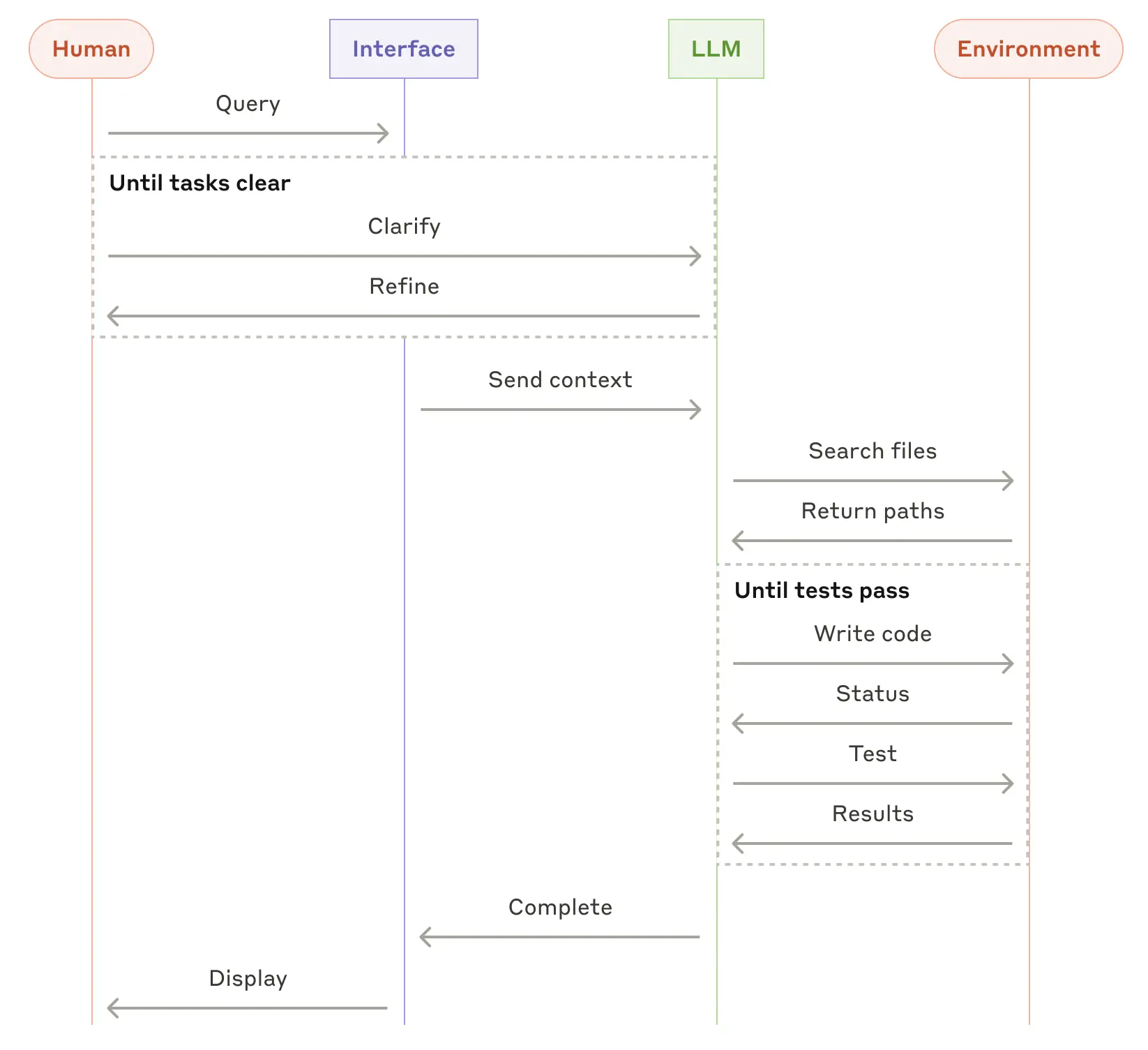
1 Simple web-based chat
2 Web chat where provider has server-side tools (web search, etc.)
3 Agentic development environment (tools defined on client side)
(Interpretation: the “provider” mostly supplies the model; the client runtime owns tool definitions, permissions, and execution.)