11.1 - HTTP and ASP.NET Core Basics
Recap
In 10.2 - async/await the console AI became responsive with Task and CancellationToken, and in 08.1 - Repository & DI you hid IGameRepository and IConfigRepository behind a DI container so that ConsoleUI never creates a DbContext by hand. This week the same class libraries get a second front-end: a browser. Nothing in GameEngine, DAL.Json or DAL.EF changes — we only add a new UI project, WebApp.
By the end of this lecture you should be able to:
- Read an HTTP request and response (method, path, headers, status code, body) in the browser's network tab.
- Explain what Kestrel is and what
Program.csdoes in a minimal-hosting ASP.NET Core app. - Describe the middleware pipeline and why its order matters.
- Create a Razor Pages project, add a page with a
PageModel, and predict its URL from its file path. - Run the app with
dotnet runordotnet watchover HTTPS with a trusted development certificate.
Lecture demos: csharp-2026-fall
HTTP in ten minutes
HTTP is a plain-text protocol. The browser sends a request (a verb, a path, some headers, optionally a body); the server answers with a response (a status code, some headers, optionally a body). That is the whole model — every web framework, including ASP.NET Core, is just a nicer way of producing responses.
A GET request and its response
Typing https://localhost:7123/Configs into the address bar produces roughly this (headers trimmed):
GET /Configs HTTP/1.1
Host: localhost:7123
Accept: text/html,application/xhtml+xml
Accept-Language: en-US,en;q=0.9,et;q=0.8
Cookie: .AspNetCore.Antiforgery.abc=CfDJ8...
HTTP/1.1 200 OK
Content-Type: text/html; charset=utf-8
Content-Length: 2317

<!DOCTYPE html>
<html lang="en">
<head>
    <title>Configurations - WebApp</title>
    ...
The first line is the request line: method, path, protocol version. Then headers as Key: Value pairs, an empty line, and (for GET) no body. The response starts with the status line, then headers, an empty line, then the body — here HTML.
A POST request and its response
Submitting the "create configuration" form sends the field values in the body, URL-encoded:
POST /Configs/Create HTTP/1.1
Host: localhost:7123
Content-Type: application/x-www-form-urlencoded
Content-Length: 97

Name=Classic&BoardWidth=3&BoardHeight=3&WinLength=3&__RequestVerificationToken=CfDJ8...
HTTP/1.1 302 Found
Location: /Configs
Content-Length: 0
Note the body: key=value&key=value. Those keys are exactly the name attributes of the form's inputs, and next lecture you will see ASP.NET Core map them onto C# properties. The response has no body at all — 302 plus Location tells the browser "now GET this other URL". That redirect is deliberate; we will come back to it as Post-Redirect-Get.
Methods
| Method | Meaning | Has body | In Razor Pages |
|---|---|---|---|
GET | read; must not change server state | no | OnGet — every page load, every link |
POST | send data, change state | yes | OnPost — every form submit |
PUT, PATCH, DELETE | update / delete a resource | yes / no | Web API only — HTML forms cannot send them |
HEAD, OPTIONS | headers only / capabilities | no | handled by the framework |
An HTML <form> can only do GET and POST, so in this course those two are all you need. Search forms use GET (the values go into the query string, the URL is bookmarkable); anything that creates, changes or deletes uses POST.
Status codes
- 1xx informational — you will not see these.
- 2xx success —
200 OK,201 Created,204 No Content. - 3xx redirection —
301 Moved Permanently,302 Found(whatRedirectToPagesends),304 Not Modified(cache hit). - 4xx the client did something wrong —
400 Bad Request(e.g. antiforgery token missing),401 Unauthorized,403 Forbidden,404 Not Found. - 5xx the server broke —
500 Internal Server Erroris an unhandled exception in your code.
A 404 on a page you are sure exists is almost always a file-name / URL mismatch. A 400 right after submitting a form is almost always a missing antiforgery token. A 500 in development shows you the exception page with the stack trace.
Statelessness and cookies
HTTP has no memory. Two requests from the same browser are, to the server, two unrelated events — it does not know it is "the same user" or "the same game". If you want continuity, the client has to carry an identifier on every request. Our game puts the game id in the URL (/Games/Play/3f2a...), which is stateless and shareable. The other mechanism is cookies: a Set-Cookie response header stores a small value in the browser, and the browser sends it back as a Cookie header on every request to that host. ASP.NET Core uses cookies for the antiforgery token and for TempData; you will not write login code in this course (a per-player secret link is enough for A7).
ASP.NET Core overview
ASP.NET Core is Microsoft's cross-platform web framework. It is a console application — dotnet run starts a process that opens a TCP port and serves HTTP. There is no separate web server to install.
- Kestrel — the built-in web server. Fast, small, cross-platform. It takes over the whole
ip:port, so in production it usually sits behind a reverse proxy (nginx, Apache, IIS) that handles TLS termination and hosting several apps on one machine. For development, Kestrel alone is all you need. - Hosting —
WebApplication.CreateBuilder(args)wires up Kestrel, configuration, logging and the DI container;app.Run()blocks until the process is stopped. - The request pipeline — a chain of middleware components that each request flows through. Razor Pages is the last link in that chain.
Which flavour?
ASP.NET Core ships several ways to produce HTML or JSON. They share the same hosting, DI, configuration and middleware — they differ in how you write the endpoint.
| Razor Pages | MVC | Minimal API | Blazor | |
|---|---|---|---|---|
| Unit of code | a page: .cshtml + PageModel | controller class with action methods + views | a lambda per endpoint | a component .razor |
| Output | server-rendered HTML | server-rendered HTML or JSON | JSON | interactive UI (server or WebAssembly) |
| Routing | by file path | by convention or attributes | explicit MapGet / MapPost | @page in component |
| Good for | page-focused apps, CRUD, our game | large apps, REST services | small REST services | SPA-style apps |
| In this course | yes — the only one we use | next course (ICD0024) | next course | no |
Razor Pages is the simplest of the four and covers everything A7 needs. MVC and Web API are the subject of Web Applications with C# next semester; you will find that most of what you learn here (Razor syntax, tag helpers, model binding, DI) carries over unchanged.
Creating the project
Inside the existing solution folder:
dotnet new webapp -n WebApp
dotnet sln add WebApp
dotnet add WebApp reference GameEngine DAL.EF DAL.Json
dotnet run --project WebApp
webapp is the Razor Pages template. The last line starts Kestrel and prints the URLs it listens on.
Project structure
WebApp/
├── Pages/
│   ├── Index.cshtml            ← page markup (Razor)
│   ├── Index.cshtml.cs         ← page code (PageModel)
│   ├── Privacy.cshtml
│   ├── Error.cshtml
│   ├── Shared/
│   │   ├── _Layout.cshtml      ← common HTML skeleton
│   │   └── _ValidationScriptsPartial.cshtml
│   ├── _ViewImports.cshtml     ← directives shared by every page
│   └── _ViewStart.cshtml       ← sets Layout for every page
├── wwwroot/                    ← static files served as-is: css/, js/, lib/
├── Properties/launchSettings.json
├── appsettings.json
├── appsettings.Development.json
├── Program.cs
└── WebApp.csproj
Pages/— one page = one.cshtmlfile plus, usually, a.cshtml.cscode-behind. The folder structure is the URL structure.wwwroot/— everything here is reachable from the browser at/:wwwroot/css/site.cssishttps://localhost:7123/css/site.css. Put your board CSS here; never put code here._ViewImports.cshtml—@usingand@addTagHelperdirectives applied to every page in the folder and below._ViewStart.cshtml— runs before every page; the template uses it to setLayout = "_Layout".Shared/_Layout.cshtml— the<html>,<head>, navigation bar and footer that wrap every page.
Program.cs
The whole application is configured in one file, top to bottom:
var builder = WebApplication.CreateBuilder(args);

// 1. Services go into the DI container (same container as lecture 08.1)
builder.Services.AddRazorPages();

var app = builder.Build();

// 2. Middleware pipeline — order matters
if (!app.Environment.IsDevelopment())
{
    app.UseExceptionHandler("/Error");
    app.UseHsts();
}

app.UseHttpsRedirection();
app.UseRouting();
app.UseAuthorization();

app.MapStaticAssets();          // serve wwwroot (UseStaticFiles() in older templates)
app.MapRazorPages()
   .WithStaticAssets();

app.Run();
Two halves. Before Build() you register services — things pages will ask for through their constructors. After Build() you assemble the pipeline — what happens to each request, in the order you write it. In Development the builder adds the developer exception page automatically, which is why the explicit handler is only wired for other environments.
Middleware pipeline
Each app.Use… call adds one link. A request enters at the top; each middleware can act, pass the request on, or stop right there and answer.
- Exception handler wraps everything below it — that is why it must be first. Any unhandled exception further down becomes a friendly
/Errorpage (or the stack trace page in Development). - HTTPS redirection answers an
http://request with a302to thehttps://URL and stops. - Static files checks
wwwroot; if the path matches a file it is sent and the pipeline ends. No page code runs for a stylesheet. - Routing decides which page (if any) matches the URL. Authorization would enforce
[Authorize]— unused in this course but harmless. - Razor Pages finally runs your
OnGet/OnPostand renders the.cshtml.
Put UseStaticFiles / MapStaticAssets before the page endpoints and UseRouting before UseAuthorization. Swapping lines in Program.cs produces confusing failures — a 404 for a CSS file, or every page returning 401.
Environments
ASPNETCORE_ENVIRONMENT selects the environment: Development, Staging or Production (default). Properties/launchSettings.json sets it for dotnet run and for the IDE run configuration:
{
  "profiles": {
    "https": {
      "commandName": "Project",
      "launchBrowser": true,
      "applicationUrl": "https://localhost:7123;http://localhost:5123",
      "environmentVariables": {
        "ASPNETCORE_ENVIRONMENT": "Development"
      }
    }
  }
}
app.Environment.IsDevelopment() in Program.cs reads the same value. A published app on a server has no launchSettings.json — it runs as Production unless you set the variable.
Configuration
appsettings.json holds settings; appsettings.Development.json overrides them when the environment is Development. Environment variables and command-line arguments override both. The classic use is the connection string:
{
  "ConnectionStrings": {
    "Default": "Data Source=game.db"
  },
  "Logging": { "LogLevel": { "Default": "Information" } }
}
var connectionString = builder.Configuration.GetConnectionString("Default")
                       ?? throw new InvalidOperationException("Connection string 'Default' missing");
The DI container
The same IServiceCollection you used in ConsoleUI in lecture 08.1 is builder.Services here. Registrations look identical; what changes is the scope: ASP.NET Core creates a new DI scope for every HTTP request, so a Scoped service — the DbContext, a repository — lives exactly as long as one request. Transient is created on every resolve; Singleton lives as long as the process.
builder.Services.AddDbContext<AppDbContext>(o => o.UseSqlite(connectionString));
builder.Services.AddScoped<IConfigRepository, ConfigRepositoryEf>();
builder.Services.AddScoped<IGameRepository, GameRepositoryEf>();
A PageModel receives these through its constructor, exactly like your console MenuSystem did. Wiring all of this up properly is the subject of lecture 13.1; for now it is enough to know the container is the same one.
Razor Pages basics
A page is two files that share a name:
Pages/<pagename>.cshtml— HTML with Razor markup. The view.Pages/<pagename>.cshtml.cs— a C# class deriving fromPageModelthat holds the page's data and handler methods for GET and POST. The model (code-behind).
Razor is Microsoft's syntax for mixing C# into HTML. The default language in a .cshtml file is HTML; the @ character switches to C# for one expression or one block, and there is no closing marker — the parser knows where C# ends. @page on the first line is what makes a file a page (routable) rather than a plain view.
Simplest page
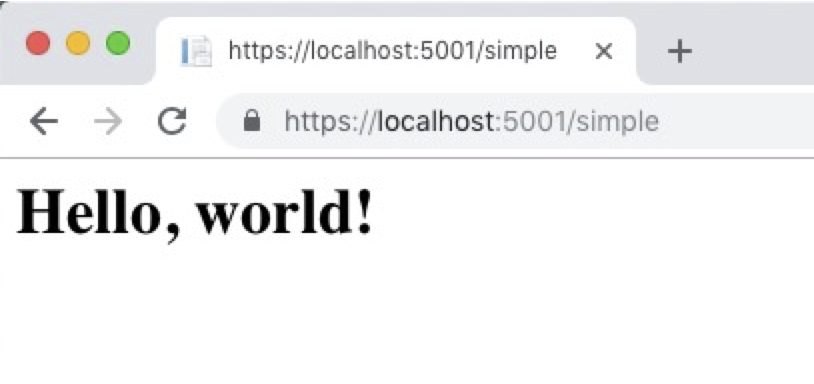
@page
<h1>Hello, world!</h1>
Save that as Pages/Hello.cshtml, open /Hello, done. No code file needed.
URL ↔ file matching
The route of a page is its path under Pages/, without the extension. Index is optional at the end.
| File | URL |
|---|---|
Pages/Index.cshtml | / or /Index |
Pages/Configs/Index.cshtml | /Configs or /Configs/Index |
Pages/Configs/Create.cshtml | /Configs/Create |
Pages/Games/Play.cshtml | /Games/Play — plus a game id from the route template, next lecture |
Files whose names start with an underscore (_Layout.cshtml, _ViewImports.cshtml) are never routable — they are helpers that other pages pull in.
First page with a PageModel
The code-behind gives the page data. @model declares the class; @Model (capital M) is the instance at run time, so the view is strongly typed and the IDE completes Model. for you.
@page
@model WebApp.Pages.IndexModel
@{
    ViewData["Title"] = "Home";
}

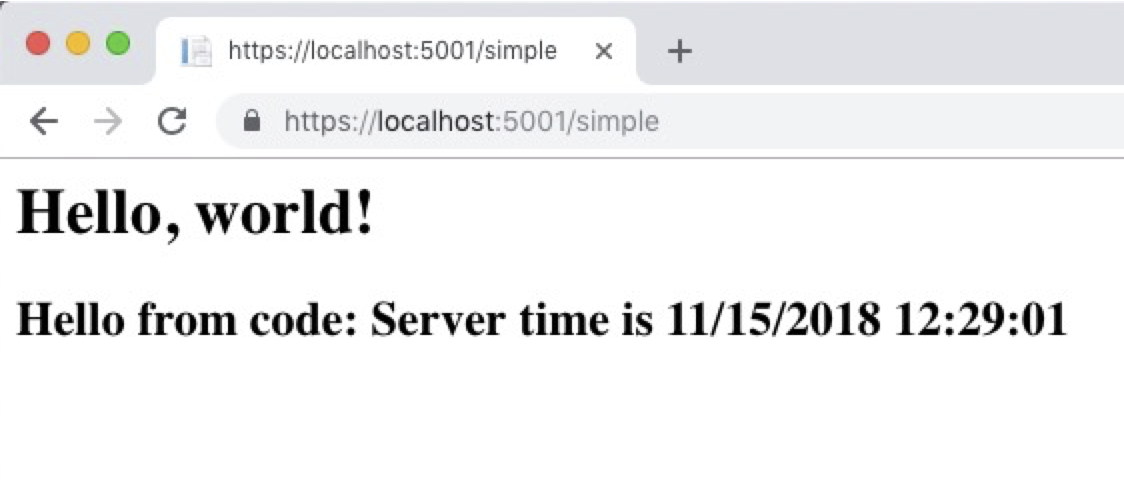
<h1>Hello, world!</h1>
<h2>@Model.Message</h2>
using Microsoft.AspNetCore.Mvc.RazorPages;

namespace WebApp.Pages;

public class IndexModel : PageModel
{
    public string Message { get; private set; } = "Hello from code: ";

    public void OnGet()
    {
        Message += $"server time is {DateTime.Now:HH:mm:ss}";
    }
}
The framework instantiates IndexModel (through DI, so a constructor with parameters is fine), calls OnGet() because the request was a GET, and then renders the .cshtml with Model pointing at that instance. One request, one PageModel instance — properties set in OnGet are visible in the view, and gone when the response is sent.
Layout and the universal files
Most sites share a header, a navigation bar and a footer. Razor puts the shared skeleton into Pages/Shared/_Layout.cshtml, and every page renders only its own middle part.
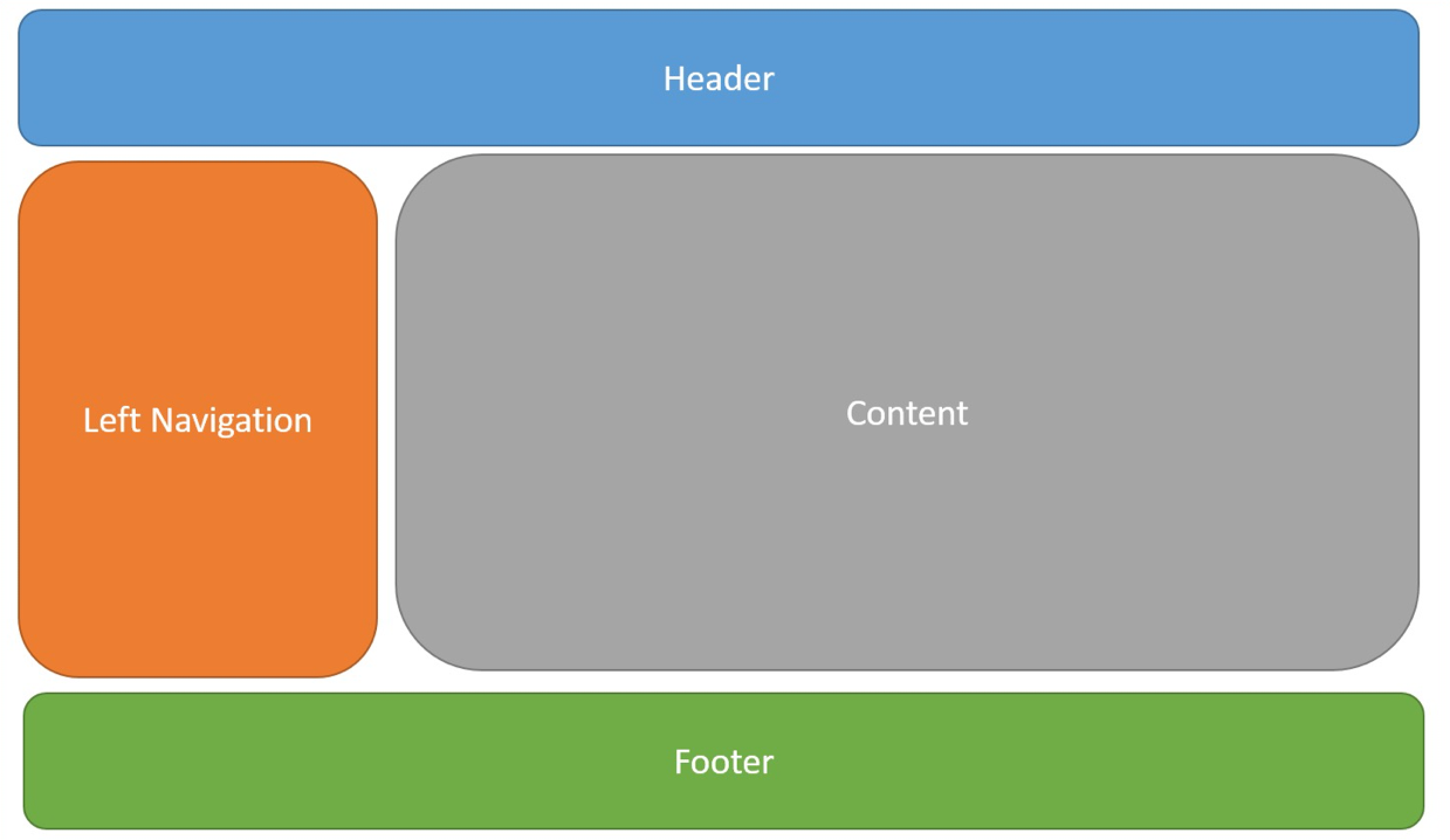
The smallest working layout:
<!DOCTYPE html>
<html lang="en">
<head>
    <meta charset="utf-8" />
    <meta name="viewport" content="width=device-width, initial-scale=1.0" />
    <title>@ViewData["Title"] - WebApp</title>
    <link rel="stylesheet" href="~/css/site.css" asp-append-version="true" />
</head>
<body>
    <main class="container">
        @RenderBody()
    </main>
    @await RenderSectionAsync("Scripts", required: false)
</body>
</html>
@RenderBody() is where the page's output goes. The template's layout adds Bootstrap, a navbar and jQuery-based client-side validation — you will keep most of it. _ViewStart.cshtml contains only @{ Layout = "_Layout"; }, which is why no page has to mention its layout, and _ViewImports.cshtml contains the @using WebApp and @addTagHelper *, Microsoft.AspNetCore.Mvc.TagHelpers lines that make asp-… attributes work everywhere. Next lecture covers all three in detail.
Running the app
dotnet run and dotnet watch
dotnet run --project WebApp           # build, start Kestrel, print the URLs
dotnet watch --project WebApp         # same, plus rebuild / hot-reload on every save
dotnet watch is the one you want while working on pages: edit a .cshtml, save, refresh the browser. Changes to Program.cs or to a class library trigger a full restart, which takes a few seconds. Stop with Ctrl+C.
HTTPS development certificate
The https profile needs a certificate the browser trusts. The SDK creates a self-signed one; you trust it once per machine:
dotnet dev-certs https --trust
On Windows and macOS this pops up a system dialog. On Linux the trust step depends on the distribution and browser — if the browser keeps warning, use the http profile for local work; nothing in A7 depends on TLS.
Browser developer tools
Press F12 and open the Network tab before you click anything. Every row is one request: method, URL, status code, size, time. Click a row to see request headers, response headers, the form body of a POST, and the raw response. When something "does nothing", the Network tab tells you whether the browser sent what you think it sent and what the server actually answered. Keep it open for the whole of A7.
dotnet run prints Now listening on: https://localhost:7123. The port number comes from launchSettings.json and is random per project, so yours will differ. If you get "address already in use", another instance is still running.
Self preparation QA
Be prepared to explain topics like these:
- What are the parts of an HTTP request and an HTTP response? — Request: method + path + version, headers, optional body. Response: status line with a code, headers, optional body.
- Why does a successful form POST answer with
302instead of200? — So that the browser makes a fresh GET of the result page; a refresh then repeats the harmless GET instead of re-submitting the form (Post-Redirect-Get). - HTTP is stateless — how does the server know which game a request belongs to? — The client carries the identifier: in our app the game id is part of the URL; cookies are the other mechanism and ASP.NET Core uses them for antiforgery and
TempData. - What is Kestrel and why is it usually behind a reverse proxy in production? — The built-in cross-platform web server inside the app process; a proxy adds TLS termination, multiple sites per machine and hardening that Kestrel does not aim to provide.
- What are the two halves of
Program.cs? — BeforeBuild(): service registrations into the DI container; afterBuild(): the middleware pipeline, in execution order, ending with the page endpoints. - Why must the static-files middleware come before the Razor Pages endpoints? — So a request for
/css/site.cssis answered directly fromwwwrootand never reaches routing; a swapped order costs a lookup on every asset or breaks it entirely. - How is the URL of a Razor page determined? — From its path under
Pages/without the extension;Indexmay be omitted; underscore-prefixed files are not routable. - What is the difference between
@modeland@Model? —@modelis a directive declaring thePageModeltype of the view;@Modelis the run-time instance the framework created for this request and populated inOnGet/OnPost.