10.2 - async/await and Cancellation
Recap
10.1 - Game AI: Heuristics & Difficulty made the time budget one of the difficulty knobs and left a problem open: while minimax thinks, the console is frozen — no spinner, no "press Esc to stop". 08.1 - Repository & DI left another: DbContext is not thread-safe, which starts to matter the moment anything runs concurrently. This lecture introduces Task, async/await and CancellationToken in the console app, so that they are familiar tools when the web app needs them on every page.
By the end of this lecture you should be able to:
- Explain the difference between IO-bound and CPU-bound work, and what
awaitactually does with the thread. - Write and call
async Task/async Task<T>methods, including an asyncMain. - Run the minimax search with
Task.Run, keep the console responsive, and stop the search through aCancellationTokenwhen the time budget runs out. - Combine tasks with
Task.WhenAll,Task.WhenAnyandTask.Delay. - Use the async EF Core API correctly and name the two mistakes that lock up or corrupt an application.
Lecture demos: csharp-2026-fall
Two kinds of waiting
Every slow operation is slow for one of two reasons:
| IO-bound | CPU-bound | |
|---|---|---|
| The program is waiting for | a disk, a network, a database, a person | its own arithmetic |
| Example in the game | reading a save file, SaveChanges(), an HTTP call | the minimax search |
| A thread during the wait | is not needed at all | is busy the whole time |
| The tool | async / await | Task.Run (plus await to observe it) |
An OS thread costs about a megabyte of stack and a context switch every time it blocks. Parking a thread for 20 ms while SQLite writes a row is pure waste; in a web server it is the difference between serving 100 and 10 000 concurrent requests. The .NET answer is that IO-bound methods return before the work is done and hand back a Task that completes later.
Task and Task<T>
A Task is a promise that some work will finish — think of it as a void method that has not returned yet. A Task<T> is a promise of a value of type T. Both have a status (IsCompleted, IsCanceled, IsFaulted) and, once completed, either a result or an exception.
Two helpers you will use in tests and adapters:
Task done = Task.CompletedTask;                         // a finished Task
Task<(int Row, int Col)> move = Task.FromResult((1, 1)); // a finished Task<T> with a value
async / await
The method signature changes in three ways: the async modifier, a Task or Task<T> return type, and — by convention — an Async suffix.
public async Task<GameState> GetAsync(Guid id, CancellationToken ct)
{
    var json = await File.ReadAllTextAsync(PathFor(id), ct);
    return JsonSerializer.Deserialize<GameState>(json, Options)
           ?? throw new InvalidDataException($"Corrupt save file for {id}");
}
Inside the body, await is allowed on anything that returns a Task. The return statement returns a plain GameState; the compiler wraps it into the Task<GameState>. Calling code awaits it in turn:
var state = await repository.GetAsync(id, ct);
The rule that follows: async all the way. Once one method in a call chain is async, its callers become async too, up to Main or the web handler. Mixing in a blocking call halfway up is where the problems in the warning boxes below come from.
What actually happens
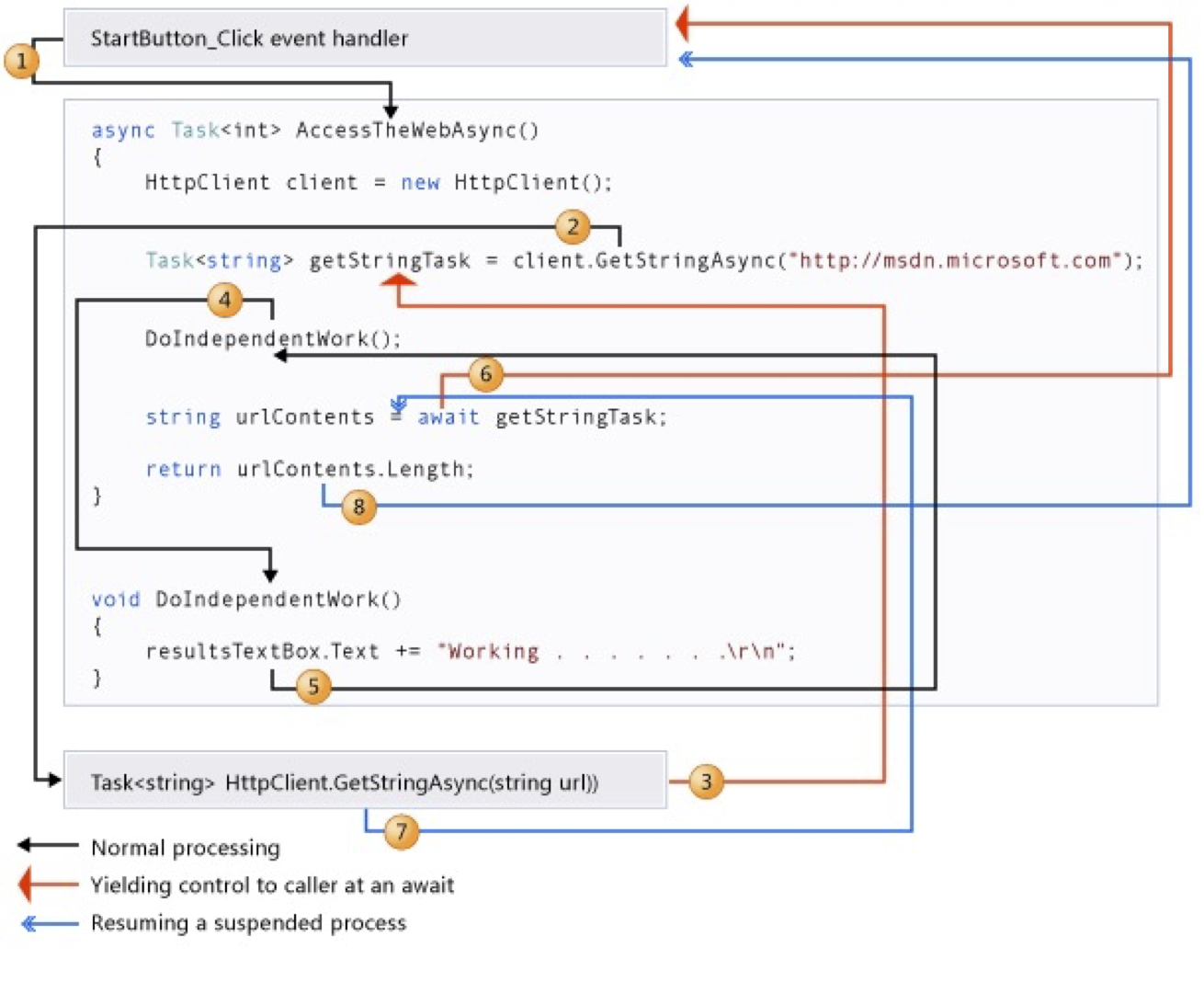
- The caller calls
GetAsync. It runs synchronously, like any method, until the firstawait. File.ReadAllTextAsyncstarts the OS read and returns an incompleteTask.awaitsees the incomplete task, saves the method's local variables into a compiler-generated state machine, registers "continue here when done", and returns to the caller. The thread is free.- When the data arrives, the continuation runs — on a thread-pool thread in a console app — restores the locals and executes the rest of the method.
- The
Task<GameState>that the caller received completes, and the caller's ownawaitwakes up the same way.
If the awaited task is already complete when await reaches it, none of this happens: the method just continues. await does not create a thread, does not start a thread, and does not block one.
async/await is compiler sugar over a state machine — the same trick as yield return in iterators. Knowing that explains most of the behaviour: locals survive, exceptions are captured into the task and re-thrown at the await, and the code after await may run on a different thread than the code before it.
Other IO-bound operations
Anything that talks to the outside world has an async API in .NET, and you should prefer it:
- Files —
File.ReadAllTextAsync,Stream.ReadAsync,JsonSerializer.DeserializeAsync. - Network —
HttpClient.GetStringAsync, sockets, gRPC. Everything the web app does. - Databases — every EF Core query and
SaveChangesAsync(section below). - External services — X-Road, payment gateways, mail servers.
- The console itself —
Console.In.ReadLineAsync()exists, although on a real terminal it still blocks a thread.
The CPU-bound case is different, and it is the one A6 needs.
CPU-bound work: Task.Run and a responsive console
Minimax does not wait for anything; it computes. Marking it async changes nothing — there is no incomplete task to await. To get it off the calling thread, hand it to the thread pool with Task.Run. The async variant of IMoveProvider:
public interface IMoveProvider
{
    Task<(int Row, int Col)> GetMoveAsync(GameState state, CancellationToken ct);
}

public class MinimaxMoveProvider(int maxDepth, IEvaluator evaluator) : IMoveProvider
{
    public Task<(int Row, int Col)> GetMoveAsync(GameState state, CancellationToken ct) =>
        Task.Run(() => Search(state, ct), ct);

    private (int Row, int Col) Search(GameState state, CancellationToken ct)
    {
        // iterative deepening, see the cancellation section
    }
}

public class HumanConsoleMoveProvider : IMoveProvider
{
    // reading the console is fine to do synchronously; adapt the result into a Task
    public Task<(int Row, int Col)> GetMoveAsync(GameState state, CancellationToken ct) =>
        Task.FromResult(ReadMove(state));
}
Now the game loop can do something while the AI thinks:
private static async Task<(int Row, int Col)> ThinkWithSpinnerAsync(
    IMoveProvider ai, GameState state, TimeSpan budget)
{
    using var cts = new CancellationTokenSource(budget);
    var search = ai.GetMoveAsync(state, cts.Token);
    var spinner = "|/-\\";
    var tick = 0;

    while (!search.IsCompleted)
    {
        Console.Write($"\rThinking {spinner[tick++ % spinner.Length]} (Esc to stop) ");
        if (Console.KeyAvailable && Console.ReadKey(intercept: true).Key == ConsoleKey.Escape)
        {
            cts.Cancel();
        }
        await Task.Delay(100);
    }

    Console.Write("\r" + new string(' ', 40) + "\r");
    return await search;
}
The search runs on a pool thread; the main thread draws a spinner, polls the keyboard and sleeps asynchronously between ticks. That is what "responsive UI" in the A6 rubric means.
Cancellation
.NET cancellation is cooperative. Nothing is killed; a token is handed to the work, and the work has to check it. The pieces:
CancellationTokenSource— the thing you cancel.new CancellationTokenSource(TimeSpan.FromSeconds(2))cancels itself after the budget;Cancel()cancels it now.CancellationToken— the read-only view that gets passed down.IsCancellationRequestedfor a soft check,ThrowIfCancellationRequested()to abort with anOperationCanceledException.CancellationTokenSource.CreateLinkedTokenSource(a, b)— one token that fires when either of two does. "The user pressed Esc" and "two seconds are up" become one token for the search.
Inside the search, check at the top of every recursive call. The cost is one volatile read; the benefit is that a cancelled search stops within microseconds:
private int Negamax(GameState state, int depth, int alpha, int beta, CancellationToken ct)
{
    ct.ThrowIfCancellationRequested();

    var brain = new GameBrain(state);
    if (depth == 0 || brain.CheckWin() != EGamePiece.Empty || brain.IsDraw())
        return evaluator.Evaluate(state, state.NextMoveBy);

    var best = int.MinValue + 1;
    foreach (var (row, col) in brain.GetLegalMoves())
    {
        var cmd = new MoveCommand(state, row, col);
        cmd.Execute();
        best = Math.Max(best, -Negamax(state, depth - 1, -beta, -alpha, ct));
        cmd.Undo();
        alpha = Math.Max(alpha, best);
        if (alpha >= beta) break;
    }
    return best;
}
The time budget per move is then iterative deepening around it: search depth 1, then 2, then 3, and keep the last complete answer when the token fires.
private (int Row, int Col) Search(GameState state, CancellationToken ct)
{
    var legal = new GameBrain(state).GetLegalMoves();
    var best = legal[0];                     // always have a legal answer, even at depth 0
    try
    {
        for (var depth = 1; depth <= maxDepth; depth++)
        {
            best = BestMoveAtDepth(state, depth, ct);   // throws when the token fires
        }
    }
    catch (OperationCanceledException)
    {
        // out of time: 'best' still holds the deepest fully searched result
    }
    return best;
}
Two details students get wrong:
- Passing
cttoTask.Run(..., ct)only prevents the task from starting if the token is already cancelled. Stopping a running search is the job of the checks inside it. catch (OperationCanceledException)belongs where you have a fallback answer. Everywhere else, let it propagate — the caller awaiting the task sees a cancelled task, which is the correct outcome.
Combining tasks
Task.WhenAll waits for several tasks and returns their results as an array. The natural use in the AI is root parallelism: evaluate each first move on its own copy of the board.
var brain = new GameBrain(state);
var tasks = brain.GetLegalMoves()
    .Select(move => Task.Run(() =>
    {
        var copy = state.Clone();                 // one board per task - never share it
        new GameBrain(copy).MakeMove(move.Row, move.Col);
        var score = -Negamax(copy, depth - 1, int.MinValue + 1, int.MaxValue, ct);
        return (Move: move, Score: score);
    }, ct))
    .ToList();

var results = await Task.WhenAll(tasks);
var best = results.MaxBy(r => r.Score).Move;
Each task gets its own clone because MoveCommand mutates the board in place. Alpha-beta cut-offs shrink when siblings search in parallel, so measure — on a seven-column Connect Four board this is often a 2-3x win, on a 3x3 board it is slower than the sequential search.
Task.WhenAny returns the first task that completes — a race. It is the second way to build a timeout, useful when the work does not accept a token:
var finished = await Task.WhenAny(search, Task.Delay(budget));
var move = finished == search ? await search : fallbackMove;
Task.Delay is the async Thread.Sleep. It is what the AI-vs-AI mode needs so that humans can follow the game:
while (brain.CheckWin() == EGamePiece.Empty && !brain.IsDraw())
{
    var (row, col) = await providers[state.NextMoveBy].GetMoveAsync(state, ct);
    brain.MakeMove(row, col);
    BoardRenderer.Draw(state);
    await Task.Delay(TimeSpan.FromMilliseconds(500), ct);   // pause between AI moves
}
Thread.Sleep inside an async method blocks a pool thread for no reason; await Task.Delay gives it back.
ConfigureAwait, in one line
await something.ConfigureAwait(false) tells the continuation "you do not need to come back to the original context". In library code (GameEngine, the DAL projects) it is a good habit; in a console app and in ASP.NET Core there is no synchronization context, so it changes nothing. It matters in desktop UI frameworks, which this course does not cover.
Two things not to do
async voidOnly event handlers may be async void, and only because the delegate signature forces it. Everywhere else, return Task. An async void method cannot be awaited, so the caller does not know when it finished, and an exception thrown inside it crashes the process instead of surfacing at an await.
.Result, .Wait() and .GetAwaiter().GetResult() block the current thread until the task finishes. In a console app that "works" and teaches the wrong habit; in an environment with a synchronization context (desktop UI, old ASP.NET) it deadlocks, because the continuation needs the very thread that is blocked waiting for it. Exceptions also come out wrapped in AggregateException. Use await.
Async in EF Core
Every EF Core operation that touches the database has an async twin: ToListAsync, FirstOrDefaultAsync, FindAsync, AnyAsync, SaveChangesAsync. They take a CancellationToken as the last parameter. An async GameRepositoryEf looks like this:
public async Task<List<(Guid Id, string Name, DateTime SavedAtUtc)>> ListAsync(CancellationToken ct = default)
{
    var rows = await db.SavedGames
        .AsNoTracking()
        .OrderByDescending(g => g.SavedAtUtc)
        .Select(g => new { g.Id, g.Name, g.SavedAtUtc })
        .ToListAsync(ct);

    return rows.Select(g => (g.Id, g.Name, g.SavedAtUtc)).ToList();
}

public async Task SaveAsync(GameState state, CancellationToken ct = default)
{
    var json = JsonSerializer.Serialize(state, Options);
    var row = await db.SavedGames.FindAsync([state.Id], ct);
    if (row is null)
    {
        db.SavedGames.Add(new SavedGame
        {
            Id = state.Id, Name = state.Config.Name, SavedAtUtc = DateTime.UtcNow, StateJson = json,
        });
    }
    else
    {
        row.StateJson = json;
        row.SavedAtUtc = DateTime.UtcNow;
    }
    await db.SaveChangesAsync(ct);
}
DbContext, one operation at a timeDbContext is not thread-safe and does not support overlapping operations. This throws — or, worse, corrupts the change tracker:
// WRONG: two queries in flight on the same context
var games = db.SavedGames.ToListAsync();
var configs = db.Configurations.ToListAsync();
await Task.WhenAll(games, configs);
Always await each EF call before starting the next one. If you truly need parallel queries, each task needs its own context — one scope per task from the DI container. SQLite adds its own rule: one writer at a time.
Should IGameRepository become async now? For the console app the sync interface from lecture 08.1 is fine — files and SQLite are local and fast. The web app in Week 13 wants async handlers, and the cleanest solution is to add the async members to the same interface (the JSON implementation returns Task.FromResult) so that both front-ends share one contract. Do it in A6 if you want a head start; A7 is where it becomes required.
Async Main
With top-level statements the compiler makes the entry point async as soon as it sees an await. With an explicit Main, change the return type:
public static async Task Main(string[] args)
{
    var provider = BuildServices(args);
    var game = provider.GetRequiredService<GameController>();
    await game.RunAsync();
}
There is no async for a Menu.Run() written in A1 that takes Action callbacks. Either give MenuItem a Func<Task> overload, or keep the menu synchronous and let the handler block on a single awaited game loop that runs as its own Task — the menu returns when the game does. The first option is cleaner; both are acceptable for A5.
Towards the web app
In 12.1 - Razor Pages every handler is public async Task OnPostAsync(CancellationToken ct). The framework supplies the token — it fires when the browser closes the connection — and awaits the handler on a thread-pool thread while the same thread serves other requests in between. Everything in this lecture applies unchanged: await the repository, pass the token into EF Core, Task.Run the AI move, never block.
Self preparation QA
- What is the difference between IO-bound and CPU-bound work, and which tool fits each? — IO-bound waits for something outside the process;
awaitfrees the thread meanwhile. CPU-bound computes;Task.Runmoves it to a pool thread so the caller stays responsive. - What happens at an
awaiton an incomplete task? — The method's locals are saved into a state machine, a continuation is registered, and the method returns to its caller. When the task completes, the continuation resumes the method, possibly on another thread. - How do you give the AI a time budget per move? —
new CancellationTokenSource(budget), pass its token into the search,ThrowIfCancellationRequested()at each recursive call, iterative deepening that keeps the last fully searched depth whenOperationCanceledExceptionarrives. - Why does passing the token to
Task.Runnot stop a running search? — The token only prevents the task from starting when already cancelled. Stopping requires cooperative checks inside the work. - When do you use
Task.WhenAllvsTask.WhenAny? —WhenAllto wait for a set of independent tasks and collect all results.WhenAnyto race tasks, for example work against a timeout. - Why is
async voiddangerous? — It cannot be awaited, so completion and exceptions are invisible to the caller; an unhandled exception crashes the process. ReturnTaskinstead. - Why must two EF Core queries never run in parallel on one
DbContext? — The context is not thread-safe; overlapping operations throw or corrupt the change tracker. Await each call, or use one context per task. - What does
Task.Delaydo in the AI-vs-AI loop thatThread.Sleepdoes not? — It pauses without holding a thread; the loop stays cancellable through the token and the console can still be redrawn.